
Introduction
This manual provides essential instructions for the proper installation and maintenance of your Pro Breeze HEPA 13 Ceramic Replacement Filters. These filters are designed specifically for the Pro Breeze 3.8L Ultrasonic Humidifier, model PB-07 Version 2. Regular replacement ensures optimal performance and extends the life of your humidifier.
Please read this manual thoroughly before use and retain it for future reference.
Product Overview
The Pro Breeze HEPA 13 Ceramic Replacement Filters feature a carbon filtration system designed to purify water before it is vaporized by your ultrasonic humidifier. This filtration system helps to remove impurities, ensuring cleaner mist output.
- Compatibility: Specifically for Pro Breeze 3.8L Ultrasonic Humidifier (PB-07 Version 2). Verify your humidifier's safety label for "PB-07-EU (Version 2.0)".
- Filtration: Features a carbon filtration system to remove water impurities.
- Replacement Frequency: Recommended replacement every 500 hours of operation or every 6 months, whichever comes first.

Image 1: Three Pro Breeze HEPA 13 Ceramic Replacement Filters. These white, cylindrical filters feature a slotted design and contain small ceramic beads.
Setup and Installation
Follow these steps to install the replacement filter in your Pro Breeze 3.8L Ultrasonic Humidifier:
- Power Off and Unplug: Before beginning, ensure your humidifier is turned off and unplugged from the power outlet to prevent electric shock.
- Remove Water Tank: Carefully lift and remove the water tank from the humidifier base.
- Access Filter Compartment: Invert the water tank. The filter compartment is typically located at the bottom of the tank. Unscrew the existing filter or filter cap by turning it counter-clockwise.
- Remove Old Filter: Take out the used filter. Dispose of it responsibly.
- Insert New Filter: Place the new Pro Breeze HEPA 13 Ceramic Replacement Filter into the compartment. Ensure it is seated correctly.
- Secure Filter: Screw the new filter or filter cap clockwise until it is hand-tight. Do not overtighten.
- Refill and Reassemble: Fill the water tank with clean water and place it back onto the humidifier base.
- Power On: Plug in the humidifier and turn it on.
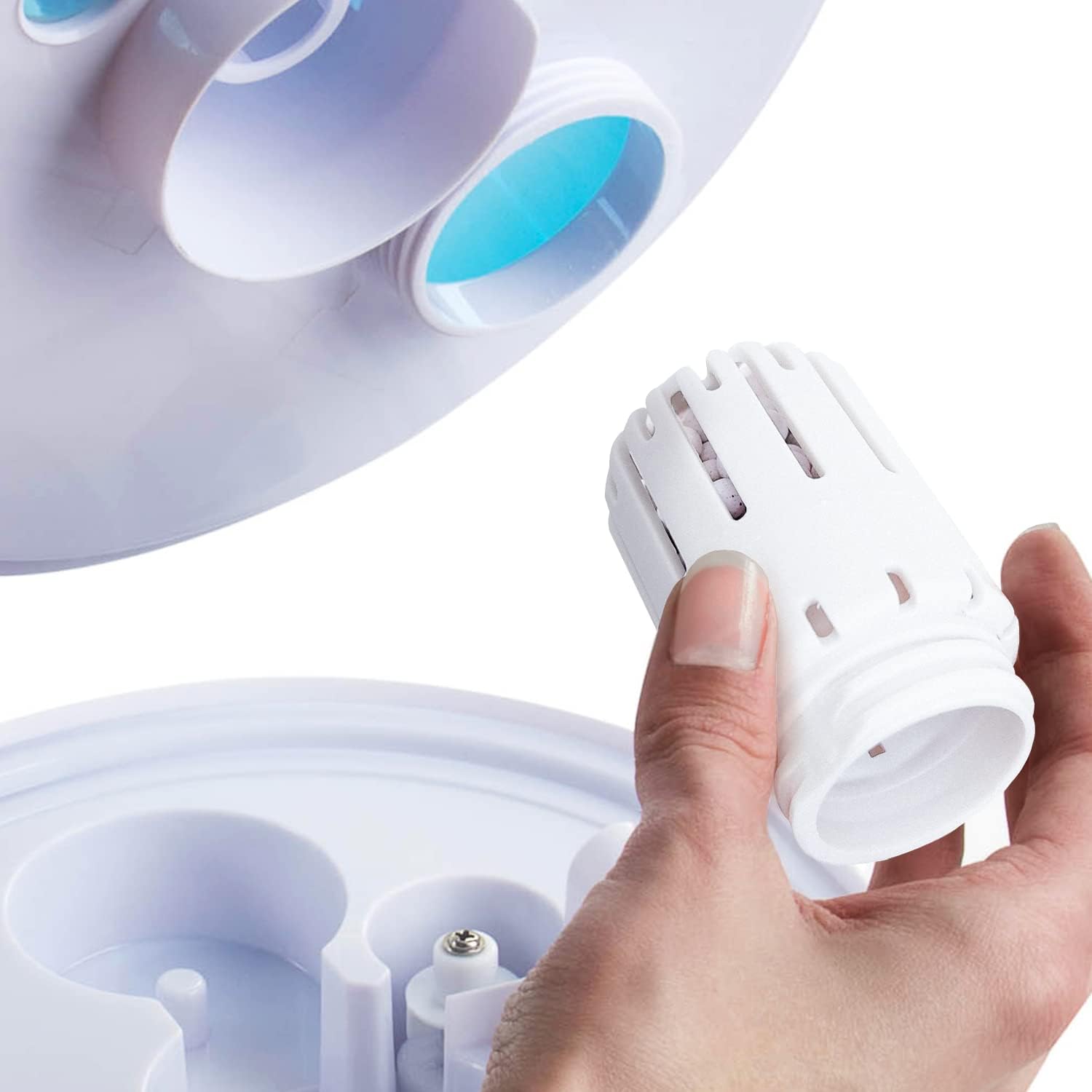
Image 2: A hand is shown installing a white Pro Breeze replacement filter into the base of a humidifier. The filter is being inserted into a circular opening.
Operating Instructions
Once the new filter is installed, operate your humidifier as per its original instruction manual. The filter works automatically to purify the water as the humidifier functions.
Important Considerations:
- The filter is a consumable part and requires regular replacement.
- Do not attempt to clean or reuse old filters beyond their recommended lifespan, as this can reduce filtration effectiveness.
Maintenance
The primary maintenance for these filters is timely replacement. Pro Breeze recommends replacing your filter every 500 hours of operation or every 6 months, whichever occurs first. This schedule ensures consistent water purification and optimal humidifier performance.
Signs that a filter may need replacement sooner include:
- Reduced mist output from the humidifier.
- Presence of white dust around the humidifier (indicating mineral buildup).
- Unpleasant odors from the mist.
For general humidifier cleaning, refer to your humidifier's specific instruction manual.
Troubleshooting
If you experience issues after replacing the filter, consider the following:
- Humidifier not producing mist:
- Ensure the filter is correctly installed and securely tightened.
- Check if the water tank is properly seated on the base.
- Verify that the humidifier itself is powered on and functioning (refer to the humidifier's manual).
- White dust appearing:
- This indicates mineral content in the water. While the filter reduces impurities, very hard water may still produce some dust. Consider using distilled or demineralized water.
- If the filter is old, replace it.
- Filter does not fit:
- Double-check your humidifier's model number and version. These filters are specifically for the Pro Breeze 3.8L Ultrasonic Humidifier (PB-07 Version 2). The safety label on your humidifier should state "PB-07-EU (Version 2.0)".
- Ensure you are attempting to install it in the correct orientation and compartment.
For further assistance, please contact Pro Breeze customer support.
Specifications
| Feature | Detail |
|---|---|
| Brand | Pro Breeze |
| Model Number | PB-P07F (also PB-07F-2) |
| Compatibility | Pro Breeze 3.8L Ultrasonic Humidifier (PB-07 Version 2) |
| Filter Type | Carbon Filtration System |
| Recommended Replacement | Every 500 hours or 6 months |
| Product Dimensions (L x W x H) | 11.4 x 39 x 63 cm (approximate, as per product data) |
| Item Weight | 120 g |
Warranty and Support
Information regarding the warranty for replacement filters is typically covered under the terms of the original humidifier purchase or specific accessory warranty. Please refer to the warranty documentation provided with your Pro Breeze 3.8L Ultrasonic Humidifier (PB-07 Version 2) for details.
For customer support, technical assistance, or to purchase additional genuine Pro Breeze replacement filters, please visit the official Pro Breeze website or contact their customer service department. Contact information can usually be found in your humidifier's manual or on the Pro Breeze website.
You can also visit the Pro Breeze Store on Amazon for more products and support.