1. Introduction
This manual provides essential information for the safe and efficient operation of your LG QNED80 Series 65-Inch Class QNED Mini-LED Smart TV. Please read this manual thoroughly before using your TV and retain it for future reference.
The LG QNED80UQA is designed to deliver a high-quality viewing experience with its AI-Powered 4K display. It features Quantum Dot NanoCell Color Technology for vibrant colors, local dimming for improved contrast, and a 120Hz refresh rate for smooth motion. Integrated voice assistants like Amazon Alexa and Google Assistant, along with support for Apple AirPlay2 and HomeKit, enhance smart home connectivity. For gamers, the TV offers low input lag, fast response times with Auto Low-Latency Mode, HGiG compliance, and support for FreeSync Premium and Variable Refresh Rate (VRR) via HDMI 2.1 connections.
2. Safety Information
Always follow these basic safety precautions to reduce the risk of fire, electric shock, or injury:
- Power Source: Connect the TV to an AC 100-240V~ 50/60Hz power outlet. Do not overload wall outlets.
- Ventilation: Ensure proper ventilation around the TV. Do not block ventilation openings or install the TV in a confined space.
- Water and Moisture: Do not expose the TV to rain or moisture. Do not place objects filled with liquids, such as vases, on the TV.
- Cleaning: Unplug the TV before cleaning. Use a soft, dry cloth. Do not use liquid cleaners or aerosol cleaners.
- Mounting: When mounting the TV on a wall, ensure the wall mount is securely installed and capable of supporting the TV's weight. Use a VESA 300 x 300 mount (sold separately).
- Children: Do not allow children to climb on the TV or stand.
- Servicing: Do not attempt to service the TV yourself. Refer all servicing to qualified service personnel.
3. What's in the Box
Verify that all components are present:
- LG QNED80 Series 65-Inch 4K Smart TV (65QNED80UQA)
- Magic Remote Control
- Remote Control Batteries (AA)
- Power Cable
- Quick Start Guide
- TV Stand (sold separately, if applicable)

Figure 3.1: Package Contents and TV Dimensions. This image illustrates the TV's dimensions, the included Magic Remote, and lists the main items found in the product packaging.
4. Setup
4.1 Physical Setup
Before setting up your TV, ensure you have a stable surface or a compatible wall mount. The TV weighs approximately 73.8 pounds (with stand) and requires careful handling.
- Stand Installation: If using the included stand (sold separately), carefully attach the stand components to the TV following the instructions in the Quick Start Guide.
- Wall Mounting: For wall mounting, use a VESA 300 x 300 compatible mount (sold separately). Consult a professional for installation to ensure safety and proper alignment.

Figure 4.1: Side view of the LG QNED TV, showcasing its slim profile and stand design.
4.2 Connecting Devices
Your LG QNED TV offers multiple connectivity options:
- HDMI: The TV features HDMI 2.1 ports, ideal for connecting gaming consoles, Blu-ray players, and other high-definition devices.
- USB: Use the USB ports to connect external storage devices for media playback.
- Wi-Fi: Connect to your home network wirelessly for smart TV features and internet access.

Figure 4.2: Rear panel of the TV, highlighting the location of HDMI and USB ports for connecting external devices.
4.3 Initial Power-On and Basic Settings
After connecting the power cable, press the power button on the remote control. Follow the on-screen prompts to complete the initial setup, including language selection, network connection, and channel scanning.
5. Operating the TV
5.1 Magic Remote Control
The Magic Remote allows for intuitive control of your TV. Point and click, use voice commands, or navigate with the scroll wheel.
- Pointing: Point the remote at the TV screen to move the cursor.
- Clicking: Press the scroll wheel to select items.
- Voice Command: Press the microphone button and speak your command.
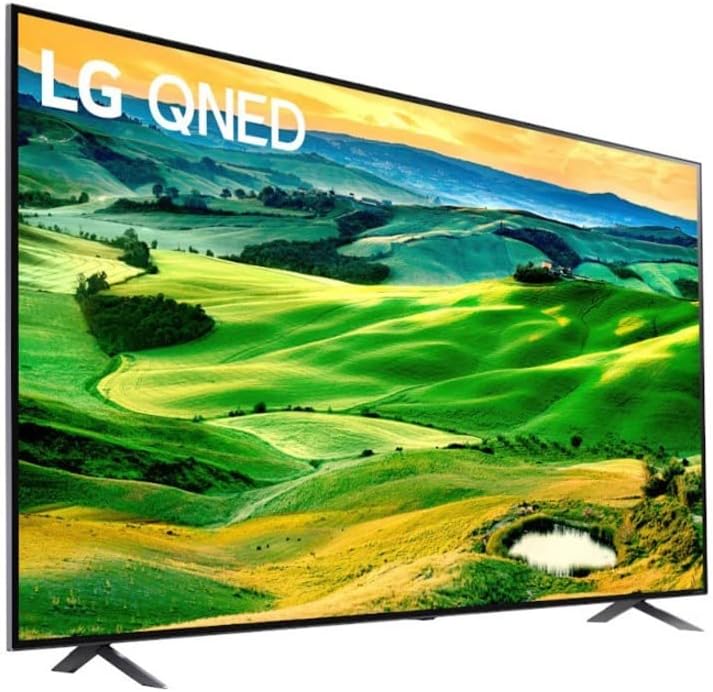
Figure 5.1: The LG Magic Remote, featuring dedicated buttons for streaming services and voice control.
5.2 Smart TV Features (webOS)
Your TV runs on LG's webOS platform, providing access to a wide range of streaming services and apps. The Home Dashboard allows for easy navigation and personalized recommendations.

Figure 5.2: The webOS interface on the LG QNED TV, showing a selection of streaming applications and content recommendations.
5.3 Voice Control
The TV supports built-in Amazon Alexa and Google Assistant. Use your voice to control the TV, search for content, and manage smart home devices.

Figure 5.3: Voice assistant and smart home integration logos, including Google Assistant, Alexa, Apple AirPlay, and HomeKit.
5.4 Picture and Sound Settings
The advanced α7 Gen5 AI Processor 4K optimizes picture and sound quality. Quantum Dot NanoCell Color Technology delivers rich, accurate colors, while local dimming enhances contrast.
- AI Picture Pro: Automatically adjusts picture settings based on content.
- AI Sound Pro: Optimizes sound for the genre of viewing content, providing virtual 5.1.2 surround sound.
- 120Hz Refresh Rate: Ensures fluid on-screen motion, especially beneficial for fast-paced content.

Figure 5.4: Visual representation of Local Dimming technology, which improves contrast and reduces the halo effect for a clearer picture.
5.5 Gaming Features
The LG QNED80UQA is optimized for gaming with features like:
- FreeSync Premium & VRR: Reduces screen tearing and stuttering for a smooth gaming experience.
- Game Optimizer: A dedicated menu to quickly adjust all game settings in one location.
- GeForce Now: Cloud gaming support allows streaming games directly to your TV (subscription and compatible controller required).
Video 5.1: LG QNED Cloud Gaming. This video demonstrates the cloud gaming capabilities of the LG QNED TV, highlighting the seamless experience with services like GeForce Now.

Figure 5.5: The Game Optimizer interface, allowing users to quickly adjust various game-related settings for an enhanced gaming experience.
6. Maintenance
Proper maintenance ensures the longevity and performance of your TV:
- Screen Cleaning: Gently wipe the screen with a soft, lint-free cloth. For stubborn marks, slightly dampen the cloth with water or a specialized screen cleaner. Never spray liquid directly onto the screen.
- Cabinet Cleaning: Wipe the TV cabinet with a soft, dry cloth.
- Software Updates: Periodically check for and install software updates to ensure optimal performance and access to the latest features. Navigate to Settings > All Settings > Support > Software Update.
7. Troubleshooting
If you encounter issues with your TV, refer to the following common troubleshooting steps:
| Problem | Solution |
|---|---|
| No Power | Check if the power cable is securely connected to the TV and the wall outlet. Ensure the outlet is functional. |
| No Picture / Distorted Picture | Verify that the correct input source is selected. Check HDMI/AV cable connections. Try a different cable or port. |
| No Sound / Low Sound | Check the volume level and mute settings. Ensure external audio devices (soundbar, receiver) are properly connected and powered on. |
| Remote Control Not Working | Replace the batteries in the Magic Remote. Ensure there are no obstructions between the remote and the TV. Re-pair the remote if necessary. |
| Wi-Fi Connection Issues | Restart your router and modem. Check TV network settings. Ensure the TV is within range of your Wi-Fi network. |
8. Specifications
Detailed technical specifications for the LG QNED80 Series 65-Inch 4K Smart TV (65QNED80UQA):
- Brand: LG
- Model Number: 65QNED80UQA
- Screen Size: 64.5 Inches (Standing screen display size)
- Display Technology: QNED (Quantum Dot NanoCell)
- Resolution: 4K (3840 x 2160)
- Refresh Rate: 120 Hz
- Processor: α7 Gen 5 AI Processor 4K
- Special Features: Active HDR, Filmmaker Mode, Game Optimizer, Works with Google Assistant and Alexa, AI Picture Pro, Quantum Dot NanoCell Display
- Connectivity Technology: Wi-Fi
- Product Dimensions (with stand): 11.6"D x 57.2"W x 35.7"H
- Item Weight (with stand): 73.8 pounds
- Aspect Ratio: 16:9
- Included Components: Remote
9. Warranty and Support
For warranty information and technical support, please refer to the warranty card included with your product or visit the official LG website. You can also contact LG customer service for assistance with product registration, troubleshooting, and service requests.
Online Support: www.lg.com/us/support