
1. Introduction
Thank you for purchasing the Paladone Minecraft Glitter Flow Lamp. This product is designed to provide ambient mood lighting with a unique glitter flow effect, featuring iconic Minecraft characters. Please read this manual thoroughly before use to ensure proper operation and safety.
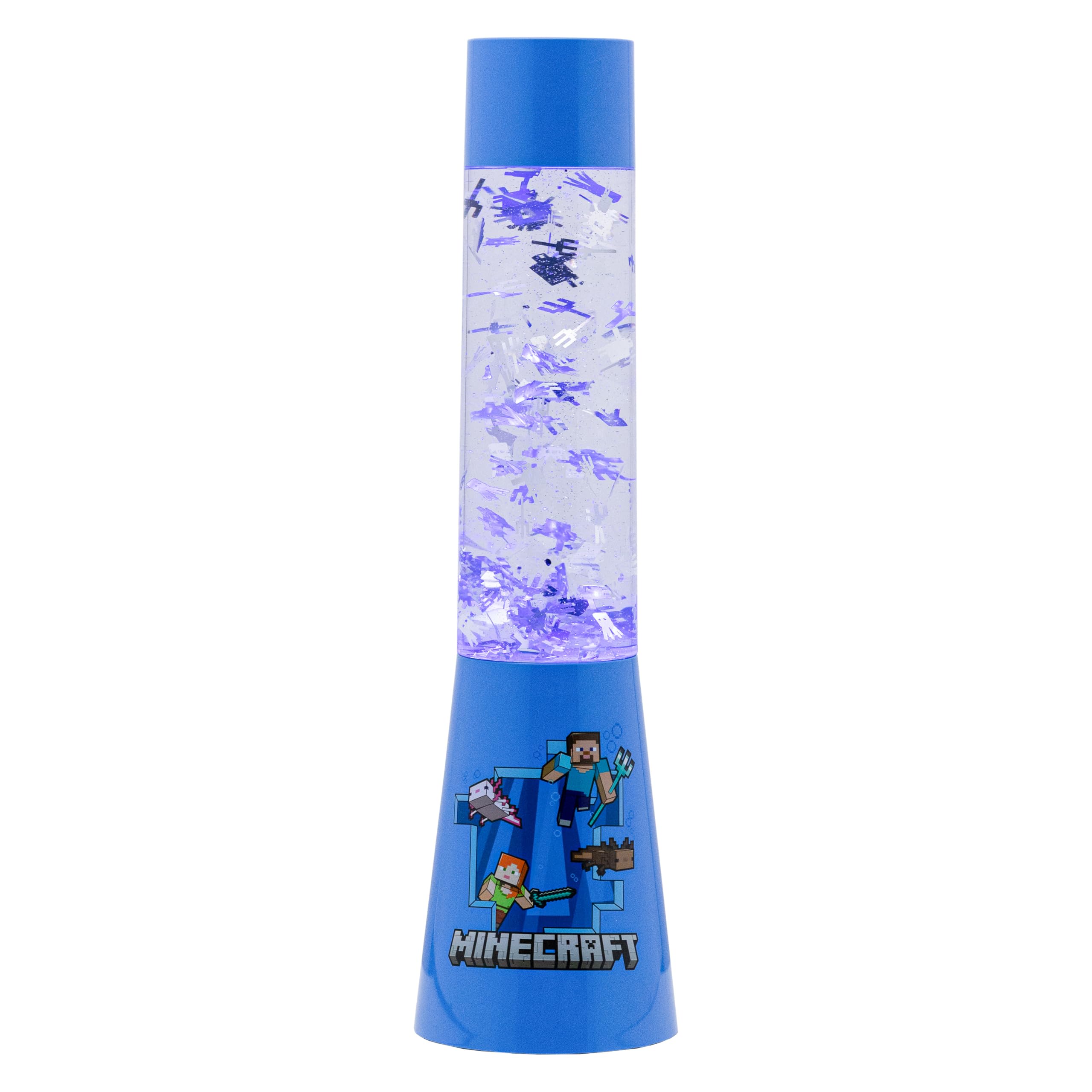
Image 1: The Paladone Minecraft Glitter Flow Lamp, featuring a green base with a Creeper face and a clear tube filled with glitter.
2. Safety Information
- Keep this product out of reach of small children and pets.
- Do not open the lamp unit or attempt to consume the liquid contents. In case of accidental ingestion or contact with skin/eyes, seek immediate medical attention.
- Use only 3 AAA batteries (not included) or a compatible USB power source (USB cable not included). Ensure correct battery polarity.
- Avoid exposing the lamp to extreme temperatures, direct sunlight, or high humidity.
- Do not immerse the lamp in water or any other liquid.
- Dispose of used batteries according to local regulations.
3. Package Contents
Please check the box for the following items:
- 1 x Paladone Minecraft Glitter Flow Lamp Unit
- 1 x Instruction Leaflet
Note: 3 AAA batteries and a USB power cable are NOT included and must be purchased separately.
4. Setup
4.1 Powering the Lamp
The Minecraft Glitter Flow Lamp can be powered by either 3 AAA batteries or a USB cable.
Battery Installation:
- Locate the battery compartment on the bottom of the lamp.
- Using a small screwdriver, open the battery compartment cover.
- Insert 3 new AAA batteries, ensuring the correct polarity (+/-) as indicated inside the compartment.
- Replace the battery compartment cover and secure it with the screw.
USB Power Option:
- Connect a compatible USB cable (not included) to the USB port on the back of the lamp.
- Plug the other end of the USB cable into a suitable USB power source (e.g., computer, USB wall adapter).
4.2 Placement
Place the lamp on a stable, flat, and level surface to ensure proper glitter flow and prevent accidental tipping. Avoid placing it near edges where it could fall.
Image 2: The Minecraft Glitter Flow Lamp positioned on a bedside table, providing ambient blue lighting.
5. Operating Instructions
5.1 Power On/Off
To turn the lamp on, locate the power button on the back of the base and press it once. The lamp will illuminate and the glitter will begin to flow.
To turn the lamp off, press the power button again.
5.2 Timer Function
This lamp features a convenient 15-minute timer function.
- With the lamp already on, press the power button a second time to activate the timer.
- The lamp will remain lit for approximately 15 minutes and then automatically turn off.
- To manually turn off the lamp while the timer is active, press the power button a third time.
Image 3: The Minecraft Glitter Flow Lamp operating in a dimly lit room, showcasing the dynamic glitter movement and blue illumination.
Image 4: A detailed view of the glitter particles suspended and flowing within the liquid of the lamp.
5.3 Official Product Video

Video 1: An official product video demonstrating the glitter flow effect of the Minecraft Flow Lamp.
6. Maintenance
6.1 Cleaning
To clean the lamp, gently wipe the exterior with a soft, dry cloth. Do not use abrasive cleaners, solvents, or harsh chemicals, as these may damage the finish or the plastic components.
6.2 Battery Replacement
When the light dims or the lamp stops functioning, it is time to replace the batteries. Follow the battery installation steps in Section 4.1, ensuring to replace all 3 AAA batteries simultaneously with new ones.
7. Troubleshooting
7.1 Lamp Not Turning On
- Check Batteries: Ensure 3 fresh AAA batteries are correctly installed with the proper polarity.
- Check USB Connection: If using USB power, verify that the USB cable is securely connected to both the lamp and a functional power source.
7.2 Glitter Not Flowing Properly
- Level Surface: Ensure the lamp is placed on a completely flat and level surface. Tilting can affect glitter movement.
- Temperature: Allow the lamp to reach room temperature. Extreme cold can temporarily affect the liquid's viscosity and glitter movement.
8. Specifications
| Model Name: | Minecraft Glitter Flow Lamp, Night Light Mood Lighting |
| Part Number: | PP10069MCF |
| Dimensions: | 4.06"D x 4.06"W x 13.9"H |
| Item Weight: | 910 Grams (2.01 pounds) |
| Power Source: | Battery Powered (3 AAA, not included) or USB (cable not included) |
| Material: | Plastic |
| Light Source Type: | Fluorescent |
| Brightness: | 50 Lumen |
| Control Method: | Touch |
9. Warranty & Support
This product comes with a standard manufacturer's warranty. For detailed warranty information, please refer to the packaging or contact Paladone customer support.
If you experience any issues or have questions about your Paladone Minecraft Glitter Flow Lamp, please visit our official website or contact our customer support team for assistance.