
1. Product Overview
The NeoCharge Smart Splitter 240V NEMA 14-30 is an intelligent device designed to enable Level 2 electric vehicle (EV) charging using an existing 240V dryer outlet. This UL-certified device features automatic power switching, allowing you to share a single high-voltage outlet between your dryer and EV charger without the need for costly electrical upgrades or rewiring. It ensures safe operation by prioritizing the dryer and adhering to National Electrical Code (NEC) power ratings.
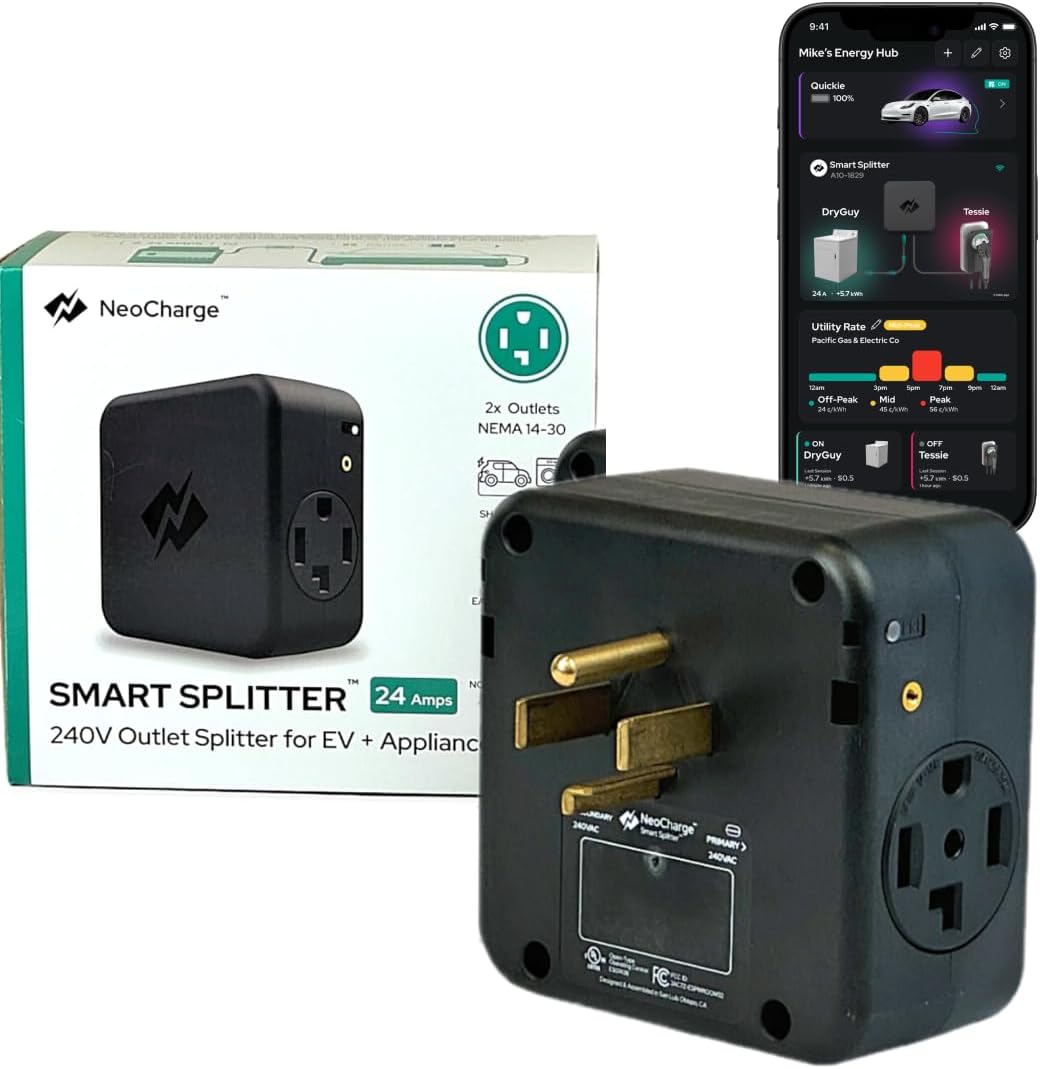
Image 1: NeoCharge Smart Splitter 240V NEMA 14-30, showing the device and its accompanying mobile application interface.
2. Safety Information
Read all safety instructions before installation and use. Failure to follow these instructions may result in electric shock, fire, or serious injury.
- UL Listed: The NeoCharge Smart Splitter is UL listed for electrical safety, ensuring it meets rigorous safety standards.
- NEC Compliance: The device monitors total power usage to ensure operation within 24 Amp NEC safe limits.
- Amperage Setting: Ensure your EV charger or EV is set to 24 Amps or lower when using this NEMA 14-30 model to prevent tripping your circuit breaker and potential hazards. Chargers that pull 32 Amps (e.g., some mobile chargers from Audi, Chevy, VW, Ford) are not compatible with this 14-30 model unless their amperage can be manually reduced.
- Dedicated Circuit: This device is designed to share an existing 240V dryer circuit. Do not attempt to connect it to circuits not rated for 240V or with insufficient amperage.
- Professional Consultation: If you are unsure about your home's electrical system or the compatibility of your EV charger, consult a qualified electrician.
- Avoid Overloading: Do not connect other high-power appliances to the Smart Splitter simultaneously with the dryer and EV.

Image 2: The UL Listed certification mark, indicating the product's adherence to safety standards.
3. Setup and Installation
The NeoCharge Smart Splitter is designed for a simple plug-in installation, requiring no rewiring or electrical panel upgrades. Follow these steps for quick setup:
- Identify Your Outlet: Locate your existing 4-prong 240V NEMA 14-30 dryer outlet. This model is specifically designed for NEMA 14-30 outlets found in homes built after 1996.
- Mount the Smart Splitter (Optional but Recommended): The Smart Splitter includes a mounting bracket. Securely attach the bracket to the wall near your dryer outlet using appropriate hardware. This provides stability and reduces strain on the outlet.
- Plug in the Smart Splitter: Plug the NeoCharge Smart Splitter directly into your NEMA 14-30 dryer outlet.
- Connect Your Dryer (Primary): Plug your dryer's power cord into the designated primary outlet on the Smart Splitter. The primary outlet is typically labeled or indicated by the device's design.
- Connect Your EV Charger (Secondary): Plug your EV charger into the secondary outlet on the Smart Splitter. Remember to set your EV charger's amperage to 24 Amps or lower.
- Download the NeoCharge App: For smart features like scheduling and cost tracking, download the NeoCharge app from your device's app store. Follow the in-app instructions to connect your Smart Splitter to Wi-Fi.

Image 3: Step-by-step visual guide for connecting the NeoCharge Smart Splitter, dryer, and EV charger.
Video 1: Demonstrates the easy installation process of the NeoCharge Smart Splitter for EV charging.
Video 2: Shows the simple installation of the 240V Splitter for EV and Dryer.
4. Operating Instructions
The Smart Splitter operates automatically to manage power distribution between your connected devices.
- Automatic Power Switching: The Smart Splitter prioritizes the device plugged into the primary outlet (typically your dryer). When the dryer is running, power is directed to it, and EV charging will pause. Once the dryer cycle is complete, power automatically switches back to the secondary outlet, and EV charging resumes.
- EV Charger Amperage: Always ensure your EV charger is configured to draw 24 Amps or less to avoid overloading the circuit and tripping the breaker.
- NeoCharge App Features:
- Smart Scheduling: Optimize charging times to take advantage of off-peak utility rates, reducing your charging costs.
- Real-time Tracking: Monitor your EV and appliance energy usage and track charging costs directly from the app.
- Over-the-Air Updates: Receive software updates via Wi-Fi to enhance functionality and safety.

Image 4: Visual representation of the Smart Splitter's auto-switching functionality, prioritizing the dryer.

Image 5: The NeoCharge mobile app displaying features for saving money on home EV charging, including smart scheduling and energy usage tracking.
Video 3: Explains how to share a 240V outlet between an EV and a dryer using the Smart Splitter.
5. Maintenance
To ensure optimal performance and longevity of your NeoCharge Smart Splitter, follow these simple maintenance guidelines:
- Regular Inspection: Periodically inspect the Smart Splitter, its plugs, and connected cables for any signs of damage, wear, or overheating. Ensure all connections are secure.
- Cleaning: Keep the device clean and free from dust and debris. Use a dry, soft cloth for cleaning. Do not use liquid cleaners or immerse the device in water.
- Environmental Conditions: Ensure the Smart Splitter is used in a dry, well-ventilated area, away from direct sunlight, extreme temperatures, and moisture.
- Cable Management: Avoid kinking or excessive bending of the power cables. Proper cable management can prevent damage and extend the life of the cables.
6. Troubleshooting
If you encounter issues with your NeoCharge Smart Splitter, refer to the following troubleshooting tips:
- No Power to Devices:
- Check if the Smart Splitter is securely plugged into the wall outlet.
- Verify that the wall outlet is receiving power by testing it with another appliance.
- Check your home's circuit breaker panel. A tripped breaker will cut power to the outlet. Reset if necessary.
- EV Not Charging / Charging Pauses Unexpectedly:
- Confirm that the dryer (primary device) is not currently running. The Smart Splitter prioritizes the primary device.
- Ensure your EV charger is set to 24 Amps or lower. Higher amperage settings can cause the Smart Splitter's internal safety breaker or your home's breaker to trip.
- Check the NeoCharge app for any error messages or status updates.
- Verify that your EV charger is properly connected to your vehicle.
- App Connectivity Issues:
- Ensure your home Wi-Fi network is active and the signal is strong where the Smart Splitter is located.
- Restart your Wi-Fi router and the Smart Splitter.
- Follow the app's instructions for re-pairing the device if necessary.
- Overheating/Melting (Critical Safety Concern): If you observe any signs of overheating, melting, or unusual odors from the Smart Splitter or its connections, immediately unplug the device and discontinue use. Contact NeoCharge customer support for assistance. This can occur if the EV charger is set to an amperage higher than the recommended 24 Amps for the NEMA 14-30 outlet.
7. Specifications
| Feature | Detail |
|---|---|
| Product Dimensions | 5.25 x 5.25 x 2.8 inches |
| Item Weight | 2.5 pounds |
| Item Model Number | NEMA 14-30 |
| Input Voltage | 240 Volts (AC) |
| Max Amperage | 24 Amps (for NEMA 14-30 outlet) |
| Color | Matte Black |
| Certifications | UL Listed |
8. Warranty and Support
The NeoCharge Smart Splitter is backed by a 3-year warranty. For technical assistance, troubleshooting, or warranty claims, please contact NeoCharge customer support. Expert support is available to assist you with any questions regarding your EV charging setup.
For more information and resources, visit the official NeoCharge website or refer to the NeoCharge app.


