
Introduction
This manual provides detailed instructions for the installation, operation, and maintenance of your weelye CSG4A (CSR-12T-2A) 12V 2.4G Bluetooth Remote Control and Receiver Kit. This kit is designed as a replacement part for specific children's electric riding cars. Please read this manual thoroughly before use to ensure proper functionality and safety.
Compatibility Check
Before installing, it is crucial to verify that this control box is compatible with your child's electric riding car. Follow these steps:
- Open the electric car: Locate the existing control box within the damaged electric car.
- Compare appearance: Ensure the appearance of this replacement control box (CSG4A or CSR-12T-2A) is identical to your original unit.
- Verify model numbers: Confirm that the numbers on the side of the receiver match your original unit. This kit is specifically for CSG4A (CSR-12T-2A) 12V models.
- Check socket type: This kit includes a 7-pin white one-sided socket. It is not compatible with 7-pin four-sided socket receivers.
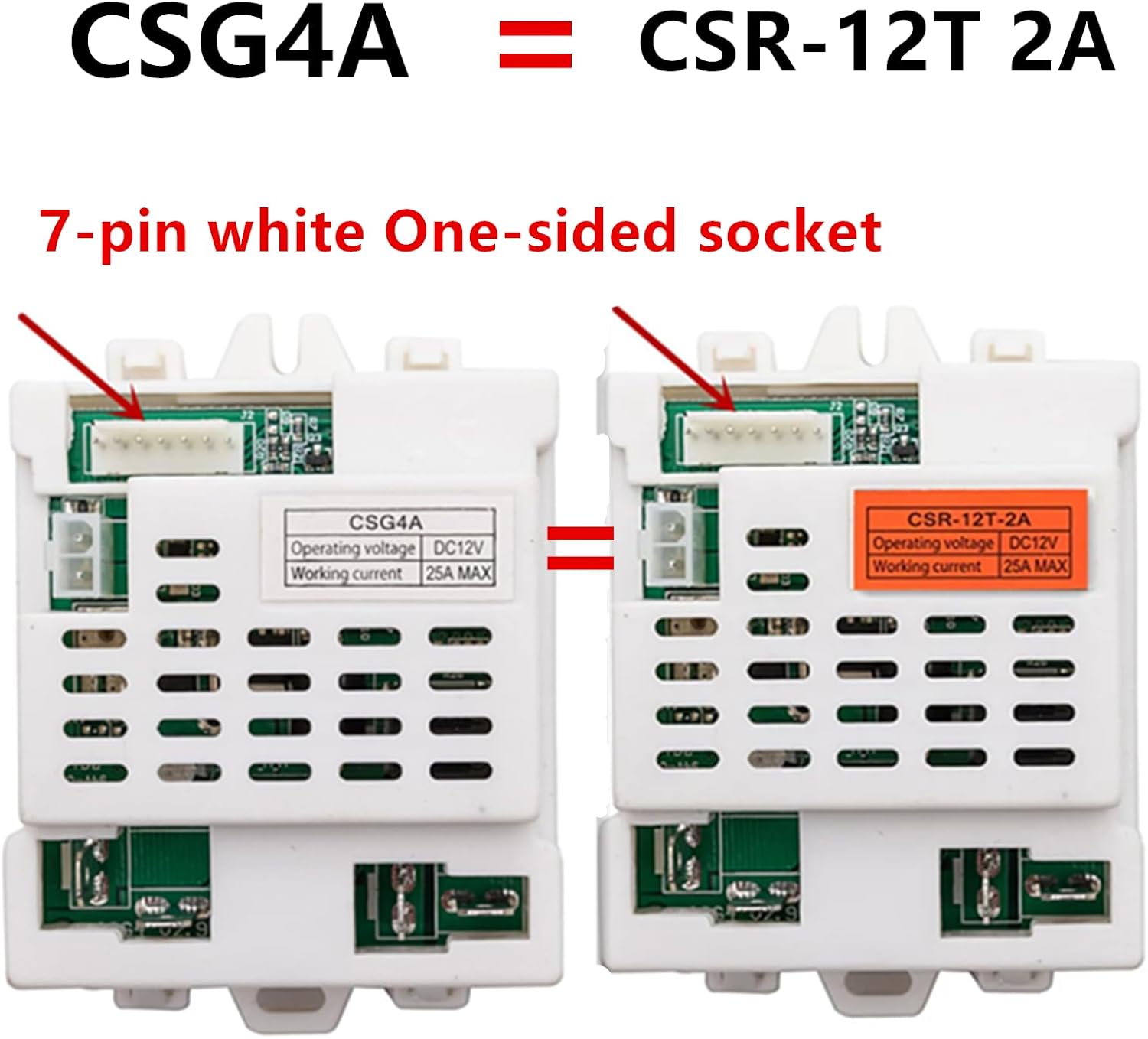
Image: Comparison of CSG4A and CSR-12T-2A control boxes, highlighting the 7-pin white one-sided socket type for compatibility verification.

Image: Detailed view of the CSG4A control box, showing the 7-pin white one-sided socket connector.

Image: Detailed view of the CSR-12T-2A control box, showing the 7-pin white one-sided socket connector.
Setup and Pairing
Remote Control Battery Installation
The remote control requires 2 AAA batteries (not included). To install:
- Locate the battery compartment on the back of the remote control.
- Remove the battery cover.
- Insert 2 AAA batteries, ensuring correct polarity (+/-).
- Replace the battery cover securely.

Image: Front view of the weelye 2.4G Bluetooth remote control, showing control buttons.

Image: Back view of the weelye 2.4G Bluetooth remote control, indicating the battery compartment and pairing instructions.
Pairing the Remote Control with the Receiver
The remote control and receiver need to be paired (linked frequency) upon first use or after replacing the remote control batteries. This kit features a slow start function, eliminating the need for an additional slow starter.
- Turn on the car: Ensure the power switch on the children's riding car is in the "ON" position.
- Prepare remote: With the remote control batteries installed, the three LED indicators on the remote will flash.
- Initiate pairing: While the car is on, press and hold any button on the remote control. The LED indicators on the remote will stop flashing and two of them will remain lit, indicating successful pairing.
- Test functionality: After successful pairing, test the remote control's functions to ensure proper operation.
Note: Once the matching is made, there is no need to match code again unless the battery in the remote control is replaced.
Operating Instructions
Remote Control Sleep Mode
If the remote control is not used for an extended period, it will enter a sleep mode to conserve battery power. The LED indicators will turn off.
To wake up the remote control, simply press any button. The remote control will reactivate and can be used normally.
Maintenance
- Cleaning: Use a soft, dry cloth to clean the control box and remote control. Do not use harsh chemicals or abrasive cleaners.
- Storage: Store the components in a dry, cool place away from direct sunlight and moisture when not in use.
- Battery Replacement: Replace remote control batteries as needed. Always use new AAA batteries.
Troubleshooting
| Problem | Possible Cause | Solution |
|---|---|---|
| Remote control not responding. |
|
|
| Car not responding to remote after battery replacement. | Remote needs re-pairing. | Perform pairing procedure (see "Setup and Pairing"). |
| Car not functioning at all. |
|
|
Specifications
- Brand: weelye
- Model: CSG4A (CSR-12T-2A)
- Voltage: 12V
- Connectivity: 2.4G Bluetooth
- Socket Type: 7-pin white one-sided socket
- Features: Slow start function integrated
- Material: Plastic
- Item Weight: 0.4 Pounds
- Item Dimensions: 5.3 x 3.4 x 2.6 inches
Warranty and Support
For warranty information or technical support, please refer to the seller's policy on the purchase platform or contact the seller directly. Ensure you have your purchase details readily available.