1. Introduction
Thank you for choosing the Omega OM0520WB 1600 dpi Wireless Optical Mouse. This manual provides detailed instructions for setting up, operating, maintaining, and troubleshooting your new device. Please read this manual carefully before use to ensure optimal performance and longevity of your mouse.
2. Package Contents
Please check the package for the following items:
- Omega OM0520WB Wireless Optical Mouse
- User Manual
- 1 x AA Battery (may be pre-installed or included separately)
3. Product Overview
Familiarize yourself with the components of your Omega OM0520WB mouse:
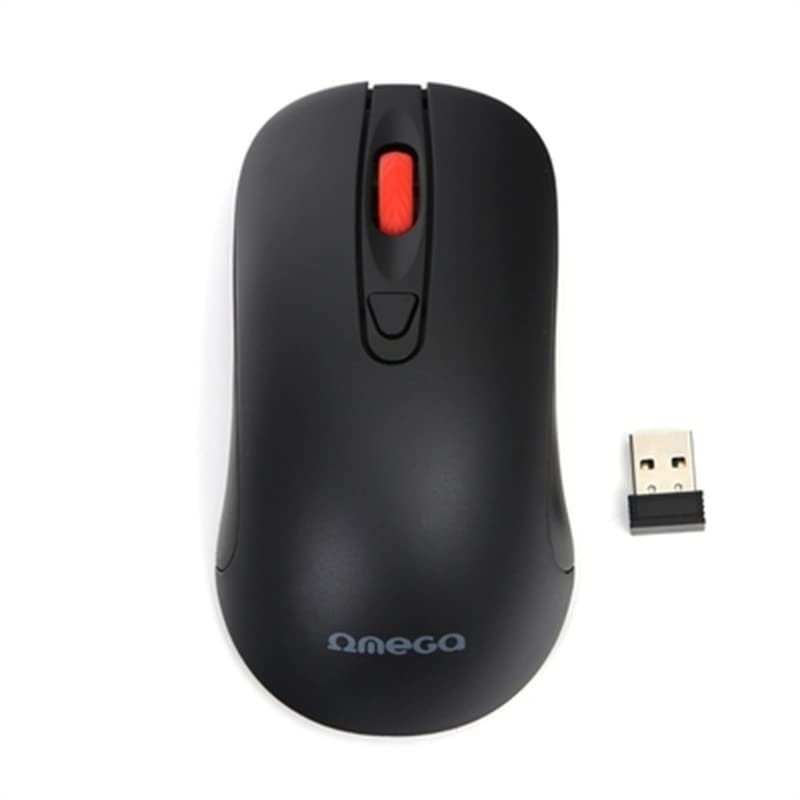
Image: The Omega OM0520WB Wireless Optical Mouse, shown in black. It features a sleek, ergonomic design with standard left and right click buttons, a scroll wheel, and a smooth finish.
- Left Click Button: Standard primary click function.
- Right Click Button: Standard secondary click function.
- Scroll Wheel: For vertical scrolling and middle-click function.
- Optical Sensor: Located on the underside, for precise tracking.
- Battery Compartment: Located on the underside, for inserting the AA battery.
- Power Switch: On/Off switch, usually on the underside of the mouse.
4. Setup Instructions
Follow these steps to set up your Omega OM0520WB mouse:
- Install Battery: Open the battery compartment cover on the underside of the mouse. Insert one AA battery, ensuring the polarity (+/-) matches the diagram inside the compartment. Close the cover securely.
- Turn On Mouse: Locate the power switch on the underside of the mouse and slide it to the 'ON' position.
- Connect via Bluetooth:
- On your computer or laptop, navigate to the Bluetooth settings.
- Ensure Bluetooth is enabled.
- Search for new devices. The mouse should appear as 'Omega OM0520WB' or similar.
- Select the mouse to pair. Once paired, your mouse is ready for use.
5. Operating Instructions
Your Omega OM0520WB mouse is designed for intuitive use:
- Basic Navigation: Move the mouse on a flat surface to control the cursor on your screen.
- Clicking: Use the left button for primary clicks (e.g., selecting items) and the right button for secondary clicks (e.g., opening context menus).
- Scrolling: Roll the scroll wheel up or down to navigate through documents and web pages. Press the scroll wheel for a middle-click function, if supported by your application.
- DPI Setting: The mouse operates at a fixed 1600 dpi, providing a balance of speed and precision for most tasks.
- Ambidextrous Design: The symmetrical design allows comfortable use for both left-handed and right-handed users.
6. Maintenance
To ensure the longevity and optimal performance of your mouse, follow these maintenance guidelines:
- Cleaning: Use a soft, dry cloth to wipe the surface of the mouse. For stubborn dirt, slightly dampen the cloth with water. Avoid using harsh chemicals or abrasive cleaners.
- Optical Sensor: Keep the optical sensor on the underside clean and free from dust or debris.
- Battery Replacement: When the mouse performance degrades or it stops responding, replace the AA battery. Always use a fresh, high-quality battery.
- Storage: When not in use for extended periods, turn off the mouse using the power switch to conserve battery life. Store it in a cool, dry place.
7. Troubleshooting
If you encounter issues with your Omega OM0520WB mouse, refer to the following solutions:
- Mouse Not Responding:
- Ensure the mouse is turned on.
- Check the battery. Replace it if necessary.
- Verify that Bluetooth is enabled on your computer and the mouse is paired. Try re-pairing the mouse.
- Move the mouse closer to your computer to ensure a strong Bluetooth signal.
- Erratic Cursor Movement:
- Clean the optical sensor on the underside of the mouse.
- Use the mouse on a clean, non-reflective, and uniform surface. Mouse pads are recommended.
- Connection Issues:
- Restart your computer and try connecting again.
- Remove the mouse from your computer's Bluetooth device list and then re-pair it.
- Ensure there are no other devices interfering with the Bluetooth signal.
8. Specifications
| Model Name | OM0520WB |
| Connectivity Technology | Wireless (Bluetooth) |
| Movement Detection Technology | Optical |
| DPI | 1600 dpi |
| Number of Buttons | 3 (Left, Right, Scroll Wheel) |
| Hand Orientation | Ambidextrous |
| Power Source | 1 x AA Lithium-ion battery (required) |
| Compatible Devices | Personal Computer, Laptop |
| Weight | Approximately 73 g |
| Color | Black |
9. Warranty and Support
Omega products are designed for reliability and performance. For information regarding warranty coverage, technical support, or service, please refer to the warranty card included with your product or visit the official Omega website. Keep your purchase receipt as proof of purchase.


