Introduction
This manual provides essential information for the safe and efficient use of your Haier HW80-B14959TU1 Freestanding Washing Machine. Please read these instructions carefully before installation, operation, and maintenance. Keep this manual for future reference.

Image: Front-right view of the Haier HW80-B14959TU1 washing machine, showcasing its white finish, large dark porthole door, and black control panel with an LED display.
Safety Instructions
Always follow basic safety precautions when using electrical appliances to reduce the risk of fire, electric shock, and injury to persons.
- Ensure the appliance is properly grounded.
- Do not allow children to play on or in the appliance.
- Unplug the appliance before cleaning or performing any maintenance.
- Do not operate the appliance if it is damaged or malfunctioning.
- Keep flammable materials away from the appliance.
- Only use the appliance for its intended purpose of washing laundry.
Installation
1. Unpacking
Carefully remove all packaging materials. It is crucial to remove all transit bolts and their rubber bungs from the rear of the machine before operation. Failure to do so will cause excessive vibration and potential damage.
2. Positioning
Place the washing machine on a firm, level floor. Adjust the leveling feet to ensure the machine is stable and does not rock. Maintain adequate space around the machine for ventilation and access.

Image: Diagram showing the dimensions of the Haier HW80-B14959TU1 washing machine: 85cm height, 59.5cm width, and 49.7cm depth.
3. Water Supply Connection
Connect the inlet hose to a cold water tap with a 3/4-inch thread. Ensure all connections are tight to prevent leaks. Do not overtighten.
4. Drainage Connection
Securely attach the drain hose to a standpipe or a sink trap. Ensure the drain hose is not kinked or obstructed and is positioned at an appropriate height (between 60 cm and 100 cm from the floor).
5. Electrical Connection
Plug the power cord into a grounded electrical outlet. Ensure the voltage and frequency match the specifications of your appliance. Do not use extension cords or adapters.
Operation
1. Control Panel Overview
The control panel features an LED display, a program selection dial, and touch-sensitive buttons for various functions.
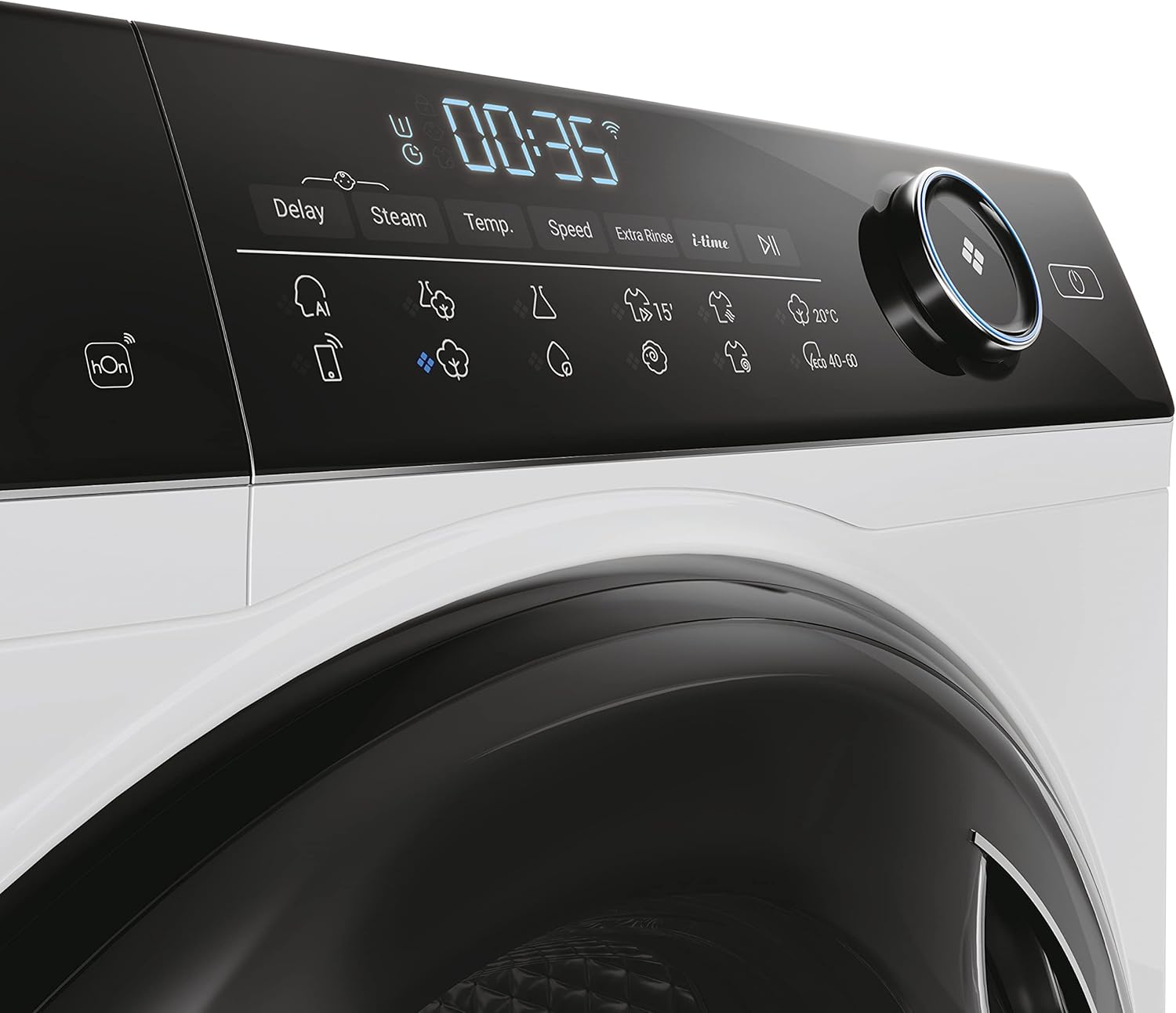
Image: Close-up view of the Haier HW80-B14959TU1 washing machine's black control panel, showing the LED display with '00:35' and icons for Delay, Steam, Temp, Speed, Extra Rinse, and i-Time, alongside the program selection dial.
2. Loading Laundry
Open the porthole door and load laundry into the drum. Do not overload the machine; ensure there is enough space for clothes to tumble freely. The maximum load capacity is 8 kg.
3. Adding Detergent
Pull out the detergent dispenser drawer. Add the appropriate amount of detergent and fabric softener to the designated compartments. Refer to your detergent packaging for dosage recommendations.
4. Program Selection
Turn the program selection dial to choose the desired wash program (e.g., Cotton, Synthetics, Delicates, Quick Wash). The LED display will show the default settings for the selected program.
5. Adjusting Settings
Use the touch buttons to adjust temperature, spin speed, or add special functions like 'Steam' or 'Extra Rinse' if available for the selected program.
6. Starting a Wash Cycle
Press the 'Start/Pause' button to begin the wash cycle. The machine will automatically lock the door and start filling with water.
7. Special Functions
- Delay Start: Allows you to postpone the start of a wash cycle for a specified number of hours.
- Direct Motion Motor: Provides quiet and efficient operation with fewer moving parts.
- App Control: This model supports control via a mobile application, allowing remote scheduling and monitoring of wash cycles.
Maintenance and Cleaning
1. Detergent Dispenser
Regularly clean the detergent dispenser drawer to prevent residue buildup. Remove the drawer, rinse it under running water, and use a brush to clean any stubborn deposits.
2. Drum Cleaning
Run a maintenance wash cycle (e.g., 'Drum Clean' or a hot wash with no laundry and a descaling agent) periodically to remove detergent residue and prevent odors.
3. Filter Cleaning
Locate the drain pump filter, usually at the bottom front of the machine. Open the cover, drain any residual water, and unscrew the filter. Clean the filter of lint and foreign objects, then reassemble securely.
4. Exterior Care
Wipe the exterior of the machine with a soft, damp cloth. Do not use abrasive cleaners or solvents.
Troubleshooting
| Problem | Possible Cause | Solution |
|---|---|---|
| Machine does not start | Power cord unplugged; door not closed properly; 'Start/Pause' not pressed. | Check power connection; ensure door is latched; press 'Start/Pause'. |
| Excessive vibration | Transit bolts not removed; machine not level; uneven load. | Remove transit bolts and rubber bungs; adjust leveling feet; redistribute laundry. |
| Water leakage | Hoses loose or damaged; detergent drawer overflowing. | Check hose connections; ensure detergent drawer is clean and not overfilled. |
| Poor washing results | Incorrect program; insufficient detergent; overloaded machine. | Select appropriate program; use correct detergent dosage; reduce load size. |
Technical Specifications
| Feature | Specification |
|---|---|
| Model Name | HW80-B14959TU1 |
| Brand | Haier |
| Capacity | 8 Kilograms |
| Maximum Spin Speed | 1400 RPM |
| Product Dimensions (D x W x H) | 49.7 x 59.5 x 85 cm |
| Item Weight | 65 Kilograms |
| Energy Efficiency Class | A |
| Motor Type | Direct Motion Motor |
| Special Features | Delay Start, App Control |
| Controls Type | Dial |

Image: EU Energy Label for the Haier HW80-B14959TU1 washing machine, indicating an 'A' energy efficiency rating, 49 kWh/100 cycles, 8.0 kg capacity, 3:48 program duration, 48 L water consumption, and 70 dB noise level during spinning. For more details, visit energy-label.ec.europa.eu.

Image: Product Information Sheet for the Haier HW80-B14959TU1, detailing energy consumption, water consumption, spin speed, and other technical data as per EU regulations.
Warranty and Customer Support
This appliance comes with a manufacturer's guarantee of 24 months. For warranty claims or technical assistance, please contact Haier customer support.
For further information and support, please visit the official Haier website: www.haier.com.


