
Product Overview
The AQUA CONTROL C5005 Double Outlet Tap Programmer is designed to automate garden watering for two distinct zones using a single tap. This device features an internal ball mechanism for reliable operation and allows for completely independent programming of each watering zone. It includes a time delay function for flexible scheduling.
Key features include:
- Two independent watering zones from one tap.
- Adjustable watering frequency: 1 to 72 hours, or once per week.
- Adjustable watering duration: 1 to 120 minutes.
- Time delay function.
- Low battery LED indicator.
- Operates on 2 AA 1.5V batteries (not included).
- Operating pressure range: 0.5 to 6 bar.
Setup Instructions
1. Battery Installation
The programmer requires 2 AA 1.5V batteries for operation. Ensure batteries are inserted with correct polarity.
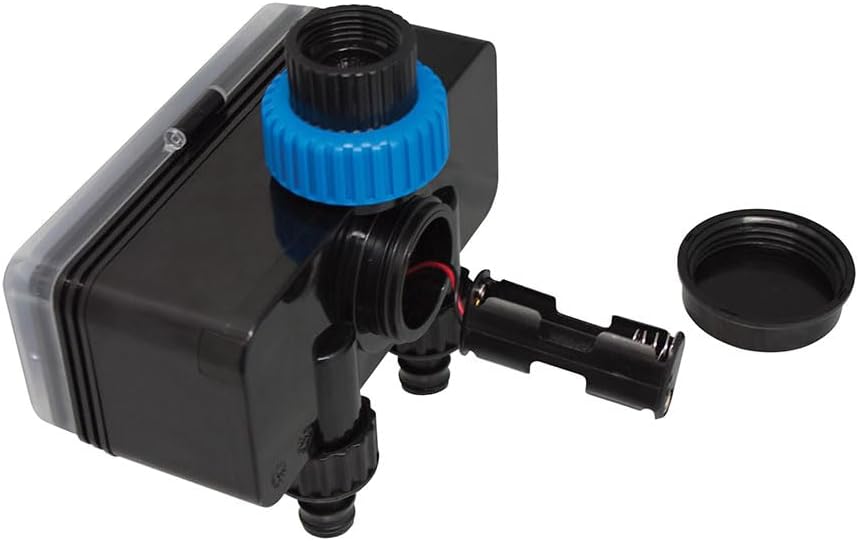
Image: The AQUA CONTROL C5005 programmer with its battery compartment open, illustrating the correct placement for two AA 1.5V batteries.
- Locate the battery compartment on the side of the programmer.
- Unscrew the battery compartment cover.
- Insert two (2) AA 1.5V batteries, paying close attention to the positive (+) and negative (-) terminals.
- Securely replace the battery compartment cover.
2. Connecting to the Tap
Attach the programmer to your outdoor tap.

Image: The AQUA CONTROL C5005 programmer securely attached to an outdoor tap, demonstrating its dual outlet functionality with hoses connected.
- Ensure the tap is clean and free of debris.
- Screw the programmer's inlet connector (top blue ring) onto a standard outdoor tap.
- Hand-tighten the connection firmly to prevent leaks. Do not overtighten.
3. Connecting Hoses
Connect your garden hoses to the two independent outlets.
- Attach your garden hoses to the two threaded outlets located at the bottom of the programmer.
- Ensure these connections are also tight to prevent water leakage.
Operating Instructions
The AQUA CONTROL C5005 features two independent zones, each with its own frequency and duration settings.

Image: A detailed view of the AQUA CONTROL C5005 control panel, highlighting the separate 'FREQUENCY' and 'DURACIÓN' dials for Zone 1 and Zone 2.
1. Setting Watering Frequency
For each zone, use the 'FREQUENCY' dial to select how often watering occurs:
- Options include: 1, 2, 3, 4, 6, 8, 12, 24, 48, 72 hours.
- You can also select 'SEMANAL/WEEKLY' for watering once per week.
2. Setting Watering Duration
For each zone, use the 'DURACIÓN' dial to select the length of each watering cycle:
- Options include: 1, 3, 5, 10, 15, 20, 30, 60, 90, 120 minutes.
3. Independent Zone Programming
Each zone (ZONE 1 and ZONE 2) operates independently. This means you can set different watering frequencies and durations for each connected hose, allowing for tailored irrigation based on specific plant needs or garden areas.
4. Delay Function
The programmer incorporates a time delay function. Refer to the specific markings on the frequency dial for details on how to activate and adjust this feature, which allows you to postpone the start of a watering cycle.
Maintenance
Battery Replacement
When the LED indicator signals a low battery, replace both AA 1.5V batteries promptly to ensure uninterrupted operation and accurate programming. Refer to the 'Battery Installation' section for instructions.
Cleaning
Clean the exterior of the programmer with a soft, damp cloth. Do not use abrasive cleaners, solvents, or immerse the unit in water, as this can damage the electronic components.
Winter Storage
Before the first frost or during periods of extended non-use, disconnect the programmer from the tap and hoses. Remove the batteries. Store the unit in a dry, frost-free location to prevent damage from freezing water.
Troubleshooting
- No Water Flow:
Ensure the outdoor tap is fully open. Check that hoses are not kinked or blocked. Verify that the batteries are not depleted. - Incorrect Watering Schedule:
Double-check the 'FREQUENCY' and 'DURACIÓN' dial settings for both Zone 1 and Zone 2. Ensure the batteries have sufficient power. - Leaks from Connections:
Ensure all connections (to the tap and to the hoses) are tightened securely. Inspect washers for damage and replace if necessary. - Low Battery Indicator:
If the LED indicator flashes or remains on, replace both AA 1.5V batteries immediately.
Specifications
| Brand | AQUA CONTROL |
| Model Number | C5005 (74027) |
| Material | Stainless Steel |
| Dimensions (L x W x H) | 10 x 10 x 5 cm |
| Operating Pressure | 0.5 to 6 bar |
| Power Source | 2 x AA 1.5V batteries (not included) |
| Watering Frequency | 1 to 72 hours, or weekly |
| Watering Duration | 1 to 120 minutes |
| Number of Zones | 2 (independent) |
Warranty Information
This AQUA CONTROL product is covered by a standard manufacturer's warranty. For specific details regarding warranty duration and terms, please refer to the documentation provided with your purchase or contact your retailer.
Customer Support
For technical assistance, troubleshooting, or any questions regarding your AQUA CONTROL C5005 Double Outlet Tap Programmer, please contact the retailer where you purchased the product or visit the official AQUA CONTROL website for customer service contact information.