1. Product Overview
The ALPHA ELETTRONICA PIR (Passive Infrared) motion sensor is designed for automatic lighting control, particularly suitable for ceiling lights and emergency lighting applications in various environments such as offices, shops, and homes. This sensor detects movement and automatically activates connected lights, providing convenience and energy efficiency.
Key features include:
- Versatile Adjustments: Three customizable settings for time delay, sensitivity, and ambient light (Lux) to tailor operation to specific needs.
- High Protection Rating: IP65 degree of protection, making it suitable for outdoor use or humid environments.
- Standard Power Supply: Operates on AC 230Vac, compatible with standard electrical systems.
- Accurate Detection: Infrared sensor technology ensures precise motion detection, unaffected by minor ambient light variations.
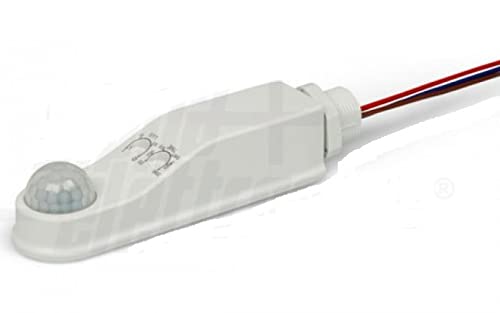
Figure 1: Overview of the ALPHA ELETTRONICA PIR Motion Sensor. This image shows the compact, white housing of the sensor with its dome-shaped PIR lens at one end and electrical wires extending from the other. The main body features subtle markings for the adjustment dials.
2. Specifications
| Attribute | Value |
|---|---|
| Brand | ALPHA ELETTRONICA |
| Model Number | 23-116 |
| Power Source | AC 230Vac (Wired Electric) |
| Sensor Type | Passive Infrared (PIR) |
| Protection Rating | IP65 |
| Mounting Type | Ceiling Mount |
| Adjustments | Time, Sensitivity, Lux |
| Item Weight | 200 grams |
| Country of Origin | Italy |
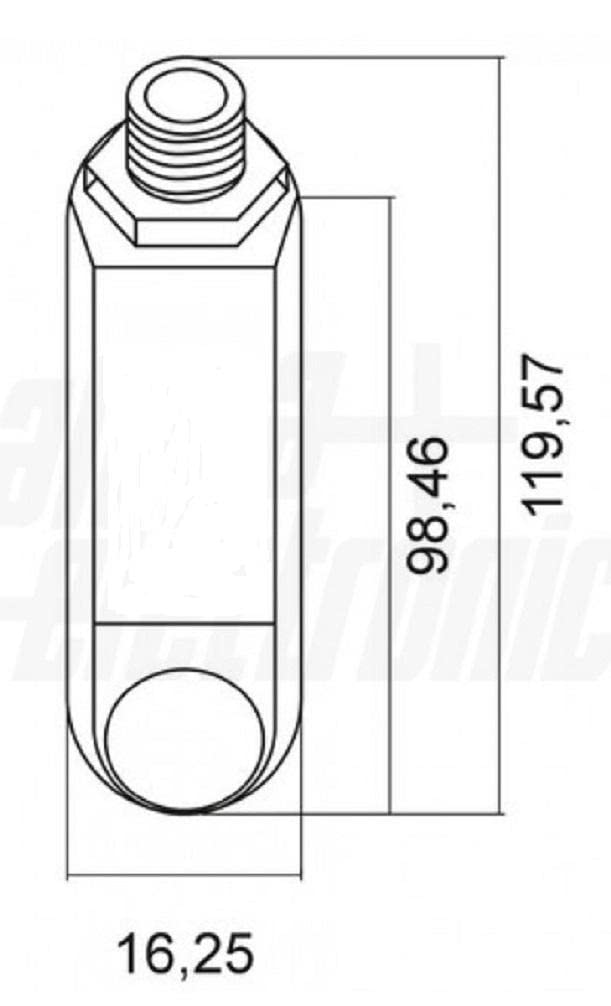
Figure 2: Technical drawing showing the dimensions of the PIR motion sensor. The diagram illustrates the length and width of the sensor, providing precise measurements in millimeters for installation planning.
3. Setup and Installation
This PIR motion sensor is designed for ceiling mounting and requires a wired electrical connection to an AC 230Vac power supply. Professional installation is recommended to ensure safety and proper functionality.
3.1 Safety Precautions
- Always disconnect power at the main circuit breaker before beginning any installation or wiring work.
- Ensure all wiring complies with local electrical codes and regulations.
- Do not exceed the specified voltage (AC 230Vac).
- Avoid installing the sensor near heat sources, air conditioning vents, or in direct sunlight, as this may affect performance.
3.2 Mounting Instructions
- Choose a suitable ceiling location that provides an unobstructed view of the area to be monitored.
- Securely mount the sensor to the ceiling using appropriate fasteners. Ensure the mounting is stable and can support the sensor's weight.
3.3 Wiring Instructions
- Identify the Live (L), Neutral (N), and Load (L') wires from your electrical supply and the device to be controlled (e.g., ceiling light).
- Connect the sensor's input wires to the main power supply (Live and Neutral).
- Connect the sensor's output wire (Load) to the Live input of the light fixture. Connect the Neutral of the light fixture directly to the main Neutral supply.
- Ensure all connections are secure and properly insulated.
- Once wiring is complete, restore power to the circuit.
4. Operating and Adjustments
The ALPHA ELETTRONICA PIR sensor features three adjustable dials to customize its operation:

Figure 3: Top-down view of the PIR motion sensor showing the three adjustment dials. These dials are labeled for Time, Sensitivity, and Lux, allowing users to fine-tune the sensor's behavior.
4.1 Time Delay (TIME)
This dial controls how long the connected light remains on after motion is no longer detected. Turning the dial typically increases or decreases the delay time. Adjust this setting based on the desired duration for the light to stay active after someone leaves the detection area.
4.2 Sensitivity (SENS)
The sensitivity dial adjusts the range and responsiveness of the motion detection. A higher sensitivity setting will allow the sensor to detect motion from a greater distance or with smaller movements. A lower setting will require closer or more significant motion. Adjust this to prevent false triggers or to ensure detection in the desired area.
4.3 Ambient Light (LUX)
The Lux dial determines the ambient light level at which the sensor will activate. If set to a low Lux value (e.g., "moon" symbol), the sensor will only activate the light when it is dark. If set to a high Lux value (e.g., "sun" symbol), the sensor will activate the light regardless of ambient light conditions. This feature helps save energy by preventing the light from turning on during daylight hours when not needed.
After making adjustments, allow a brief period for the sensor to recalibrate and test its operation.
5. Maintenance
The ALPHA ELETTRONICA PIR motion sensor is designed for low maintenance. Regular cleaning and periodic checks can help ensure optimal performance.
5.1 Cleaning
- Gently wipe the sensor lens and housing with a soft, dry, or slightly damp cloth.
- Do not use abrasive cleaners, solvents, or excessive moisture, as these can damage the sensor.
- Ensure the lens remains clear of dust, dirt, or obstructions that could impede motion detection.
5.2 Periodic Checks
- Periodically test the sensor's functionality by walking through its detection area to ensure it activates the connected light as expected.
- Check for any loose wiring connections or physical damage to the sensor or its mounting.
6. Troubleshooting
If you encounter issues with your PIR motion sensor, refer to the following common problems and solutions:
6.1 Light Does Not Turn On When Motion is Detected
- Check Power: Ensure the sensor is receiving power (AC 230Vac) and the circuit breaker is on.
- Check Wiring: Verify all electrical connections are secure and correct according to the wiring diagram.
- Adjust LUX Setting: If the ambient light is too high, the sensor might not activate. Try adjusting the LUX dial towards the "moon" symbol to allow activation in brighter conditions.
- Adjust Sensitivity: Increase the SENSITIVITY setting to ensure the sensor can detect motion in the desired range.
- Obstructions: Ensure there are no physical obstructions blocking the sensor's view.
- Light Bulb: Check if the connected light bulb is functional.
6.2 Light Stays On Constantly or Turns On Randomly
- Adjust TIME Setting: If the light stays on too long, decrease the TIME delay setting.
- Adjust Sensitivity: Reduce the SENSITIVITY setting. High sensitivity can cause the sensor to detect minor movements or environmental changes (e.g., drafts, small animals) that are not intended to trigger it.
- Environmental Factors: Ensure the sensor is not exposed to direct sunlight, heat sources (e.g., heating vents), or rapid temperature changes, which can cause false triggers.
- Detection Area: Re-evaluate the sensor's placement to ensure it's not detecting motion from unintended areas (e.g., outside a window).
6.3 Light Flashes or Cycles Rapidly
- Power Fluctuations: Check for unstable power supply.
- Faulty Wiring: Re-check all wiring connections for looseness or shorts.
- Overload: Ensure the connected load (light fixture) does not exceed the sensor's maximum power rating.
If the problem persists after trying these solutions, contact customer support or a qualified electrician.
7. Warranty and Support
ALPHA ELETTRONICA stands behind the quality of its products. This PIR motion sensor is manufactured to high standards, ensuring reliable and prolonged operation.
For technical assistance, troubleshooting beyond this manual, or warranty inquiries, please contact ALPHA ELETTRONICA customer support through their official channels. Keep your purchase receipt as proof of purchase for any warranty claims.
For more information, visit the official ALPHA ELETTRONICA website or contact your local distributor.