
1. Introduction
Thank you for purchasing the INSPIRE ALEX Desk Lamp. This modern LED lamp is designed to provide versatile and comfortable lighting for your workspace or reading area. It features adjustable light color temperature, multiple brightness levels, a convenient USB charging port, and a digital display for time and temperature. Please read this manual carefully before use to ensure proper operation and maintenance.

Figure 1: INSPIRE ALEX Desk Lamp Overview
2. Safety Information
- Ensure the lamp is placed on a stable, flat surface to prevent tipping.
- Do not expose the lamp to water or excessive humidity.
- Do not attempt to disassemble or repair the lamp yourself. Contact qualified service personnel.
- Keep the lamp away from heat sources and direct sunlight.
- Use only the provided power adapter.
- Unplug the lamp from the power outlet before cleaning or if it will not be used for an extended period.
3. Package Contents
Verify that all items are present in the package:
- INSPIRE ALEX Desk Lamp (1 unit)
- Power Adapter (1 unit)
- User Manual (this document)
4. Setup
- Unpack the Lamp: Carefully remove the lamp and all components from the packaging.
- Position the Lamp: Place the lamp on a stable, flat surface where you intend to use it.
- Connect Power: Insert the power adapter cable into the DC input port located at the back of the lamp's base. Plug the power adapter into a suitable 240V electrical outlet.
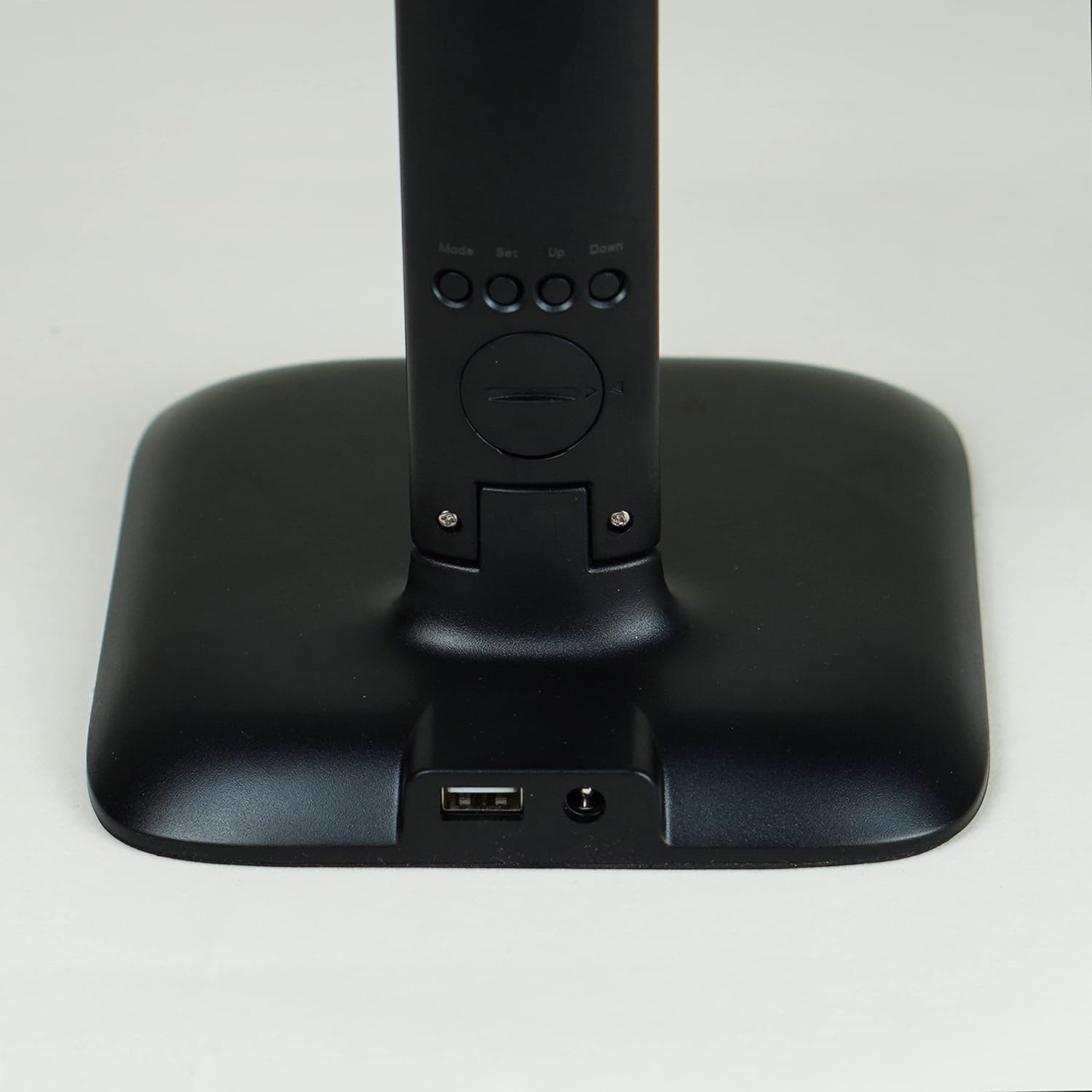
Figure 2: Power Input and USB Port on Lamp Base
- Adjust Lamp Head: The lamp head can be adjusted to direct light as needed. Gently move the lamp arm to the desired angle.
5. Operating Instructions
The INSPIRE ALEX Desk Lamp features touch controls on its base for easy operation.

Figure 3: Lamp Features Overview
5.1. Power On/Off and Brightness Adjustment
- Power On/Off: Lightly touch the power symbol on the lamp base to turn the lamp on or off.
- Brightness Levels: With the lamp on, repeatedly touch the power symbol to cycle through three different brightness levels (e.g., low, medium, high).
5.2. Color Temperature Adjustment
- Change Color Temperature: Locate the color temperature control symbol (often represented by a sun or color spectrum icon) on the base. Touch this symbol to switch between different color temperatures: warm light (3000K), white light (4000K), and cool light (6500K).
5.3. USB Charging Port
- Charge Devices: Connect your smartphone or other USB-powered devices to the USB port located on the lamp's base. The lamp must be plugged into a power outlet for the USB port to function.
5.4. Digital Display

Figure 4: Digital Display
- The digital display on the lamp's stem shows the current time and ambient room temperature.
- Setting Time/Date: Refer to the small buttons (Mode, Set, Up, Down) usually located on the back or side of the display panel for setting the time and date.
6. Maintenance
- Cleaning: Ensure the lamp is unplugged before cleaning. Wipe the lamp with a soft, dry cloth. Do not use abrasive cleaners or solvents.
- Storage: If storing the lamp for an extended period, unplug it and store it in a cool, dry place.
7. Troubleshooting
| Problem | Possible Cause | Solution |
|---|---|---|
| Lamp does not turn on. | Not plugged in; power outlet issue; faulty adapter. | Ensure power adapter is securely plugged into the lamp and a working outlet. Try a different outlet. |
| USB port not charging. | Lamp not powered; device cable issue. | Ensure the lamp is plugged in. Try a different USB cable or device. |
| Digital display is blank or incorrect. | Power interruption; settings need adjustment. | Check power connection. Use the 'Set' button to adjust time/date. |
| Touch controls are unresponsive. | Temporary glitch; dirty sensor. | Unplug the lamp for 30 seconds and plug it back in. Clean the touch area with a dry cloth. |
8. Specifications

Figure 5: Product Dimensions
- Brand: Inspire
- Model: ALEX (3276007355598)
- Manufacturer: ADEO
- Product Dimensions: 26 x 15 x 33 cm
- Weight: 710 grams
- Color: Black
- Material: Plastic
- Light Source: Integrated LED
- Luminous Flux: 820 Lumens
- Color Temperature: 3000K (Warm White) / 4000K (Neutral White) / 6500K (Cool White)
- Power Input: 240V
- Switch Type: Touch Control
- Additional Features: Dimmable, USB Charging Port, Digital Time/Temperature Display
9. Warranty Information
This product is covered by a standard manufacturer's warranty. Please retain your proof of purchase for any warranty claims. For specific warranty terms and conditions, refer to the documentation provided at the time of purchase or contact your retailer.
10. Support
If you encounter any issues or have questions regarding your INSPIRE ALEX Desk Lamp that are not addressed in this manual, please contact your retailer or the manufacturer's customer support for assistance.


