
Introduction
Thank you for purchasing the Cruxgg 6-in-1 9qt Air Fryer with TriZone Technology. This appliance is designed to provide versatile cooking options, including air frying, roasting, broiling, baking, reheating, and dehydrating, with the convenience of dual-zone cooking. Please read this manual thoroughly before first use to ensure safe and optimal operation.
Important Safeguards
When using electrical appliances, basic safety precautions should always be followed, including the following:
- Read all instructions before use.
- Do not touch hot surfaces. Use handles or knobs.
- To protect against electric shock, do not immerse cord, plugs, or main housing in water or other liquid.
- Close supervision is necessary when any appliance is used by or near children.
- Unplug from outlet when not in use and before cleaning. Allow to cool before putting on or taking off parts.
- Do not operate any appliance with a damaged cord or plug, or after the appliance malfunctions or has been damaged in any manner.
- The use of accessory attachments not recommended by the appliance manufacturer may cause injuries.
- Do not use outdoors.
- Do not let cord hang over edge of table or counter, or touch hot surfaces.
- Do not place on or near a hot gas or electric burner, or in a heated oven.
- Extreme caution must be used when moving an appliance containing hot oil or other hot liquids.
- Always attach plug to appliance first, then plug cord into the wall outlet. To disconnect, turn any control to "off", then remove plug from wall outlet.
- Do not use appliance for other than intended use.
- This appliance is for household use only.
Product Components
Familiarize yourself with the parts of your Cruxgg Air Fryer:
- Main Unit with Digital Touchscreen Display
- Removable Cooking Baskets (2)
- Crisper Trays (2)
- Removable Divider for TriZone Technology
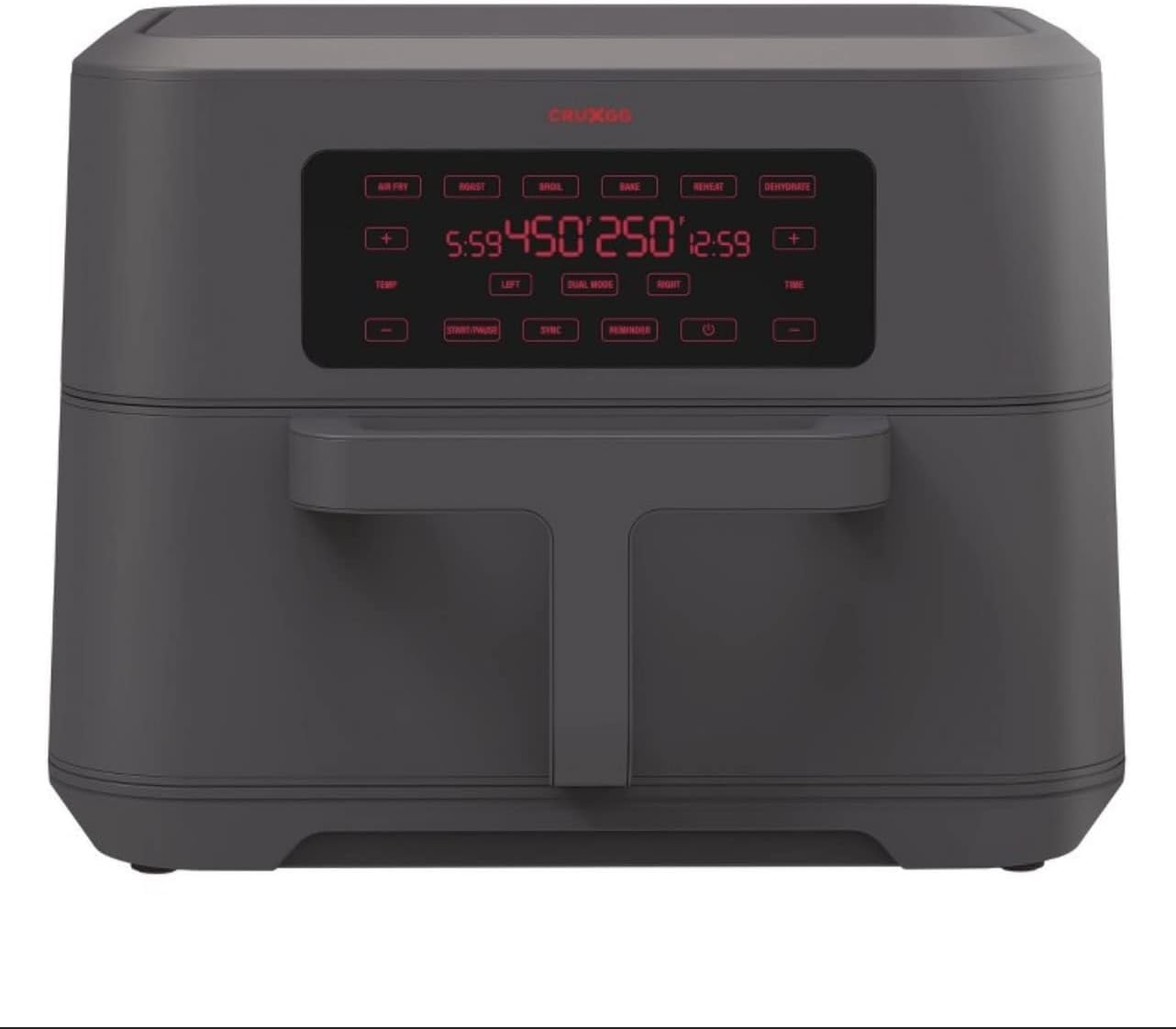
Figure 1: Front view of the Cruxgg Air Fryer, showcasing its digital display and sleek design.

Figure 2: The air fryer with both cooking baskets pulled out, revealing the interior compartments and removable divider.
Setup and First Use
- Unpack: Carefully remove all packaging materials, stickers, and labels from the appliance.
- Clean: Wash the cooking baskets and crisper trays with hot water, dish soap, and a non-abrasive sponge. Rinse thoroughly and dry completely. Wipe the interior and exterior of the main unit with a damp cloth.
- Placement: Place the air fryer on a stable, heat-resistant surface, away from walls or other appliances to allow for proper air circulation.
- Insert Components: Place the crisper trays into the cooking baskets. Insert the cooking baskets into the main unit. If using TriZone, ensure the divider is properly seated.
- Power On: Plug the power cord into a grounded electrical outlet. The digital display will illuminate.
- Initial Run (Optional but Recommended): For first use, it is recommended to run the air fryer empty for about 10-15 minutes at 350°F (175°C) to burn off any manufacturing residues. A slight odor may be present, which is normal. Ensure good ventilation.
Operating Instructions
Digital Touchscreen Controls:
- Power Button: Turns the unit on/off.
- Function Buttons: Select from Air Fry, Roast, Broil, Bake, Reheat, Dehydrate.
- Temperature Controls (+/-): Adjust temperature for each zone (LEFT/RIGHT) or combined.
- Time Controls (+/-): Adjust cooking time for each zone (LEFT/RIGHT) or combined.
- LEFT/RIGHT Buttons: Select which cooking zone to adjust.
- DUAL MODE Button: Activates simultaneous cooking in both zones with independent settings.
- SYNC Button: Synchronizes the finish time of both zones when using DUAL MODE.
- SHAKE/FLIP Reminder: Activates a reminder to shake or flip food during cooking.
- START/PAUSE Button: Starts or pauses the cooking cycle.
Basic Operation:
- Place food in the cooking basket(s). Do not overfill.
- Insert the basket(s) firmly into the main unit.
- Press the Power Button to turn on the display.
- Select your desired cooking function (e.g., Air Fry).
- Adjust the temperature and time using the +/- buttons. If using a single zone, ensure the correct LEFT/RIGHT button is selected or the divider is removed for full capacity.
- For dual-zone cooking, press DUAL MODE, then set independent temperatures and times for LEFT and RIGHT zones. Use SYNC if you want both zones to finish at the same time.
- Press START/PAUSE to begin cooking.
- Some recipes may require shaking or flipping food halfway through. The SHAKE/FLIP reminder can be set for this purpose.
- Once cooking is complete, the unit will beep. Carefully remove the baskets and transfer food to a serving dish.

Figure 3: The air fryer in use, demonstrating the dual basket functionality with different food items in each compartment.
Care and Maintenance
Cleaning:
- Always unplug the air fryer and allow it to cool completely before cleaning.
- The cooking baskets and crisper trays are not dishwasher safe. Wash them with hot water, dish soap, and a non-abrasive sponge.
- For stubborn food residue, soak the baskets and trays in warm, soapy water for 10-15 minutes before cleaning.
- Wipe the exterior of the air fryer with a damp cloth. Do not use abrasive cleaners or scouring pads.
- Clean the heating element inside the air fryer with a cleaning brush to remove any food residue.
- Ensure all parts are completely dry before storing or reusing.
Storage:
Store the air fryer in a cool, dry place. Ensure the power cord is neatly wrapped and secured to prevent damage.
Troubleshooting
| Problem | Possible Cause | Solution |
|---|---|---|
| Air fryer does not turn on. | Not plugged in; power outlet malfunction; unit not properly assembled. | Ensure plug is firmly in outlet. Check circuit breaker. Ensure baskets are fully inserted. |
| Food is not cooked evenly. | Basket overloaded; food not shaken/flipped. | Cook in smaller batches. Shake or flip food halfway through cooking. |
| White smoke coming from the appliance. | Grease residue from previous use; high-fat food cooking. | Clean the basket and crisper tray thoroughly. For high-fat foods, drain excess oil. |
| Appliance smells like plastic. | New appliance odor. | This is normal for first few uses. Run empty for 10-15 minutes in a well-ventilated area. |
Product Specifications
- Brand: Cruxgg
- Model Name: 072-04-4160
- Capacity: 9 Quarts (total)
- Color: Smoke Gray
- Product Dimensions: 15"D x 19"W x 16"H
- Item Weight: 19.31 pounds
- Material: Plastic
- Wattage: 1700 Watts (Output Wattage: 1500 Watts)
- Max Temperature Setting: 450 Degrees Fahrenheit
- Control Method: Touch
- Special Feature: Temperature Control, TriZone Technology
- Nonstick Coating: Yes
- Dishwasher Safe: No (Baskets/Trays)
- UPC: 829486173394
Warranty Information
For detailed warranty information, please refer to the warranty card included with your product packaging or visit the official Cruxgg website. Keep your purchase receipt as proof of purchase for any warranty claims.
Customer Support
If you have any questions, concerns, or require assistance with your Cruxgg Air Fryer, please contact our customer support team. Contact details can be found on the Cruxgg website or in the documentation provided with your appliance.