
Introduction
Thank you for choosing the DUDAO U4XS Single Ear Business Bluetooth Headset. This manual provides essential information for the proper use, setup, and maintenance of your new headset. Designed for business and everyday use, the U4XS offers clear communication, long battery life, and a comfortable, rotatable design for versatile wear.
Important Safety Information
- Do not expose the headset to extreme temperatures, humidity, or corrosive substances.
- Avoid dropping or subjecting the headset to strong impacts.
- Keep the headset away from children and pets.
- Use only the provided charging cable or a certified equivalent.
- Do not attempt to disassemble or modify the headset. This will void the warranty.
- Dispose of the battery and headset responsibly according to local regulations.
What's in the Box
- 1 x DUDAO U4XS Wireless Headset
- 1 x Charging Cable
- 1 x User Manual
- Eartips (various sizes)

Image: The retail packaging for the DUDAO U4XS headset, showing the product and its box.
Product Overview
Components and Features

Image: The DUDAO U4XS headset comfortably fitted in an ear, demonstrating its ergonomic design.
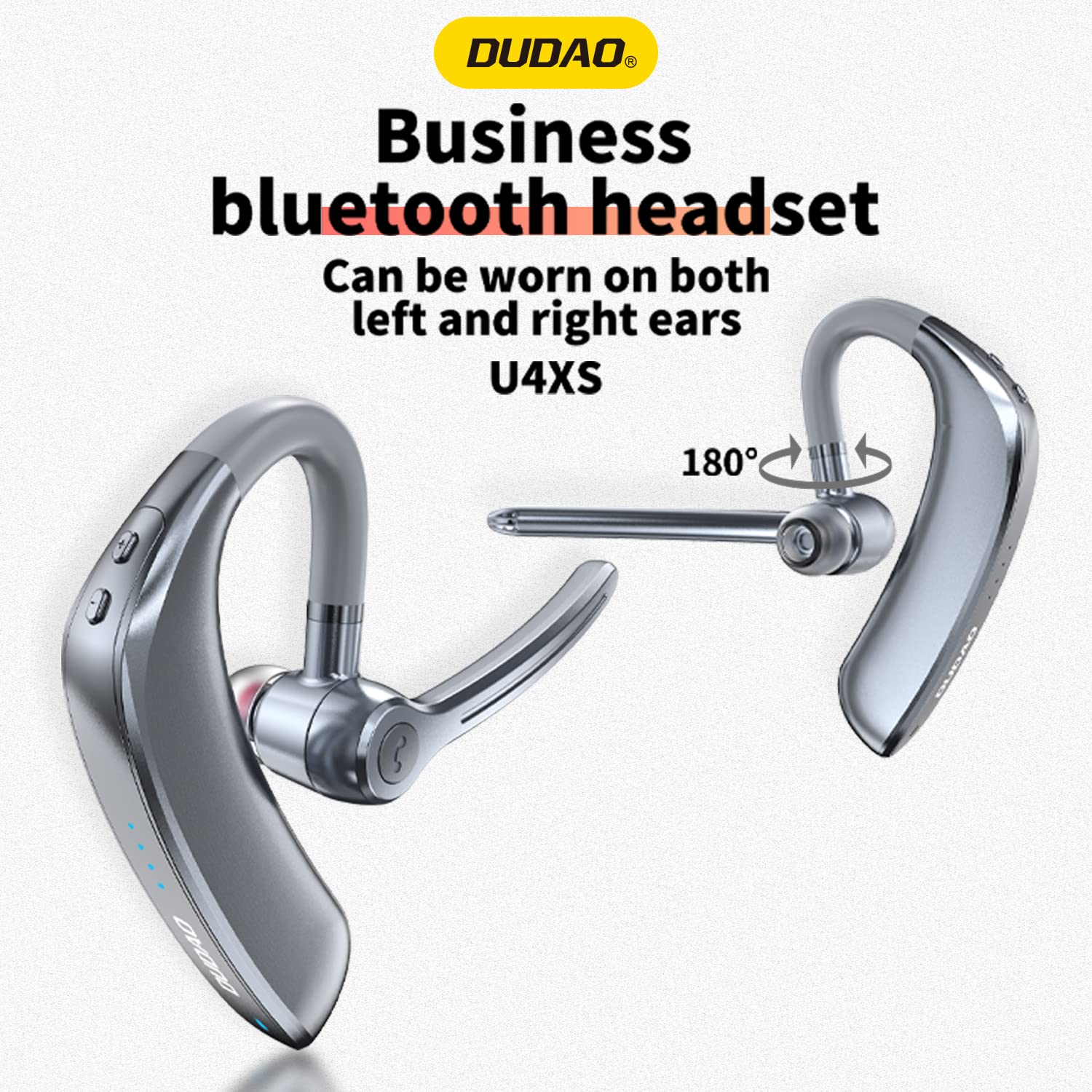
Image: Diagram illustrating the 180-degree rotatable ear hook of the DUDAO U4XS, allowing for left or right ear wear.
The DUDAO U4XS headset features an ergonomic design for comfortable, pain-free wear throughout the day. Its unique 180-degree rotatable ear hook allows for easy adjustment, ensuring a secure and comfortable fit on either your left or right ear, adapting to individual wearing habits.

Image: An internal view diagram of the DUDAO U4XS headset highlighting the integrated Bluetooth 5.0 smart chip for stable connectivity.
Equipped with a Bluetooth 5.0 smart chip, the U4XS ensures stable and efficient wireless communication, providing HD sound quality and intelligent noise reduction for smooth, barrier-free conversations.
Getting Started
Charging the Headset
Before first use, fully charge your DUDAO U4XS headset. Connect the provided charging cable to the headset's charging port and the other end to a USB power source (e.g., computer USB port, wall adapter). The charging indicator light will show the charging status. A full charge typically takes approximately 1 hour.

Image: Illustration showing the DUDAO U4XS headset next to a large battery icon, indicating 200 hours standby time, 20 hours music time, and 20 hours talk time.
The headset offers an impressive 20 hours of music play time, 20 hours of talk time, and a super long 200 hours of standby time on a single charge, thanks to its 150mAh large-capacity lithium battery.
Pairing with Your Device
- Ensure the headset is fully charged and turned off.
- Press and hold the Multi-function Button on the headset until the indicator light flashes blue and red alternately, indicating it is in pairing mode.
- On your smartphone or Bluetooth-enabled device, go to the Bluetooth settings.
- Search for available devices and select "DUDAO U4XS" from the list.
- Once connected, the indicator light will turn solid blue or flash slowly, and you may hear a confirmation tone.
Operating Your Headset
Power On/Off
- Power On: Press and hold the Multi-function Button for approximately 3 seconds until the blue indicator light flashes.
- Power Off: Press and hold the Multi-function Button for approximately 5 seconds until the red indicator light flashes and then turns off.
Making and Receiving Calls
- Answer Call: Press the Multi-function Button once.
- End Call: Press the Multi-function Button once during a call.
- Reject Call: Press and hold the Multi-function Button for 2 seconds.
- Redial Last Number: Double-press the Multi-function Button.
Music Playback
- Play/Pause: Press the Multi-function Button once.
- Next Track: Press and hold the Volume Up button.
- Previous Track: Press and hold the Volume Down button.
Volume Control
- Volume Up: Short press the Volume Up button.
- Volume Down: Short press the Volume Down button.
Voice Assistant
- Activate Voice Assistant: Triple-press the Multi-function Button (functionality depends on your connected device).
Care and Maintenance
- Clean the headset regularly with a soft, dry cloth. Do not use harsh chemicals or abrasive materials.
- Store the headset in a cool, dry place away from direct sunlight and extreme temperatures.
- Avoid prolonged exposure to water, although the headset is water-resistant, it is not waterproof.
- Charge the headset at least once every three months if not used for extended periods to preserve battery life.
Troubleshooting
| Problem | Solution |
|---|---|
| Headset does not power on. | Ensure the headset is fully charged. Press and hold the Multi-function Button for 3 seconds. |
| Cannot pair the headset with my device. | Ensure the headset is in pairing mode (flashing blue/red). Turn off and on your device's Bluetooth. Clear previous Bluetooth connections on your device. |
| No sound or low volume. | Increase the volume on both the headset and your connected device. Ensure the headset is properly connected. |
| Connection is unstable or frequently disconnects. | Ensure the headset is within the 10-meter Bluetooth range of your device. Avoid obstacles between the headset and device. |
| Microphone not working. | Ensure the headset is properly connected and selected as the audio input device on your phone. Check for any mute settings on your device. |
Technical Specifications
| Feature | Specification |
|---|---|
| Model Name | U4XS Business Single Ear Bluetooth Headset |
| Connectivity Technology | Wireless (Bluetooth) |
| Bluetooth Version | 5.0 |
| Bluetooth Range | Up to 10 meters (32.8 feet) |
| Battery Life (Music Play Time) | 20 Hours |
| Battery Life (Standby Time) | 200 Hours |
| Charging Time | 1 Hour |
| Noise Control | Sound Isolation |
| Microphone Format | In Ear, With Microphone |
| Water Resistance Level | Water Resistant |
| Item Weight | 140 Grams |
| Product Dimensions | 3 x 2 x 2 cm |
| Material | Plastic |
Warranty and Support
The DUDAO U4XS Wireless Bluetooth Headset comes with a 12-Months Warranty for Manufacturing Defects Only. This warranty covers defects in materials and workmanship under normal use.
For any compatibility issues, technical support, or warranty claims, please contact DUDAO customer care:
- Email: customercare@dudao.in
- Phone: +91 9310681651
You can also visit the official DUDAO store on Amazon for more products and information: DUDAO Store