
Introduction
This manual provides comprehensive instructions for the setup, operation, and maintenance of your AcuRite Iris (5-in-1) Indoor/Outdoor Wireless Weather Station and the accompanying 5-inch Capacity Easy-to-Read Magnifying Rain Gauge. This bundle offers detailed hyperlocal weather information, including indoor and outdoor temperature, humidity, wind speed and direction, and rainfall.

Image: The AcuRite Iris 5-in-1 Weather Station display unit and outdoor sensor, alongside the separate 5-inch magnifying rain gauge.
Package Contents
- AcuRite Iris (5-in-1) Outdoor Sensor
- AcuRite Iris Digital Display Unit
- AcuRite 5" Capacity Easy-to-Read Magnifying Rain Gauge
- Mounting Hardware for 5-in-1 Sensor
- Power Cord for Display Unit
- Instruction Manual (this document)
Setup
1. AcuRite Iris (5-in-1) Outdoor Sensor Setup
The 5-in-1 sensor measures outdoor temperature, humidity, wind speed, wind direction, and rainfall. For optimal performance, choose a location that is:
- At least 5 feet (1.5 meters) off the ground.
- Away from heat sources (e.g., exhaust vents, air conditioners).
- Free from obstructions that could block wind or rain (e.g., trees, buildings).
- Within 330 feet (100 meters) of the display unit for wireless communication.
- Ensure the sensor is level for accurate rain and wind measurements.
Battery Installation: The sensor requires 4 AA batteries (not included). Install them into the battery compartment, observing polarity.

Image: The AcuRite Iris 5-in-1 Weather Station display and outdoor sensor, illustrating key features such as temperature, humidity, wind, and real-time weather ticker.
2. AcuRite Digital Display Unit Setup
Place the display unit indoors, away from direct sunlight and heat sources. Connect the included power cord to the display unit and a power outlet. The display also uses 3 AA batteries (not included) for backup power during outages.
Once powered on, the display will automatically search for the 5-in-1 sensor. This may take a few minutes. Ensure both units are within range.

Image: A close-up of the AcuRite Iris 5-in-1 Weather Station display, highlighting sections for weather, humidity & wind information, dew point, weather forecast & rainfall, and date & time.
3. AcuRite 5" Capacity Magnifying Rain Gauge Setup
The rain gauge is designed for easy, accurate rainfall measurement. It can be mounted or placed directly in the ground.
- Placement: Choose an open area away from buildings, trees, or other obstructions that could interfere with rainfall collection.
- Mounting: The rain gauge features an integrated hang hole for easy mounting to a fence post or wall using screws (not included).
- Ground Placement: It can also be placed directly into soft ground.
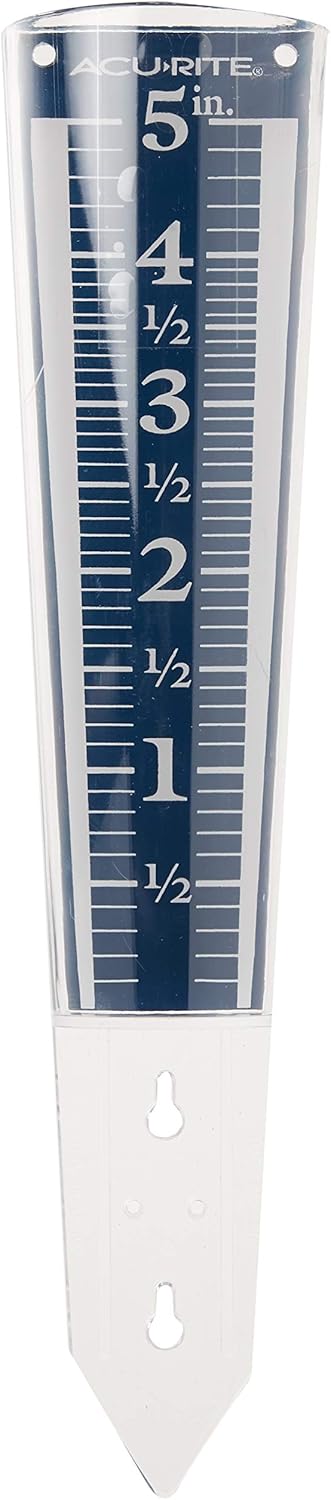
Image: A clear view of the AcuRite 5-inch Capacity Easy-to-Read Magnifying Rain Gauge, showing its measurement markings and design.
Operating Instructions
AcuRite Iris Digital Display Unit
The display unit provides real-time weather data and forecasts. Key features include:
- Indoor/Outdoor Temperature & Humidity: Displays current readings for both indoor and outdoor environments.
- Wind Speed & Direction: Shows current wind speed and direction, with historical data available.
- Rainfall: Tracks daily, weekly, and historical rainfall totals.
- Barometric Pressure: The unit takes 4,000 readings at 12-minute intervals to calculate a running average and compute the barometric pressure for your exact location. This self-calibrating technology improves forecast accuracy over time.
- Weather Forecast: Provides a 12 to 24-hour weather forecast based on barometric pressure changes.
- Date & Time: Automatically updates for convenience.
- Weather Ticker: A scrolling text display provides additional information like "feels like" temperature, dew point, and historical highs/lows.
AcuRite 5" Capacity Magnifying Rain Gauge
To read the rainfall, simply observe the water level against the magnified markings on the side of the gauge. The numbers are enlarged for easy visibility. The gauge measures up to 5 inches of rainwater. After recording, empty the gauge to prepare for the next rainfall.
Maintenance
AcuRite Iris (5-in-1) Outdoor Sensor
- Cleaning: Periodically clean the sensor, especially the rain collection funnel and debris screen, to ensure accurate rainfall measurements. Use a soft, damp cloth.
- Battery Replacement: Replace batteries approximately every 2 years, or when the low battery indicator appears on the display unit. Use fresh, high-quality alkaline or lithium batteries.
- Winter Care: In freezing conditions, ensure the rain gauge funnel is clear of ice and snow.
AcuRite 5" Capacity Magnifying Rain Gauge
- Cleaning: Rinse the rain gauge with water periodically to remove dirt or debris that may accumulate.
- Durability: The acrylic construction is weather-resistant and designed for long-term outdoor use.
Troubleshooting
| Problem | Possible Solution |
|---|---|
| No outdoor data on display |
|
| Inaccurate temperature/humidity |
|
| Inaccurate wind readings |
|
| Inaccurate rainfall readings |
|
Specifications
- Brand: AcuRite
- Model (Weather Station): 01512M (Iris 5-in-1)
- Model (Rain Gauge): 00850A2
- Power Source: Battery Powered (4 AA for sensor, 3 AA for display backup), AC Power (for display)
- Special Features: Thermometer, Barometer, Hygrometer, Anemometer, Rain Gauge
- Material: Plastic, Acrylic
- Connectivity Technology: Wireless
- Temperature Accuracy: ±1 °C
- Display Type: LCD
- Wireless Range: Up to 330 feet (100 meters)
Warranty and Support
AcuRite products typically come with a 1-year limited warranty. Please refer to the official AcuRite website or the full user manual for detailed warranty information and terms.
For further assistance, troubleshooting, or to access the complete user manual, please visit the official AcuRite support website or refer to the PDF document provided by the manufacturer:


