
1. Introduction
The Alarm.com ADC-V724 is a high-performance 1080p outdoor Wi-Fi camera designed to enhance the security of your home or business. Featuring High Dynamic Range (HDR) for clear imaging in various lighting conditions and two-way audio, this camera allows for proactive deterrence and communication. It integrates seamlessly with the Alarm.com platform, offering advanced video analytics and onboard recording capabilities.
This manual will guide you through the installation, configuration, and daily operation of your ADC-V724 camera, ensuring you can fully utilize its robust features.
2. Key Features
- 2-Way Audio: Hear and speak with visitors or deter unwanted activity directly through the camera.
- Microphone and Speaker: Integrated components for clear two-way communication.
- Video Analytics: Advanced detection capabilities for smarter, more relevant alerts regarding people and animals.
- Onboard Recording with Smart View: Supports continuous, local, encrypted recordings to a microSD card (sold separately), viewable from anywhere.
- High Dynamic Range (HDR): Provides balanced and clear video quality in scenes with both very bright and very dark areas.
- Wi-Fi Connectivity: Supports 2.4 GHz and 5 GHz networks for flexible installation.
- Weather-Resistant Design: IP66 rated for outdoor use, capable of withstanding various weather conditions.
3. Package Contents
Please verify that all items are present in your package:
- Alarm.com ADC-V724 Outdoor Wi-Fi Camera
- Mounting Hardware (screws and anchors)
- Power Adapter
- Installation Guide (this document)
4. Setup and Installation
Follow these steps to set up your ADC-V724 camera:
- Plan Placement: Choose an outdoor location that provides the desired field of view, has a strong Wi-Fi signal, and is within reach of a power outlet. Ensure the camera is mounted securely and is protected from direct impact.
- Power On: Connect the camera to the power adapter and plug it into an electrical outlet. The camera's LED indicator will begin to flash.
- Connect to Alarm.com:
- Download the Alarm.com mobile app from your device's app store.
- Log in to your Alarm.com account. If you don't have one, contact your security service provider.
- Navigate to the 'Video' section and select 'Add Video Device' or 'Add Camera'.
- Follow the on-screen prompts to connect your camera to your Wi-Fi network. This typically involves scanning a QR code on the camera or entering its MAC address.
- Mount the Camera:
- Use the provided mounting hardware to securely attach the camera's base to the chosen surface (wall or ceiling).
- Adjust the camera's angle to achieve the optimal viewing area.
- Insert MicroSD Card (Optional): For onboard recording, open the cover on the back of the camera and insert a compatible microSD card (sold separately) into the slot. Close the cover securely.

Figure 4.1: Front view of the ADC-V724 camera, showing the lens and LED indicator.

Figure 4.2: Angled view of the camera, illustrating its adjustable mounting bracket.
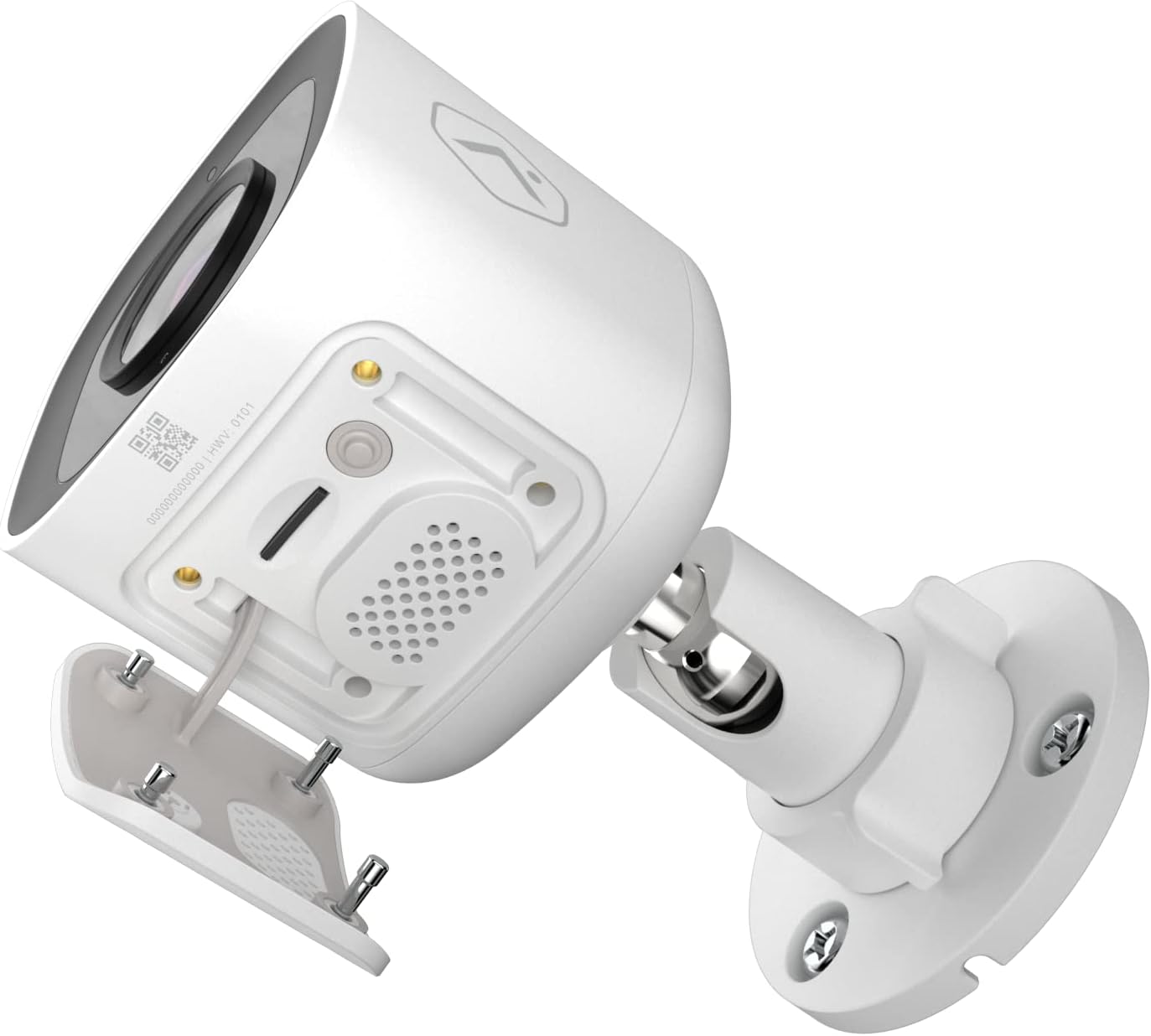
Figure 4.3: Rear view of the camera with the protective cover open, showing the microSD card slot for local storage.
5. Operating the Camera
Once installed, you can operate your ADC-V724 camera through the Alarm.com mobile app or website.
- Live View: Access real-time video feed from your camera. You can view live footage, take snapshots, and manually record clips.
- Two-Way Audio: Use the microphone and speaker icons within the live view to initiate two-way communication. This allows you to speak to someone at the camera's location or listen to audio from the camera.
- Video Analytics: Configure custom detection zones and rules for people, animals, or vehicles. The camera will send alerts based on these settings.
- Recorded Clips: Review recorded video clips triggered by events or continuous recording (if a microSD card is installed). Clips can be saved to the cloud or viewed from the onboard storage.
- Settings: Adjust camera settings such as video quality, motion sensitivity, night vision, and notification preferences.

Figure 5.1: Example of the Alarm.com mobile app interface, displaying live and saved video feeds from connected cameras.
6. Maintenance
Regular maintenance ensures the longevity and optimal performance of your camera.
- Cleaning: Periodically clean the camera lens and housing with a soft, damp cloth. Avoid abrasive cleaners or solvents that could damage the surface.
- Firmware Updates: Ensure your camera's firmware is up to date. Alarm.com typically manages these updates automatically, but you can check for available updates through the app or website.
- Connectivity Check: Regularly verify the camera's Wi-Fi connection strength and power supply to prevent interruptions in service.
7. Troubleshooting
If you encounter issues with your ADC-V724 camera, refer to the following common problems and solutions:
| Problem | Possible Cause | Solution |
|---|---|---|
| Camera is offline | No power, Wi-Fi signal loss, network issue | Check power connection. Verify Wi-Fi signal strength. Restart your router. Reconnect camera via Alarm.com app. |
| Poor video quality | Dirty lens, low bandwidth, poor lighting | Clean the lens. Ensure adequate internet speed. Adjust camera position for better lighting or enable HDR. |
| Two-way audio not working | Microphone/speaker disabled, app permissions, network latency | Check audio settings in the Alarm.com app. Ensure app has microphone permissions. Verify stable internet connection. |
| No motion detection alerts | Incorrect settings, detection zone issues | Review video analytics rules and detection zones in the Alarm.com app. Adjust sensitivity. |
If the problem persists, contact your Alarm.com service provider for further assistance.
8. Specifications
| Feature | Specification |
|---|---|
| Image Sensor | 1/3 inches, 2 MP, HDR |
| Video Capture Resolution | 1080p (Up to 1920x1080) |
| Recording Compression | H.264 |
| Horizontal Field of View | 117 degrees |
| Vertical Field of View | 65 degrees |
| Diagonal Field of View | 140 degrees |
| Wi-Fi Support | 802.11 b/g/n/ac, 2.4 and 5 GHz |
| Ingress Protection (IP) Rating | IP66 (Water Resistant) |
| Low Light Sensitivity | 0.5 lux with IR |
| IR Range | Up to 49 ft (15 m) |
| Dimensions (L x W x H) | 2.5 x 2.5 x 4.5 inches (Product: 3 x 5 x 2.9 inches) |
| Item Weight | 1.43 pounds |
| Power | 12 Volts, 5 watts |
| Mounting Type | Wall Mount |
9. Warranty Information
For specific warranty details regarding your Alarm.com ADC-V724 camera, please refer to the warranty documentation provided by your Alarm.com service provider or visit the official Alarm.com website. Warranty terms typically cover manufacturing defects for a specified period from the date of purchase.
10. Support
If you require technical assistance, have questions about your service, or need to report an issue, please contact your Alarm.com service provider. They are equipped to provide support for your specific system configuration and camera. You can also find general support resources and FAQs on the official Alarm.com website.