
1. Introduction
This manual provides essential instructions for the safe and efficient operation of your JIGUUN 1500 Watt Pure Sine Wave Inverter. Please read it thoroughly before use to ensure proper installation, operation, and maintenance. This device converts 12V DC battery power into 110V/120V AC household power, suitable for various applications including outdoor camping, RV use, and emergency power backup.

Image 1.1: The JIGUUN 1500W Pure Sine Wave Inverter, showing its front panel with AC outlets, USB port, LED display, and included remote control and battery cables.
2. Safety Instructions
Adhering to these safety guidelines is crucial for preventing injury and damage to the inverter or connected devices.
- Power Rating: Do not connect equipment with a rated power higher than 1500W to this inverter. Overloading will damage the inverter and connected devices.
- Battery Connection: Always connect the inverter to the battery using the correct polarity (red cable to positive, black cable to negative). Incorrect connection will result in a short circuit and potential damage. Replace supplied fuses in case of a short circuit.
- Battery Voltage: For the 12V inverter, it is recommended to use a 12V 200AH or above battery for power supply. Using an incompatible voltage will damage the unit.
- Environmental Conditions: Do not expose the inverter to direct sunlight or water. Ensure it is used in a dry, well-ventilated area.
- Vehicle Operation: Do not keep the inverter on when your RV, truck, or car engine is not running, as this can drain the vehicle's battery.
- Solar Panel Connection: This inverter cannot be directly connected to solar panels. It must be used with a battery and a suitable charge controller in a solar power system.
- Inductive Loads: Be aware that inductive loads (e.g., microwave ovens, refrigerators, coffee machines) have a high instantaneous starting power, often 4-6 times their working power. Ensure the inverter's peak power capacity can handle these surges.

Image 2.1: Visual representation of the inverter's seven comprehensive protection systems, including temperature control, ground wire, overload, reverse polarity, short circuit, low voltage, and over voltage protection.
3. Package Contents
Verify that all items are present in the package upon unboxing:
- 1x JIGUUN DC 12V to AC 110V 1500W Pure Sine Inverter
- 1x User Manual (this document)
- 1 Set of Battery Cables (1x Red for positive, 1x Black for negative)
- 1x Remote Control
- 6x 20A Fuses (spare)
- 1x Alligator Clip Safety Ground Cable
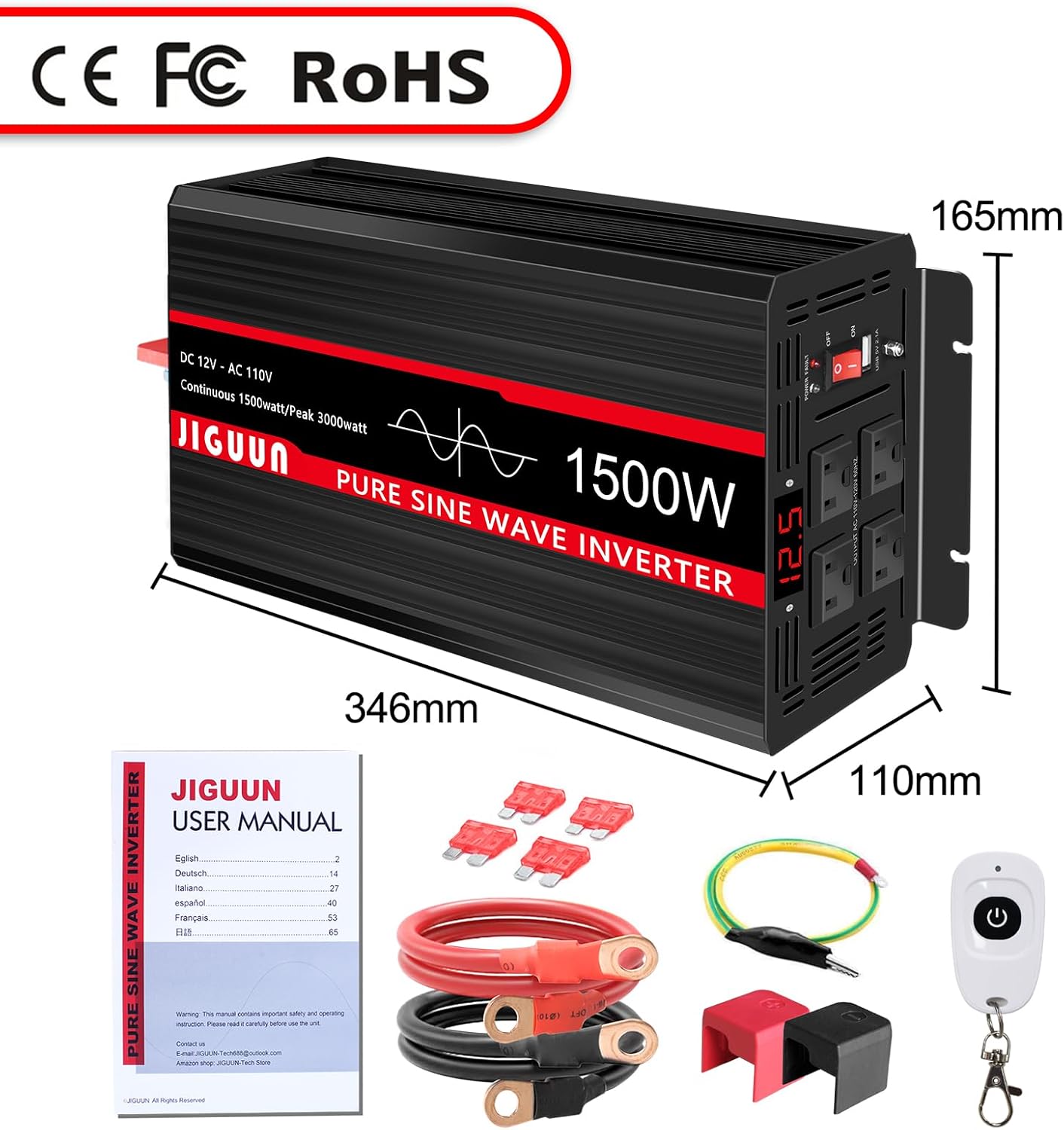
Image 3.1: All components included in the JIGUUN 1500W inverter package, showing the inverter, user manual, battery cables, remote control, and spare fuses.
4. Product Features
The JIGUUN 1500W Pure Sine Wave Inverter is designed with advanced features for reliable and safe power conversion:
- Pure Sine Wave Output: Provides clean, stable power (1500W continuous, 3000W peak) suitable for sensitive electronics, comparable to household mains electricity.
- Input/Output: Converts DC 12V input to AC 110V/120V output.
- Multiple Outlets: Equipped with 4 standard AC outlets and one 2.1A USB charging port.
- Digital LED Display: Clearly shows input voltage, output voltage, and frequency.
- Wireless Remote Control: Allows for convenient power management from a distance of 170-200 feet.
- Comprehensive Protection: Features 7 protection systems: under voltage, over voltage, overload, over temperature, short circuit, AC ground terminal, and reverse connection protection.
- Efficient Cooling: Integrated fan cooling system activates automatically when the internal temperature exceeds 45°C, ensuring optimal performance and longevity.
- Durable Construction: Housed in a high-strength thickened aluminum-magnesium alloy shell for lasting protection and efficient heat dissipation.
- Optimized Terminals: New designed DC terminals offer secure, high-current DC input connections for thicker cables.
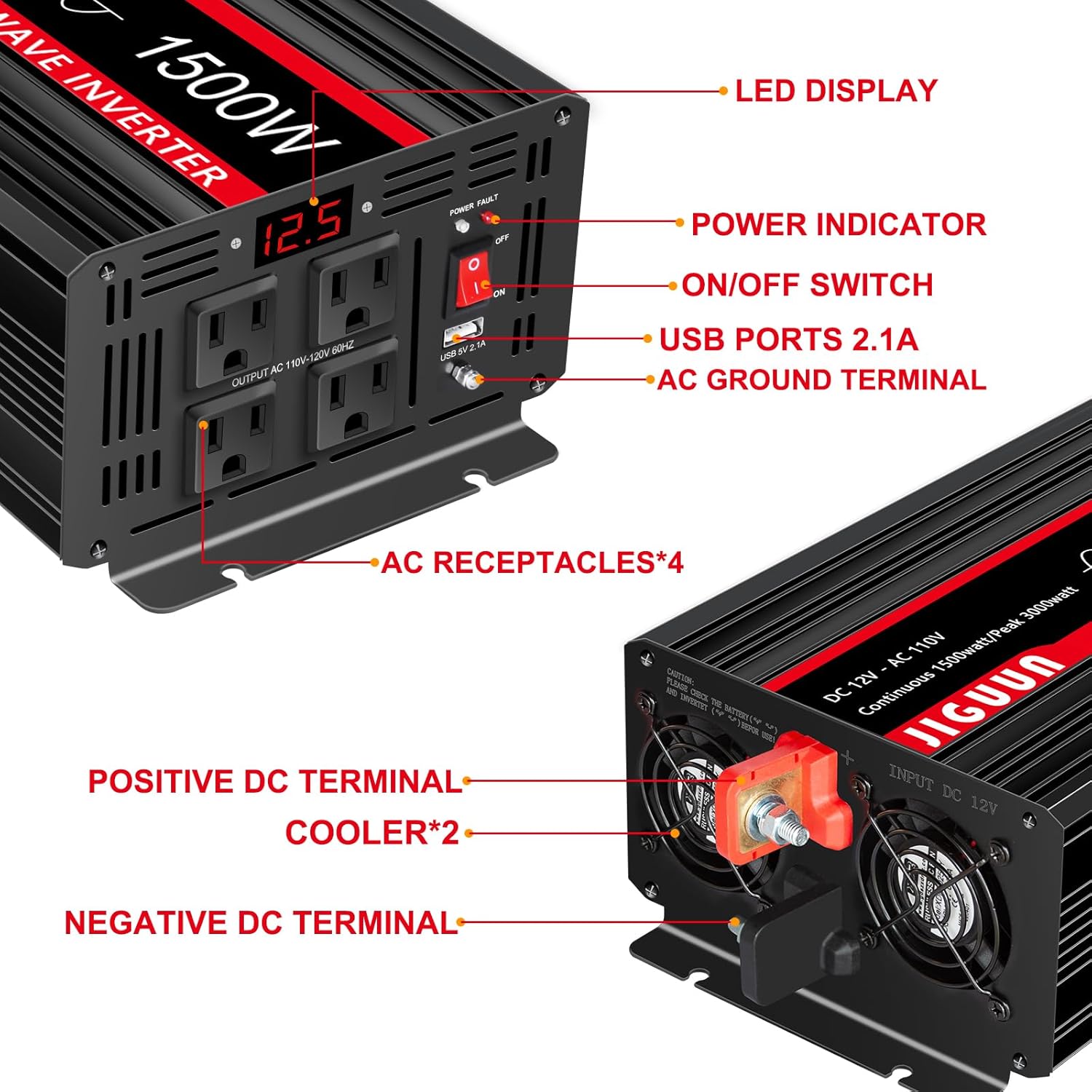
Image 4.1: Detailed view of the inverter's front panel, highlighting the LED display, power indicator, ON/OFF switch, USB ports, AC ground terminal, and four AC receptacles. The rear panel shows positive and negative DC terminals and cooling fans.

Image 4.2: Illustration demonstrating the smooth, stable waveform of a pure sine wave output compared to the stepped waveform of a modified sine wave, highlighting the benefits for sensitive electronics.
5. Setup and Installation
Follow these steps for proper setup and installation of your inverter:
- Placement: Choose a dry, well-ventilated location for the inverter, away from direct sunlight, heat sources, and moisture. Ensure adequate space around the unit for airflow, especially around the cooling fans.
- Battery Selection: Use a 12V battery with a capacity of 200AH or higher for optimal performance and to prevent damage to the inverter.
- Battery Connection:
- Ensure the inverter's power switch is in the "OFF" position.
- Connect the red battery cable to the positive (+) terminal of the inverter and the positive (+) terminal of the 12V battery.
- Connect the black battery cable to the negative (-) terminal of the inverter and the negative (-) terminal of the 12V battery.
- Ensure all connections are tight and secure to prevent arcing and overheating.
- Grounding: Connect the alligator clip safety ground cable to the inverter's ground terminal and to a suitable ground point (e.g., vehicle chassis, earth ground).
- Solar System Integration (Optional): If integrating with a solar power system, connect the inverter to the battery bank. The inverter cannot be directly connected to solar panels; a charge controller must be used between the solar panels and the battery.

Image 5.1: A schematic diagram illustrating how the inverter integrates into a DIY solar power system, showing connections between solar panels, charge controller, battery, and the inverter for AC output.
6. Operation
Once the inverter is properly installed, follow these steps for operation:
- Power On: Flip the ON/OFF switch on the inverter's front panel to the "ON" position. The LED display will illuminate, showing the input voltage.
- Connect Devices: Plug your AC appliances into the 4 AC outlets and/or USB devices into the 2.1A USB port. Ensure the total power consumption does not exceed 1500W.
- Monitor Display: The LED display will show the current input voltage, output voltage, and frequency, allowing you to monitor the inverter's status.
- Remote Control Usage: The wireless remote control can be used to turn the inverter ON/OFF from a distance. Important: The inverter must be turned off manually before the remote control can be used to power it on or off.
- Power Off: When finished, first turn off all connected appliances, then flip the inverter's ON/OFF switch to the "OFF" position.

Image 6.1: The JIGUUN 1500W inverter connected and powering multiple household appliances, demonstrating its capability for various applications.

Image 6.2: A hand operating the wireless remote control for the JIGUUN inverter, illustrating its convenience for remote power management.
7. Troubleshooting
Refer to this section for common issues and their solutions:
| Problem | Possible Cause | Solution |
|---|---|---|
| Inverter does not turn on. | Loose battery connections, low battery voltage, blown fuse. | Check battery cable connections. Ensure battery voltage is sufficient (above 11V). Replace internal 20A fuses if blown. |
| No AC output. | Overload, over-temperature, low/high input voltage. | Reduce connected load. Allow inverter to cool down. Check battery voltage. |
| Alarm sounds. | Low battery voltage, overload, over-temperature. | Recharge battery. Reduce load. Allow inverter to cool. The remote control can sometimes silence alarms. |
| Cooling fan is running constantly. | High internal temperature. | This is normal operation if the temperature exceeds 45°C. Ensure adequate ventilation around the inverter. |
| Remote control not working. | Inverter not initially turned off, battery in remote. | Ensure the inverter was manually turned OFF before attempting to use the remote. Check remote battery. |
8. Specifications
| Model Name | 1500 Watt Pure Sine Wave Inverter (1500W 12V LED) |
| Continuous Power | 1500W |
| Peak Power | 3000W |
| DC Input Voltage | 12V |
| AC Output Voltage | 110V / 120V |
| Output Frequency | 60Hz |
| Conversion Efficiency | >90% |
| USB Output | 5V 2.1A |
| AC Outlets | 4 |
| Dimensions (L x W x H) | 16.61 x 7.99 x 5.24 inches (approx. 346mm x 165mm x 110mm) |
| Item Weight | 10.5 pounds |
| Protection Systems | Under Voltage, Over Voltage, Overload, Over Temperature, Short Circuit, AC Ground Terminal, Reverse Connection |
| Cooling | Intelligent Fan Cooling (activates >45°C) |
9. Maintenance
To ensure the longevity and optimal performance of your JIGUUN inverter, follow these maintenance guidelines:
- Cleaning: Periodically clean the exterior of the inverter with a soft, dry cloth. Do not use liquid cleaners or solvents.
- Ventilation: Ensure that the cooling fan vents are free from dust and obstructions. Blocked vents can lead to overheating.
- Connections: Regularly check battery cable connections to ensure they remain tight and free from corrosion.
- Storage: If storing the inverter for an extended period, disconnect it from the battery and store it in a cool, dry place, away from direct sunlight and moisture.
- Fuse Replacement: In the event of a short circuit, replace the internal 20A fuses with new ones of the same rating. Refer to the package contents for spare fuses.

Image 9.1: A close-up of the inverter's cooling fans, emphasizing the importance of keeping them clear for proper heat dissipation.
10. Warranty and Support
Your JIGUUN 1500W Pure Sine Wave Inverter comes with a 1-year warranty that includes free replacement for manufacturing defects. For any questions, technical assistance, or warranty claims, please contact the JIGUUN customer service team via email. They are committed to providing prompt support and solutions.
Please retain your proof of purchase for warranty validation.
