
Product Overview
The Garmin tactix 7 Pro Edition is a multisport GPS smartwatch engineered for rugged environments and demanding missions. It features a Power Sapphire™ solar charging lens, combining traditional button controls with a responsive touchscreen display. Designed for durability, it includes an always-on 1.4-inch solar-powered display with a sapphire lens, a custom front bezel, a black DLC-coated steel bezel, and a black PVD-coated steel rear cover.
This smartwatch is equipped with mission-ready tactical features such as a dimmable white or green LED flashlight, a night vision compatible display, preloaded tactical activities, dual-position GPS formatting, Jumpmaster mode, projected waypoints, stealth mode, and a kill switch for data erasure. It supports navigation in challenging terrains with preloaded TopoActive and ski maps, along with multi-band and multi-GNSS support for superior positional accuracy.
Beyond its tactical capabilities, the tactix 7 Pro Edition offers advanced training and performance tracking, including endurance and stamina metrics, comprehensive health and wellness monitoring, and everyday smart functionalities like notifications and Garmin Pay™ contactless payments when paired with a compatible smartphone.
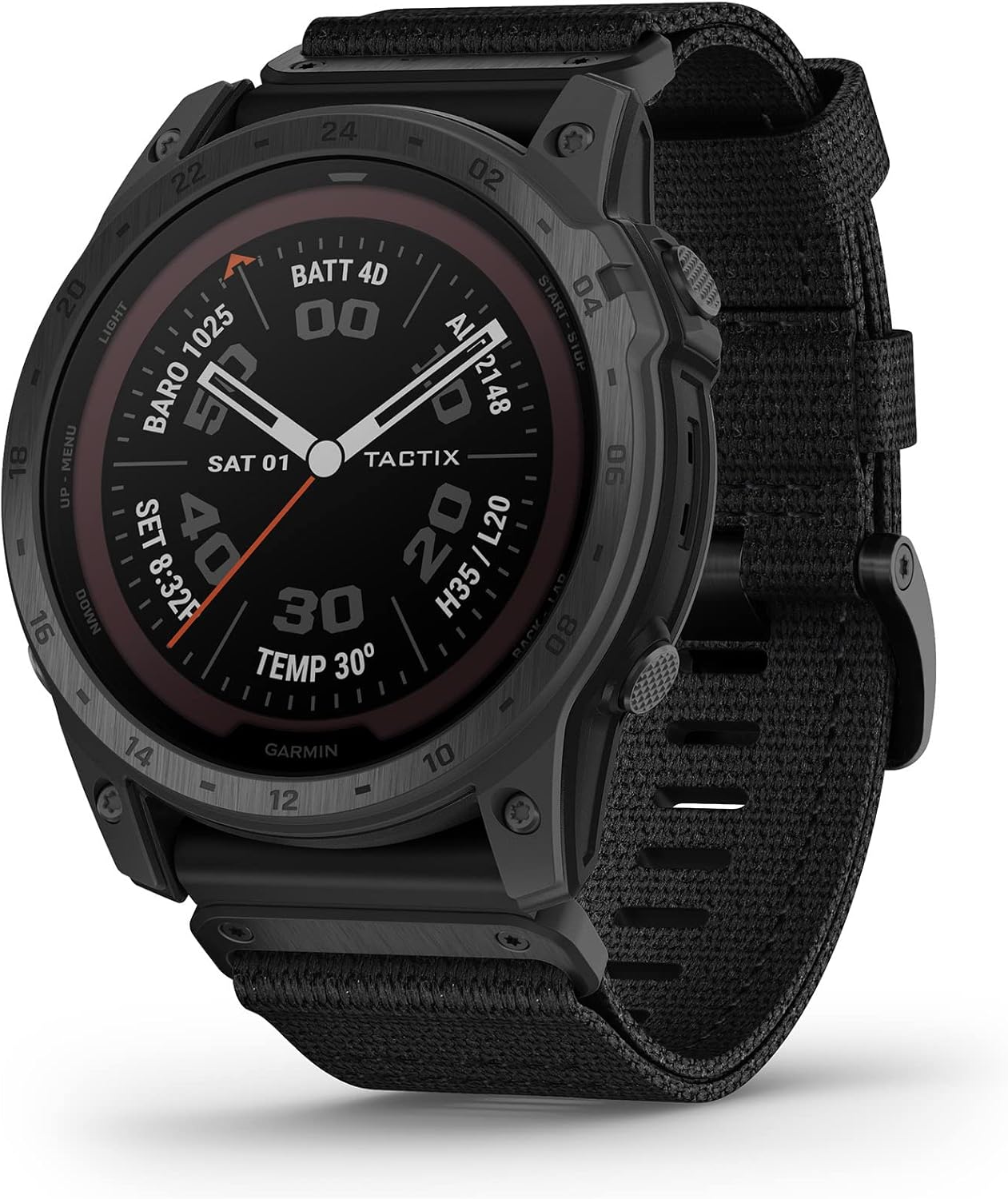
Image: Garmin tactix 7 Pro Edition GPS Watch, showcasing its robust design and digital watch face with time, date, temperature, and battery status.
What's in the Box
Upon unboxing your Garmin tactix 7 Pro Edition, please verify that all the following components are included:
- Garmin tactix 7 Series watch
- Charging/data cable
- Documentation (Quick Start Manual, Safety and Product Information)
- Black silicone band (pre-installed or included separately)
Setup Guide
1. Initial Charging
Before first use, it is recommended to fully charge your tactix 7 Pro Edition. The watch features solar charging capabilities, but for initial setup, use the provided charging/data cable.
- Connect the small end of the charging cable to the charging port on the back of your watch.
- Plug the large end of the charging cable into a USB power source (e.g., computer USB port, USB wall adapter).
- The watch display will show the current battery charge level. Allow the watch to charge completely.

Image: Watch display showing battery charge status, indicating the charging process.
2. Powering On/Off
- To Power On: Press and hold the LIGHT button (top left) until the Garmin logo appears.
- To Power Off: Press and hold the LIGHT button until the control menu appears, then select the power icon.
3. Pairing with Your Smartphone (Garmin Connect App)
To unlock the full potential of your tactix 7 Pro Edition, pair it with the Garmin Connect app on your compatible smartphone.
- Download the Garmin Connect app from your smartphone's app store.
- Enable Bluetooth on your smartphone.
- Open the Garmin Connect app and follow the on-screen instructions to create an account or sign in.
- From the app, select Garmin Devices > Add Device and follow the prompts to pair your tactix 7.
- On your watch, navigate to the settings menu and select Phone > Pair Phone to make it discoverable.
- Confirm the pairing code displayed on both your watch and smartphone.
4. Basic Controls and Navigation
The tactix 7 Pro Edition combines traditional button controls with a touchscreen for intuitive navigation.
- Buttons: Use the five physical buttons (three on the left, two on the right) to navigate menus, select options, and access specific functions. Refer to the watch's on-screen prompts for button assignments in different contexts.
- Touchscreen: Swipe up/down to scroll through widgets and menus. Tap to select items. Pinch-to-zoom and pan gestures are available on maps.
- Customization: Many watch faces, data fields, and activity profiles can be customized through the watch settings or the Garmin Connect app.

Image: Side view of the watch, highlighting the robust casing and accessible control buttons.
Operating Your Device
Tactical Features
- Dimmable LED Flashlight: The built-in multi-LED flashlight provides quick access to a bright, steady beam in either green or white light. Access it from the control menu.

Image: Watch displaying the activated green LED flashlight, useful for low-light conditions.
- Night Vision Compatibility: Easily switch between daytime and nighttime view with a screen that can be read by night vision goggles.

Image: Watch display in Night Vision mode, optimized for use with night vision devices.
- Jumpmaster Mode: Provides guidance for high-altitude jumps, including HAHO, HALO, and Static jump types.

Image: Watch displaying the Jumpmaster mode selection screen.
- Dual-Position Format: Simultaneously view your current location in both universal transverse mercator (UTM) and military grid reference system (MGRS) coordinates on the same screen.

Image: Watch displaying location in dual-position format for enhanced situational awareness.
- Stealth Mode: Disables GPS position saving and sharing, and wireless connectivity.

Image: Watch display indicating Stealth Mode is active, disabling GPS and wireless functions.
- Kill Switch: Erases all user data from the device memory. Use with extreme caution.

Image: Watch display showing the Kill Switch activation countdown, indicating data erasure is imminent.
Navigation Features
- Preloaded Maps: The watch comes with preloaded TopoActive maps for your region and SkiView maps for over 2,000 ski resorts worldwide. Additional maps can be downloaded.

Image: Watch displaying a detailed topographical map, showing current location and surrounding terrain.
- Multi-band GNSS Support: Access multiple global navigation satellite systems (GPS, GLONASS, and Galileo) to track in more challenging environments than GPS alone. This improves positional accuracy.

Image: Watch displaying a map with active multi-band GNSS tracking, indicating enhanced location accuracy.
- ABC Sensors: Navigate your next trail with ABC sensors, including an altimeter for elevation data, a barometer to monitor weather, and a 3-axis electronic compass.

Image: Watch displaying altimeter and compass readings, essential for outdoor navigation.
- Expedition Mode: An ultralow-powered GPS reference mode that extends battery life for weeks, ideal for long treks.

Image: Watch displaying Expedition Mode, showing extended battery life for prolonged outdoor use.
Training and Performance Features
- Built-in Sports Apps: Use preloaded activity profiles for trail running, swimming, running, biking, hiking, rowing, skiing, golfing, surfing, indoor climbing, and more.

Image: Individuals engaged in outdoor running, demonstrating the watch's use in sports activities.
- HIIT Workouts: This activity profile tracks your high-intensity interval training workouts, including AMRAP, EMOM, Tabata, and custom.

Image: Individual performing a high-intensity workout, showcasing the watch's tracking capabilities.
- Daily Workout Suggestions: Get daily run and ride recommendations based on your current training load and training status.

Image: Watch displaying personalized daily workout suggestions to guide training.
- Real-time Stamina: Use this data to track and manage your exertion and help avoid overexerting at the start of your run or bike.

Image: Individuals engaged in a physical challenge, illustrating the watch's real-time stamina tracking.
Everyday Functionality
- Smart Notifications: Receive alerts for incoming calls, texts, emails, and other app notifications directly on your watch when paired with your compatible smartphone.
- Garmin Pay™: Make contactless payments directly from your watch (with a supported country and payment network).
- Health and Wellness Monitoring: Includes features like heart rate tracking, Pulse Ox blood oxygen saturation, sleep monitoring, and Body Battery™ energy monitoring.
Maintenance
Proper care and maintenance will ensure the longevity and optimal performance of your Garmin tactix 7 Pro Edition.
- Cleaning the Watch: Regularly clean the watch and band with a soft, damp cloth. For stubborn dirt, use a mild soap solution and rinse thoroughly. Ensure the watch is completely dry before charging or prolonged storage.
- Cleaning the Charging Contacts: Periodically clean the metal charging contacts on the back of the watch and the charging cable with a cotton swab or soft cloth. This prevents corrosion and ensures proper charging.
- Avoid Harsh Chemicals: Do not use strong cleaning agents, solvents, or abrasive materials, as these can damage the watch's finish and internal components.
- Storage: When not in use for extended periods, store the watch in a cool, dry place away from direct sunlight and extreme temperatures.
- Water Resistance: The watch is designed for water resistance (e.g., 10 ATM). However, avoid pressing buttons underwater or exposing the watch to high-velocity water streams. Rinse with fresh water after exposure to salt water or chlorinated water.
Troubleshooting
This section addresses common issues you might encounter with your tactix 7 Pro Edition.
Watch Not Turning On or Responding
- Ensure the watch is fully charged. Connect it to the charging cable and a power source for at least 30 minutes.
- Perform a soft reset by holding the LIGHT button for 15 seconds.
GPS Signal Acquisition Issues
- Ensure you are in an open area with a clear view of the sky.
- Sync your watch with the Garmin Connect app to update satellite data (EPO file).
- Allow sufficient time for initial GPS lock, especially after moving to a new geographical area.
Bluetooth Connectivity Problems
- Ensure Bluetooth is enabled on both your watch and smartphone.
- Verify that your watch is within range of your smartphone (typically 10 meters or 33 feet).
- Restart both your watch and smartphone.
- Remove the watch from the Garmin Connect app and your phone's Bluetooth settings, then re-pair the devices.
Inaccurate Sensor Readings (Heart Rate, Altimeter, Barometer)
- Heart Rate: Ensure the watch is worn snugly on your wrist, above the wrist bone. Clean the optical sensor on the back of the watch.
- Altimeter/Barometer: Calibrate the altimeter regularly, especially before activities where elevation accuracy is critical. Ensure the sensor ports are clear of debris.
Specifications
| Feature | Detail |
|---|---|
| Model Name | tactix 7 Pro |
| Item Model Number | 010-02704-10 |
| Product Dimensions | 2.01 x 2.01 x 0.59 inches |
| Item Weight | 11.4 ounces |
| Screen Size | 1.4 Inches |
| Scanner Resolution | 280 x 280 pixels |
| Battery Type | 1 Lithium Polymer battery (included) |
| Operating System | android_wear |
| Connectivity Technologies | Bluetooth, USB |
| GPS | GPS Enabled (Multi-band GNSS support) |
| Special Features | Bluetooth, Solar Charging, Tactical Features (Flashlight, Night Vision, Jumpmaster, Stealth Mode, Kill Switch), ABC Sensors, Preloaded Maps |
| Human Interface Input | Buttons, Touchscreen |
| Water Resistance | 10 ATM (100 meters) |
Warranty and Support
Garmin products are built to the highest quality standards. For detailed warranty information, please refer to the official Garmin website or the documentation included with your product.
For comprehensive support, including detailed user manuals, software updates, and frequently asked questions, please visit the official Garmin support page or consult the full user manual PDF:
Download Full User Manual (PDF)
You can also contact Garmin customer support directly for personalized assistance with your tactix 7 Pro Edition.