
TTfone TT970
TTfone TT970 User Manual
Model: TT970 | Brand: TTfone
1. Introduction
This manual provides comprehensive instructions for the TTfone TT970 Whatsapp 4G Touchscreen Senior Big Button Flip Mobile Phone. Please read this manual carefully to ensure proper usage and to maximize the phone's features.
The TT970 is designed for ease of use, featuring a large button keypad, a responsive touchscreen, and essential communication tools like WhatsApp. Its compact flip design makes it convenient for daily use.
2. What's in the Box
- TTfone TT970 Mobile Phone
- Battery
- User Manual
- USB Cable
- Mains Charger
- Desktop Charging Cradle
- Neck-strap Lanyard
3. Initial Setup
3.1. Removing the Back Cover
To access the SIM and SD card slots, the back cover must be removed. Locate the notch at the bottom left corner of the phone and gently pry it open.

Image: Rear view of the TTfone TT970 with the back cover detached, showing the battery compartment and card slots.
3.2. Inserting SIM Card
Insert your Nano SIM card into the designated slot. Ensure the metal contacts face downwards and slide it gently until it clicks into place.

Image: Close-up of the TTfone TT970's internal compartment, highlighting the SIM card slot.
3.3. Inserting Micro SD Card (Optional)
If you wish to expand storage, insert a Micro SD card into the dedicated slot. This is optional for phone operation but recommended for storing photos, videos, and voice notes.
3.4. Attaching the Neck-Strap Lanyard
For added security and convenience, attach the included neck-strap lanyard to the designated loop on the phone's body.

Image: A person attaching the neck-strap lanyard to the TTfone TT970.
3.5. Installing the Battery and Replacing the Cover
Align the metallic connectors of the battery with those in the phone's compartment and gently press down. Once the battery is in place, reattach the back cover, ensuring it snaps securely.

Image: The TTfone TT970 with its battery inserted and the back cover being reattached.
3.6. Setup Video Guide
For a visual guide on the initial setup, please watch the official TTfone TT970 Setup video:
Video: Official setup guide for the TTfone TT970, demonstrating how to insert the SIM, SD card, battery, and attach the lanyard.
4. Operating Your TTfone TT970
4.1. Powering On/Off
To power on the phone, press and hold the red 'End Call' button until the screen lights up. To power off, press and hold the same button and follow the on-screen prompts.
4.2. Navigation and Interface
The TT970 features both a responsive touchscreen and a traditional keypad for navigation. Use the directional keys and central 'OK' button on the keypad, or simply tap icons on the touchscreen to access menus and applications.

Image: The TTfone TT970 in its open position, displaying the main screen with app icons and the physical keypad.
4.3. Making and Receiving Calls
Dial numbers using the keypad or select a contact from your phonebook. Press the green 'Call' button to initiate a call. To answer an incoming call, press the green 'Call' button or swipe on the touchscreen. To end a call, press the red 'End Call' button.
4.4. WhatsApp Functionality
The TT970 has built-in WhatsApp, allowing for fast, simple, and secure messaging and calling. Connect to Wi-Fi or use 4G mobile data to message friends and family, share photos and videos, and make video calls.
Video: Overview of the TTfone TT970's features, including its WhatsApp capabilities.
4.5. Photo Contacts
Utilize the Photo Contacts feature to save numbers with an associated photo of the person. This makes calling loved ones super simple, as their picture will appear on both the inner and outer screens when they call or when you select them to call.
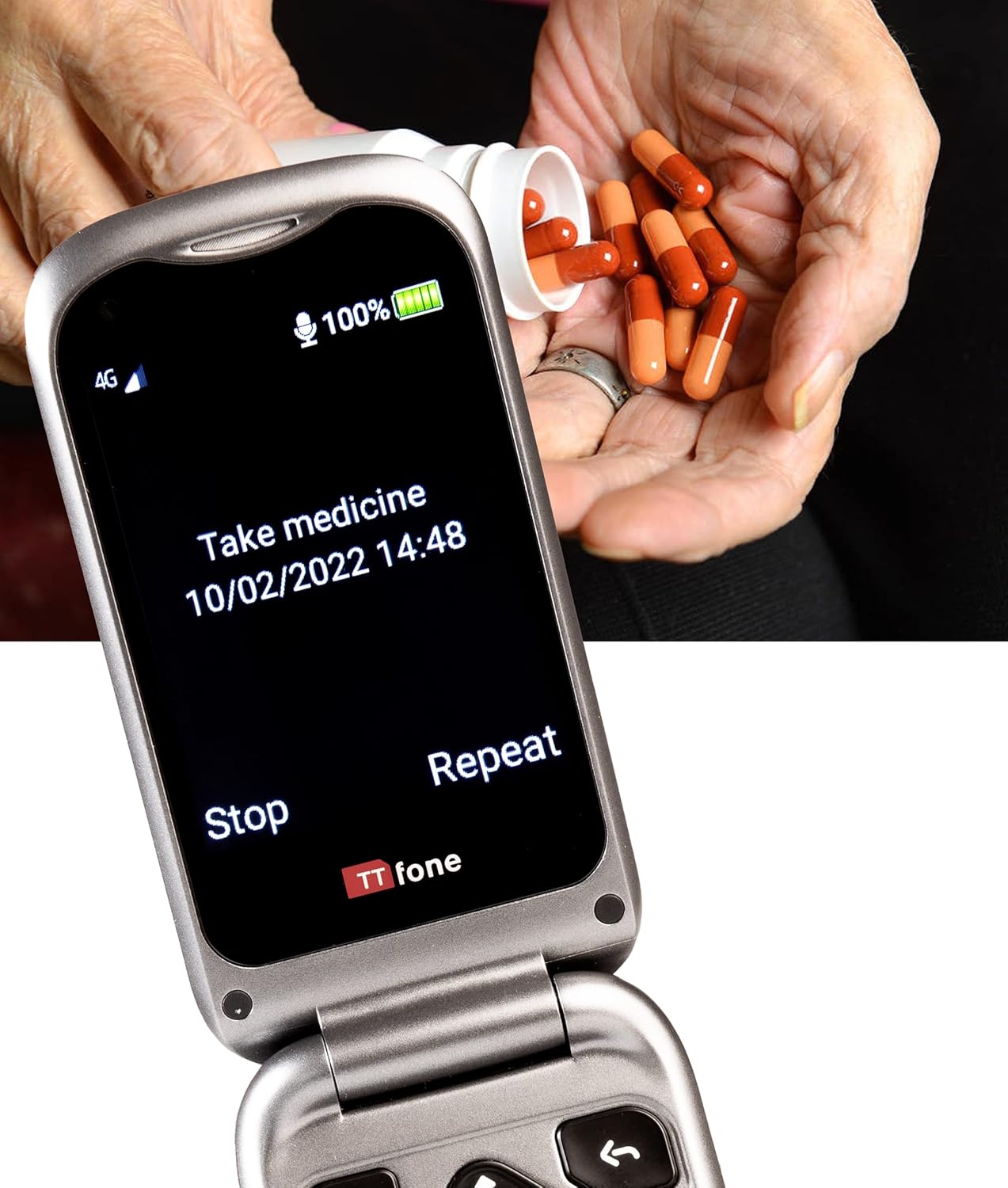
Image: The TTfone TT970 displaying the Photo Contacts feature with multiple contact images.
4.6. Voice Note Reminders
The TT970 includes a voice notes application where you can record voice files to serve as reminders for important tasks, such as taking medication or attending appointments. The phone will play the recorded reminder at the scheduled time.

Image: The TTfone TT970 screen showing a "Take medicine" voice note reminder.
5. Key Features
- 4G Connectivity: Enables faster WhatsApp calling, email, and social media access. Compatible with major UK networks (Vodafone, Three, O2, EE, Virgin, Giff Gaff, Asda Mobile, BT Mobile, PlusNet Mobile, Sky Mobile, Tesco Mobile, VOXI, ID Mobile, Smarty).
- 8MP Camera: An 8-megapixel rear camera for taking and sharing photos, plus a VGA front camera for selfies and video calls.
- Hearing Aid Compatibility (HAC): Automatically connects to your hearing aid (M4/T4 rating of ANSI C63.19 test method).
- Loud Volume: Features an amplified +25dB volume for clear audio.
- Desktop Charging System: Comes with a convenient charging cradle for easy and reliable charging.
- SOS Emergency Button: A dedicated button on the back that, when pressed, makes an important call and sends the user's GPS location via text message to pre-set contacts.

Image: The TTfone TT970 resting in its desktop charging cradle, showing the external screen.

Image: A hand holding the TTfone TT970, capturing a photo with its 8MP camera.
6. Maintenance and Care
- Keep the phone dry. Liquids can corrode electronic circuits.
- Do not use or store the phone in dusty, dirty areas.
- Do not store the phone in hot or cold temperatures.
- Do not attempt to open the phone.
- Handle the phone with care. Do not drop, knock, or shake it.
- Clean the phone with a soft, damp cloth. Do not use harsh chemicals, cleaning solvents, or strong detergents.
- Use only the supplied or approved replacement battery and charger.
7. Troubleshooting
7.1. Phone Not Turning On
Ensure the battery is correctly inserted and fully charged. Connect the phone to the charging cradle or USB cable and allow it to charge for at least 30 minutes before attempting to power on again.
7.2. No Network Signal
Check that your SIM card is correctly inserted. Ensure you are in an area with network coverage. If issues persist, try restarting the phone or contacting your network provider.
7.3. Poor Call Quality
Verify that the volume is adjusted to a comfortable level. If using a hearing aid, ensure HAC is active. Move to an area with better network signal if call quality is consistently poor.
7.4. Battery Drains Quickly
Battery life can vary based on usage. Reduce screen brightness, close unused applications, and limit background data usage. Ensure the phone is fully charged using the provided charger and desktop cradle.
8. Specifications
| Feature | Detail |
|---|---|
| Model Name | TT970 |
| Brand | TTfone |
| Operating System | Android (Simplified) |
| Screen Size | 2.8 Inches (main) / 3 inches (visible diagonal) |
| Resolution | 240 x 320 pixels |
| Memory Storage Capacity | 8 GB |
| RAM Memory Installed Size | 1 GB |
| CPU Model | A-Series |
| CPU Speed | 1 Hz |
| Wireless Carrier | Unlocked for All Carriers |
| Product Dimensions | 10.9 x 5.7 x 2.1 cm; 133 g |
| Battery | 1 Lithium Ion battery (included) |
| Country of Origin | China |
9. Warranty and Support
The TTfone TT970 comes with a standard return policy allowing for refund/replacement within 30 days. For specific warranty details, please refer to the documentation included with your purchase or contact TTfone customer support.
For additional support, FAQs, and setup videos, please visit the official TTfone website: www.ttfone.com
Related documentsTT970


Ask a question about this manual
Ask about setup, troubleshooting, compatibility, parts, safety, or missing instructions. Manuals+ will review the question and use this page’s manual context to help answer it.