1. Introduction
Thank you for choosing the Samsung Smart AI Wash Washer Dryer, model WD18T. This appliance combines advanced washing and drying technologies to provide efficient and convenient laundry care. Please read this manual carefully before using the appliance to ensure safe and optimal operation. Keep this manual for future reference.
2. Safety Information
Important Safety Instructions:
- Always follow basic precautions, including the following:
- Do not install or store this appliance where it will be exposed to the weather or freezing temperatures.
- Do not repair or replace any part of the appliance or attempt any servicing unless specifically recommended in this manual or in published user-repair instructions that you understand and have the skills to carry out.
- Keep flammable materials and vapors away from the appliance.
- Ensure the appliance is properly grounded.
- Unplug the appliance before cleaning or performing any maintenance.
- Do not allow children to play on or in the appliance. Close supervision is necessary when the appliance is used near children.
3. Product Overview
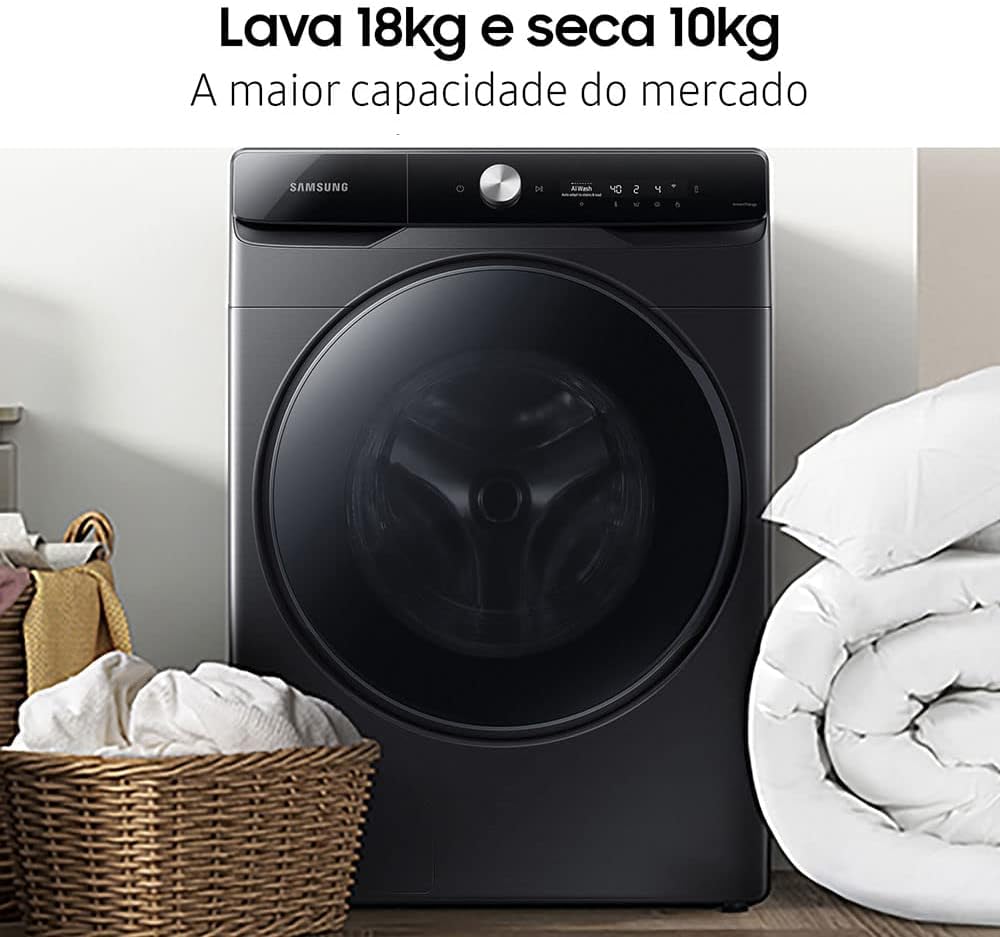
The Samsung Smart AI Wash Washer Dryer WD18T is designed for high capacity and energy efficiency, featuring a Digital Inverter motor for quiet operation and durability.


4. Setup
Proper installation is crucial for the performance and longevity of your washer dryer. It is recommended to have a qualified technician perform the installation.
4.1 Unpacking
- Remove all packaging materials, including the shipping bolts from the rear of the appliance. Keep the packaging for future transport if needed.
4.2 Location
- Place the appliance on a firm, level floor. Ensure there is adequate space around the unit for ventilation and maintenance.
4.3 Leveling
- Adjust the leveling feet to ensure the appliance is perfectly level. An unlevel machine can cause excessive vibration and noise during operation.
4.4 Water Supply Connection
- Connect the cold water inlet hose to the cold water tap. If your model supports hot water, connect the hot water inlet hose to the hot water tap. Ensure connections are tight to prevent leaks.
4.5 Drain Hose Installation
- Securely attach the drain hose to a standpipe or laundry tub. The drain hose must be positioned between 60 cm and 90 cm (24 to 35 inches) from the floor. Ensure the hose is not kinked or obstructed. Incorrect drain hose installation can lead to improper drying performance.
4.6 Power Connection
- Plug the power cord into a grounded 127V electrical outlet. Do not use extension cords.
5. Operating Instructions
This section guides you through the daily use of your Samsung Smart AI Wash Washer Dryer.
5.1 Loading Laundry
- Open the door and load clothes loosely into the drum. Do not overload the machine; ensure there is enough space for clothes to tumble freely. For optimal drying, do not exceed the 10kg dry capacity.
5.2 Adding Detergent and Softener
- The appliance features an automatic detergent and softener dispenser. Fill the respective compartments with liquid detergent and fabric softener. The machine will dispense the appropriate amount based on the selected cycle and load size.
- For manual dispensing or specific additives, refer to the markings on the dispenser tray.
5.3 Selecting a Wash Cycle
Turn the cycle selector knob to choose from various programs:
- Cotton: For general cotton items.
- Cotton+: Enhanced cotton wash.
- TurboWash 59: Quick wash for lightly soiled items.
- Mix: For mixed fabric loads.
- Synthetics: For synthetic fabrics.
- Anti-Allergic: For items requiring thorough allergen removal.
- Baby Care: Gentle wash for baby clothes.
- Delicates: For delicate items.
- Hand Wash/Wool: For hand-washable or wool items.
- Quick 14: Very fast wash for small, lightly soiled loads.
- Wash+Dry (8kg): Combined wash and dry cycle for up to 8kg.
- Dry: Drying only cycle.
5.4 Starting the Cycle
- After selecting the desired cycle and adding detergent, press the Start/Pause button to begin the cycle.
- The AI Wash feature automatically detects fabric type and soil level to optimize washing performance.
5.5 SmartThings Connectivity
- Connect your washer dryer to the Samsung SmartThings app for remote control, cycle recommendations, and status notifications.
6. Maintenance
Regular maintenance ensures your appliance operates efficiently and extends its lifespan.
6.1 Cleaning the Drum
- Use the 'Drum Clean' or 'Limpeza do Cesto' cycle regularly to remove detergent residue and bacteria from the drum.
6.2 Cleaning the Detergent Dispenser
- Pull out the detergent dispenser drawer and rinse it under running water to remove any buildup. Clean the housing with a brush if necessary.
6.3 Cleaning the Debris Filter
- Locate the debris filter at the bottom front of the appliance. Open the cover, drain any residual water, and then unscrew the filter. Clean it thoroughly and reinsert.
6.4 Exterior Cleaning
- Wipe the exterior surfaces with a soft, damp cloth. Do not use abrasive cleaners or solvents.
7. Troubleshooting
If you encounter issues with your appliance, refer to the following common problems and solutions before contacting service.
7.1 Appliance Does Not Start
- Ensure the power cord is securely plugged into a live outlet.
- Check if the door is fully closed.
- Verify that the Start/Pause button has been pressed.
7.2 Clothes Not Drying Properly
- Drain Hose: Ensure the drain hose is installed correctly, not kinked, and positioned at the recommended height (60-90 cm from the floor). Incorrect installation can severely impact drying performance.
- Overloading: Do not overload the machine beyond the 10kg drying capacity.
- Cycle Selection: Ensure the appropriate drying cycle is selected for the fabric type and load size.
- Filter: Clean the debris filter as described in the maintenance section.
7.3 Detergent Not Dispensing / Residue in Dispenser
- Clean the detergent dispenser drawer thoroughly to remove any clogs or residue.
- Ensure you are using the correct type and amount of detergent for your machine.
7.4 Excessive Noise or Vibration
- Check if the appliance is perfectly level. Adjust the leveling feet if necessary.
- Ensure all shipping bolts have been removed from the back of the machine.
- Verify that the load is balanced inside the drum.
8. Specifications
| Feature | Specification |
|---|---|
| Brand | Samsung |
| Model | WD18T |
| Voltage | 127 Volts |
| Control Type | Touch |
| Maximum Spin Speed | 1400 RPM |
| Loading Type | Front Load |
| Number of Drying Cycles | 1 (Multiple drying options available within cycles) |
| Number of Washing Cycles | 1 (Multiple washing programs available) |
| Drum Material | Stainless Steel |
| Operation Mode | Automatic |
| Special Features | Compact, Smart AI Wash |
| Package Dimensions | 112.6 x 86.6 x 74.6 cm |
| Weight | 101 kg |
| Washing Capacity | 18 Kilograms |
| Color | Black |
| Energy Consumption | 0.41 kWh/cycle |
| Water Consumption | 216 L/cycle |
9. Warranty and Support
Warranty Information:
Your Samsung Smart AI Wash Washer Dryer WD18T comes with a manufacturer's warranty. Please refer to the warranty card included with your purchase for specific terms and conditions, including the 10-year warranty on the Digital Inverter motor.
Customer Support:
For technical assistance, service requests, or to purchase genuine Samsung parts and accessories, please contact Samsung Customer Service. You can find contact information on the official Samsung website or in your warranty documentation.
When contacting support, please have your model number (WD18T) and serial number ready.