
ZEBRONICS ZEB-BRO
User Manual
Zeb-Bro In-Ear Wired Earphones with Mic
Model: ZEB-BRO | Brand: ZEBRONICS
Introduction
Thank you for choosing the ZEBRONICS Zeb-Bro In-Ear Wired Earphones. This manual provides essential information for the proper use, setup, and maintenance of your new earphones. Please read it carefully before use and retain it for future reference.
The Zeb-Bro earphones are designed for daily use, offering deep bass, a comfortable snug fit, and a convenient call function with an integrated microphone. They connect via a standard 3.5mm audio jack, making them compatible with a wide range of phones and tablets.
Safety Information
- Avoid prolonged listening at high volume levels to prevent hearing damage.
- Do not use the earphones in situations where the inability to hear ambient sounds could be dangerous (e.g., while driving, cycling, or walking in traffic).
- Keep the earphones away from water and moisture. While water resistant, they are not waterproof and should not be submerged.
- Do not attempt to disassemble or modify the earphones. This will void the warranty and may cause damage.
- Keep out of reach of children.
Package Contents
Please check the box for the following items:
- Zeb-Bro In-Ear Wired Earphone - 1 unit
Product Overview

The Zeb-Bro earphones feature a standard 3.5mm audio jack for universal compatibility, along with an inline remote and microphone for convenient control.
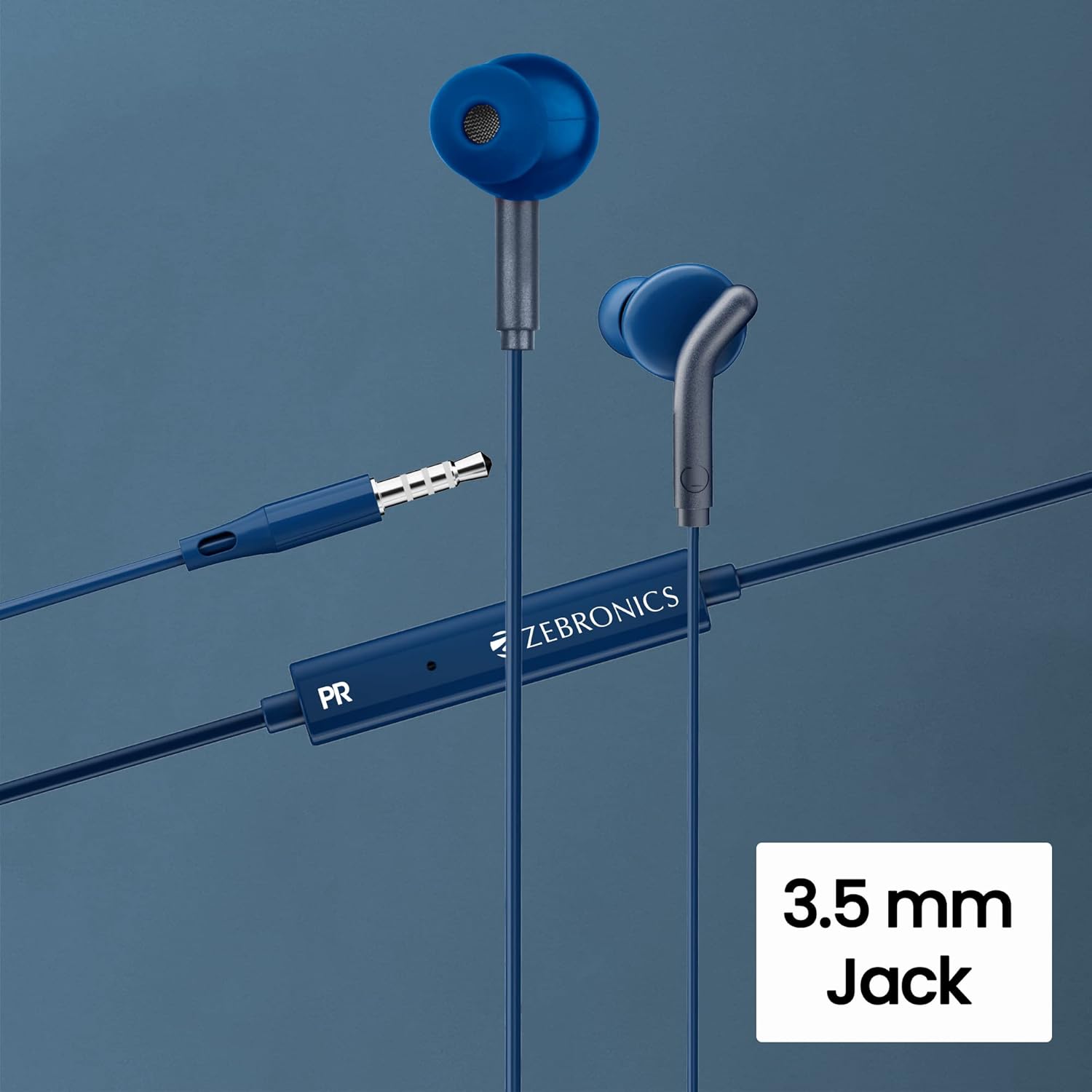
A closer look at the 3.5mm audio jack and the inline control module, which houses the microphone and media control buttons.

Each earbud is equipped with a 10mm audio driver, engineered to deliver clear sound and robust bass.

The ergonomic design ensures a snug fit within the ear, contributing to passive noise cancellation and enhancing the deep bass experience.

The inline remote includes a built-in microphone, enabling hands-free calling and voice commands.
Setup
- Identify the Audio Jack: Locate the 3.5mm audio jack on your smartphone, tablet, laptop, or any compatible audio device.
- Connect the Earphones: Insert the 3.5mm plug of the Zeb-Bro earphones firmly into the audio jack of your device.
- Device Sync: The earphones should be recognized by your device automatically within a few seconds. No additional drivers or software are typically required.
- Adjust Volume: Adjust the volume on your connected device to a comfortable listening level before placing the earphones in your ears.
Operating Instructions
The Zeb-Bro earphones feature an inline remote for easy control of music playback and calls.
Music Playback Control:
- Play/Pause: Press the multi-function button once.
- Next Track: Press the multi-function button twice quickly.
- Previous Track: Press the multi-function button three times quickly.
Call Function Control:
- Answer/End Call: Press the multi-function button once during an incoming call or an active call.
- Reject Call: Press and hold the multi-function button for approximately 2 seconds during an incoming call.
- Activate Voice Assistant: Press and hold the multi-function button for approximately 2 seconds when not on a call (functionality depends on your device).
Note: Volume control is typically managed directly from your connected device.
Maintenance
- Cleaning: Gently wipe the earphones and cable with a soft, dry, lint-free cloth. Do not use harsh chemicals or abrasive materials.
- Ear Tips: If removable, clean the ear tips with a damp cloth and allow them to dry completely before reattaching.
- Storage: Store the earphones in a clean, dry place when not in use. Avoid tangling the cable to prevent damage.
- Water Resistance: The earphones are water resistant, meaning they can withstand splashes or light rain. Do not submerge them in water or expose them to heavy downpours. Dry them thoroughly if they get wet.
Troubleshooting
| Problem | Possible Cause | Solution |
|---|---|---|
| No sound or low volume |
|
|
| Microphone not working |
|
|
| Sound distortion or crackling |
|
|
Specifications
| Model Name | ZEB-BRO |
| Connectivity Technology | Wired |
| Headphones Jack | 3.5 mm Jack |
| Ear Placement | In Ear |
| Form Factor | In Ear |
| Audio Driver Size | 10 Millimeters |
| Impedance | 16 Ohm |
| Frequency Range | 20Hz-20kHz |
| Cable Length | 1.2 Meters |
| Control Type | Media Control, Remote |
| Microphone | Built-in |
| Noise Control | Sound Isolation (Passive Noise Cancellation) |
| Water Resistance Level | Water Resistant |
| Material | Plastic |
| Color | Blue |
| Item Weight | 14 Grams (0.494 ounces) |
| Compatible Devices | Phones, Tablets |
| Recommended Uses | Music, Calling |
| Included Components | Earphone - 1 unit |
| Manufacturer | Zebronics |
| Country of Origin | China |
Warranty and Support
ZEBRONICS products are designed for reliability and performance. For warranty information and customer support, please refer to the warranty card included with your purchase or visit the official ZEBRONICS website.
For technical assistance or service inquiries, please contact ZEBRONICS customer support through their official channels. Ensure you have your product model number (ZEB-BRO) and proof of purchase ready when contacting support.
Please note that warranty terms and conditions may vary by region.
Related documentsZEB-BRO


Ask a question about this manual
Ask about setup, troubleshooting, compatibility, parts, safety, or missing instructions. Manuals+ will review the question and use this page’s manual context to help answer it.