
1. Product Overview
The eufy HomeVac S11 Reach is a lightweight, cordless stick-vacuum cleaner designed for efficient cleaning across various surfaces, from deep carpets to hard floors. It features 120AW suction power, a detachable battery for convenient charging, and versatile modes to tackle different cleaning tasks.
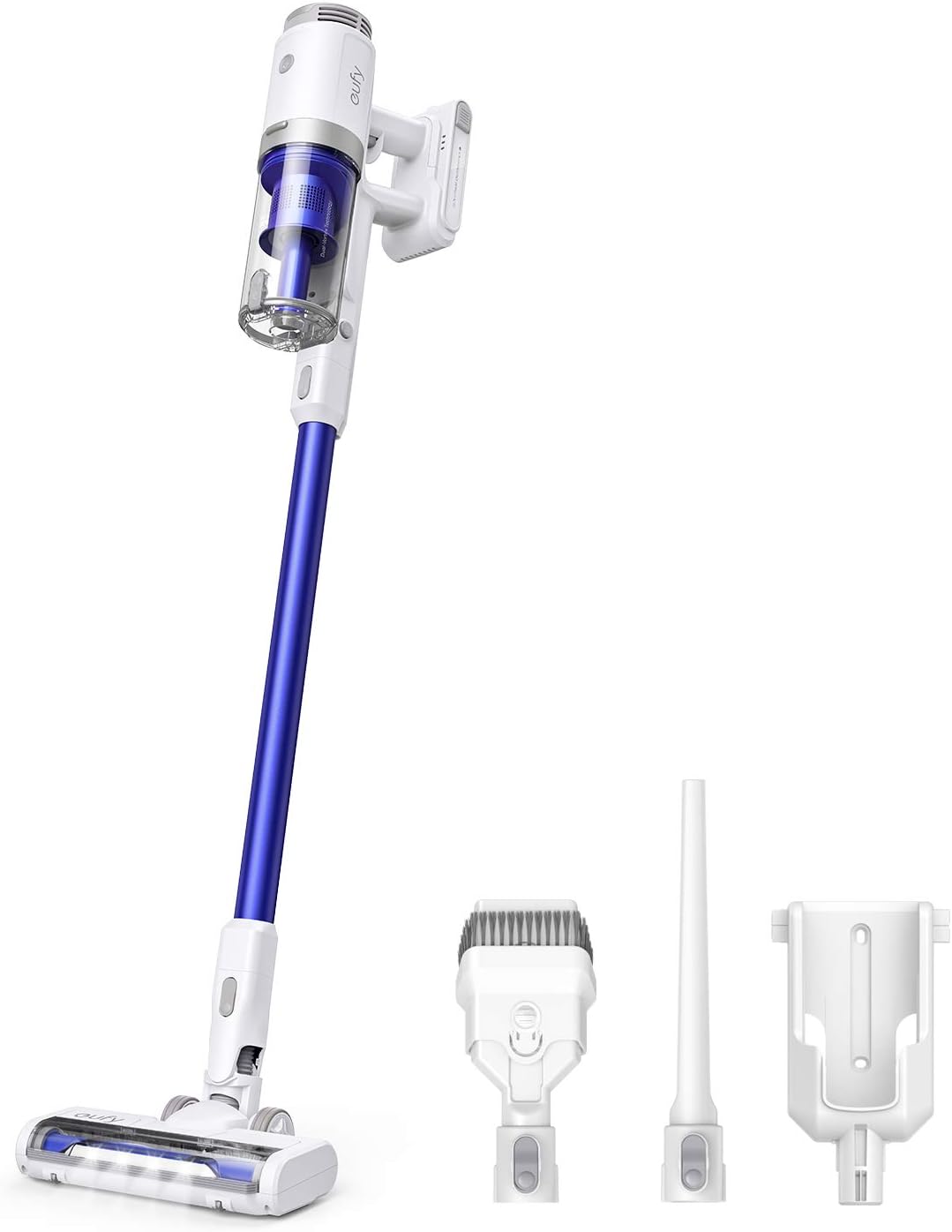
Figure 1: eufy HomeVac S11 Reach and included accessories.
Key Features:
- Effortless Handling: The cordless, lightweight design allows for easy maneuverability around furniture and into corners.
- Powerful Suction: Delivers 120AW suction power in max-mode for intense cleaning of deep dust and debris.
- Versatile Modes: Offers up to 25 minutes of cleaning in mid-mode for everyday messes and an ultra-long 40-minute run-time in low-mode for whole-home cleaning.
- Specialized Tools: Includes attachments suitable for various cleaning scenarios, such as tight spaces and delicate surfaces.
- Detachable Battery: Allows for convenient charging and extended cleaning sessions by swapping batteries.
- LED Lights: Integrated LED lights on the brush-head illuminate dark areas to ensure no speck is missed.
2. Setup and Assembly
Before first use, ensure all components are present and the battery is fully charged.
- Unpack Components: Carefully remove all items from the packaging.
- Attach Extension Wand: Connect the extension wand to the main vacuum body until it clicks securely into place.
- Attach Floor Brush: Connect the desired floor brush (e.g., motorized brush head) to the end of the extension wand, ensuring it clicks into place.
- Install Battery: Insert the detachable battery into the battery slot on the main vacuum body until it locks.
- Initial Charging: Fully charge the battery before the first use. Connect the AC charger to the battery or the vacuum body. The charging indicator will show progress.

Figure 2: The eufy HomeVac S11 Reach features a detachable battery for flexible charging and extended use.
3. Operating Instructions
The HomeVac S11 Reach offers multiple suction modes to suit your cleaning needs.
- Power On/Off: Press the power button located on the handle to turn the vacuum on or off.
- Select Suction Mode: Use the mode selection button to cycle through the available suction modes:
- Low Mode: Ideal for light cleaning and maximizing runtime (up to 40 minutes).
- Mid Mode: Suitable for everyday messes and general cleaning (up to 25 minutes).
- Max Mode: Provides maximum suction power (120AW) for tough dirt and deep cleaning (up to 8 minutes).
- Cleaning Surfaces: The vacuum is designed for both carpet and hard floor cleaning. The motorized brush head is effective on both.
- Illuminating Dark Areas: The integrated LED lights on the brush head automatically illuminate dark areas under furniture or in corners, ensuring thorough cleaning.

Figure 3: The HomeVac S11 Reach effectively cleans various types of debris on hard floors.

Figure 4: LED lights on the brush head help to reveal hidden dust and debris.

Figure 5: The lightweight design allows for easy cleaning of elevated surfaces and hard-to-reach areas.
4. Maintenance
Regular maintenance is crucial for maintaining the optimal suction performance of your eufy HomeVac S11 Reach.
4.1. Cleaning Accessories
The filters and rolling brush need to be cleaned periodically to maintain optimal suction performance.
- Remove Filters: Detach the dust collector from the main unit. Remove the high-performance filter and pre-filter from the dust collector.
- Remove Rolling Brush: Press the release button on the floor brush and remove the rolling brush.
- Rinse Components: Rinse the high-performance filter, pre-filter, and rolling brush under running water for 3 minutes.
- Air Dry: Let the filters and rolling brush dry naturally in open air for at least 24 hours before reinstallation. Ensure they are completely dry to prevent damage.
- Reinstall Components: Reinstall the high-performance filter, pre-filter, and rolling brush in reverse order of removal.

Figure 6: Rinse the filter under running water until clean.
Video 1: Watch this video for a detailed guide on how to maintain peak suction performance by cleaning your HomeVac S11 accessories.
Accessory Replacement: The accessories need to be replaced every 6 months or when the parts have been used more than 50 times. Replacement parts are available on eufy's official store or Amazon.
4.2. Check for Blockages in the Cyclone
Regularly check and clean the dustbin and cyclone tube to prevent blockages.
- Remove Dust Collector: Press the dust collector release button and remove it from the main unit.
- Empty Dustbin: Empty the dustbin and remove all dust and debris.
- Disassemble Cyclone Tube: Rotate the cyclone tube clockwise, aligning the triangle with the hollow circle, and then pull out the blue cyclone tube.
- Clean Components: Remove all dust and debris from the dust collector and cyclone tube. Rinse the dustbin and cyclone tube under running water.
- Air Dry: Allow all components to dry completely before reassembly.
- Reassemble: Install the dustbin back into the vacuum once it is dry. Rotate the cyclone tube counter-clockwise, aligning the triangle with the solid circle, until you hear a 'click' sound. Tightly clamp the dust collector to the clamp, and then press the dust collector down until you hear a 'click' sound.

Figure 7: Empty the dustbin regularly to maintain suction.
4.3. Confirm Connectors are Not Clogged
Periodically check the metal tube, floor brush, main connectors, and dust inlet for blockages. Clean them if needed.

Figure 8: Inspect and clean all connection points for any debris that might impede airflow.
5. Troubleshooting
If you encounter issues with your eufy HomeVac S11 Reach, refer to the following common problems and solutions:
- No Suction or Weak Suction:
- Check if the dustbin is full and empty it.
- Ensure filters (high-performance and pre-filter) are clean and properly installed. Refer to Section 4.1.
- Check for blockages in the cyclone tube, extension wand, floor brush, or main connectors. Refer to Section 4.2 and 4.3.
- Ensure the rolling brush is free of tangled hair or debris.
- Vacuum Not Turning On:
- Check if the battery is properly installed and charged.
- Ensure the power button is pressed firmly.
- Short Battery Life:
- Ensure the battery is fully charged before use.
- Operating in Max Mode will significantly reduce battery life. Use lower modes for longer runtime.
- Battery may need replacement if it no longer holds a charge effectively after prolonged use.
- Unusual Noises:
- Check for any foreign objects caught in the brush roll or air pathways.
- Ensure all parts are securely assembled.
For persistent issues not resolved by these steps, please contact eufy customer support.
6. Specifications
| Attribute | Value |
|---|---|
| Brand | eufy |
| Model Number | T2501Z23 |
| Special Feature | Lightweight |
| Filter Type | Foam/Cloth |
| Included Components | Brush |
| Is Cordless? | Yes |
| Wattage | 120 watts |
| Runtime | 25 minutes (Mid Mode) |
| Recommended Uses | Carpet, Hard Floor, Home |
| Form Factor | Stick |
| Color | White |
| Controller Type | Push Button |
| Control Method | Touch |
| Portable | Yes |
| Number of Power Levels | 3 |
| Indoor/Outdoor Usage | Indoor |
| UPC | 194644018849 |
| Product Dimensions | 49.21 x 9.45 x 4.17 inches |
| Item Weight | 6.61 pounds |
7. Warranty and Support
eufy provides a warranty for the HomeVac S11 Reach against defects in materials and workmanship under normal use. For specific warranty terms and conditions, please refer to the warranty card included with your product or visit the official eufy website.
For technical support, troubleshooting assistance, or to inquire about replacement parts, please contact eufy customer service through their official website or the contact information provided in your product packaging.