
1. Product Overview
The De'Longhi ECAM 290.61.SB is a fully automatic espresso machine designed to deliver a variety of coffee beverages with ease. It features an integrated grinding system, a milk frothing system, and intuitive controls for a personalized coffee experience. This manual provides essential information for the proper setup, operation, and maintenance of your machine.

Figure 1: Front view of the De'Longhi ECAM 290.61.SB espresso machine, showcasing its sleek design and integrated milk carafe.
2. Setup
2.1 Unpacking and Initial Placement
- Carefully remove the machine from its packaging.
- Place the machine on a stable, level surface, away from water splashes and heat sources.
- Ensure adequate space around the machine for ventilation and access to components.
2.2 Filling the Water Tank
- Remove the water tank from the back of the machine.
- Fill the tank with fresh, cold tap water up to the MAX level indicator.
- Replace the water tank securely into the machine.
2.3 Filling the Bean Hopper
- Open the lid of the bean hopper located on top of the machine.
- Pour fresh coffee beans into the hopper. Do not use ground coffee in the bean hopper.
- Close the lid firmly to maintain bean freshness.
2.4 First Use and Priming
- Plug the machine into a suitable power outlet.
- Follow the on-screen prompts or indicator lights for the initial priming cycle. This process flushes the internal circuits and prepares the machine for use.
- Place a container under the coffee spouts during the priming process.
3. Operating Instructions
3.1 Control Panel Overview
The control panel features various touch buttons for selecting your desired beverage and accessing settings.

Figure 2: Close-up view of the intuitive touch control panel, showing options for various coffee types and settings.
3.2 Making Coffee and Espresso
- Ensure the water tank is filled and the bean hopper contains coffee beans.
- Place one or two cups under the coffee spouts.
- Select your desired beverage (e.g., Espresso, Coffee) from the control panel. The machine will automatically grind the beans and brew the coffee.
- For two cups, press the corresponding "x2" button if available, or select the double shot option.
3.3 Milk Frothing and Latte/Cappuccino Preparation
The integrated LatteGo system allows for easy preparation of milk-based beverages.
- Fill the milk carafe with fresh milk up to the desired level.
- Attach the milk carafe to the machine.
- Place a cup under the milk spout and coffee spouts.
- Select your desired milk-based beverage (e.g., Cappuccino, Latte Macchiato, My Latte). The machine will automatically froth the milk and dispense it, followed by the coffee.
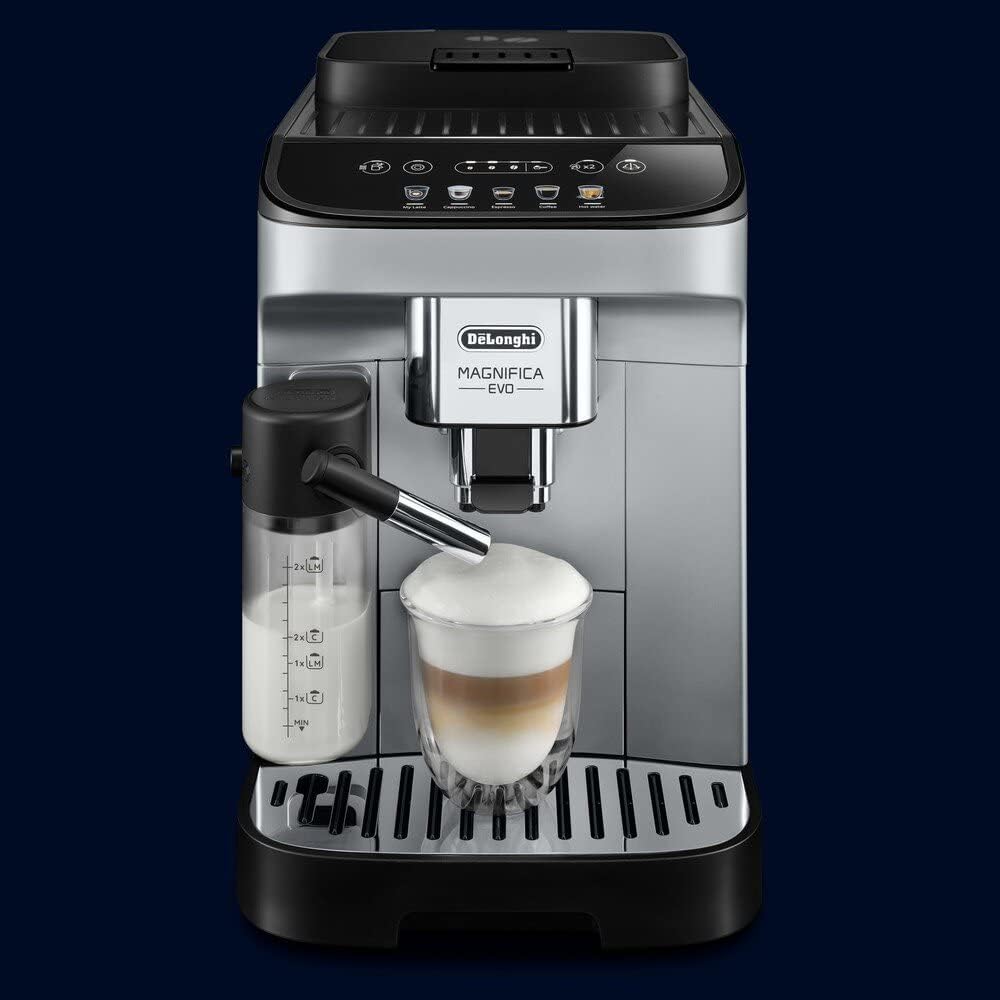
Figure 3: The De'Longhi ECAM 290.61.SB dispensing a layered latte into a glass, demonstrating the milk frothing capability.
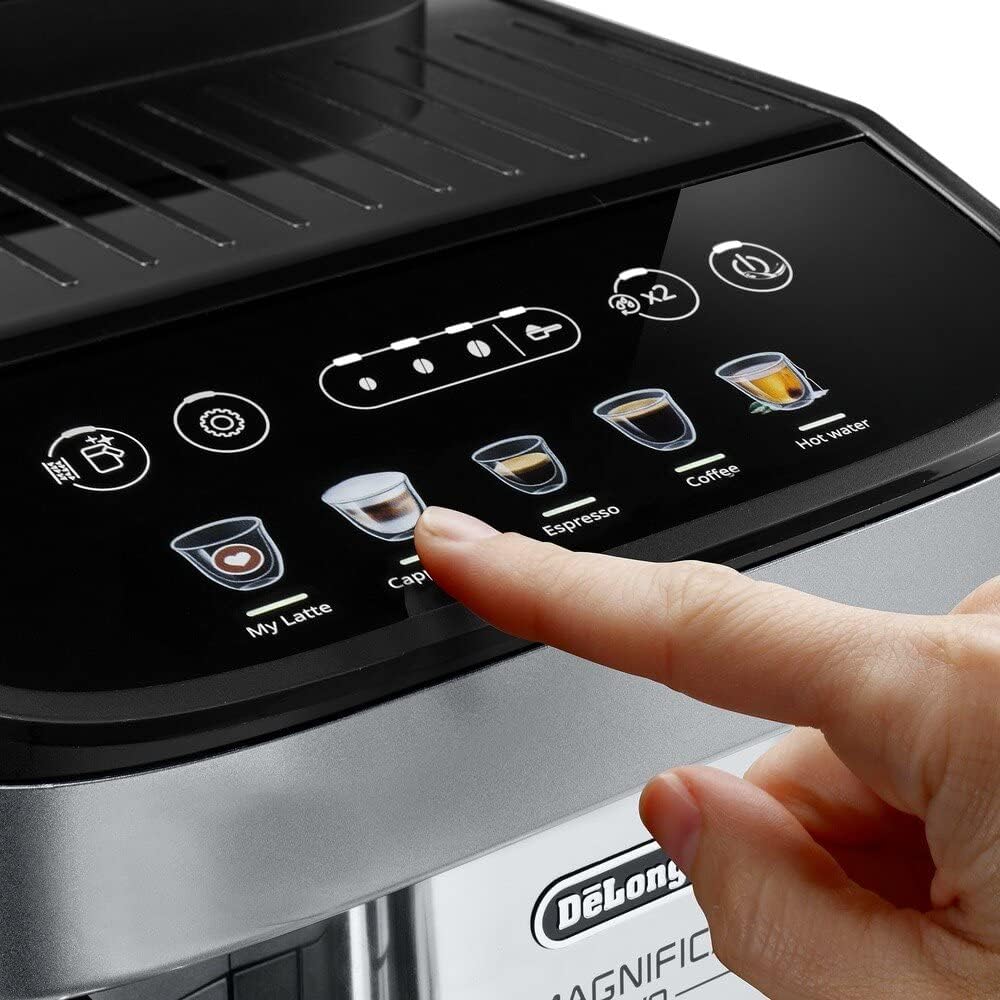
Figure 4: A side view of the machine actively brewing coffee and frothing milk simultaneously for a perfect layered beverage.
3.4 Hot Water Function
- Place a cup under the hot water spout.
- Select the "Hot Water" option on the control panel.
- The machine will dispense hot water for tea or other hot beverages.

Figure 5: A selection of beverages, including espresso, latte, and tea, demonstrating the versatility of the De'Longhi ECAM 290.61.SB.
4. Maintenance
Regular maintenance ensures the longevity and optimal performance of your espresso machine.
4.1 Cleaning the Brewing Unit
- Turn off and unplug the machine.
- Remove the brewing unit by following the instructions in the full manual (usually involves opening a side door and pressing release buttons).
- Rinse the brewing unit under running tap water. Do not use detergents.
- Allow it to air dry before reinserting.
4.2 Descaling
- The machine will indicate when descaling is required.
- Use a De'Longhi descaling solution and follow the instructions provided with the descaler and on the machine's display.
- This process removes mineral buildup and is crucial for machine health.
4.3 Cleaning the Milk System (LatteGo)
- After each milk preparation, detach the LatteGo system.
- Rinse all components under running water.
- For thorough cleaning, the components are typically dishwasher safe. Refer to the full manual for specific instructions.
4.4 Emptying Drip Tray and Grounds Container
- Empty and clean the drip tray and coffee grounds container daily or when indicated by the machine.
- Rinse with warm water and dry thoroughly.
5. Troubleshooting
This section addresses common issues you might encounter with your De'Longhi ECAM 290.61.SB.
| Problem | Possible Cause | Solution |
|---|---|---|
| No coffee dispensed | Water tank empty; brewing unit clogged; machine needs descaling. | Fill water tank; clean brewing unit; perform descaling cycle. |
| Coffee is too weak/watery | Insufficient coffee grounds; grind setting too coarse; old coffee beans. | Adjust coffee strength setting; set grind to finer; use fresh beans. |
| Milk not frothing properly | Milk carafe not clean; milk type unsuitable; milk too warm. | Clean milk carafe thoroughly; use cold, fresh milk (dairy or suitable plant-based); ensure milk is cold. |
| Machine leaking water | Water tank not seated correctly; drip tray full; internal component issue. | Ensure water tank is firmly in place; empty drip tray; contact customer support if issue persists. |
For more detailed troubleshooting or issues not listed here, please refer to the complete user manual or contact De'Longhi customer support.
6. Specifications
| Feature | Detail |
|---|---|
| Brand | De'Longhi |
| Model Number | ECAM290.61.SB |
| Coffee Maker Type | Espresso Machine |
| Operation Mode | Fully Automatic |
| Special Feature | Programmable |
| Filter Type | Reusable |
| Product Dimensions | 0.39 x 0.39 x 0.39 inches |
| Item Weight | 2.2 pounds |
| Manufacturer | Delonghi |
| Date First Available | December 9, 2023 |
7. Warranty and Support
For detailed warranty information, product registration, and customer support, please visit the official De'Longhi website or contact their customer service department. Keep your proof of purchase for warranty claims.
Official De'Longhi Website: www.delonghi.com