
1. Introduction and Overview
This manual provides detailed instructions for the Losfom WD1 Body Camera. Designed for reliability and versatility, this wearable camera is equipped with a 2100mAh battery for extended recording, clear night vision, and supports external memory for flexible storage. It is suitable for various applications including law enforcement, security patrols, delivery services, and personal monitoring.
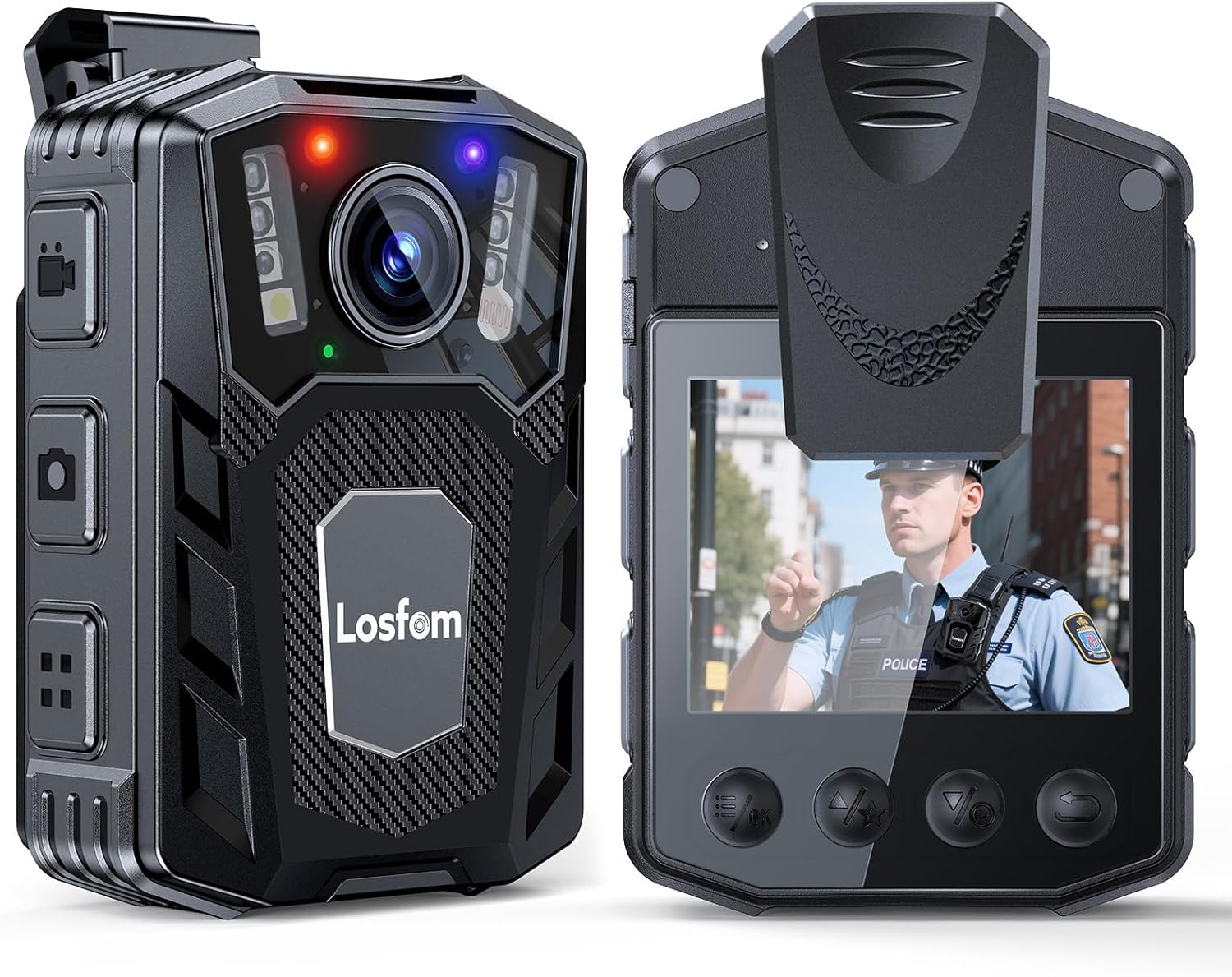
Key Features:
- Long Battery Life: 2100mAh battery supports up to 10 hours of continuous 1080P video recording (with screen and IR off).
- Clear Night Vision: Features 6 infrared LED lights for sharp images up to 10 meters in total darkness.
- External Memory Card Design: Supports user-replaceable micro SD cards for extended recording capacity and easy data transfer.
- Loop Recording: Automatically overwrites the oldest files to ensure continuous recording without missing critical moments.
- Versatile Use: Easy one-button control, suitable for indoor and outdoor scenarios including deliveries, patrols, and personal security.
2. What's in the Box
Verify that all items listed below are included in your package:
- WD1 Camera
- Long Clip (180° Rotatable)
- Short Clip (360° Rotatable)
- USB Cable
- User Manual

3. Setup
3.1 Charging the Device
Before first use, fully charge the WD1 Body Camera. Connect the provided USB cable to the camera's USB port and to a power source (e.g., computer USB port or a compatible USB wall adapter). The charging indicator light will show the charging status.

3.2 Inserting/Replacing the Micro SD Card
The WD1 Body Camera uses a micro SD card for storage. Locate the micro SD card slot on the side of the device. Gently insert the card until it clicks into place. To remove, push the card inward until it springs out. Ensure the device is powered off before inserting or removing the card.

3.3 Attaching Clips
Select either the long or short clip based on your preference and attachment point. The clips attach to the back of the camera and can be rotated for optimal positioning. The long clip offers 180° rotation, while the short clip provides 360° rotation.

4. Operating Instructions
4.1 Power On/Off and Menu Navigation
To power on the device, press and hold the Power button. The 2.0-inch screen will display the live view. Use the navigation buttons (Up, Down, OK, Menu) to access and adjust settings. To power off, press and hold the Power button again.
4.2 Video Recording
Press the dedicated Video Record button to start recording. The camera supports continuous 1080P video recording for up to 10 hours. The loop recording feature ensures that when the memory card is full, the oldest files are automatically overwritten, allowing for uninterrupted recording.

4.3 Audio Recording
The camera supports audio recording. Refer to the on-screen menu for specific audio recording options and controls.
4.4 Photo Taking
Press the dedicated Photo button to capture still images. The camera features a photo sensor technology for clear image capture.
4.5 Night Vision
Activate night vision mode for recording in low-light or total darkness. The camera's infrared 6 LED lights enable clear footage up to 10 meters. This feature is ideal for nighttime patrols or monitoring.

Video 1: Demonstration of 1080P FHD Body Cam with IR Night Vision (Source: WMNC, Seller).
4.6 Dash Cam Mode
The WD1 Body Camera can function as a dash cam. When connected to your car's power, it can continuously record while the vehicle is on. This feature is useful for documenting driving incidents or journeys.
4.7 Motion Detection
Activate motion detection for security monitoring. The camera will begin recording when motion is detected in its field of view, conserving battery and storage space when no activity is present.
4.8 Siren/Strobe Lights
The device may include a siren and strobe light feature for emergency situations. Consult the user manual for specific instructions on how to activate and use this function responsibly.
5. Maintenance
- Cleaning: Use a soft, dry cloth to clean the camera lens and body. Avoid abrasive cleaners or solvents.
- Storage: Store the camera in a cool, dry place away from direct sunlight and extreme temperatures.
- Battery Care: For optimal battery life, avoid fully discharging the battery frequently. Charge regularly, especially if storing for extended periods.
- SD Card Management: Periodically back up important footage and format the micro SD card to maintain performance and prevent data corruption.
6. Troubleshooting
- Device Not Powering On: Ensure the battery is charged. Connect to a power source and try again.
- Recording Issues: Check if the micro SD card is inserted correctly and has sufficient free space. Format the card if necessary.
- File Playback Issues: Ensure your computer's media player supports MOV video format. VLC Media Player is often recommended for broad compatibility.
- Charging Issues: Use the provided USB cable and a compatible power adapter. Some USB-C to USB-C cables may not provide sufficient power if not compliant with specific standards.
7. Specifications
| Feature | Detail |
|---|---|
| Brand Name | Losfom |
| Item Weight | 8.3 ounces |
| Package Dimensions | 4.72 x 3.94 x 3.15 inches |
| Item Model Number | WD1 |
| Batteries | 1 A batteries required (included) |
| Color Name | Black |
| Special Features | Night Vision |
| Photo Sensor Technology | CMOS |
| Video Capture Resolution | 1080p |
| Maximum Focal Length | 20 |
| Maximum Aperture | 20 Millimeters |
| Flash Memory Type | Micro SD |
| Video Capture Format | MOV |
| Supported Audio Format | AAC |
| Screen Size | 2 Inches |
| Connectivity Technology | USB |
8. Warranty and Support
For warranty information or technical support, please refer to the contact details provided in the original product packaging or visit the official Losfom website. Keep your purchase receipt for any warranty claims.


