
Autel Autel MaxiCOM MK900BT
Autel MaxiCOM MK900BT OBD2 Diagnostic Tool User Manual
Model: Autel MaxiCOM MK900BT
1. Introduction
The Autel MaxiCOM MK900BT is an advanced OBD2 diagnostic tool designed for comprehensive vehicle system analysis. This manual provides detailed instructions for setting up, operating, maintaining, and troubleshooting your device to ensure optimal performance and accurate diagnostics.
The MK900BT features an Android 11.0 operating system, a powerful 1.8 GHz 4-core processor, and a large 8-inch touchscreen display, offering a fast and intuitive user experience. It supports over 40 hot services, 3000+ active tests, and new protocols like CAN FD and DoIP, making it a versatile tool for professional technicians and automotive enthusiasts.
2. Setup
2.1 Unboxing and Initial Inspection
Carefully unpack all components from the box. Verify that all items listed in the packing list are present and in good condition. If any items are missing or damaged, contact your vendor immediately.
2.2 Charging the Device
Before first use, fully charge the MaxiCOM MK900BT. Connect the provided power adapter to the device's charging port and plug it into a power outlet. The 7700mAh battery ensures extended operation time.
2.3 Connecting to the Vehicle
The MK900BT utilizes a Bluetooth (BT) VCI (Vehicle Communication Interface) for wireless diagnostics, allowing for a stable connection up to 33 feet (10 meters) from the vehicle. Locate the vehicle's OBD2 port, typically under the dashboard. Plug the VCI into the OBD2 port. The VCI will power on automatically.

Image: The Autel MaxiCOM MK900BT main unit with its wireless VCI module, illustrating the device's primary components.

Image: The Autel MK900BT tablet wirelessly connected to a vehicle via its VCI, demonstrating the 33-foot wireless diagnostic capability.
2.4 Initial Software Setup and Updates
Upon first power-on, follow the on-screen prompts to configure language settings (English, French, German, Spanish, etc. are supported), Wi-Fi connection, and time zone. It is highly recommended to perform a software update immediately to ensure you have the latest vehicle coverage and functionalities. The device comes with one year of free software updates.
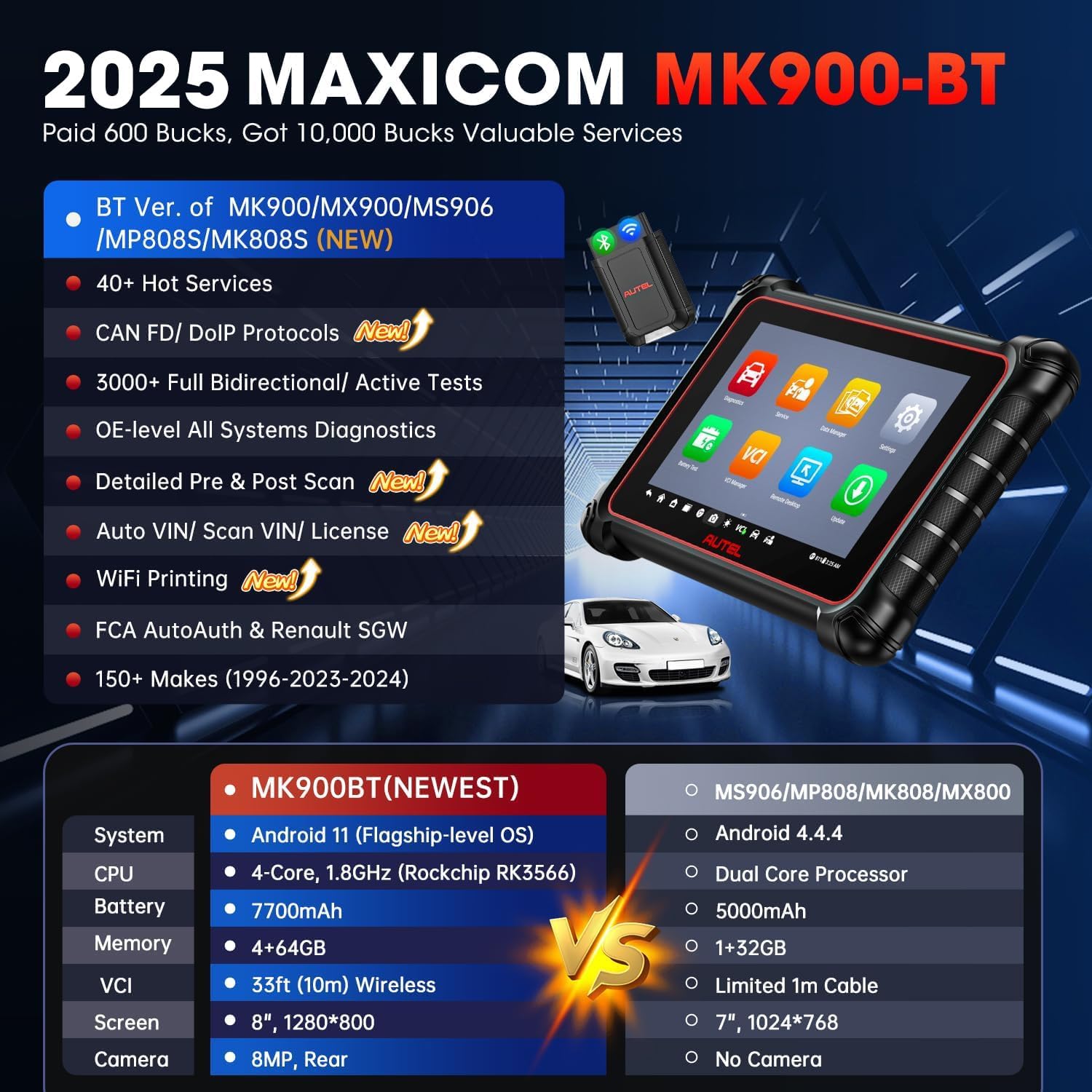
Image: A visual comparison highlighting the hardware and software upgrades of the MK900BT, including Android 11.0, improved CPU, larger battery, and enhanced memory, compared to previous models.
3. Operating Instructions
3.1 OE-Level All Systems Diagnostics
The MK900BT provides comprehensive diagnostics for all available vehicle systems, including Engine, Transmission, ABS, Airbag, TPMS, IMMO, and more. It can read and clear diagnostic trouble codes (DTCs), display live data streams in various formats (text, graph, analog), retrieve ECU information, and perform freeze frame analysis.

Image: An illustration of the MK900BT's capability to perform OE-level diagnostics across all vehicle systems, including engine, ABS, TPMS, and IMMO.
3.2 Bidirectional Control / Active Tests
The tool supports over 3000 active tests, allowing you to send commands to vehicle systems and components to test their functionality. This includes activating/deactivating fuel injectors, cooling fans, wipers, EGR valves, windows, and more, to quickly pinpoint faulty components.

Image: A visual representation of the 3000+ bidirectional control and active tests, showing examples such as testing exhaust flaps, car mirrors, and car lights.
3.3 Special Functions and Services
The MK900BT offers over 40 hot services for common maintenance and repair tasks. These include:
- Oil Reset
- EPB (Electronic Parking Brake) Reset
- BMS (Battery Management System) Reset
- SAS (Steering Angle Sensor) Calibration
- TPMS (Tire Pressure Monitoring System) Reset
- IMMO (Immobilizer) Services
- ABS Bleeding
- Injector Coding
- Throttle Adaptation
- Gear Learning
- Suspension Calibration
- Sunroof Initialization
- And many more.

Image: A graphic detailing the extensive list of 40+ maintenance services supported by the MK900BT, including various reset and calibration functions.
3.4 Advanced Features: CAN FD, DoIP, Pre & Post Scan, WiFi Printing
The MK900BT supports advanced communication protocols like CAN FD (for newer GM vehicles 2019+) and DoIP (for certain Volvo 2018+, Jaguar/Land Rover 2017+, BMW F&G chassis models). It also includes Pre & Post Scan reports to document diagnostic and repair progress, and WiFi printing for convenient report generation.

Image: A visual summary of the MK900BT's new advanced features, including support for CAN FD and DoIP protocols, Pre & Post Scan reporting, and WiFi printing capabilities.
3.5 Vehicle Coverage
The device covers over 150 car brands, supporting vehicles from 1996 to 2025. It also includes specific support for Renault SGW (Security Gateway) and FCA AutoAuth for newer Jeep/Fiat/Chrysler/Dodge/Ram models.
4. Maintenance
4.1 Software Updates
Regular software updates are crucial for maintaining optimal performance and expanding vehicle coverage. Connect the device to a stable Wi-Fi network and check for updates periodically through the 'Update' application on the main menu. Ensure the device has sufficient battery charge before starting an update.
4.2 Battery Care
To prolong the life of the lithium-polymer battery, avoid fully discharging it frequently. Charge the device when the battery level is low. If storing the device for an extended period, ensure it is charged to approximately 50%.
4.3 Cleaning and Storage
Clean the device with a soft, damp cloth. Avoid using abrasive cleaners or solvents. Store the device in a cool, dry place, away from direct sunlight and extreme temperatures.
5. Troubleshooting
5.1 Common Issues and Solutions
- Device not powering on: Ensure the battery is charged. Connect the power adapter and try again.
- VCI not connecting via Bluetooth: Ensure the VCI is properly plugged into the vehicle's OBD2 port and the vehicle's ignition is on. Check Bluetooth settings on the tablet to ensure it's enabled and paired with the VCI.
- Unable to communicate with vehicle: Verify the vehicle's ignition is on. Check the OBD2 cable/VCI connection. Ensure the correct vehicle make, model, and year are selected in the software.
- Software freezing or slow performance: Close unnecessary applications. Perform a system restart. Ensure the software is up to date.
- Update issues: Ensure a stable internet connection. Check available storage space on the device.
For persistent issues, refer to the online support resources or contact Autel technical support.
6. Specifications
| Feature | Specification |
|---|---|
| Brand | Autel |
| Model Number | Autel MaxiCOM MK900BT |
| Operating System | Android 11.0 |
| Processor | 4-core, 1.8 GHz (Rockchip RK3566) |
| Memory | 4GB RAM + 64GB ROM |
| Battery Type | Lithium-polymer, 7700mAh |
| Display | 8-inch LCD, 1280x800 resolution |
| Camera | 8MP Rear |
| Connectivity | Bluetooth (33ft/10m wireless), Wi-Fi (2.4 & 5 GHz) |
| Supported Protocols | CAN FD, DoIP, K-Line, GM UART, TP1.6, TP2.0, SAE-J1850 VPW, SAE-J1850 PWM, ISO9141-2, ISO14230-2, ISO15765, ISO11898, SAE J2610, UART Echo Byte Protocol, Honda Diag-H Protocol |
| UPC | 762917114361 |

Image: A comprehensive table comparing the specifications of the Autel MK900BT with other diagnostic tools, highlighting its superior hardware and new functions.
7. Warranty and Support
The Autel MaxiCOM MK900BT comes with a 12-month warranty from the date of purchase. It includes one year of free software updates to ensure your device remains current with the latest vehicle models and diagnostic functions. A 30-day refund and replacement policy is also available.
For technical assistance, professional support is available for the lifetime of the product. You can reach Autel Choice customer service via email at autelchoice@outlook.com.

Image: Information regarding Autel's commitment to customer service, including 1-year free updates, 12-month quality backup, 30-day return/replace policy, and 24/7/365 technical assistance.
Ask a question about this manual
Ask about setup, troubleshooting, compatibility, parts, safety, or missing instructions. Manuals+ will review the question and use this page’s manual context to help answer it.