
1. Introduction to the Autel MaxiTPMS ITS600 (E)
The Autel MaxiTPMS ITS600 (E) is a professional Tire Pressure Monitoring System (TPMS) diagnostic and service tool. Designed for comprehensive TPMS functions, it offers advanced capabilities for activating, reading, programming, and relearning TPMS sensors. This device also integrates essential maintenance services, making it a versatile tool for automotive technicians and enthusiasts.
The ITS600 (E) features an upgraded hardware configuration for efficient operation and is compatible with additional Autel accessories for extended functionality.

Image 1.1: The Autel MaxiTPMS ITS600 (E) handheld device with its wireless Vehicle Communication Interface (VCI) module.
2. Initial Setup and Hardware Overview
2.1. Device Components
- ITS600 (E) Main Unit: A 5.5-inch LCD touchscreen tablet running Android 9.0 OS, serving as the primary interface for all operations.
- Wireless VCI Module: Connects to the vehicle's OBDII port to establish communication with the vehicle's systems. It communicates wirelessly with the main unit via Bluetooth.
- Charging Cable and Power Adapter: For powering and charging the main unit.
2.2. Powering On and Initial Configuration
- Ensure the ITS600 (E) main unit is sufficiently charged. Connect the power adapter if necessary.
- Press and hold the Power button to turn on the device.
- Follow the on-screen prompts to complete the initial setup, including language selection, Wi-Fi connection, and time zone settings. A stable Wi-Fi connection is essential for software updates.
- Register the device online to activate the warranty and access software updates.
2.3. Connecting to a Vehicle
- Locate the vehicle's OBDII port, typically under the dashboard on the driver's side.
- Plug the wireless VCI module into the OBDII port. The VCI's indicator light should illuminate.
- On the ITS600 (E) main unit, navigate to the 'VCI Manager' or 'Connection' menu.
- Select 'Bluetooth' and pair with the VCI module. Once connected, the VCI indicator on the main unit will confirm the connection.
3. TPMS Functions
The Autel MaxiTPMS ITS600 (E) provides comprehensive TPMS services, including sensor activation, diagnosis, programming, and relearn procedures.
3.1. Activating and Diagnosing TPMS Sensors
- From the main menu, select 'TPMS'.
- Choose 'Activate Sensors' to trigger and read data from existing TPMS sensors.
- Select 'Diagnosis' to read TPMS fault codes, view live sensor data (tire pressure, temperature, battery status), and turn off the TPMS warning light.
3.2. Programming Autel MX-Sensors
The ITS600 (E) can program Autel MX-Sensors to replace faulty or dead sensors. It offers two primary programming methods:

Image 3.1: Two methods for programming Autel MX-Sensors: Auto Create and Copy by OBD.
- Program by OBD: This method programs new MX-Sensors with sensor IDs retrieved directly from the vehicle's ECU via the OBDII connection. This is the recommended method as it often eliminates the need for a subsequent relearn procedure.
- Auto Create (1-20 Sensors): Generates new, unique sensor IDs for MX-Sensors when the original sensor is completely non-functional or its ID is unknown. This method supports programming up to 20 sensors simultaneously.
Note: MX-Sensors should be programmed before installation into the tire.
3.3. Relearning OEM Sensors
After replacing or programming TPMS sensors, a relearn procedure is necessary to register the new sensor IDs with the vehicle's ECU. The ITS600 (E) supports three relearn methods:

Image 3.2: Three methods for relearning TPMS sensors: Stationary, Automatic, and OBD Relearn.
- Stationary Relearn: Requires the vehicle to be placed in 'Relearn Mode' and often involves specific steps like inflating/deflating tires or using a TPMS trigger tool.
- Automatic Relearn: For certain vehicles, the relearn process completes automatically by driving the vehicle for a specified period at a certain speed.
- OBD Relearn: Writes the new sensor IDs directly to the TPMS module via the OBDII connection. This method is supported for a wide range of vehicles.
Step-by-step instructions for each relearn procedure are provided on the device for supported vehicles.
3.4. TPMS Retrofit
The TPMS Retrofit function allows for the installation of a TPMS system on vehicles that were not originally equipped with one. This involves building TPMS modules into the ECU and connecting new sensor information to display real-time tire data on the dashboard.
4. Maintenance Services
Beyond TPMS, the ITS600 (E) includes four commonly used maintenance services, provided with lifetime free updates.
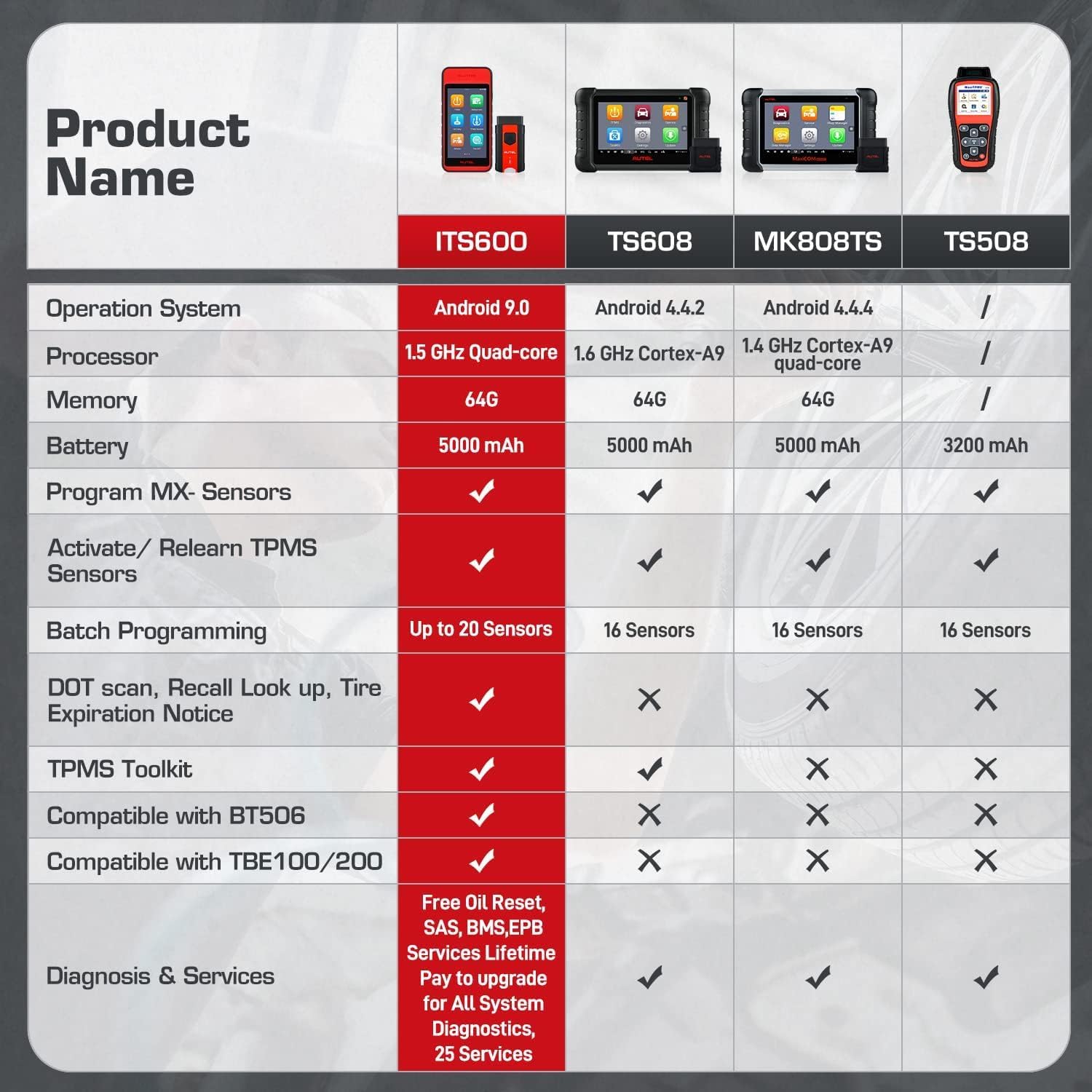
Image 4.1: The four vital maintenance services offered by the ITS600 (E).
- Oil Reset: Resets the Engine Oil Life system after an oil change, allowing the vehicle to accurately calculate the next service interval.
- EPB Reset (Electronic Parking Brake): Deactivates and reactivates the brake control system, assists with brake fluid control, opens and closes brake pads, and resets brakes after disc or pad replacement.
- BMS Reset (Battery Management System): Evaluates the battery charge state, monitors close-circuit current, registers new battery replacements, activates the vehicle's rest state, and charges the battery via the diagnostic socket.
- SAS Calibration (Steering Angle Sensor): Calibrates the Steering Angle Sensor after steering wheel replacement, sensor replacement, or any maintenance affecting the steering angle.
Note: The availability and specific procedures for these service functions may vary by vehicle make and model. Always verify compatibility for your specific vehicle.
5. Advanced Features and Expandability
5.1. Tire Health Check with TBE200 (E)
The ITS600 (E) can be paired with the Autel TBE200 (E) Laser Tire & Brake Tester (sold separately) for a comprehensive tire health analysis. This integration provides:
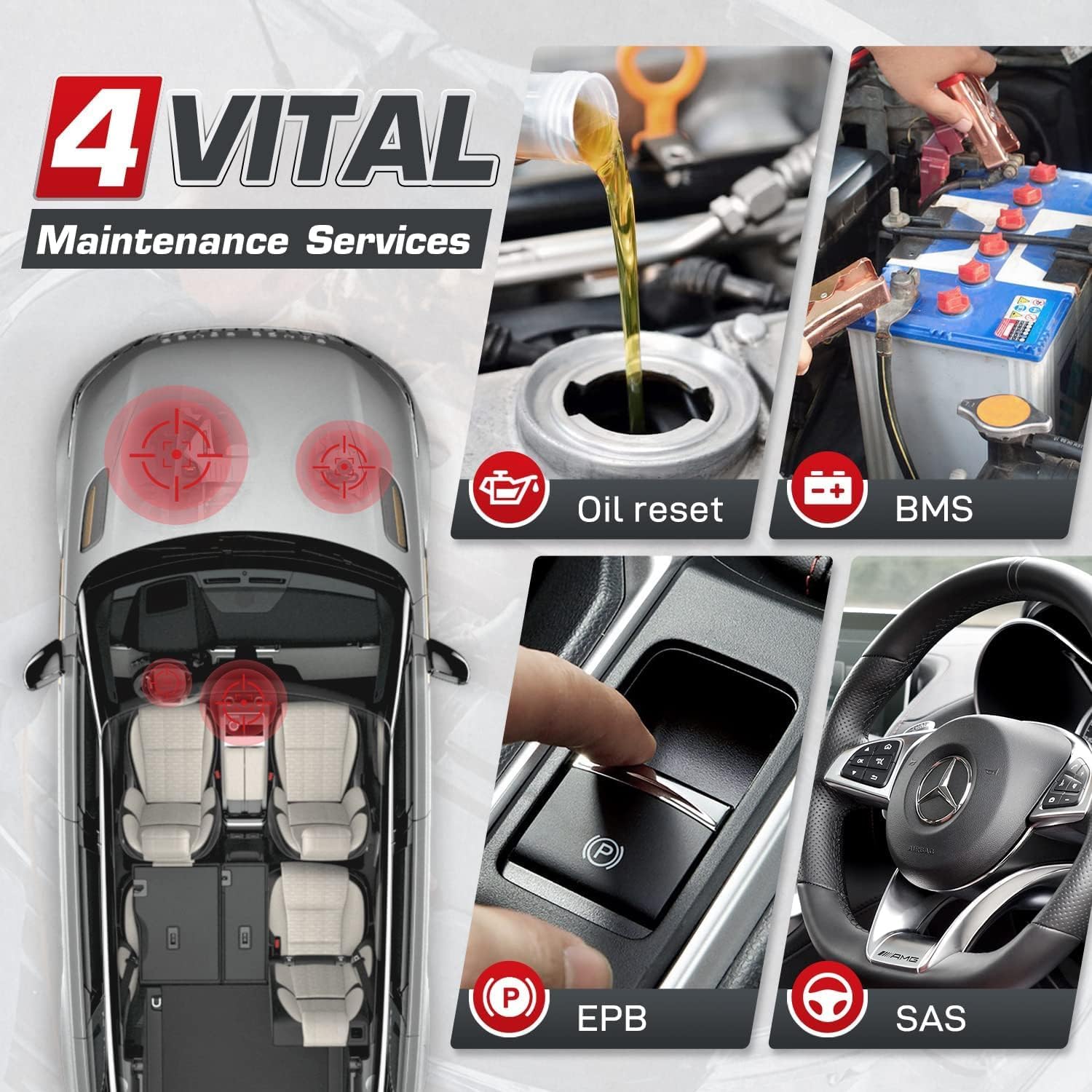
Image 5.1: The ITS600 (E) device connected to the TBE200 (E) for detailed tire and brake analysis.
- Real-time tire measurement data, including tread depth and brake disc wear.
- Uneven wear analysis.
- Detailed replacement and maintenance suggestions (tire/brake disc replacement, tire rotation/alignment).
- DOT scan for tire expiration notice and recall lookup.
5.2. Battery and Cranking Analysis with BT506
The ITS600 (E) is compatible with the Autel BT506 Battery Tester (sold separately) for complete vehicle battery, cranking, and generator analysis.
5.3. Pro Upgrade for All Systems Diagnosis
The Autel ITS600 (E) can be upgraded to the ITS600 Pro version via an in-app purchase. This upgrade unlocks:
- All Systems Diagnosis: Ability to read and clear codes for all vehicle systems, including Engine, Transmission, Powertrain, Brake, Chassis, etc.
- 28+ Additional Service Functions: Access to a wider range of maintenance services such as ABS, Injector Coding, Suspension, Throttle, Airbag, Trans Adaptation, Cylinder, TEC Learn, CHG Tire Size, Headlamp, Seats, Window/Door/Roof, and more.
6. Specifications
| Feature | Specification |
|---|---|
| Operating System | Android 9.0 |
| Processor | Quad-core 1.5 GHz |
| Memory | 1GB RAM, 64GB ROM |
| Display | 5.5-inch LCD touchscreen, 1280x720 resolution |
| Battery | 5000mAh Lithium Polymer |
| Connectivity | Bluetooth (VCI), Wi-Fi |
| Camera | 8MP |
| Dimensions (L x W x H) | 7.2 x 3.5 x 0.8 inches (approx.) |
| Item Weight | 3.43 pounds (approx.) |
| Supported Protocols | OBDII/EOBD compliant protocols |
The ITS600 (E) is designed for broad vehicle compatibility, covering 99% of US, European, and Asian vehicles, with OBD relearn functionality for approximately 85% of these vehicles.
7. Troubleshooting
This section provides general guidance for common issues. For specific technical problems, refer to the support section.
7.1. Device Not Powering On
- Ensure the device battery is charged. Connect the power adapter and allow it to charge for at least 30 minutes before attempting to power on again.
- Verify the power button is pressed and held for the required duration (typically 3-5 seconds).
7.2. VCI Not Connecting to Vehicle
- Check that the VCI module is securely plugged into the vehicle's OBDII port.
- Ensure the vehicle's ignition is in the 'ON' position (engine off).
- Verify that the VCI module's indicator light is on, indicating power.
- On the ITS600 (E) main unit, confirm that Bluetooth is enabled and the VCI is paired. Try re-pairing if necessary.
7.3. TPMS Sensor Data Not Reading
- Ensure the sensor activation tool is positioned correctly near the tire valve stem.
- Check the sensor's battery status (if visible) or age. Old sensors may have depleted batteries.
- Verify that the correct vehicle make, model, and year are selected on the device.
8. Warranty and Support
Autel provides comprehensive support for the MaxiTPMS ITS600 (E) tool.

Image 8.1: Overview of Autel's customer support and warranty terms.
- Quality Warranty: The product is backed by a 1-year quality warranty from the date of purchase.
- Return Policy: A 30-day return and full refund or new replacement policy is available.
- Software Updates: Enjoy lifetime free updates for the core TPMS functions and the four included maintenance services.
- Technical Support: For any questions or technical assistance, please contact Autel support via email at autelusa@outlook.com.


