
1. Introduction
Thank you for choosing the Xoopar Mini Xboy Eco Bluetooth Portable Speaker. This speaker combines innovative design with eco-friendly materials, offering powerful 360° sound and an integrated selfie remote control. This manual provides essential information for setting up, operating, and maintaining your device.
The Mini Xboy Eco features a head made from recycled plastic bottles and a body incorporating non-food wheat fiber with a biosphere additive to enhance biodegradability. Its compact size and integrated wrist strap make it ideal for portable use.

Image: The Xoopar Mini Xboy Eco Bluetooth Portable Speaker.
2. Package Contents
Please check the box for the following items:
- Xoopar Mini Xboy Eco Bluetooth Portable Speaker
- Integrated Hand Strap
- USB Charging Cable (assumed to be included for charging functionality)
- User Manual (this document)

Image: Front and side view of the Xoopar Mini Xboy Eco speaker.
3. Setup
3.1 Initial Charge
Before first use, fully charge your Mini Xboy Eco speaker. Connect the provided USB charging cable to the charging port on the speaker and to a standard USB power source (e.g., computer USB port, USB wall adapter). The LED indicator will show charging status (refer to product packaging for specific LED behavior).
3.2 Powering On/Off
- To Power On: Press and hold the power button (refer to speaker for button location) until the LED indicator lights up.
- To Power Off: Press and hold the power button until the LED indicator turns off.
4. Operating Instructions
4.1 Bluetooth Pairing
The Mini Xboy Eco uses Bluetooth 5.0 for wireless connectivity, with a transmission distance of up to 10 meters (33 feet).
- Ensure the speaker is powered on and within range of your device.
- Activate Bluetooth on your smartphone, tablet, or computer.
- Search for available Bluetooth devices. The speaker will typically appear as "Xoopar Mini Xboy Eco" or similar.
- Select the speaker from the list to pair. A confirmation sound or LED indication will confirm successful pairing.
Once paired, the speaker will automatically connect to your device when both are powered on and within range.

Image: The Mini Xboy Eco speaker connected to a tablet for audio playback.
4.2 Stereo Pairing (TWS Function)
If you have two Xoopar Mini Xboy Eco speakers, you can pair them together for a stereo sound experience.
- Ensure both speakers are powered on and not connected to any other Bluetooth device.
- On one speaker (this will be the primary speaker), double-press the power button (refer to speaker for specific action) to initiate TWS pairing mode.
- The speakers will automatically search for and connect to each other. A confirmation sound will indicate successful stereo pairing.
- Connect your device to the primary speaker via Bluetooth as described in Section 4.1. Both speakers will now play audio in stereo.
4.3 Selfie Remote Control
The Mini Xboy Eco features an integrated selfie remote control function.
- Ensure the speaker is paired with your smartphone via Bluetooth.
- Open your smartphone's camera application.
- Press the designated button on the speaker (refer to speaker for button location) to trigger the camera shutter.
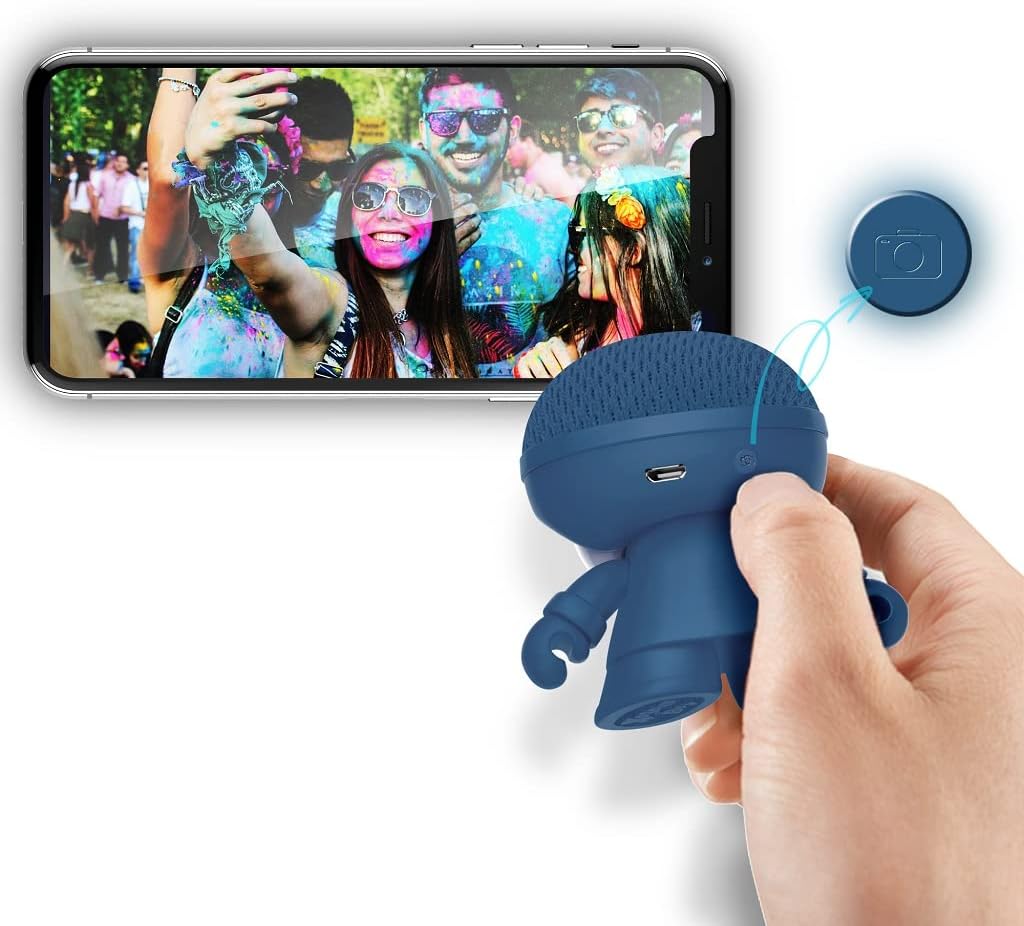
Image: The Xoopar Mini Xboy Eco speaker can be used as a remote shutter for your smartphone camera.
4.4 LED Light Function
The Mini Xboy Eco features a multi-LED lighted face. The lights may indicate power status, charging status, or simply provide ambient lighting.

Image: The Mini Xboy Eco speaker features a multi-LED lighted face.
5. Maintenance
5.1 Cleaning
To clean your speaker, gently wipe the surface with a soft, dry, or slightly damp cloth. Do not use harsh chemicals, solvents, or abrasive cleaners, as these may damage the finish or internal components.
5.2 Storage
When not in use for extended periods, store the speaker in a cool, dry place away from direct sunlight and extreme temperatures. It is recommended to charge the battery periodically (e.g., every 3-6 months) to maintain battery health.
6. Troubleshooting
| Problem | Possible Cause | Solution |
|---|---|---|
| Speaker does not power on. | Battery is depleted. | Charge the speaker using the provided USB cable. |
| Cannot pair via Bluetooth. | Speaker is not in pairing mode or out of range. | Ensure speaker is on and within 10 meters. Turn Bluetooth off/on on your device. Restart both devices. |
| No sound or low volume. | Volume too low on speaker or connected device. | Increase volume on both the speaker and your connected device. |
| Selfie remote not working. | Speaker not paired or camera app not open. | Ensure speaker is paired and camera app is active. |
7. Specifications
- Model Name: Mini Xboy Eco
- Item Model Number: XBOY81001.16BO
- Brand: Xoopar
- Connectivity Technology: Bluetooth 5.0
- Speaker Maximum Output Power: 3 Watts
- Audio Output Mode: Stereo (with TWS pairing)
- Speaker Type: Coaxial
- Frequency Response: 20 GHz (Note: This value is unusually high for a speaker and may be a typo in the source data. Typical speaker frequency ranges are in Hz-kHz.)
- Battery: 1 Lithium Polymer (included)
- Battery Autonomy: Approximately 4 hours
- Transmission Distance: Up to 10 meters (33 feet)
- Product Dimensions: 1 x 1 x 1 cm
- Item Weight: 50 g
- Material: ABS, Acrylonitrile Butadiene Styrene (head from recycled plastic bottles, body with non-food wheat fiber and biosphere additive)
- Mounting Type: Table top mounting
- Special Feature: Mini portable Bluetooth speaker, integrated selfie remote, multi-LED lighted face
8. Warranty and Support
For warranty information and customer support, please refer to the documentation provided with your purchase or visit the official Xoopar website. Keep your proof of purchase for any warranty claims.
Manufacturer: Xoopar