
Introduction
Thank you for choosing the NORTH EDGE APACHE Digital Sport Watch. This manual provides comprehensive instructions for the proper setup, operation, and maintenance of your watch. Please read this manual carefully to ensure optimal performance and longevity of your device.
The NORTH EDGE APACHE is a multi-functional outdoor watch designed for various activities, featuring an altimeter, barometer, compass, stopwatch, countdown timer, dual time, and 50-meter water resistance.

Image: NORTH EDGE APACHE Multi-Function Outdoor Watch. This image displays the watch face with icons indicating its various functions: altitude monitoring, temperature display, compass, 5ATM waterproof rating, time/date, stopwatch, countdown timer, auto calendar, alarm function, and EL backlight.
Setup
Initial Power On and Time Setting
- Power On: The watch is typically powered on from the factory. If the display is blank, press and hold the MODE button (usually bottom left) for a few seconds.
- Time Zone and Time Setting:
- In Time Mode, press and hold the SET button (usually top left) until the seconds start flashing.
- Press the MODE button to cycle through settings: Seconds → Hours → Minutes → Year → Month → Day → 12/24 Hour Format.
- Use the ADJUST button (usually top right) to change the flashing value.
- Press SET again to confirm and exit the setting mode.
- Dual Time Setting: The watch supports dual time. Refer to the "Operating" section for detailed instructions on setting the second time zone.
Compass Calibration
For accurate compass readings, calibration is essential, especially after significant travel or magnetic interference.
- Enter Compass Mode.
- Press and hold the SET button to enter calibration mode.
- Follow the on-screen prompts, usually involving rotating the watch horizontally in a full circle (360 degrees) slowly and steadily.
- Once calibration is complete, the watch will return to normal compass display.

Image: Compass Function Display. This image shows the watch displaying a compass reading, indicating direction (NW) and degrees (316°). It highlights the watch's ability to provide precise directional information.
Operating Instructions
Your NORTH EDGE APACHE watch features multiple modes accessible via the MODE button. The primary buttons are typically:
- SET/LIGHT: Top Left button. Used to enter/exit setting modes and activate backlight.
- ADJUST: Top Right button. Used to adjust values in setting modes or start/stop functions.
- MODE: Bottom Left button. Used to switch between different watch modes.
- VIEW/RESET: Bottom Right button. Used to view different data or reset functions.
Mode Navigation
Press the MODE button repeatedly to cycle through the following modes:
- Time Mode (main display)
- Altimeter Mode
- Barometer Mode
- Compass Mode
- Stopwatch Mode
- Countdown Timer Mode
- Alarm Mode
- Pedometer Mode
- Dual Time Mode
Altimeter Function
The altimeter measures current altitude, displays altitude trend, and can provide sea level altitude reference.
- Enter Altimeter Mode. The watch will display current altitude and temperature.
- To set a reference altitude (e.g., known altitude of your current location), press and hold SET. Use ADJUST to change the value and MODE to move between digits. Press SET to confirm.
- The watch will track altitude changes relative to this reference or based on absolute barometric pressure.

Image: Altimeter Function Display. This image shows the watch displaying altitude (186m) and temperature (25.7°C), along with an altitude trend chart. It illustrates the watch's capability to monitor real-time elevation and track changes.
Barometer Function
The barometer measures atmospheric pressure and can help predict weather changes.
- Enter Barometer Mode. The watch will display current atmospheric pressure (hPa) and temperature.
- The watch may display a pressure trend graph, indicating rising or falling pressure, which can suggest improving or worsening weather.
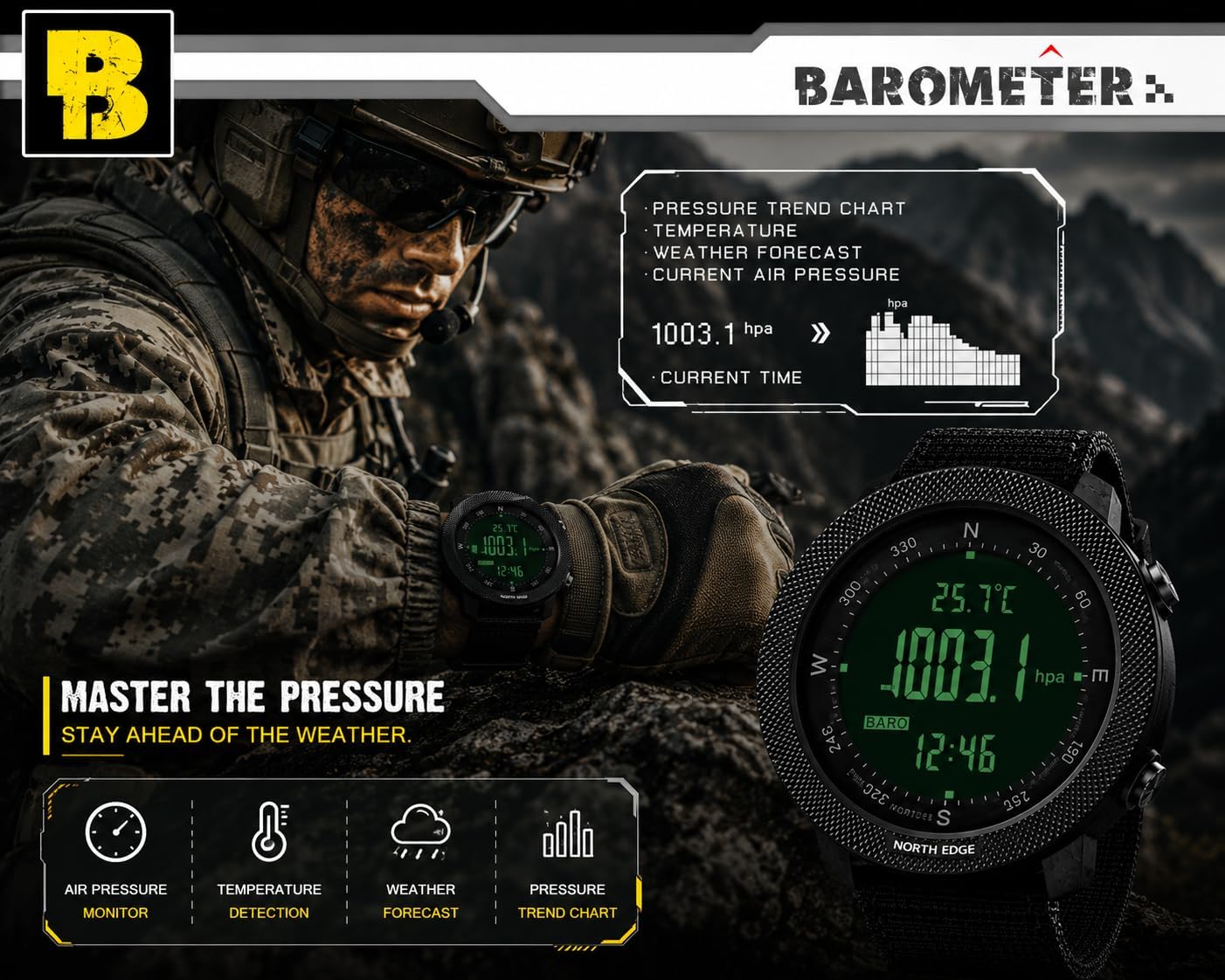
Image: Barometer Function Display. This image shows the watch displaying current atmospheric pressure (1003.1 hPa) and temperature (25.7°C), along with a pressure trend chart. It demonstrates the watch's ability to monitor air pressure and assist in weather forecasting.
Compass Function
Provides directional information. Ensure proper calibration as described in the "Setup" section.
- Enter Compass Mode.
- Hold the watch horizontally and steady. The display will show the current direction (e.g., N, NE, SW) and degrees.
- Magnetic declination can be adjusted if needed for your specific location. Refer to the watch's detailed menu for this advanced setting.
Stopwatch and Countdown Timer
- Stopwatch:
- Enter Stopwatch Mode.
- Press ADJUST to start/stop the stopwatch.
- Press VIEW/RESET to reset to zero.
- Countdown Timer:
- Enter Countdown Timer Mode.
- Press and hold SET to set the desired countdown time (up to 23 hours, 59 minutes, 59 seconds). Use ADJUST to change values and MODE to move between units.
- Press SET to confirm.
- Press ADJUST to start/pause the countdown.
- An alarm will sound when the countdown reaches zero.
Alarm Function
The watch supports daily alarms and an hourly chime.
- Enter Alarm Mode.
- Press and hold SET to set the alarm time. Use ADJUST to change values and MODE to move between hours and minutes.
- Press SET to confirm.
- Use ADJUST to toggle the alarm ON/OFF or to activate/deactivate the hourly chime.
Pedometer and Calorie Tracking
The watch can track your steps and estimate calories burned.
- Enter Pedometer Mode.
- Ensure your personal data (stride length, weight) is set correctly in the watch's settings for accurate readings. Refer to the full manual for detailed personal data input.
- The watch will display your step count and estimated calories.
Backlight
Press the SET/LIGHT button (top left) to activate the EL backlight for visibility in low-light conditions.
Image: Watch Display Clear at Night with Backlight. This image demonstrates the watch's EL backlight feature, making the digital display clearly visible in dark environments.
Detailed Mode Analysis Diagram
The following diagram illustrates the button functions for Altimeter, Barometer, and Compass modes.

Image: Altimeter, Barometer, and Compass Mode Analysis Diagram. This diagram provides a visual guide to the watch's various modes, including Altimeter, Barometer, and Compass, detailing the information displayed and button interactions for each. It also lists general specifications like dimensions, weight, display type, strap material, water resistance, and supported functions.
Maintenance
Cleaning
- Wipe the watch case and strap with a soft, damp cloth.
- For stubborn dirt, use a mild soap solution and rinse thoroughly with clean water.
- Ensure the watch is completely dry before wearing or storing.
- Avoid using chemical cleaners, solvents, or abrasive materials, as these can damage the watch's finish or seals.
Water Resistance
The NORTH EDGE APACHE watch is water-resistant to 50 meters (164 feet). This rating means it is suitable for:
- Daily use and splashes.
- Swimming in shallow water.
- Cold showers.
Important Precautions:
- Do not press any buttons underwater.
- Avoid exposure to hot water, steam, or saunas, as this can compromise the watch's seals.
- Not suitable for prolonged underwater activities such as diving or snorkeling.
Battery Replacement
The watch uses a 1 C battery (CR2032, as seen on the watch back image). When the low power indicator appears, it is recommended to replace the battery promptly.
- Battery replacement should ideally be performed by a qualified watch technician to ensure the water resistance seal is properly maintained.
- If replacing yourself, carefully open the back case, replace the CR2032 battery, and ensure the gasket is correctly seated before securely closing the case.
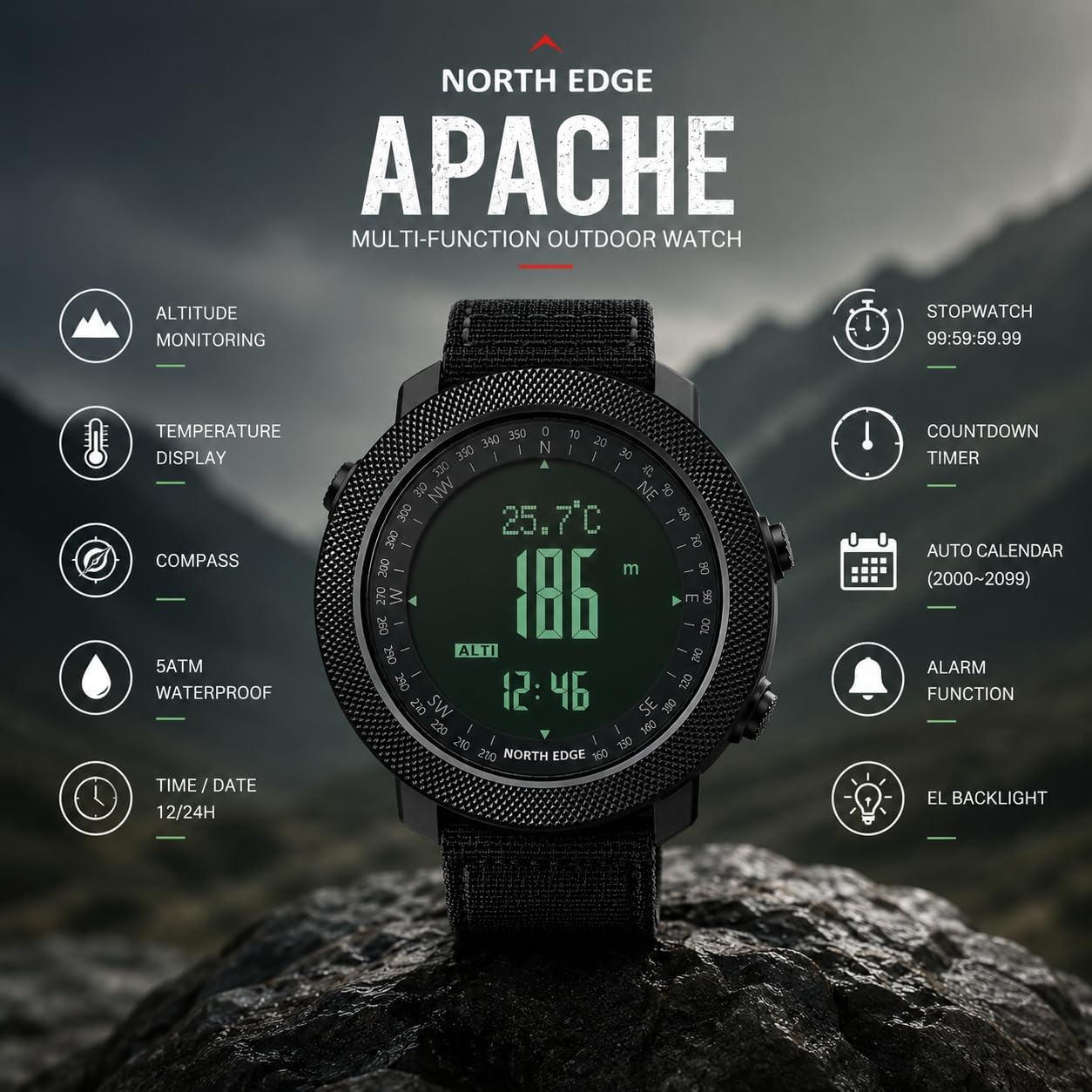
Image: NORTH EDGE Apache Watch Back with Engravings. This image shows the stainless steel back of the watch, engraved with the brand "NORTH EDGE", model "Apache", water resistance rating "WR 50m/164ft", and battery type "CR2032". It also displays the serial number T163500717.
Troubleshooting
| Problem | Possible Cause | Solution |
|---|---|---|
| Watch display is blank. | Low battery or watch is off. | Press and hold the MODE button to power on. If still blank, replace the battery. |
| Inaccurate time. | Time not set correctly or battery is low. | Reset the time as per "Initial Power On and Time Setting". Replace battery if necessary. |
| Inaccurate compass reading. | Not calibrated or magnetic interference. | Perform compass calibration away from strong magnetic fields (e.g., electronics, metal structures). |
| Altimeter/Barometer readings are inconsistent. | Sensor obstruction or rapid weather changes. | Ensure the sensor port (if visible) is clean. Calibrate altimeter with a known reference altitude. Note that barometric altimeters are affected by weather changes. |
| Buttons are unresponsive. | Watch might be frozen or low battery. | Try a soft reset (refer to full manual if available). Replace battery if low. Avoid pressing buttons underwater. |
Specifications
| Model Name: | APACHE |
| Brand: | NORTH EDGE |
| Display Type: | Digital |
| Movement: | Quartz (Battery Powered) |
| Case Material: | Alloy Steel |
| Dial Window Material: | Mineral Glass |
| Case Diameter: | 50 mm |
| Case Thickness: | 16 mm |
| Band Material: | Rubber |
| Band Width: | 24 mm |
| Clasp Type: | Buckle |
| Item Weight: | 112.04 Grams |
| Water Resistance: | 50 Meters (164 Feet) |
| Battery Type: | CR2032 (1 C battery) |
| Special Features: | Altimeter, Barometer, Compass, Thermometer, Pedometer, Stopwatch, Countdown Timer, Dual Time, Alarm, EL Backlight, Automatic Calendar. |

Image: Wrist Size Guide and Watch Dimensions. This image provides detailed dimensions of the watch, including a diameter of 50mm, thickness of 16mm, and band width of 24mm. It also includes a wrist size range guide, recommending wrist sizes between 170mm and 220mm for optimal comfort.
Warranty and Support
Warranty Information
Your NORTH EDGE APACHE Digital Sport Watch comes with a 12-month limited warranty from the date of purchase. This warranty covers manufacturing defects in materials and workmanship under normal use.
The warranty does not cover:
- Damage caused by improper use, abuse, or neglect.
- Normal wear and tear, including scratches on the case or crystal, or degradation of the strap.
- Damage caused by unauthorized repairs or modifications.
- Battery replacement.
- Water damage if the watch was exposed to conditions beyond its 50m water resistance rating (e.g., hot water, pressing buttons underwater).
To claim warranty service, please retain your proof of purchase and contact NORTH EDGE customer support.
Customer Support
For any questions, technical assistance, or warranty claims, please contact NORTH EDGE customer support. You can typically find contact information on the official NORTH EDGE website or through your retailer.
NORTH EDGE aims to provide a satisfactory solution within 24 hours for any issues you may encounter.


