1. Product Overview and Features
The EVTSCAN MS6252A Anemometer is a portable device designed for accurate measurement of wind speed and gas flow. Its robust construction and user-friendly interface make it suitable for various applications.
- The anemometer offers good performance, high precision, and accurate measurement.
- Wide range measurement, suitable for various environments.
- Featuring a portable design, it is small in size, compact in structure, and easy to carry.
- With the backlit LCD screen, you can easily read data in dark environments.
- It is made of high-quality ABS material, sturdy and durable, ensuring a long service life.

Image 1.1: The EVTSCAN MS6252A Portable Anemometer, showcasing its compact design and digital display.
2. Package Contents
Please verify that all items listed below are included in your package:
- 1 x Anemometer (battery not included)
- 1 x Screwdriver
- 1 x User Manual
- 1 x Carrying Case

Image 2.1: All components included in the MS6252A Anemometer package: the anemometer unit, a protective carrying case, and a screwdriver for battery installation.
3. Setup
3.1 Battery Installation
The MS6252A Anemometer requires one 9V 6F22 battery (not included) for operation. Follow these steps to install the battery:
- Locate the battery compartment on the back of the anemometer.
- Use the provided screwdriver to loosen the screw securing the battery cover.
- Remove the battery cover.
- Connect a new 9V 6F22 battery to the battery clip, ensuring correct polarity.
- Place the battery into the compartment.
- Replace the battery cover and tighten the screw with the screwdriver.
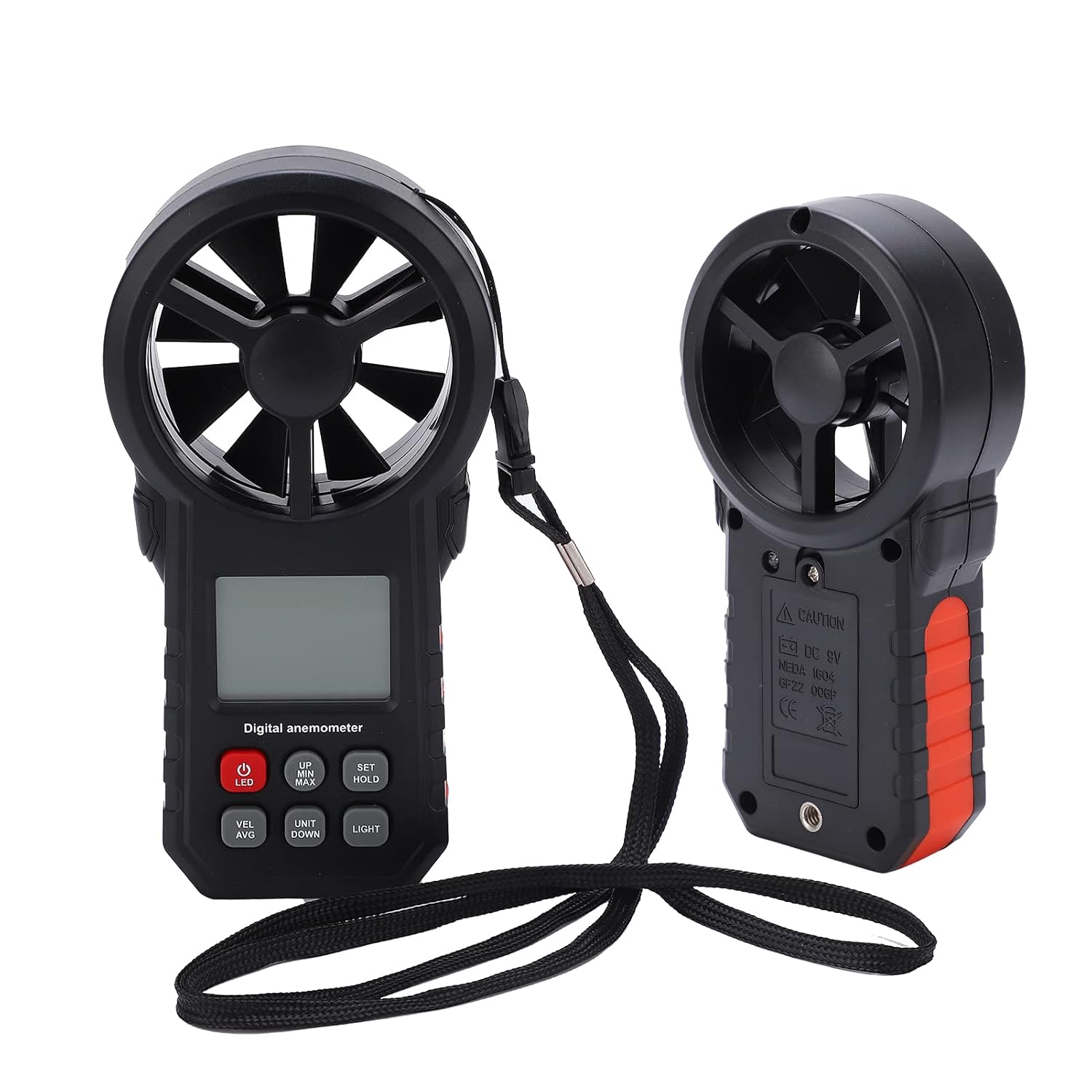
Image 3.1: Rear view of the MS6252A Anemometer, indicating the location of the battery compartment for installation of the 9V battery.
4. Operating Instructions
Familiarize yourself with the buttons and display of the anemometer for effective operation.

Image 4.1: Front view of the MS6252A Anemometer, highlighting the LCD display and control buttons for various functions.
4.1 Button Functions
- LED (Power) Button: Press to turn the device on or off.
- UP / MIN / MAX Button: Used to navigate menus or display minimum/maximum readings.
- SET / HOLD Button: Used to confirm selections or hold the current reading on the display.
- VEL / AVG Button: Toggles between current velocity and average velocity readings.
- UNIT / DOWN Button: Used to change measurement units (e.g., m/s, ft/min, knots, km/h, mph) or navigate menus downwards.
- LIGHT Button: Activates or deactivates the LCD backlight for improved visibility in low-light conditions.
4.2 Taking Measurements
- Press the LED button to power on the anemometer.
- Ensure the impeller is unobstructed and facing the direction of the wind or air flow you wish to measure.
- The current wind speed will be displayed on the LCD.
- Press the UNIT / DOWN button to cycle through different measurement units as desired.
- To view minimum, maximum, or average readings, use the UP / MIN / MAX or VEL / AVG buttons.
- To hold a reading on the screen, press the SET / HOLD button. Press again to release.
- After use, press the LED button to power off the device.
5. Maintenance
Proper maintenance ensures the longevity and accuracy of your anemometer.
- Cleaning: Wipe the device with a soft, dry cloth. Do not use abrasive cleaners or solvents. Ensure the impeller is free of dust and debris.
- Storage: When not in use for extended periods, remove the battery to prevent leakage. Store the anemometer in its carrying case in a cool, dry place, away from direct sunlight and extreme temperatures.
- Battery Replacement: Replace the 9V battery when the low battery indicator appears on the display or if the device fails to power on.
- Impeller Care: Avoid dropping the device or subjecting the impeller to impact, as this can damage the sensitive sensor.
6. Troubleshooting
If you encounter issues with your MS6252A Anemometer, refer to the following common problems and solutions:
- Device does not power on:
- Check if the 9V battery is installed correctly with the right polarity.
- Replace the battery with a new one.
- Inaccurate readings:
- Ensure the impeller is clean and rotates freely without obstruction.
- Verify that the anemometer is positioned correctly in the airflow.
- Check for strong electromagnetic interference in the measurement area.
- Display is dim or flickering:
- The battery may be low. Replace the 9V battery.
- Ensure the backlight is not continuously on, which can drain the battery faster.
7. Specifications
Detailed technical specifications for the MS6252A Anemometer:
7.1 General Specifications
- Item Type: Anemometer
- Model: MS6252A
- Material: ABS
- Color: Orange (Note: Product images show black/red)
- Battery: 1 x 6F22 9V (battery not included)
- Purpose: Wind speed, gas flow measurement
- Temperature Sensor: Negative Temperature Coefficient
- Operating Temperature: -10℃ ~ +45℃ (14℉ ~ 113℉)
- Operating Humidity: Not more than 90% RH
- Storage Temperature: -10℃ ~ +50℃ (14℉ ~ 122℉)
- Power Consumption: Approximately 6 mA
7.2 Wind Speed Measurement
| Unit | Measurement Range | Resolution | Threshold Value | Accuracy |
|---|---|---|---|---|
| m/s | 0~30 | 0.01 | 0.3 | ±5%±0.1 |
| ft/min | 0~5860 | 1.968 | 60 | ±5%±20 |
| knot | 0~55 | 0.019 | 0.6 | ±5%±0.2 |
| km/h | 0~90 | 0.036 | 1 | ±5%±0.4 |
| mph | 0~65 | 0.022 | 0.7 | ±5%±0.2 |
7.3 Wind Temperature Measurement
| Unit | Measurement Range | Resolution | Accuracy |
|---|---|---|---|
| ℃ | -10℃~+45℃ | 0.1 | ±2℃ |
| ℉ | 14℉~113℉ | 0.2 | ±3.6℉ |
7.4 Wind Flow Range
- CMM: 0-999900 m³/min
- CFM: 0-999900 ft³/min
| Unit | Range | Resolution | Interval |
|---|---|---|---|
| CFM(FT³/MIN) | 0-999900 | 0.001-100 | 0.001-9999 |
| CMM(M³/MIN) | 0-999900 | 0.001-100 | 0.001-9999 |
8. Safety Information
Please read and understand the following safety precautions before using the anemometer:
- Do not attempt to disassemble or modify the device. This may cause damage and void the warranty.
- Keep the device away from water and high humidity to prevent electrical shock or damage.
- Avoid exposing the device to extreme temperatures, direct sunlight, or corrosive environments.
- Handle the impeller with care to avoid damage, as it is a sensitive component for accurate measurements.
- Dispose of batteries according to local regulations. Do not dispose of batteries in fire.


