
Introduction
The Walrus Audio MAKO Series M1 is a powerful multi-function modulation machine designed to provide a wide array of studio-quality modulation effects. It features six distinct programs: Chorus, Phaser, Tremolo, Vibe, Rotary, and Filter, each offering extensive customization. The M1 allows users to craft subtle textures or massive, swirling soundscapes, making it a versatile tool for any musician.

Figure 1: Front view of the Walrus Audio MAKO Series M1 pedal, showcasing its controls and footswitches.
Setup
Before operating your M1 pedal, ensure proper connections and power supply.
Power Requirements
- The M1 requires a 9VDC, 300mA power supply. Use a standard center-negative power supply.
- Using an incorrect power supply can damage the unit and void the warranty.
Connections
The M1 offers flexible input and output options for mono or stereo setups, as well as USB and MIDI connectivity.
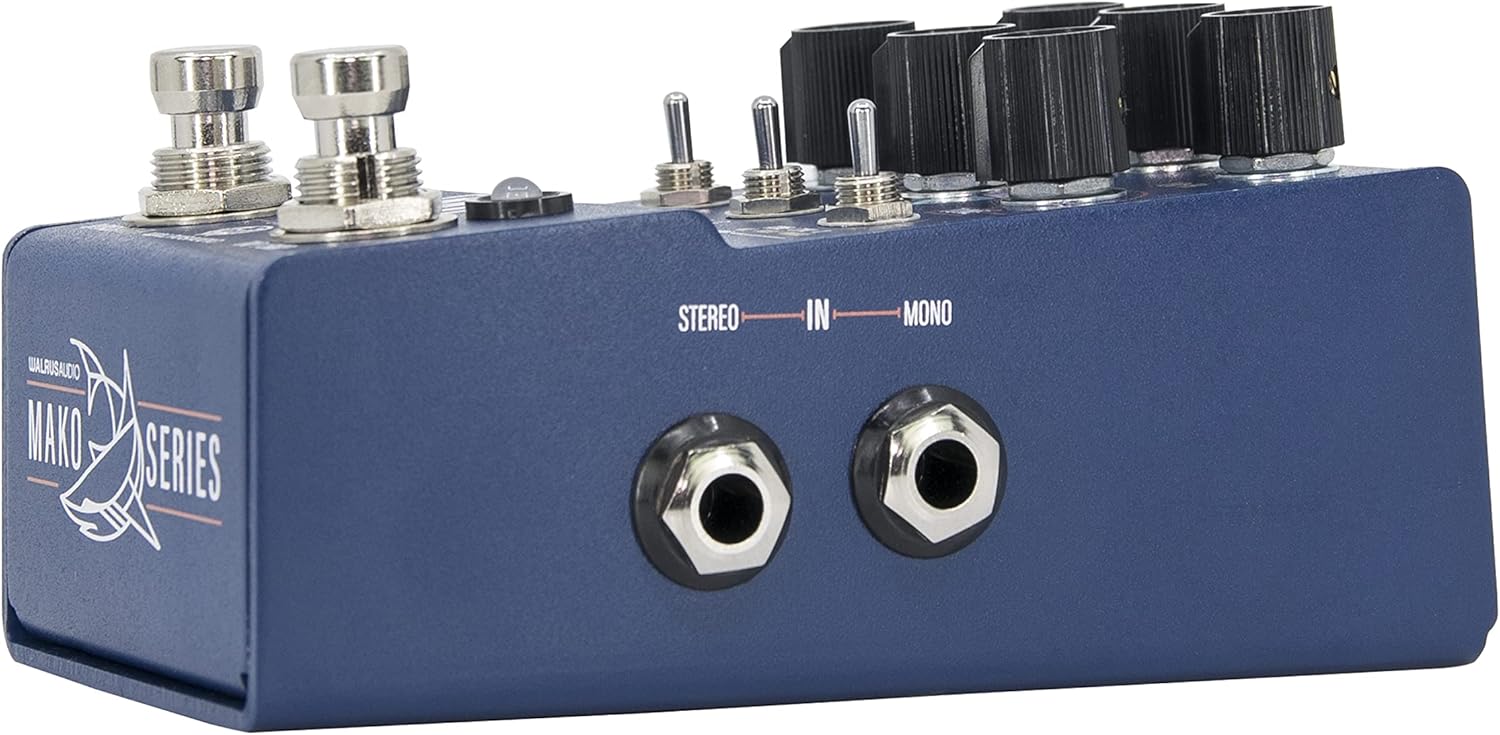
Figure 2: Right side view of the M1 pedal, showing the Mono and Stereo input jacks.
- Input (IN): Connect your instrument or the output of a preceding pedal to the input jack(s). The M1 supports both mono and stereo input.

Figure 3: Left side view of the M1 pedal, displaying the Mono and Stereo output jacks, USB port, and 9VDC power input.
- Output (OUT): Connect the output jack(s) to your amplifier or the input of a subsequent pedal. The M1 supports both mono and stereo output.
- USB Port: Used for firmware updates and MIDI control. Connect to a computer using a standard USB cable.

Figure 4: Rear view of the M1 pedal, showing the MIDI IN and MIDI THRU ports for external control.
- MIDI IN/THRU: For advanced control and integration with MIDI systems. Refer to the full manual on the Walrus Audio website for detailed MIDI implementation.
Operating the M1
The M1 features a user-friendly interface with dedicated knobs and switches for intuitive control over its modulation effects.

Figure 5: Detailed view of the M1's top panel, highlighting the control knobs, toggle switches, and footswitches.
Control Knobs
- RATE: Adjusts the speed of the modulation effect.
- DEPTH: Controls the intensity or depth of the modulation.
- LO-FI: Mixes various lo-fi parameters into the selected program, adding unique textures.
- TWEAK: A multi-function knob that adjusts specific parameters depending on the selected program and toggle switch settings.
- TUNE: Another multi-function knob that adjusts specific parameters depending on the selected program and toggle switch settings.
Toggle Switches
- SHAPE / DIV / TYPE: Selects different modulation shapes, rhythmic divisions, or effect types within a program.
- A / B / C: Selects between three different variations or modes for each modulation program.
- TONE / SYM / X: Adjusts tone characteristics, symmetry, or other unique parameters depending on the program.
Footswitches
- BYPASS / LO-FI: Engages or bypasses the effect. Can also be used to engage the Lo-Fi function with a specific press.
- TAP / SKIP: Sets the tap tempo for rate-based effects. Can also be used to skip through presets.
Modulation Programs
The M1 offers six core modulation programs, selectable via the central rotary switch:
- Chorus: Classic shimmering and swirling effects.
- Phaser: Sweeping, phase-shifted tones.
- Tremolo: Volume modulation for rhythmic pulsing.
- Vibe: Organic, watery vibrato and chorus-like sounds.
- Rotary: Emulates the sound of a rotating speaker cabinet.
- Filter: Dynamic filter effects for expressive tonal shaping.
Presets
The M1 allows you to save and recall up to nine onboard presets. Refer to the full manual for instructions on saving, loading, and organizing presets.
Features
- Six Customized, Studio-Quality Programs: Chorus, Phaser, Tremolo, Vibe, Rotary, and Filter.
- Extensive Customization: Each program offers a wealth of options to tune, tweak, and customize.
- Nine Onboard Presets: Save your favorite settings for quick recall.
- Dedicated Lo-Fi Knob: Mix various lo-fi parameters into any program for unique sonic textures.
- Flexible Connectivity: Mono/Stereo input/output, USB for firmware and MIDI, and MIDI IN/THRU.
Maintenance
To ensure the longevity and optimal performance of your M1 pedal, follow these maintenance guidelines:
- Cleaning: Wipe the pedal with a soft, dry cloth. Avoid using abrasive cleaners or solvents.
- Environment: Operate and store the pedal in a dry environment, away from extreme temperatures, direct sunlight, and moisture.
- Power Supply: Always use the specified 9VDC, 300mA, center-negative power supply. Disconnect power when not in use for extended periods.
- Physical Care: Avoid dropping the pedal or subjecting it to strong impacts.
Troubleshooting
If you encounter issues with your M1 pedal, consider the following common troubleshooting steps:
- No Sound/Weak Signal:
- Check all cable connections (input, output, power).
- Ensure the power supply meets the 9VDC, 300mA, center-negative specification.
- Verify that the pedal is engaged (Bypass footswitch LED is on).
- Test with different cables and a different power outlet.
- Unexpected Volume Drop:
- Some users report a volume drop when placing the M1 in an amplifier's effects loop. Consider placing the M1 before your gain pedals or directly into the front of your amplifier to mitigate this.
- Ensure the 'TWEAK' and 'TUNE' knobs are not set to extreme values that might attenuate the signal.
- Unresponsive Controls:
- Perform a factory reset (refer to the Walrus Audio website for specific instructions).
- Check for available firmware updates via the USB port.
- Noise/Hum:
- Ensure you are using an isolated power supply.
- Check for ground loops in your signal chain.
- Move the pedal away from other electronic devices that may cause interference.
For further assistance, visit the official Walrus Audio support page or contact their customer service.
Specifications
| Item Model Number | 900-1063 |
| Item Weight | 1.07 pounds |
| Product Dimensions | 4.92 x 2.87 x 2.48 inches |
| Voltage | 9 Volts |
| Signal Format | Analog |
| Hardware Interface | USB |

Figure 6: Bottom view of the M1 pedal, displaying regulatory compliance information.
Warranty and Support
Walrus Audio products are built with quality and reliability in mind. This product is covered by a manufacturer's warranty against defects in materials and workmanship. For detailed warranty information, product registration, and technical support, please visit the official Walrus Audio website. Keep your proof of purchase for warranty claims.
Official Website: www.walrusaudio.com


