
1. Introduction
Thank you for choosing the Retekess TA005 Wireless TV Headset. This manual provides essential information for the safe and efficient use of your new device. Please read it thoroughly before operation and retain it for future reference.

Image 1.1: Retekess TA005 Wireless TV Headset, Transmitter, and included cables.
2. Package Contents
Verify that all items listed below are included in your package:
- 1 x Retekess TA005 Headset
- 1 x Retekess TA005 Transmitter
- 1 x Power Adapter
- 1 x AUX Audio Cable (3.5mm)
- 1 x Transmitter Charging Cable (USB)
- 1 x RCA Patch Cable
- 1 x Headset Charging Cable (USB)
- 1 x Digital Optical Cable
- 1 x User Manual

Image 2.1: All components included in the Retekess TA005 product package.
3. Product Features
- Clear Stereo Sound: The RF headset provides clear stereo sound with minimal audio delay, ensuring synchronized audio for an enhanced listening experience.
- Extended Battery Life: Features a 600 mAh rechargeable battery, offering up to 10 hours of continuous playback. A full charge takes approximately 3 hours.
- Versatile Connectivity: The transmitter supports two channels and can be paired with multiple headsets. It is compatible with most televisions and supports optical, AUX (3.5mm), and RCA audio inputs.
- One-Key Mute: Includes a convenient one-key mute function for instant audio control directly from the headset.
- Comfortable Design: Designed for comfort with an over-ear, ergonomic fit suitable for extended wear.
- Extended Wireless Range: Enjoy a transmission distance of up to 30 meters (98 feet).

Image 3.1: Designed for Comfort and Portability.

Image 3.2: Audio-Visual Synchronization.

Image 3.3: Long Battery Life.

Image 3.4: Extended Wireless Range.
4. Setup Instructions
4.1 Connecting the Transmitter to Your TV
The Retekess TA005 transmitter supports multiple audio input methods. Choose the one compatible with your television or audio source.

Image 4.1: Transmitter Audio Input Options.
- Optical Audio Input: Connect one end of the Digital Optical Cable to the OPTICAL OUT port on your TV and the other end to the OPTICAL IN port on the TA005 transmitter.
- RCA Audio Input: Connect the RCA Patch Cable to the AUDIO OUT (Red and White) ports on your TV and the other end to the RCA IN ports on the TA005 transmitter.
- AUX (3.5mm) Audio Input: Connect the 3.5mm AUX Audio Cable to the headphone jack or AUX OUT port on your TV and the other end to the AUX IN port on the TA005 transmitter.
After connecting the audio cable, connect the transmitter to a power source using the provided power adapter and transmitter charging cable.
4.2 Charging the Headset
Before first use, fully charge the headset. Connect the headset charging cable to the charging port on the headset and the other end to a USB power source (e.g., computer USB port, USB wall adapter).
- A full charge takes approximately 3 hours.
- The headset provides up to 10 hours of continuous playback on a full charge.
4.3 Pairing and Channel Selection
The transmitter and headset are typically pre-paired. If pairing is needed or you wish to switch channels:
- Ensure both the transmitter and headset are powered on.
- On the headset, press the 'CH' button to cycle through available channels (Channel A or Channel B).
- The headset will automatically connect to the active channel broadcast by the transmitter.
5. Operating Instructions
5.1 Headset Controls
The headset features intuitive controls located on the earcup:
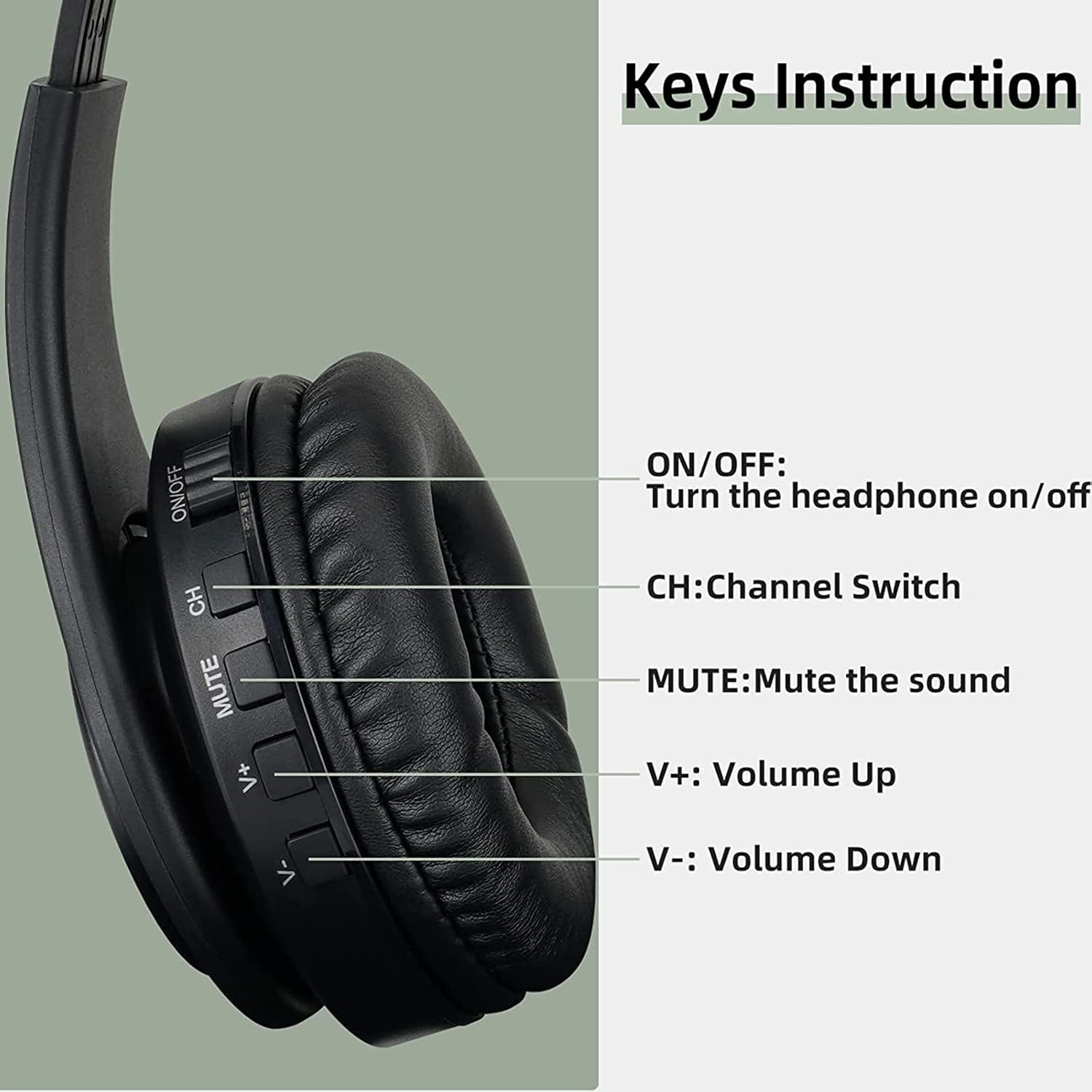
Image 5.1: Headset Key Instructions.
- ON/OFF: Press and hold to power the headset on or off.
- CH (Channel Switch): Press to switch between available channels (Channel A / Channel B).
- MUTE: Press to instantly mute or unmute the audio.
- V+ (Volume Up): Press to increase the volume.
- V- (Volume Down): Press to decrease the volume.

Image 5.2: One-Key Mute Function.
6. Maintenance
To ensure the longevity and optimal performance of your Retekess TA005 headset, follow these maintenance guidelines:
- Cleaning: Use a soft, dry cloth to clean the headset and transmitter. Avoid using abrasive cleaners, solvents, or harsh chemicals.
- Storage: Store the headset and transmitter in a cool, dry place away from direct sunlight and extreme temperatures. The headset's foldable design helps save space during storage.
- Battery Care: To preserve battery life, avoid fully discharging the headset frequently. Charge it regularly, even if not in use for extended periods.
- Avoid Moisture: The device is not waterproof. Keep it away from water, rain, and high humidity.
7. Troubleshooting Guide
Refer to the table below for common issues and their solutions:

Image 7.1: Troubleshooting Guide.
| Troubleshooting | Solutions |
|---|---|
| There is a constant squeak in the headphones. |
|
| Sometimes the connection is interrupted and will be restored after 3-4 minutes. |
|
| Cannot connect the headphone to my TV. |
|
| It works well, but the day before yesterday it stopped working, I have restarted many times, the transmitter does not light up the blue light. |
|
8. Specifications
- Model Number:
- TA005
- Brand:
- Retekess
- Material:
- Faux leather
- Item Weight:
- 460 Grams
- Style:
- Over-Ear
- Ear Placement:
- Over-Ear
- Impedance:
- 32 Ohms
- Noise Isolation:
- None
- Connectivity Technology:
- Wireless (RF)
- Audio Inputs:
- 3.5mm Audio Jack (AUX), RCA, Optical
- Battery Type:
- 1 Lithium-ion (included)
- Battery Capacity:
- 600 mAh
- Playback Time:
- Up to 10 hours
- Charging Time:
- Approximately 3 hours
- Special Features:
- Rechargeable battery, Wireless, One-key mute function
- Water Resistance Level:
- Not waterproof
- Country of Origin:
- China
9. Warranty and Support
9.1 Manufacturer Warranty
Retekess offers a 2-year warranty for this product and a 30-day no-reason return policy. For issues beyond the warranty period, maintenance services are still available, though buyers may be responsible for associated costs.
9.2 Customer Support
For any questions, technical assistance, or warranty claims, please contact Retekess customer service through the platform where you purchased the product (e.g., Amazon). We aim to respond to inquiries within 12 hours.
- Spare Parts Availability: Information regarding spare parts availability is currently not provided.
- Software Updates: Information regarding guaranteed software updates is currently not provided.