
Introduction
This manual provides instructions for the proper use and care of your Quantum Powertech Dual Time Watch, model PWG967.399. Please read this manual thoroughly to ensure optimal performance and longevity of your timepiece.
Product Overview
The Quantum Powertech Dual Time Watch is a quartz movement timepiece featuring a dual time display and water resistance up to 50 meters. It is constructed with a stainless steel case and a silicone strap.
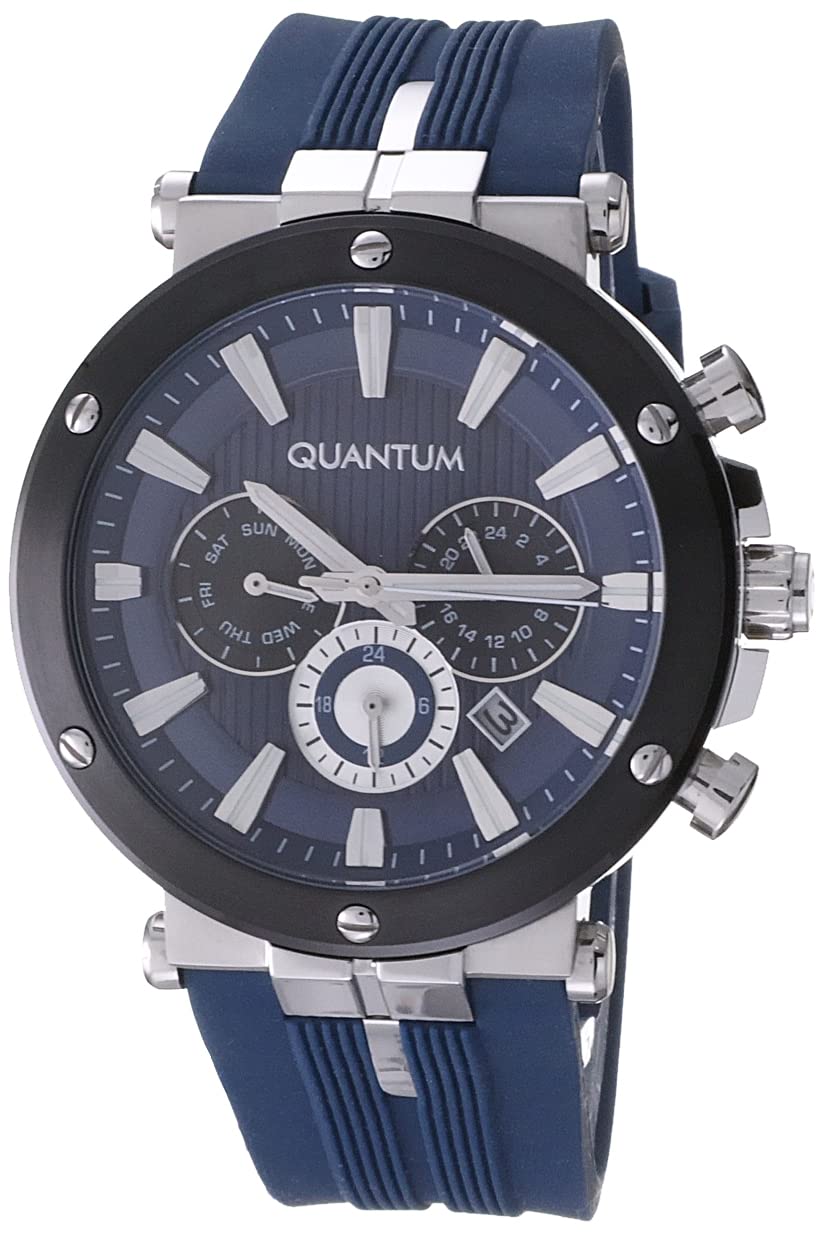
Image 1: Front view of the Quantum Powertech Dual Time Watch, showcasing the blue round dial, silver-tone case, and blue silicone strap.
Components:
- Crown: Used for setting time and date.
- Pushers: Used for operating specific functions (e.g., dual time adjustment).
- Dial: Displays time, and potentially other functions like dual time.
- Hands: Hour, minute, and second hands.
- Strap: Blue silicone strap with buckle clasp.
- Case Back: Contains model and water resistance information.

Image 2: Side view of the watch, highlighting the crown and pushers on the right side of the case, used for various adjustments.
Setup
Setting the Main Time:
- Pull the crown out to the first or second click position (refer to specific watch movement instructions if available, typically the outermost position for time setting).
- Rotate the crown to set the hour and minute hands to the desired time.
- Push the crown back into its normal position to start the watch.
Setting the Dual Time:
The dual time function allows you to track a second time zone. Specific instructions for setting the dual time may vary based on the watch's movement. Typically, this involves using one of the pushers or a secondary crown position.
- Consult the detailed movement guide if provided with your watch for precise dual time setting procedures.
- Generally, a dedicated sub-dial or hand will indicate the second time zone, adjusted via a pusher or a specific crown rotation.
Operating Instructions
Wearing the Watch:
Adjust the silicone strap to fit comfortably on your wrist. The buckle clasp ensures a secure fit. Avoid wearing the watch too tightly, which can restrict circulation, or too loosely, which can cause it to move excessively.

Image 3: The Quantum Powertech Dual Time Watch displayed on a wrist, showing its fit and appearance when worn.
Water Resistance (50m):
Your watch is water resistant up to 50 meters (5 ATM). This means it is suitable for short periods of recreational swimming, but not for diving or snorkeling. Do not operate the crown or pushers when the watch is wet or submerged, as this can compromise the water resistance.
- Avoid: Hot water, steam (showers, saunas), or sudden temperature changes, which can affect seals.
- After contact with saltwater: Rinse the watch with fresh water and dry thoroughly.
Maintenance
Cleaning:
To maintain the appearance of your watch:
- Wipe the case and glass with a soft, dry cloth.
- For the silicone strap, use a mild soap solution and a soft brush, then rinse with clean water and dry completely.
- Avoid using harsh chemicals or abrasive materials.
Battery Replacement:
Your watch is powered by a Lithium Ion battery. When the watch stops or the second hand begins to skip, it indicates a low battery. Battery replacement should be performed by a qualified watch technician to ensure proper sealing and water resistance.

Image 4: Back view of the watch, showing the stainless steel case back where battery access and water resistance markings are located.
Storage:
When not in use, store your watch in a cool, dry place, away from direct sunlight and extreme temperatures. The original packaging can be used for storage.

Image 5: The Quantum watch presented in its black and yellow branded box, suitable for storage or gifting.
Troubleshooting
- Watch not running: Check if the crown is pushed in completely. If it is, the battery may need replacement.
- Time is incorrect: Reset the time as per the "Setting the Main Time" instructions. If the issue persists, the battery may be low or the movement may require service.
- Condensation under glass: This indicates a breach in water resistance. Avoid further contact with water and seek professional service immediately.
- Strap discomfort: Ensure the strap is not too tight or too loose. Clean the strap regularly to prevent skin irritation.
Specifications
| Model Number | PWG967.399 |
| Movement Type | Quartz |
| Display Type | Analogue |
| Case Material | Stainless Steel |
| Case Diameter | 45 Millimetres |
| Case Thickness | 14 Millimetres |
| Crystal Material | Glass (Anti Reflective) |
| Dial Colour | Blue |
| Band Material | Silicone |
| Band Colour | Blue |
| Band Width | 16 Millimetres |
| Clasp Type | Buckle |
| Water Resistance Depth | 50 Metres (5 ATM) |
| Special Features | Dual Time, Water Resistant |
| Battery | 1 Lithium Ion battery (included) |
| Item Weight | 250 g |
| Product Dimensions | 1 x 2.4 x 1.2 cm |
Warranty Information
Your Quantum Powertech Dual Time Watch comes with a 2-year International Warranty from the date of purchase. This warranty covers manufacturing defects in materials and workmanship under normal use.
The warranty does not cover:
- Damage resulting from improper handling, lack of care, accidents, or normal wear and tear.
- Damage caused by unauthorized repairs or modifications.
- Battery, strap, or crystal damage.
- Water damage if the watch was opened or if the crown/pushers were operated while wet.
For warranty service, please retain your proof of purchase and contact an authorized Quantum service center.
Support
For further assistance or inquiries regarding your Quantum Powertech Dual Time Watch, please refer to the official Quantum website or contact their customer support. Ensure you have your model number (PWG967.399) and proof of purchase available when seeking support.
