1. Product Overview
This manual provides essential instructions for the safe and effective use of your Zenander HBU83S replacement battery. This 3.7V, 800mAh Li-ion battery is specifically designed for compatibility with Vodafone 715 and Vodafone 716 mobile phone models.
Key features of this battery include:
- Fully compatible with Vodafone 715 and 716 devices.
- Battery Specifications: 800mAh, 3.7V, 2.96Wh.
- Li-ion Type Battery, designed for approximately 500 charge cycles.
- Certifications: ISO9001, RoHS, CE, UN38.3, and MSDS.
2. Safety Information
Please read and understand all safety instructions before using this product. Failure to follow these instructions may result in fire, electric shock, explosion, or other hazards.
- Do not attempt to disassemble, open, or service the battery pack. This will void the warranty.
- Do not crush, puncture, short external contacts, or dispose of in fire or water.
- Do not store above 60°C (140°F). High temperatures can damage the battery and pose a fire risk.
- Replace only with the battery pack designated for this product.
- New battery packs must be fully charged before use.
- Always dispose of batteries responsibly according to local regulations.
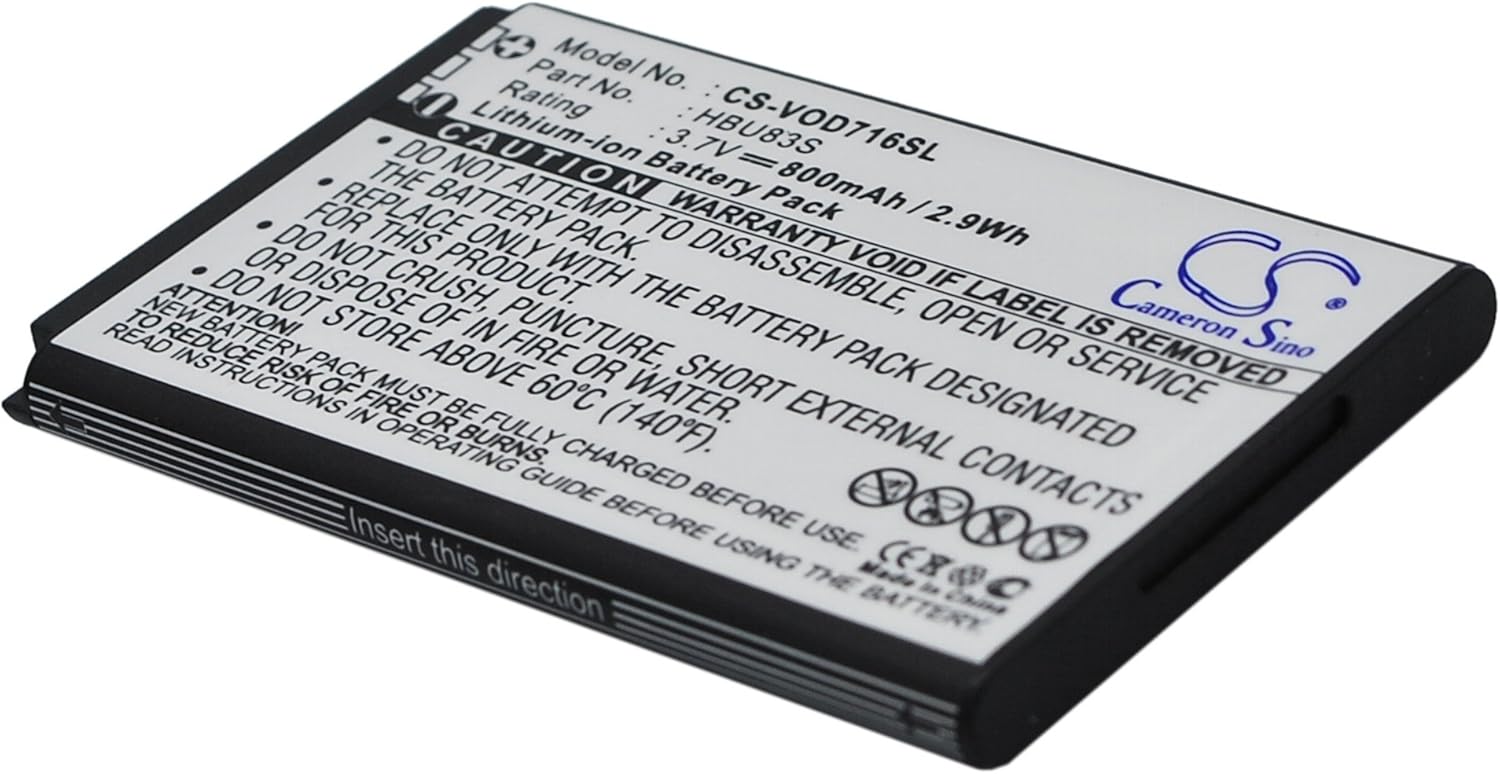
Image: Front view of the Zenander HBU83S battery, showing model number, rating, and important safety warnings printed on the label.
3. Battery Installation
Follow these general steps to replace the battery in your Vodafone 715 or 716 device. Specific steps may vary slightly depending on your phone model.
- Power Off Device: Ensure your Vodafone phone is completely powered off before beginning the installation.
- Remove Back Cover: Carefully remove the back cover of your phone. Refer to your phone's original user manual if you are unsure how to do this.
- Remove Old Battery: Gently lift and remove the existing battery from its compartment.
- Insert New Battery: Align the Zenander HBU83S battery with the battery compartment. Ensure the gold contacts on the battery match the contacts in the phone. Insert the battery in the direction indicated on the battery itself or the phone's compartment.
- Replace Back Cover: Securely reattach the back cover of your phone.
- Initial Charge: It is recommended to fully charge the new battery before its first use.

Image: Angled view of the Zenander HBU83S battery, highlighting the 'Insert this direction' text for proper installation.
4. Battery Usage
To maximize the performance and lifespan of your Zenander HBU83S battery:
- First Use: Fully charge the battery before its initial use.
- Charging: Use only compatible chargers. Avoid overcharging or completely draining the battery frequently.
- Temperature: Operate the device within normal temperature ranges. Extreme cold or heat can affect battery performance and longevity.
- Storage: If storing the battery for an extended period, charge it to about 50% and store it in a cool, dry place.
5. Battery Maintenance
Proper maintenance helps ensure the longevity and safety of your battery:
- Keep battery contacts clean. Use a dry cloth to wipe them if necessary.
- Avoid physical damage to the battery, such as drops or impacts.
- Do not expose the battery to liquids.
- If the battery appears swollen, damaged, or leaks, discontinue use immediately and dispose of it safely.
6. Troubleshooting Common Issues
If you encounter issues with your battery, consider the following:
| Problem | Possible Solution |
|---|---|
| Battery not charging | Ensure the charger is working and properly connected. Check for debris in the charging port. Try a different compatible charger. |
| Battery drains quickly | Check background apps and settings that consume power. Reduce screen brightness. Ensure the battery is fully charged. Battery life naturally degrades over time. |
| Phone not turning on after battery replacement | Ensure the battery is correctly seated in its compartment. Verify the battery contacts are clean. Try charging the phone for at least 30 minutes. |
7. Product Specifications
| Specification | Detail |
|---|---|
| Model Number | CS-VOD716SL |
| Compatible Part Number | HBU83S |
| Voltage | 3.7V |
| Capacity | 800mAh |
| Energy | 2.96Wh |
| Battery Type | Li-ion (Lithium-ion) |
| Battery Cell Composition | Polymer |
| Product Dimensions | 1.39 x 1.88 x 0.17 inches |
| Item Weight | 1.41 ounces (40 grams) |
| Manufacturer | Zenander |
8. Warranty and Support
Zenander offers a commitment to customer satisfaction:
- Warranty: Full refund or a free replacement without reason for 60 days from the date of purchase.
- Customer Support: For any questions, concerns, or support needs regarding your Zenander HBU83S battery, please contact Zenander customer service. Refer to your purchase documentation for specific contact details.


