
goobay 53934
goobay 53934 20000 mAh Outdoor Power Bank User Manual
Model: 53934 | Brand: goobay
1. Product Overview
The goobay 53934 20000 mAh Outdoor Power Bank is a portable external battery designed for charging smartphones, tablets, and other USB-powered devices. It features a high-capacity battery, quick charge functionality, and an integrated solar panel for emergency charging. This power bank is built for outdoor use, offering durability and convenience.
Key features include:
- 20,000 mAh battery capacity
- Quick Charge (QC 3.0) and Power Delivery (PD) support
- Integrated solar panel for supplementary charging
- Two USB-A QC 3.0 ports and one USB-C port
- Built-in LED flashlight
- Durable design for outdoor environments
2. Safety Instructions
Please read and follow these safety instructions carefully to prevent damage to the device or injury to yourself.
- Do not expose the power bank to extreme temperatures (above 60°C/140°F or below -10°C/14°F), direct sunlight for prolonged periods, or high humidity.
- Do not disassemble, modify, or attempt to repair the device. This will void the warranty and may cause harm.
- Keep away from water and other liquids. If the device gets wet, do not use it.
- Do not drop, puncture, or apply excessive force to the power bank.
- Keep out of reach of children.
- Use only certified charging cables and adapters.
- Dispose of the power bank responsibly according to local regulations for electronic waste.
- The solar panel is for emergency charging and supplementary power only. It is not intended as the primary charging method.
3. What's in the Box
Upon opening the package, please ensure all the following items are present:
- goobay 53934 20000 mAh Outdoor Power Bank with LED and Solar Panel
- USB-C Charging Cable
- User Manual (this document)
4. Product Layout and Components
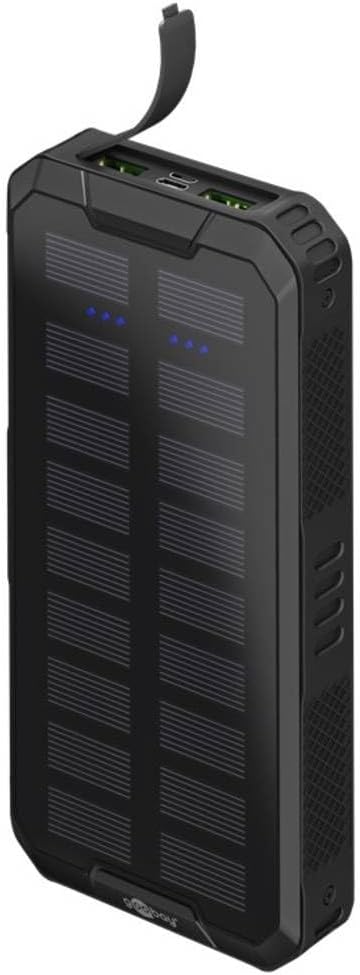
Figure 4.1: Front view of the goobay 53934 Outdoor Power Bank, showing the solar panels and LED indicators.

Figure 4.2: Back view of the goobay 53934 Outdoor Power Bank, highlighting the integrated LED flashlight.

Figure 4.3: Side view of the goobay 53934 Outdoor Power Bank, illustrating its dimensions (178mm height, 85mm width, 25mm depth).
The goobay 53934 power bank features a robust black casing with textured sides for grip. On the front, it has multiple solar panels and blue LED indicators for battery status. The top edge houses the charging ports, including two USB-A ports and one USB-C port. The back of the device includes a powerful LED flashlight.
- Solar Panels: Located on the front surface, designed for emergency and supplementary charging.
- LED Indicators: Blue LEDs on the front indicate the remaining battery charge level.
- USB-A Output Ports (x2): For charging external devices with Quick Charge 3.0 support.
- USB-C Input/Output Port (x1): For charging the power bank itself or charging external devices with Power Delivery support.
- LED Flashlight: Located on the back, activated by a dedicated button or sequence.
- Power Button: Used to check battery status and activate/deactivate the flashlight.
5. Setup
5.1 Initial Charging
Before first use, fully charge the power bank using a wall adapter. This ensures optimal battery performance and calibration.
- Connect the supplied USB-C charging cable to the USB-C input port on the power bank.
- Connect the other end of the USB-C cable to a compatible USB wall charger (not included). For fastest charging, use a Quick Charge or Power Delivery compatible charger.
- The LED indicators will light up to show the charging progress. All four LEDs will be solid blue when fully charged.
Note: A full charge via wall adapter may take several hours depending on the charger's output.
5.2 Checking Battery Level
Press the power button once to check the current battery level. The blue LED indicators will illuminate:
- 1 LED: 0-25% charge
- 2 LEDs: 25-50% charge
- 3 LEDs: 50-75% charge
- 4 LEDs: 75-100% charge
6. Operating Instructions
6.1 Charging External Devices
The power bank can charge up to three devices simultaneously using its USB-A and USB-C output ports.
- Connect your device's charging cable to one of the USB-A or the USB-C output ports on the power bank.
- Connect the other end of the cable to your device.
- The power bank will automatically begin charging your device. If not, press the power button once.
- The LED indicators on the power bank will show the remaining charge.
- Disconnect your device once fully charged or when you no longer need to charge.
Note: For optimal charging speed, use the appropriate port (USB-C for Power Delivery, USB-A for Quick Charge) if your device supports these technologies.
6.2 Using the Solar Panel
The integrated solar panel provides a supplementary charging option, ideal for emergencies or maintaining charge during outdoor activities. It is not designed for rapid or primary charging.
- Place the power bank in direct sunlight with the solar panels facing upwards.
- A green indicator light (if present, or specific blue LEDs might blink differently) may indicate solar charging is active.
- For best results, ensure no shadows are cast on the solar panels.
Important: Solar charging is significantly slower than wall charging. It is primarily for emergency use or to trickle charge the power bank when no other power source is available. Do not rely on solar charging for a full or fast charge.
6.3 Using the LED Flashlight
The power bank includes a built-in LED flashlight for convenience in low-light conditions.
- To turn on the flashlight: Double-press the power button quickly.
- To cycle through modes (if applicable, e.g., SOS, strobe): Double-press the power button again.
- To turn off the flashlight: Double-press the power button quickly again.
7. Maintenance
Proper maintenance will extend the lifespan of your goobay power bank.
- Cleaning: Wipe the device with a soft, dry cloth. Do not use harsh chemicals or abrasive cleaners.
- Storage: Store the power bank in a cool, dry place away from direct sunlight and extreme temperatures. If storing for extended periods, charge the power bank to about 50-75% every 3 months to preserve battery health.
- Avoid Over-Discharging: Do not allow the power bank to completely drain its battery frequently, as this can reduce its overall lifespan.
8. Troubleshooting
| Problem | Possible Cause | Solution |
|---|---|---|
| Power bank not charging |
|
|
| Device not charging from power bank |
|
|
| Solar charging is very slow or not working |
|
|
| Flashlight not turning on |
|
|
9. Specifications
| Feature | Detail |
|---|---|
| Model Number | 53934 |
| Battery Capacity | 20,000 mAh |
| Input Ports | 1x USB-C (Power Delivery compatible) |
| Output Ports | 2x USB-A (Quick Charge 3.0), 1x USB-C (Power Delivery) |
| Special Features | Solar Panel, LED Flashlight, Quick Charge, Power Delivery |
| Color | Black |
| Dimensions (L x W x H) | 17.9 cm x 8.6 cm x 2.5 cm (7.05 in x 3.39 in x 0.98 in) |
| Weight | 548 grams (1.21 lbs) |
10. Warranty and Support
goobay products are designed and manufactured to the highest quality standards. For information regarding warranty coverage, please refer to the warranty card included with your purchase or visit the official goobay website.
If you encounter any issues or have questions about your goobay 53934 Outdoor Power Bank, please contact goobay customer support. Contact details can typically be found on the product packaging, the official goobay website, or through your retailer.
For further assistance, you may visit the goobay store: goobay Official Store
Related documents53934


Ask a question about this manual
Ask about setup, troubleshooting, compatibility, parts, safety, or missing instructions. Manuals+ will review the question and use this page’s manual context to help answer it.