
1. Product Overview
The MRCARTOOL V309 is a professional mechatronic device designed for the diagnosis and cleaning of fuel injectors. It integrates ultrasonic cleaning technology with microcomputer-controlled oil pressure and circuit detection. This system supports the simulation of various engine operating conditions to thoroughly clean and inspect both standard and high-pressure EFI/FSI/GDI injectors.
Key features include:
- Ultrasonic Cleaning: Efficiently removes carbon deposits and impurities from injectors.
- Comprehensive Testing: Offers 9 distinct test functions to evaluate injector performance under various conditions.
- Smart Operation Panel: Digital controls for precise adjustment of test parameters and injection voltages (12V/70V/120V).
- 4-Cylinder Capacity: Equipped with four 140ml cylinders, allowing simultaneous cleaning and testing of up to four injectors.
- Wide Compatibility: Suitable for 99% of vehicles, including those with GDI, EFI, and FSI systems.

Figure 1.1: The MRCARTOOL V309 Fuel Injector Cleaner and Tester.
2. Safety Information
Please read and understand all safety warnings and instructions before operating the MRCARTOOL V309. Failure to follow these instructions may result in electric shock, fire, or serious injury.
- Always operate the device in a well-ventilated area.
- Ensure the power supply matches the device's requirements (220V).
- Do not operate the device with wet hands or in damp conditions.
- Use only approved cleaning and testing fluids. Refer to the fluid manufacturer's safety data sheet.
- Wear appropriate personal protective equipment (PPE), including safety glasses and chemical-resistant gloves.
- Keep children and unauthorized personnel away from the operating area.
- Disconnect power before performing any maintenance or cleaning on the unit.
- Avoid direct contact with ultrasonic cleaning fluid during operation.
3. What's in the Box
Upon unpacking, verify that all components listed below are present and undamaged:
- MRCARTOOL V309 Main Unit
- Ultrasonic Cleaning Bracket
- Cleaning Fluid Drain Valve
- Ultrasonic Cleaning Cover
- Oil Separator (with pressure gauge)
- Washers
- Sealing Rings
- Funnel
- Fixing Bolts
- Plugs
- Pulse Signal Cables
- Cleaning Connectors (various sizes)
- Power Cable
- User Manual (this document)

Figure 3.1: Contents of the MRCARTOOL V309 package.
4. Setup
- Placement: Place the V309 main unit on a stable, level surface in a well-ventilated area.
- Power Connection: Connect the power cable to the unit's power input and then to a 220V AC power outlet. Ensure the power switch is in the OFF position before connecting.
- Cleaning Bracket Installation: For ultrasonic cleaning, place the cleaning bracket into the ultrasonic bath.
- Injector Installation: Securely install the fuel injectors into the appropriate slots on the test bench. Use suitable adapters and sealing rings to ensure a leak-free connection.
- Fluid Filling: Fill the ultrasonic bath with appropriate cleaning fluid and the test cylinders with suitable testing fluid. Observe the visible test liquid tube on the side of the unit to ensure correct fluid levels.

Figure 4.1: Component details for setup, including the pressure gauge, visible test liquid tube, and drain valve.
5. Operation
5.1 Control Panel Overview
The intelligent control panel allows for precise control over all cleaning and testing functions. It features digital displays for pulse adjustment and working/injecting times, along with buttons for voltage selection and function control.

Figure 5.1: Intelligent Operation Panel with function descriptions.
5.2 Ultrasonic Cleaning Procedure
- Place the injectors into the ultrasonic cleaning bracket within the ultrasonic bath.
- Ensure the injectors are submerged in the cleaning fluid.
- Turn on the power switch.
- Select the 'Ultrasonic Cleaning' function on the control panel.
- Adjust the cleaning time as required using the panel controls.
- Press the Start button to begin the ultrasonic cleaning process.
- After cleaning, remove the injectors and rinse them thoroughly.

Figure 5.2: Ultrasonic cleaning in progress.
5.3 Injector Testing Procedures
The V309 offers 9 distinct test functions to assess injector performance:
- Idle Speed Test: Checks spray pattern and volume at idle RPM.
- Medium Speed Test: Evaluates performance at medium engine speeds.
- Acceleration Test: Simulates rapid acceleration conditions.
- Variable Speed Test: Tests performance across a range of RPMs.
- Leak Checking Test: Detects any fuel leakage from the injector.
- Idle Spray Volume Test: Measures fuel volume at idle.
- Medium Spray Volume Test: Measures fuel volume at medium speed.
- High Spray Volume Test: Measures fuel volume at high speed.
- High Speed Test: Assesses performance at high engine speeds.
To perform a test:
- Install the injectors onto the test bench and connect the pulse signal cables.
- Ensure the test cylinders are empty and the drain valve is closed.
- Select the desired test function from the control panel.
- Adjust parameters such as pulse width and injection times if applicable.
- Select the appropriate injector voltage (12V, 70V, or 120V) based on the injector type.
- Press the Start button to begin the test. Observe the spray pattern and measure the fuel volume in the graduated cylinders.
- Compare the results with manufacturer specifications to determine injector health.

Figure 5.3: Overview of the 9 testing functions.
5.4 Injector Voltage Selection
The V309 supports different voltage settings to accommodate various injector types, including standard 12V injectors and high-pressure GDI injectors requiring 70V or 120V. Always select the correct voltage to prevent damage to the injectors or the unit.
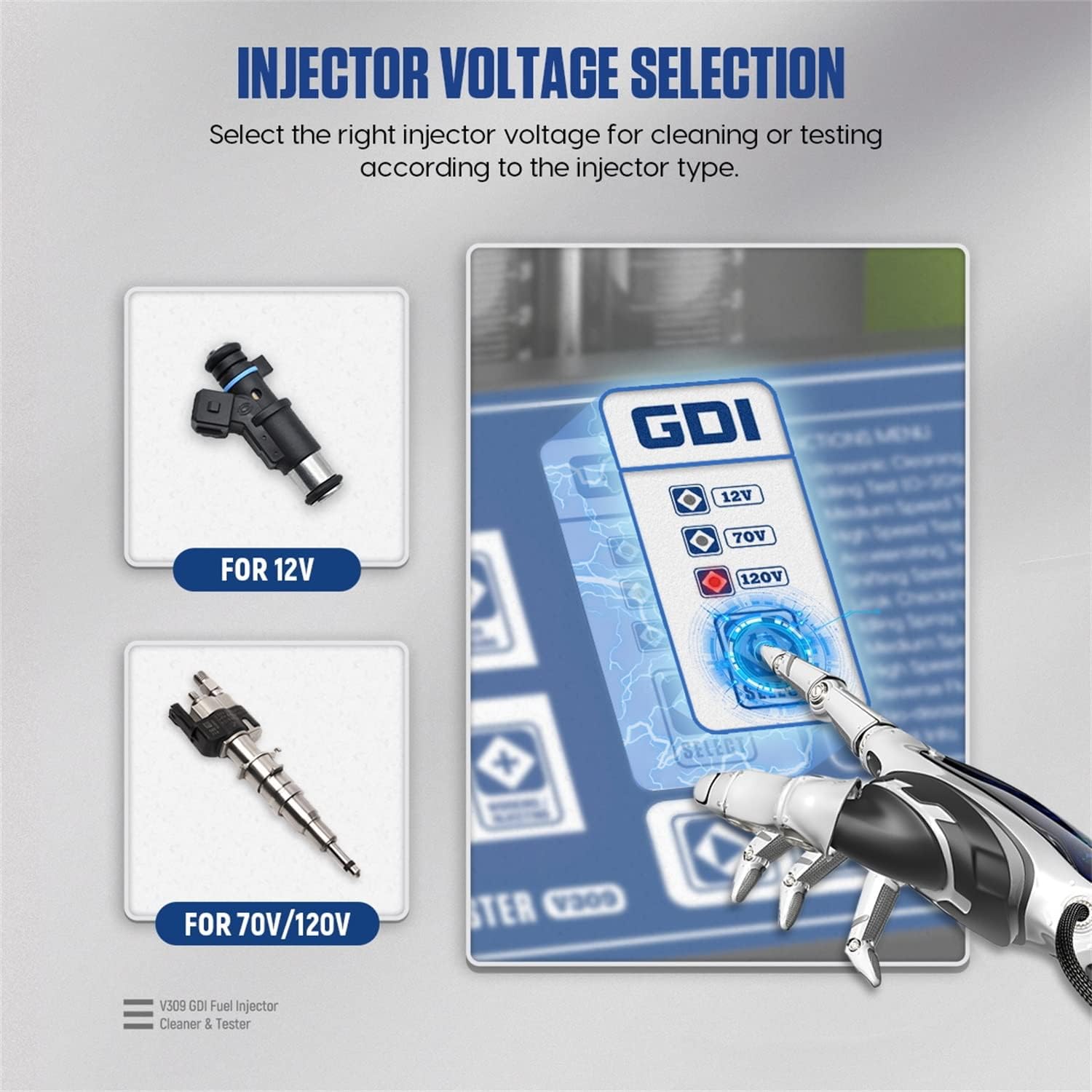
Figure 5.4: Injector voltage selection on the control panel.
6. Maintenance
- Fluid Management: Regularly drain used cleaning and testing fluids using the drain valve. Dispose of fluids according to local environmental regulations.
- Cleaning: Keep the unit clean and free from dust and debris. Wipe surfaces with a soft, dry cloth. Do not use abrasive cleaners or solvents.
- Injector Adapters: Inspect injector adapters and sealing rings for wear or damage before each use. Replace as necessary to ensure proper sealing.
- Storage: When not in use, store the V309 in a dry, cool place, away from direct sunlight and extreme temperatures.
7. Troubleshooting
| Problem | Possible Cause | Solution |
|---|---|---|
| Unit does not power on | No power supply; Power cable loose; Blown fuse | Check power connection; Ensure power switch is ON; Check and replace fuse if necessary. |
| Injectors not spraying | No test fluid; Incorrect voltage selected; Injectors clogged; Pulse signal cable loose | Add test fluid; Select correct voltage; Perform ultrasonic cleaning; Check cable connections. |
| Fluid leakage during test | Improperly installed injectors; Damaged sealing rings/adapters | Reinstall injectors correctly; Replace worn sealing rings or adapters. |
| Inaccurate test results | Contaminated test fluid; Incorrect pressure setting; Faulty pressure gauge | Replace test fluid; Adjust pressure; Calibrate or replace pressure gauge. |
8. Specifications
| Feature | Specification |
|---|---|
| Model | V309 |
| Manufacturer | MRCARTOOL |
| Input Voltage | 220V |
| Ultrasonic Cleaning Power | 100W |
| Test Cylinder Capacity | 140 ml |
| Fuel Tank Capacity | 1300 ml |
| Dimensions (L x W x H) | 40 x 40 x 38 cm |
| Product Weight | 11 kg |
| Injector Test Voltages | 12V, 70V, 120V |
9. Warranty and Support
MRCARTOOL provides a 24-month warranty for the V309 Fuel Injector Cleaner & Tester from the date of purchase. This warranty covers manufacturing defects and malfunctions under normal use. It does not cover damage caused by misuse, accidents, unauthorized modifications, or improper maintenance.
For technical support, warranty claims, or any inquiries, please contact MRCARTOOL customer service. Our team is available 7 days a week, 24 hours a day, to assist you and ensure your satisfaction.
Please retain your proof of purchase for warranty validation.
