
1. Product Overview
The GIDEALED Zigbee 3.0 LED Controller Pro is designed to provide smart control over RGBW, RGBWW, and RGBCCT LED light strips. This controller supports a wide range of input voltages from DC12V to 54V and has a maximum total power output of 270W. It integrates seamlessly with standard Zigbee 3.0 gateways and smart speakers with built-in Zigbee protocols, such as Amazon Echo Plus, Echo (4th Gen), Echo Studio, and Echo Show (2nd Gen), enabling voice control and smart app management for brightness, color, and temperature adjustments.

Image 1.1: Front view of the GIDEALED Zigbee 3.0 LED Controller Pro, showing input/output terminals and specifications.
2. Package Contents
Please verify that all items are present in the package:
- 1 x ZigBee 3.0 LED Controller (Model: GL-C-008P)
Note: LED Strip Light and Power Supply are not included and must be purchased separately.
3. Setup and Installation
3.1 Wiring the LED Controller
The controller features a press-type interface for easy and fast wire connections. Ensure proper polarity when connecting the LED strip and power supply.
- Input: Connect your DC power supply (12V-54V) to the 'INPUT' terminals (V+ and V-).
- Output: Connect your RGBCCT LED strip to the output terminals (V+, R, G, B, C, W). Ensure the common anode (V+) is correctly connected.
- Wire Preparation: For optimal connection, strip 9-10mm of insulation from your wires. The controller supports wire sizes from 0.33mm² to 2.08mm².

Image 3.1: Diagram illustrating the press-type wiring interface for easy and secure connections.
3.2 Connecting to a Zigbee Hub/Gateway
This Zigbee 3.0 LED controller requires a compatible Zigbee hub or gateway for smart control functionalities. It does not operate as a standalone wireless controller without a hub.
- Compatible Hubs: Works with standard Zigbee 3.0 gateways such as Tuya Smart Hub, and smart speakers with built-in Zigbee 3.0 protocol like Amazon Echo Plus, Echo (4th Gen), Echo Studio, and Echo Show (2nd Gen).
- Pairing Process: Refer to your specific Zigbee hub's instructions for adding new devices. Generally, you will put your hub into pairing mode, then power on the GIDEALED controller. The controller should be discovered by the hub.
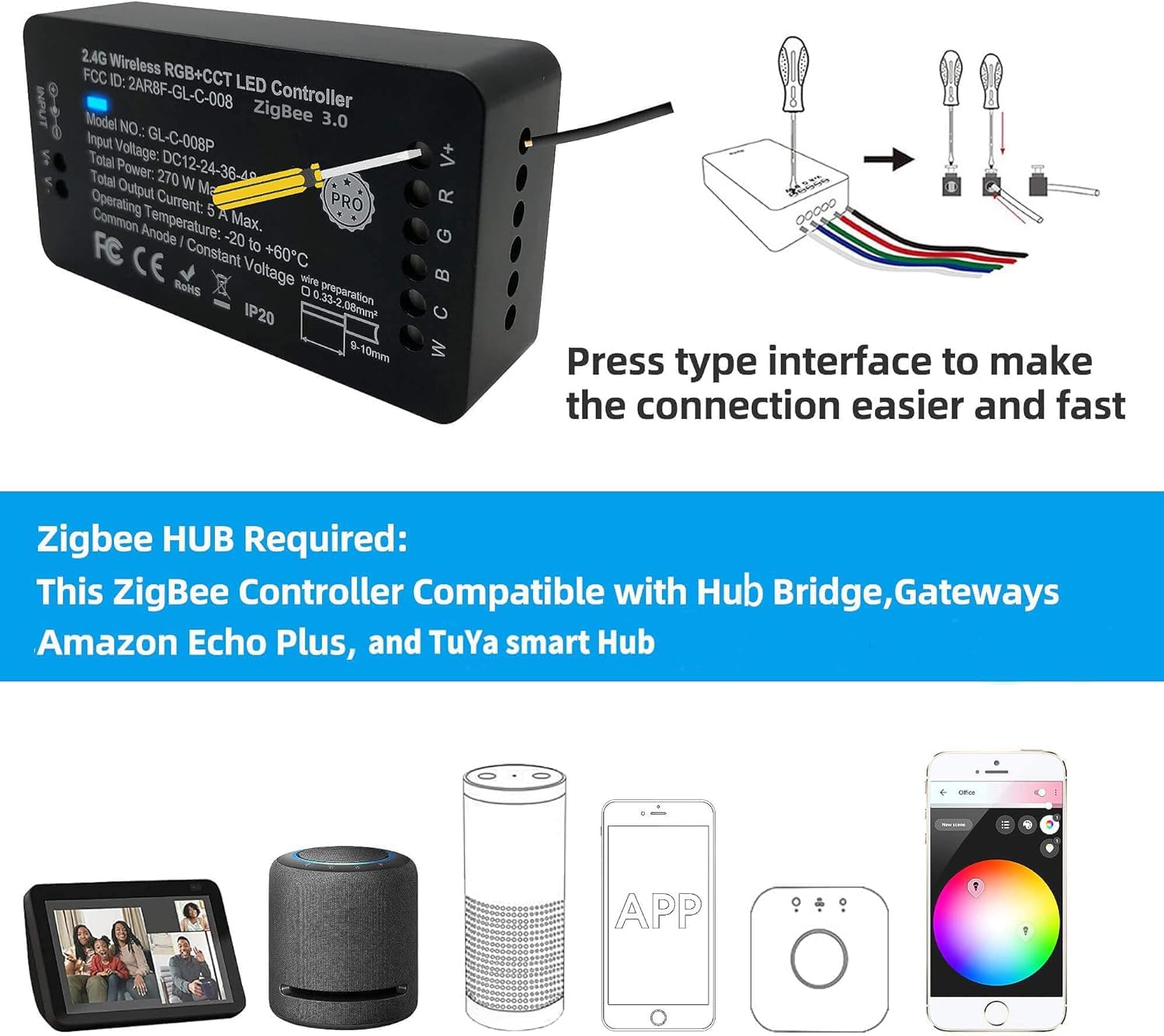
Image 3.2: The controller is compatible with various Zigbee hubs and can be controlled via a smartphone application.
4. Operating Instructions
4.1 Voice Control
Once paired with a compatible smart speaker (e.g., Amazon Echo devices), you can control your LED strip lights using voice commands.
- Turning On/Off: "Alexa, turn on the light."
- Adjusting Brightness: "Alexa, set the brightness to 50%."
- Changing Color/Temperature: "Alexa, set the light to warm white." or "Alexa, change the light to blue."

Image 4.1: A user interacting with Alexa to turn on the LED lights, demonstrating voice control functionality.

Image 4.2: A user using a voice command to set the LED lights to a warm white color.
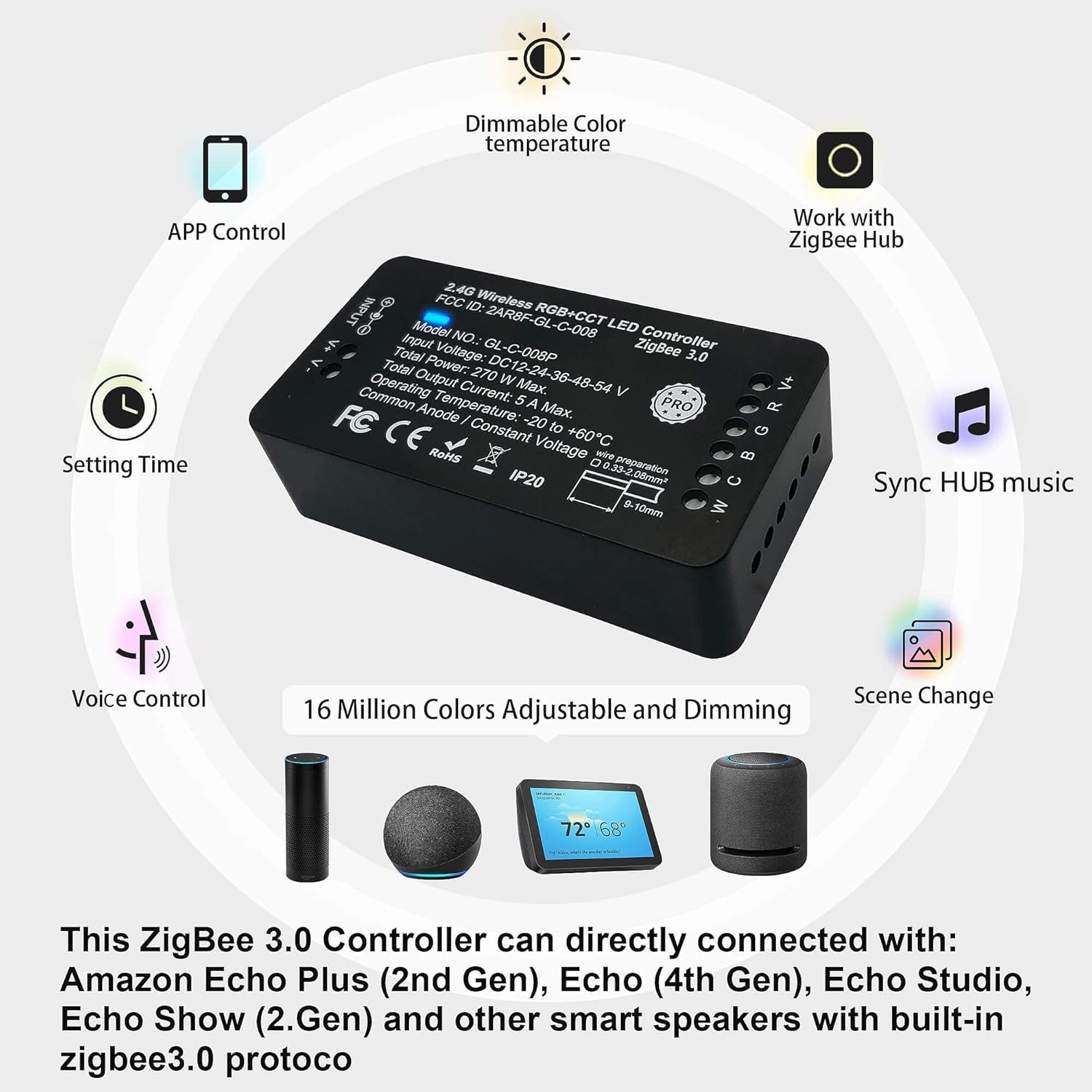
Image 4.3: A family enjoying media with LED backlighting, controlled by a voice command to adjust brightness.
4.2 App Control
Utilize your Zigbee hub's dedicated smartphone application (e.g., Tuya Smart Life app) to control your LED strip lights from anywhere.
- Full Color Spectrum: Access 16 million colors for RGB, RGBW, and RGBCCT LED strips.
- Brightness Adjustment: Dim the lights from 1% to 100%.
- Color Temperature Control: Adjust white light from cool white (CW) to warm white (WW).
- Scene Modes: Create and select various lighting scenes for different moods or occasions.
- Scheduling: Set timers for lights to turn on/off automatically.

Image 4.4: An LED strip demonstrating the wide range of 16 million colors available for selection.

Image 4.5: An interior space showcasing the ability to adjust color temperature from cool to warm white.

Image 4.6: A Zigbee hub and the LED controller illustrating the dimming function from 1% to 100% brightness.
4.3 Extra Mesh Function
Each GIDEALED Zigbee LED controller can function as a signal repeater. This allows it to form a mesh network with other Zigbee lights, effectively increasing the control distance and improving signal reliability within your smart home system.
5. Maintenance
The GIDEALED Zigbee 3.0 LED Controller Pro requires minimal maintenance.
- Keep the device in a dry environment and away from direct sunlight or extreme temperatures.
- Clean the exterior with a soft, dry cloth. Do not use liquid cleaners or solvents.
- Ensure proper ventilation around the controller to prevent overheating.
6. Troubleshooting
If you encounter issues with your GIDEALED Zigbee 3.0 LED Controller Pro, please refer to the following common solutions:
| Problem | Possible Cause | Solution |
|---|---|---|
| Controller not found by gateway/hub | Gateway/hub not in pairing mode; network interference; controller not powered. | Ensure controller is powered on. Put your Zigbee gateway/hub into pairing mode. If issues persist, try restarting your router and gateway. |
| LED strip not lighting up or incorrect colors | Incorrect wiring; faulty LED strip; insufficient power supply. | Check all wiring connections for correct polarity and secure fit. Ensure the LED strip is functional. Verify your power supply meets the voltage and wattage requirements of your LED strip and controller. |
| Voice control not working | Controller not paired with smart speaker; smart speaker not connected to internet. | Confirm the controller is successfully paired with your smart speaker. Check your smart speaker's internet connection. |
| App control not working | Hub/controller offline; app issues. | Ensure your Zigbee hub and controller are online and connected. Restart the app or reinstall it if necessary. |
If these steps do not resolve the issue, please contact GIDEALED customer support for further assistance.
7. Specifications
| Feature | Detail |
|---|---|
| Model Number | GL-C-008P |
| Input Voltage | DC12V-24V-36V-48V-54V |
| Total Power | 270 W Max. |
| Total Output Current | 5 A Max. |
| Operating Temperature | -20 to +60°C |
| Control Method | Zigbee 3.0 (App, Voice Control) |
| Light Source Type | LED (RGBW, RGBWW, RGBCCT) |
| Dimensions (Package) | 3.66 x 2.05 x 1.14 inches |
| Item Weight | 2.08 ounces (0.06 Kilograms) |
| Indoor/Outdoor Usage | Indoor |
| Material | Plastic |
8. Warranty and Support
8.1 Warranty Information
For specific warranty details and terms, please refer to the product packaging or contact GIDEALED directly. Standard return policies typically allow for refunds or replacements within 30 days of purchase.
8.2 Customer Support
If you require further assistance, have questions about the product, or need technical support, please contact GIDEALED customer service. You can find contact information on the official GIDEALED store page or through your purchase platform.
Visit the GIDEALED Store: GIDEALED Amazon Store


