
1. Introduction
Thank you for purchasing the Eyesound Y13 Smart Touch Table Lamp. This versatile lamp offers a range of features including touch control, app control, voice control compatibility with Alexa and Google Assistant, RGB color options, dimmable brightness, a built-in battery, and an HD screen with time display. This manual provides detailed instructions to help you set up and operate your new smart lamp.

Image 1: Eyesound Y13 Smart Touch Table Lamp with its companion app interface.
The Eyesound Y13 Smart Touch Table Lamp is a compact and modern lighting solution. It features a sleek design with a digital time display on top and a soft, diffused light panel. The accompanying smartphone app allows for extensive customization of colors and brightness, while voice assistant integration provides hands-free control. The lamp is shown here in a bright cyan color, next to a smartphone displaying the Eyesound app interface.
2. Important Safety Information
- Read all instructions before use.
- Do not disassemble or attempt to repair the device yourself.
- Keep the device away from water and high humidity environments.
- Use only the provided USB-C charging cable.
- Avoid exposing the device to direct sunlight or extreme temperatures.
3. Package Contents
- Eyesound Y13 Smart Touch Table Lamp
- USB-C Charging Cable
- User Manual
4. Setup Guide
4.1. Initial Charging
Before first use, fully charge the lamp using the provided USB-C cable. The charging port is located at the base of the lamp. A low battery reminder will appear on the screen when charging is needed.

Image 2: USB-C charging port and power switch.
This image shows a close-up of the base of the Eyesound Y13 Smart Touch Table Lamp, highlighting the USB-C charging port and the physical ON/OFF switch. The lamp is designed for portability, allowing it to be moved freely once charged, without needing to remain plugged in.
4.2. Downloading the Smart Life App
- Scan the QR code provided in the physical user manual or search for "Smart Life" in your smartphone's app store (App Store for iOS, Google Play for Android).
- Download and install the app.
- Register or log in to your Smart Life account.
4.3. Pairing with the App
- Ensure your lamp is powered on and your smartphone's Bluetooth and Wi-Fi are enabled.
- Open the Smart Life app and tap the "+" icon to add a device.
- The app should automatically detect the Eyesound Y13 lamp. Follow the on-screen prompts to complete the pairing process.
- Once paired, you can control the lamp via the app.
4.4. Connecting to Voice Assistants
The Eyesound Y13 lamp is compatible with Amazon Alexa and Google Assistant. To enable voice control:
- In the Smart Life app, navigate to the device settings for your Eyesound lamp.
- Look for "Third-party Control" or similar options.
- Select Amazon Alexa or Google Assistant and follow the instructions to link your Smart Life account with your voice assistant account.

Image 3: Voice control compatibility.
This image illustrates the Eyesound Y13 Smart Touch Table Lamp's compatibility with popular voice assistants. The lamp is shown emitting a blue light, positioned next to an Amazon Echo Dot. Logos for Amazon Alexa and Google Assistant are prominently displayed, indicating seamless integration for voice-activated commands.
Video 1: Demonstrating Alexa voice control with the Eyesound Y13 lamp.
This video demonstrates the Eyesound Y13 Smart Touch Table Lamp responding to voice commands via Amazon Alexa. The user instructs Alexa to change the lamp's color, showcasing the ease of integrating the lamp into a smart home ecosystem. The lamp changes colors smoothly in response to the commands.
5. Operating the Lamp
5.1. Manual Touch Control
The top surface of the lamp features intuitive touch controls:
- Power On/Off: Tap the center button on the top display.
- Change Color: Swipe your finger around the outer ring of the top display to cycle through various colors.
- Adjust Brightness: Swipe your finger along the inner ring of the top display to increase or decrease brightness.

Image 4: Manual touch controls for color and brightness.
This close-up image demonstrates the touch-sensitive controls on the top of the Eyesound Y13 Smart Touch Table Lamp. A hand is shown interacting with the display, indicating how users can slide their finger to adjust color and brightness directly on the device. The digital clock display is also visible, showing the current time.
5.2. App Control
The Smart Life app provides comprehensive control over your lamp:
- On/Off Switch: Toggle the switch within the app to turn the lamp on or off.
- Color Selection: Use the color wheel or preset color options to choose from 16 million colors.
- Brightness Adjustment: A slider allows precise control over the lamp's brightness from 1% to 100%.
- Scene Modes: Select from various pre-programmed scenes (e.g., Mood, Holiday, Life) to instantly change the lighting ambiance. Examples include 'Reading', 'Working', 'Good Night', 'Christmas', 'Halloween', 'Ocean', 'Forest'.
- Timer Function: Set a timer for the lamp to automatically turn off after a specified duration.
- Do Not Disturb: Activate this mode to prevent the lamp from turning on or off unexpectedly.

Image 5: DIY color customization options.
This image highlights the extensive color customization available for the Eyesound Y13 Smart Touch Table Lamp. It visually represents the three control methods: Touch Control, APP Control, and Voice Control. The lamp is shown in a vibrant pink hue, with a smartphone displaying the app's color selection interface, emphasizing the ability to 'DIY Your Lights to Any Color'.

Image 6: Brightness adjustment options.
This image demonstrates the dimming brightness adjustment feature of the Eyesound Y13 Smart Touch Table Lamp. It shows the lamp at various brightness levels, from 100% to 1%, illustrating the range of illumination possible. The control methods (Touch Control, APP Control, Voice Control) are also indicated, allowing users to adjust brightness conveniently.
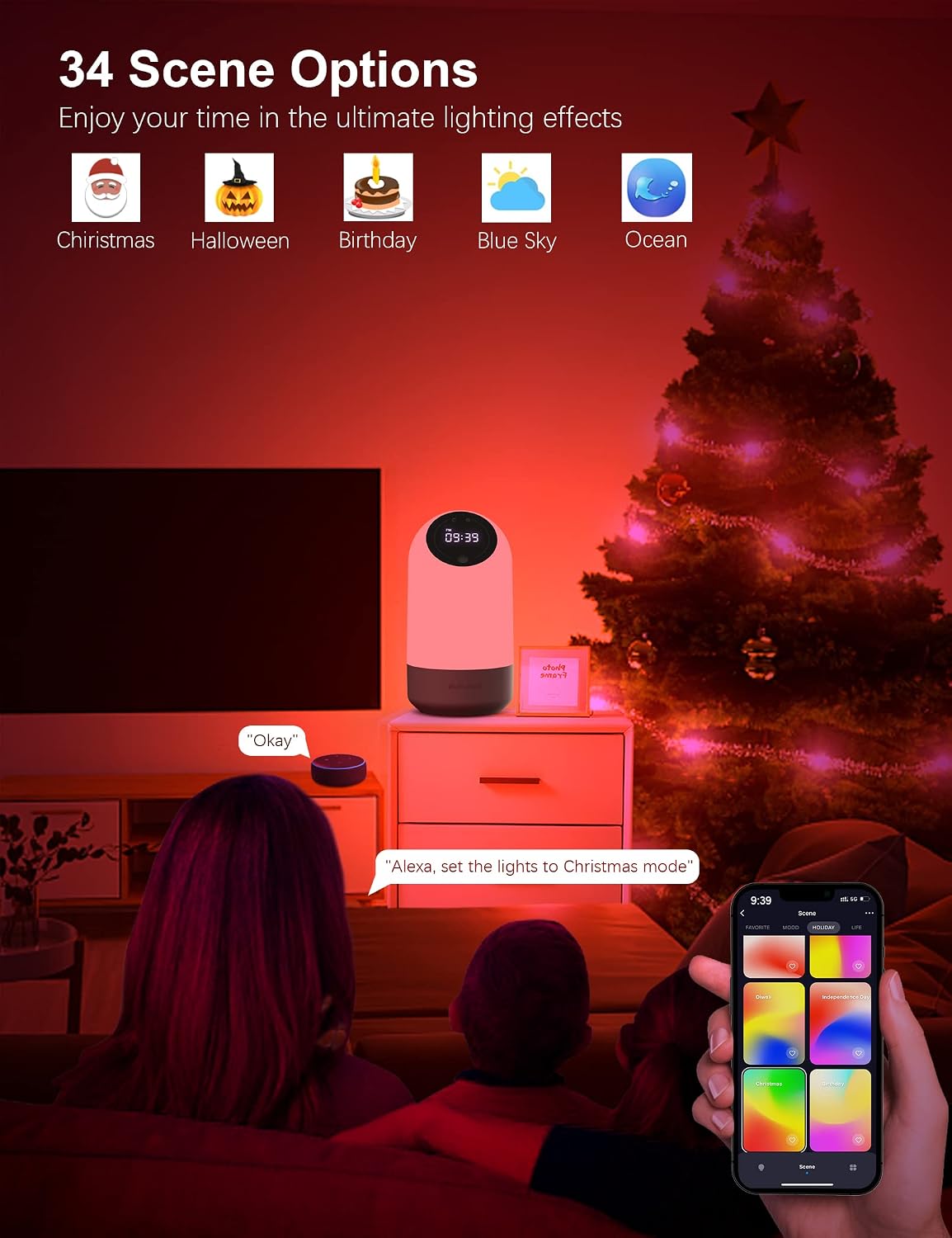
Image 7: Various scene options for different moods and occasions.
This image showcases the '34 Scene Options' available for the Eyesound Y13 Smart Touch Table Lamp, allowing users to enjoy ultimate lighting effects. Examples of scenes like Christmas, Halloween, Birthday, Blue Sky, and Ocean are displayed as icons. The lamp is shown in a festive red light, with a smartphone displaying the scene selection interface, demonstrating how users can easily choose different lighting themes.
Video 2: Overview of app control features including color, brightness, and timer.
This video provides an overview of the Eyesound Y13 Smart Touch Table Lamp's app control features. It demonstrates how to change colors, adjust brightness, and set timers using the Smart Life application on a smartphone. The lamp's digital clock display is also highlighted, showing its functionality as a bedside clock.
Video 3: Demonstrating touch, app, and voice control for the smart table lamp.
This video showcases the multiple control options for the Eyesound Y13 Smart Touch Table Lamp: touch, app, and voice control. It illustrates how users can seamlessly switch between these methods to adjust the lamp's settings, including color and brightness, providing flexibility and convenience.
Video 4: Highlighting the delay light off (timer) function of the smart bedside lamp.
This video demonstrates the 'delay light off' feature of the Eyesound Y13 Smart Touch Table Lamp. It shows how users can set a timer through the app for the lamp to automatically turn off after a specified period, which is useful for bedtime routines or energy saving.
6. Maintenance
- Cleaning: Use a soft, dry cloth to clean the lamp. Do not use abrasive cleaners or solvents.
- Battery Care: To prolong battery life, avoid fully discharging the lamp frequently. Charge it regularly.
- Storage: If storing the lamp for an extended period, ensure it is fully charged and stored in a cool, dry place.
7. Troubleshooting
| Problem | Possible Cause | Solution |
|---|---|---|
| Lamp does not turn on. | Low battery or power switch off. | Charge the lamp. Ensure the physical ON/OFF switch at the base is in the 'ON' position. |
| Cannot connect to the app. | Bluetooth/Wi-Fi off, incorrect pairing mode, or app issue. | Ensure Bluetooth and Wi-Fi are on. Restart the lamp and the app. Try re-pairing the device. |
| Voice control not working. | Not linked to voice assistant or incorrect commands. | Verify the Smart Life account is linked to Alexa/Google Assistant. Use correct voice commands. |
| Time display is incorrect. | Time not synchronized. | Ensure the lamp is connected to the app; the time should synchronize automatically. Manually adjust if necessary via the app. |
8. Specifications
- Model: Y13
- Brand: Eyesound
- Dimensions: 3.5"D x 3.5"W x 7"H
- Item Weight: 2.18 pounds (34.93 Ounces)
- Lamp Type: Night Light
- Light Source Type: LED
- Wattage: 5 watts
- Power Source: Battery Powered (Built-in 3000mAh Battery)
- Control Method: App, Touch, Voice (Alexa, Google Assistant)
- Special Features: Color Changing, Dimmable, HD Screen, Time Display, Timing Function
- Water Resistance Level: Not Water Resistant
9. Warranty and Support
For warranty information or technical support, please refer to the contact details provided on the product packaging or visit the official Eyesound website. Keep your purchase receipt for warranty claims.