
Introduction
This manual provides instructions for the NICREW Replacement Kit designed for Magi Mini and Magi200 aquarium filters. This kit includes essential filter cartridges and sponges to maintain optimal water quality in your freshwater or marine aquarium. Regular replacement of filter media is crucial for effective filtration and the health of your aquatic pets.
Safety Information
- Always unplug the aquarium filter from the power outlet before performing any maintenance or replacing filter media.
- Ensure hands are dry when handling electrical components.
- Keep replacement parts out of reach of children and pets.
- Use only genuine NICREW replacement parts to ensure proper fit and performance.
Package Contents
The NICREW Replacement Kit for Magi Mini & Magi200 Filter includes the following components:
- 2 x Biochemical Filter Sponges (Bio-foam)
- 4 x Activated Carbon Bags
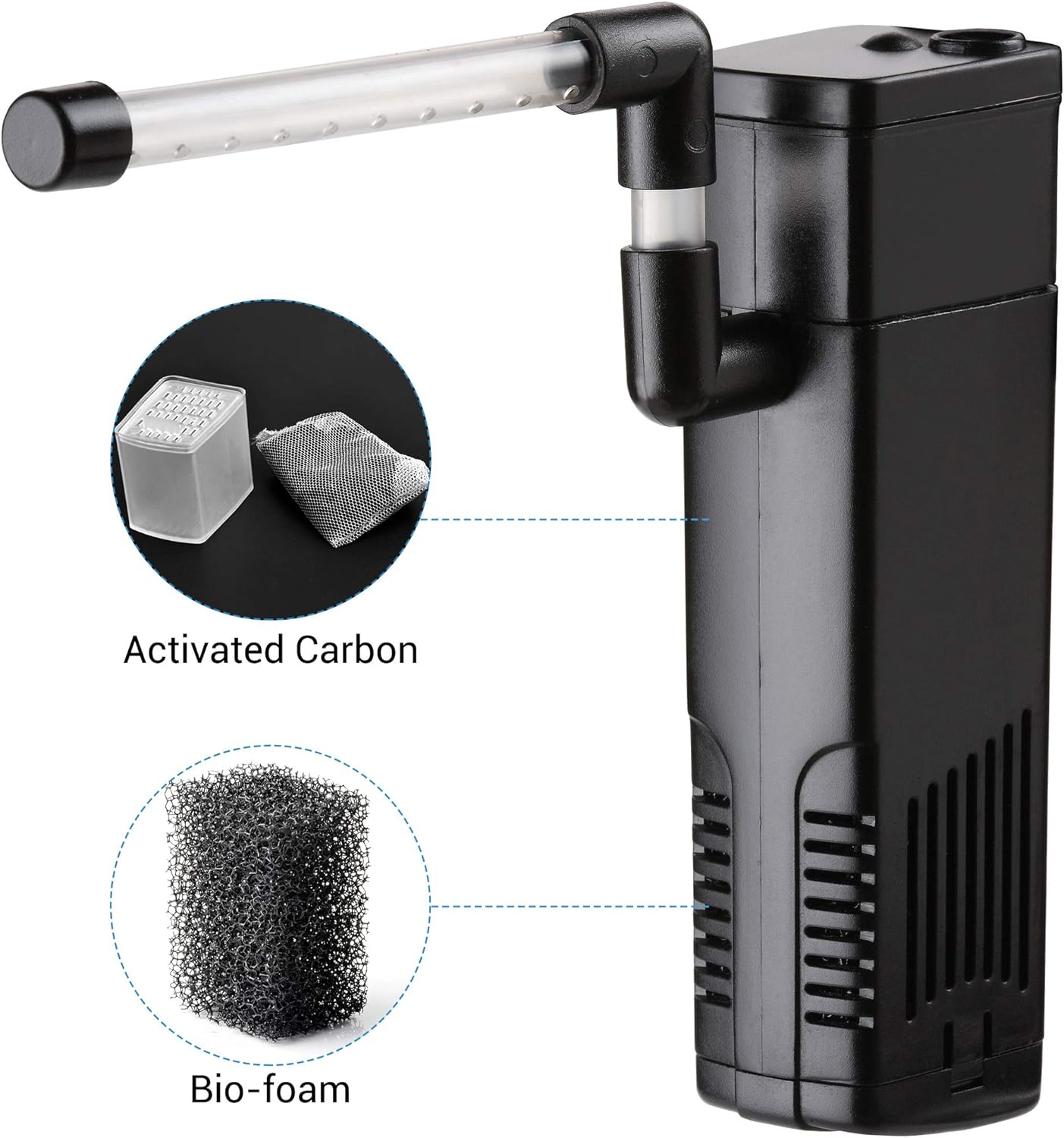
This image illustrates the main components of the NICREW Magi Mini & Magi200 filter, highlighting the activated carbon and bio-foam filter media included in the replacement kit. The activated carbon is shown in a small mesh bag, and the bio-foam is a porous black sponge.
Setup: Replacing Filter Media
- Unplug the Filter: Disconnect the aquarium filter from the power source to prevent electrical hazards.
- Remove Filter from Aquarium: Carefully remove the filter unit from your aquarium. It is advisable to do this over a sink or bucket to catch any dripping water.
- Open Filter Casing: Open the filter casing according to your specific Magi Mini or Magi200 filter model instructions. This usually involves unlatching clips or removing a cover.
- Remove Old Media: Locate and remove the used biochemical filter sponge and activated carbon bags. Dispose of them responsibly.
- Rinse New Media (Optional for Bio-foam): Lightly rinse the new biochemical filter sponge with old aquarium water (from a water change) to preserve beneficial bacteria, if desired. Do NOT rinse activated carbon bags.
- Insert New Media: Place the new biochemical filter sponge into its designated compartment. Then, insert the new activated carbon bags into their respective slots. Ensure they fit snugly without obstructing water flow.
- Reassemble and Reinstall: Close the filter casing securely. Reinstall the filter unit into your aquarium, ensuring it is properly submerged and positioned.
- Plug In Filter: Once the filter is securely in place and submerged, plug it back into the power outlet. The filter should begin operating.
Operating Principles
The NICREW replacement kit provides both mechanical and chemical filtration. The bio-foam traps large debris and provides a surface for beneficial bacteria to colonize, contributing to biological filtration. The activated carbon removes odors, discoloration, and impurities from the water, enhancing clarity and overall water quality.
Maintenance
For optimal performance and water quality, it is recommended to replace the filter media regularly:
- Activated Carbon Bags: Replace every 2-4 weeks. Activated carbon becomes saturated over time and can release absorbed pollutants back into the water if not replaced.
- Biochemical Filter Sponge (Bio-foam): Replace every 1-2 months, or sooner if it becomes heavily clogged. When replacing, consider staggering the replacement with the carbon to maintain beneficial bacteria populations. Alternatively, rinse the sponge gently in old aquarium water during water changes to extend its life, but avoid tap water as chlorine can kill beneficial bacteria.
Always monitor your aquarium's water parameters and fish health to determine the best replacement schedule for your specific setup.
Troubleshooting
- Reduced Water Flow: Check if the filter sponge is clogged. Replace or rinse the bio-foam. Ensure the filter intake is clear of debris.
- Cloudy Water: This can indicate insufficient filtration or a bacterial imbalance. Ensure filter media is replaced as recommended. Perform a partial water change.
- Unpleasant Odors: This is often a sign that the activated carbon is saturated. Replace the activated carbon bags immediately.
- Filter Not Operating After Media Change: Ensure the filter is properly reassembled and fully submerged. Check that it is securely plugged into a working power outlet.
Specifications
| Product Name | NICREW Replacement Kit for Magi Mini & Magi200 Filter |
| Compatibility | NICREW Magi Mini Filter, NICREW Magi200 Filter |
| Kit Contents | 2 x Biochemical Filter Sponges, 4 x Activated Carbon Bags |
| Aquarium Type | Suitable for freshwater or marine aquariums |
| Manufacturer | NICREW |
| ASIN | B09QKHZ725 |
| Parcel Dimensions | 11.5 x 8.6 x 3.4 cm; 80 g |
Warranty and Support
NICREW products are manufactured to high-quality standards. For specific warranty information or technical support, please refer to the original filter unit's manual or visit the official NICREW website. Keep your purchase receipt for warranty claims.
Contact Information: For further assistance, please contact NICREW customer service through their official website or the retailer where the product was purchased.