
1. Introduction
The Luminous Optimus 2300 is a Pure Sine Wave Inverter designed to provide reliable power backup for homes, offices, and shops. This manual provides essential information for the safe installation, operation, and maintenance of your inverter. Please read this manual thoroughly before using the product and retain it for future reference.
2. Safety Instructions
Observe the following safety precautions to prevent injury and damage to the inverter:
- Read all instructions carefully before installation and operation.
- Do not open the inverter casing. There are no user-serviceable parts inside. Refer servicing to qualified personnel.
- Ensure adequate ventilation around the inverter to prevent overheating. Do not block ventilation openings.
- Keep the inverter away from water, moisture, flammable materials, and direct sunlight.
- Connect only to compatible batteries as specified in this manual. Incorrect battery connection can cause damage or fire.
- Keep children and unauthorized persons away from the inverter during operation.
- Ensure proper grounding of the inverter.
- Turn off the inverter and disconnect all power sources before performing any maintenance or cleaning.
3. Product Overview
3.1 Key Features
- Pure Sine Wave Output: Provides clean power, safe for sensitive electronics.
- High Capacity: 2000VA capacity (24V system) with 1600W output.
- Appliance Support: Capable of running essential household appliances like refrigerators (up to 250L), LED TVs (40”), multiple fans, tube lights, and LED bulbs.
- Battery Compatibility: Supports 2 x 12V batteries (80Ah–220Ah) of Flat Plate, Tubular, and SMF types.
- Advanced LCD Display: Provides real-time information on battery status, load level, charging status, and system alerts.
- Efficient Performance: Engineered for high charge acceptance, stable output, and low maintenance.
3.2 Product View
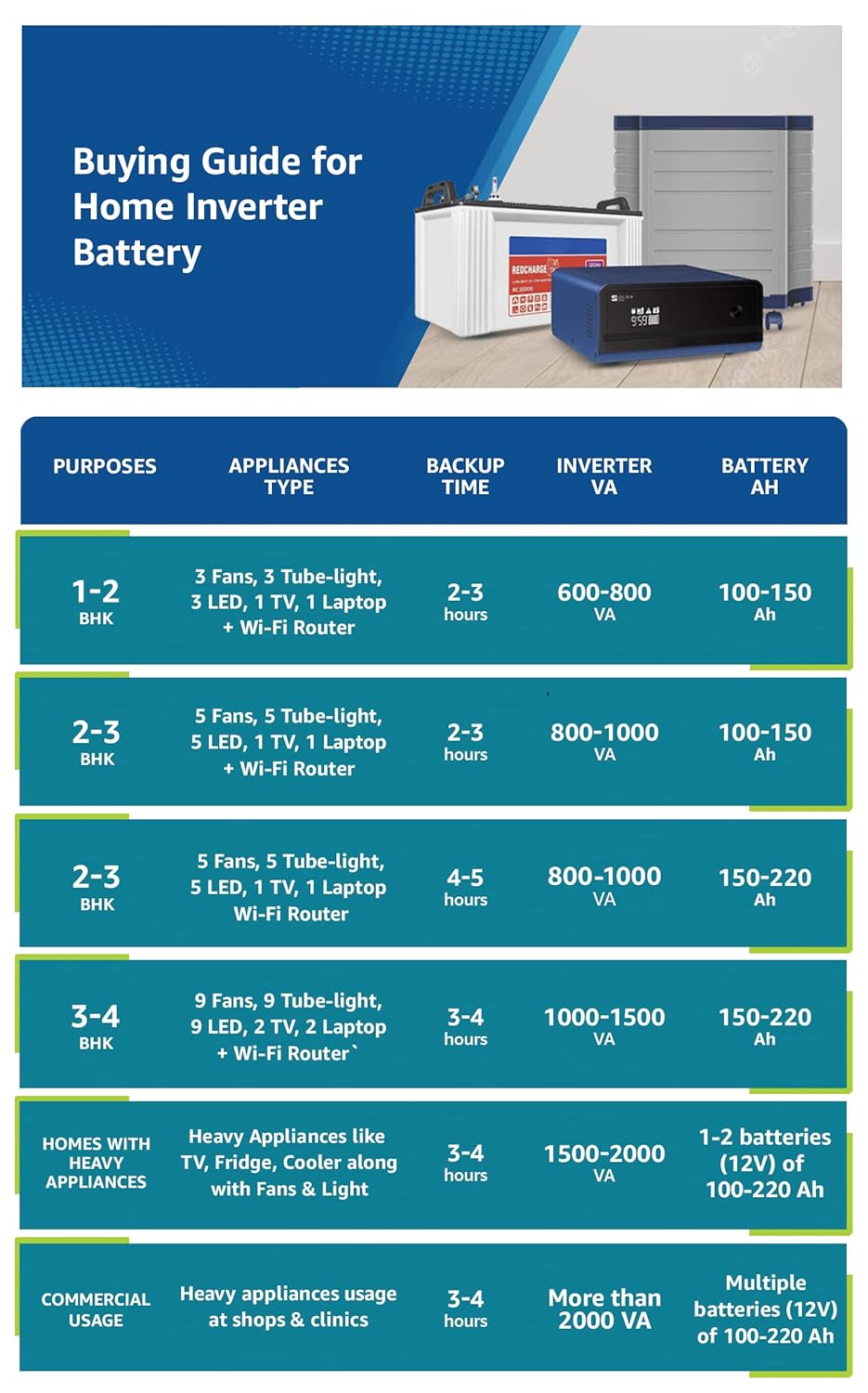
Image: Front view of the Luminous Optimus 2300 Pure Sine Wave Inverter, showcasing its design and control panel.

Image: Visual representation of key features including informative LCD display, pure sine wave technology, superfast battery charging, and support for all battery types.
3.3 Product Video
Video: A short overview of the Luminous Optimus 2300 Inverter, highlighting its design and key functionalities.
4. Setup
4.1 Unpacking and Inspection
- Carefully unpack the inverter and check for any signs of damage during transit.
- Verify that all components listed in the 'What's in the Box' section are present.
4.2 Placement
- Choose a cool, dry, and well-ventilated area for installation.
- Ensure there is sufficient clearance around the inverter for proper airflow.
- Avoid placing the inverter near heat sources, direct sunlight, or in areas with excessive dust or humidity.
4.3 Battery Connection
The Optimus 2300 requires two 12V batteries connected in series to form a 24V system. Follow these steps carefully:
- Ensure the inverter is switched OFF and disconnected from the AC mains supply.
- Connect the positive terminal of the first 12V battery to the negative terminal of the second 12V battery using a short, thick cable.
- Connect the remaining positive terminal of the second battery to the positive terminal of the inverter.
- Connect the remaining negative terminal of the first battery to the negative terminal of the inverter.
- Ensure all connections are tight and secure. Double-check polarity to avoid damage.
4.4 AC Mains and Load Connection
- Connect the inverter's AC input cable to a properly grounded wall socket.
- Connect your household appliances (load) to the inverter's AC output sockets. Do not exceed the inverter's rated capacity (1600W).
5. Operating Instructions
5.1 Powering On/Off
- To Power On: Press and hold the Power button on the front panel until the LCD display illuminates.
- To Power Off: Press and hold the Power button until the display turns off.
5.2 LCD Display Information
The advanced LCD display provides critical operational data:
- Battery Status: Shows current battery charge level and charging status.
- Load Level: Indicates the percentage of connected load.
- Mains Status: Shows if AC mains power is present and if the inverter is charging.
- System Alerts: Displays error codes or warnings (e.g., overload, low battery, short circuit). Refer to the troubleshooting section for details.
5.3 Operating Modes (If Applicable)
Your inverter may feature different operating modes. Consult the on-screen menu or specific buttons for mode selection (e.g., UPS Mode for sensitive appliances, Eco Mode for energy saving). Refer to the on-screen prompts for navigation.
6. Maintenance
Regular maintenance ensures optimal performance and longevity of your inverter and batteries.
6.1 Battery Care
- Water Level Check (for Tubular/Flat Plate Batteries): Periodically check the electrolyte level in your batteries. If low, top up with distilled water only.
- Terminal Cleaning: Keep battery terminals clean and free from corrosion. Apply petroleum jelly to prevent oxidation.
- Ventilation: Ensure batteries are in a well-ventilated area to dissipate gases.
6.2 Inverter Cleaning
- Keep the inverter's exterior clean and dust-free using a dry cloth.
- Ensure ventilation openings are clear of obstructions. Do not use liquid cleaners directly on the inverter.
7. Troubleshooting
This section addresses common issues you might encounter. For problems not listed here, contact customer support.
| Problem | Possible Cause | Solution |
|---|---|---|
| Inverter not turning on | Loose battery connections, discharged batteries, inverter fault. | Check battery connections. Ensure batteries are charged. If problem persists, contact service. |
| No output power | Overload, low battery, output circuit breaker tripped. | Reduce connected load. Check battery charge. Reset output breaker if tripped. |
| Inverter beeping continuously | Overload, low battery, high temperature. | Check LCD for specific error code. Reduce load, charge batteries, ensure ventilation. |
| Battery not charging | Mains power not present, loose AC input connection, battery fault. | Verify mains supply. Check AC input cable. Inspect battery condition. |
8. Specifications
| Parameter | Value |
|---|---|
| Brand | Luminous |
| Model Name | Optimus 2300 |
| Inverter Capacity (VA) | 2000 VA |
| Output Power (Watts) | 1600 Watts |
| System Voltage | 24V (Requires 2 x 12V batteries) |
| Electrical Output Waveform | Pure Sine Wave |
| Input Voltage (AC) | 230 Volts |
| Frequency | 50 Hz |
| Battery Compatibility | 80Ah–220Ah (Flat Plate, Tubular, SMF) |
| Item Dimensions (L x W x H) | 32.6L x 30W x 28.4H Centimeters |
| Item Weight | 21 Kilograms |
| Colour | Blue |
9. Warranty and Support
9.1 Warranty Information
The Luminous Optimus 2300 Inverter comes with a 2-year manufacturer warranty from the date of purchase. This warranty covers manufacturing defects. Please retain your purchase receipt for warranty claims. The warranty does not cover damage due to improper installation, misuse, or unauthorized repairs.
9.2 Customer Support
For technical assistance, service requests, or warranty claims, please contact Luminous Power Technologies Pvt. Ltd. at the following details:
Manufacturer: Luminous Power Technologies Pvt. Ltd.
Address: Plot No. 150, Sector 44, Gurgaon, Haryana - 122003, India
You can also visit the official Luminous Store on Amazon for more information and support resources.

