
Introduction
This manual provides essential information for setting up, operating, maintaining, and troubleshooting your Xiaomi Redmi Note 11S smartphone. Please read this guide thoroughly to ensure optimal performance and longevity of your device.
An overview of the Redmi Note 11S, highlighting its 108MP pro-grade main camera, 90Hz FHD+ AMOLED DotDisplay, and 33W Pro fast charging capabilities.
Setup
1. Unboxing and Initial Inspection
Carefully unpack your Redmi Note 11S. Ensure all items are present:
- Xiaomi Redmi Note 11S Smartphone
- Fast Car Charger
- SIM Tray Ejector
- Wall Charger
2. SIM Card Installation
The Redmi Note 11S supports dual nano SIM cards. To install:
- Locate the SIM card tray on the side of the device.
- Insert the SIM tray ejector tool into the small hole next to the tray and press gently until the tray pops out.
- Place your nano SIM card(s) into the designated slots on the tray. Ensure the gold contacts face downwards.
- Carefully reinsert the tray into the phone.
3. Initial Charging and Power On
Before first use, it is recommended to fully charge your device. Connect the wall charger to the phone and a power outlet. The Redmi Note 11S supports 33W Pro fast charging for quick recharging of its 5000mAh battery.

Illustration of the 33W Pro fast charging feature for the 5000mAh battery, showing charging efficiency and estimated usage times for video, calling, and music.
To power on, press and hold the power button located on the side of the device until the Xiaomi logo appears.
Operating Instructions
1. Basic Navigation
The Redmi Note 11S features a responsive touchscreen. Use gestures such as tap, swipe, pinch, and spread to navigate the MIUI 12 operating system. The power button controls screen on/off and device power, while the volume buttons adjust audio levels.
2. Display Features
Your device is equipped with a 6.43-inch FHD+ AMOLED DotDisplay with a 90Hz high refresh rate for smooth visuals. It also includes Sunlight Display for readability in bright conditions and Reading Mode 3.0 to reduce eye strain.

The 6.43-inch FHD+ AMOLED DotDisplay of the Redmi Note 11S, emphasizing its 90Hz high refresh rate for a responsive touchscreen experience.
3. Camera System
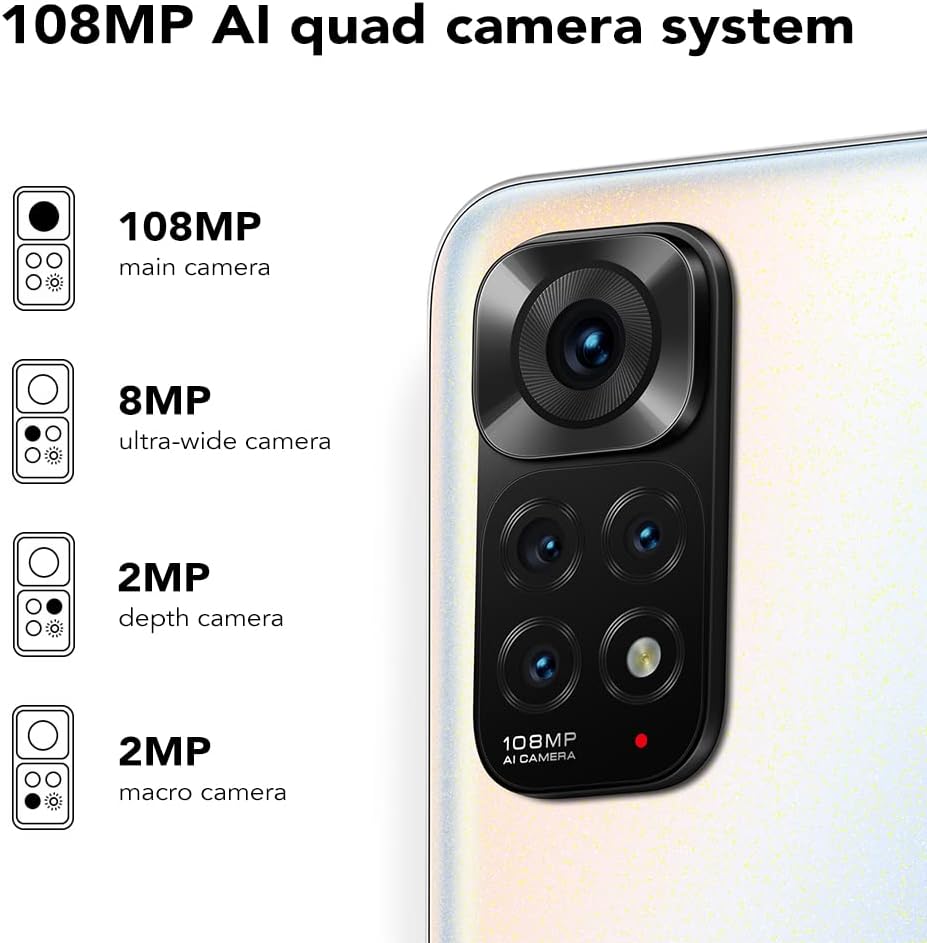
The Redmi Note 11S features a 108MP AI quad camera system on the rear and a 16MP selfie camera. The rear camera setup includes:
- 108MP Main Camera
- 8MP Ultra-wide Camera
- 2MP Macro Camera
- 2MP Depth Camera
Open the Camera application to access various modes such as Photo, Video, Portrait, Night Mode, and more.

Detailed view of the 108MP AI quad camera system on the Redmi Note 11S, featuring a 108MP main camera, 8MP ultra-wide camera, 2MP depth camera, and 2MP macro camera.
4. Storage and Performance
The device comes with 128GB of internal storage, expandable up to 1TB via a microSD card (sold separately). It is powered by the MediaTek Helio G96 processor, ensuring smooth performance for daily tasks and gaming.
5. Connectivity
The Redmi Note 11S supports 4G cellular networks, Wi-Fi, and GPS for navigation and location services.
Maintenance
1. Cleaning Your Device
Use a soft, lint-free cloth to clean the screen and body of your phone. Avoid using harsh chemicals or abrasive materials. Do not expose the device to excessive moisture.
2. Software Updates
Regularly check for and install software updates to ensure your device has the latest features, security patches, and performance improvements. Navigate to Settings > About phone > MIUI version to check for updates.
3. Battery Care
To prolong battery life:
- Avoid extreme temperatures.
- Do not let the battery completely drain frequently.
- Use the original charger provided with the device.
4. Heat Dissipation
The Redmi Note 11S incorporates LiquidCool technology with multiple layers of graphite and copper foil for efficient heat dissipation. Ensure proper airflow around the device during heavy usage to prevent overheating.

An internal view illustrating the multi-dimensional heat dissipation system using LiquidCool technology, which incorporates multiple layers of graphite and copper foil for efficient cooling.
Troubleshooting
This section addresses common issues you might encounter with your Redmi Note 11S.
Device Not Turning On
- Ensure the battery is charged. Connect the device to the charger for at least 30 minutes.
- Press and hold the power button for 10-15 seconds to perform a forced restart.
Apps Freezing or Crashing
- Close the problematic app and reopen it.
- Clear the app's cache and data via Settings > Apps > Manage apps > [App Name] > Clear data.
- Ensure your apps and operating system are up to date.
Poor Battery Life
- Adjust screen brightness and reduce screen timeout.
- Disable unused features like Wi-Fi, Bluetooth, or GPS when not needed.
- Identify and close power-consuming apps running in the background.
Network Connectivity Issues
- Restart your device.
- Check if your SIM card is properly inserted.
- Reset network settings via Settings > Connection & sharing > Reset Wi-Fi, mobile networks and Bluetooth.
Specifications
The following table outlines the key specifications for the Xiaomi Redmi Note 11S (Model: 2201117SY).
| Feature | Specification |
|---|---|
| Model Name | NOTE 11s |
| Item Model Number | 2201117SY |
| Brand | XIAOMI |
| Operating System | MIUI 12 |
| Screen Size | 6.43 Inches |
| Display Type | FHD+ AMOLED DotDisplay, 90Hz Refresh Rate |
| Rear Camera | 108MP Main, 8MP Ultra-wide, 2MP Macro, 2MP Depth |
| Front Camera | 16MP |
| RAM | 6 GB |
| Memory Storage Capacity | 128 GB (Expandable up to 1TB) |
| Battery Capacity | 5000 Milliampere Hour (mAh) |
| Charging | 33W Pro Fast Charging (58 minutes for full charge) |
| Cellular Technology | 4G |
| Wireless Carrier | Unlocked for All Carriers |
| Connectivity Technologies | Wi-Fi, Cellular |
| Special Features | Dual SIM, GPS, Smartphone |
| Product Dimensions | 2.9 x 0.32 x 6.29 inches |
| Item Weight | 6.3 ounces (179 Grams) |
| Color | Pearl White |

The aesthetic flat-frame design of the Redmi Note 11S, highlighting its slim profile (8.09mm thickness) and light weight (179g) for a comfortable grip.
Warranty Information
Specific warranty terms and conditions for the Xiaomi Redmi Note 11S may vary by region and retailer. Please refer to the warranty card included with your product packaging or visit the official Xiaomi website for detailed warranty information applicable to your purchase. Retain your proof of purchase for warranty claims.
Support
For further assistance, technical support, or service inquiries regarding your Xiaomi Redmi Note 11S, please visit the official Xiaomi support website or contact their customer service. You can typically find contact information and FAQs on the manufacturer's official website.


