Introduction
This manual provides detailed instructions for the proper use, setup, maintenance, and troubleshooting of your BAOFENG BF-780 Speaker Microphone. Please read this manual thoroughly to ensure optimal performance and longevity of your device.
Product Overview
The BAOFENG BF-780 is a robust speaker microphone designed for use with compatible two-way radios. It features an omnidirectional microphone for clear voice capture and a large speaker for audible reception. Its durable construction and water-resistant design make it suitable for various environments.
Key Features:
- Omnidirectional Microphone: Designed to pick up sound from all directions for clear communication.
- Durable Construction: Made from sturdy plastic, resistant to impacts.
- Water-Resistant Design: Features an IP54 rating, withstanding rain and moisture.
- 360-Degree Rotating Clip: Allows attachment to clothing or gear for hands-free operation.
- Enhanced Speaker: Equipped with a 4.5 cm (1.77 inch) speaker for clear audio output.
- Flexible Coiled Cable: Made from durable PU material, extending from 60 cm to 210 cm.
Components:
- Speaker Microphone Unit
- 2-Pin K-Type Connector
- Coiled Cable
- Integrated Belt Clip

This image shows the BAOFENG BF-780 speaker microphone, highlighting its robust construction and the waterproof sealing ring around the speaker grille, indicating its resistance to moisture.
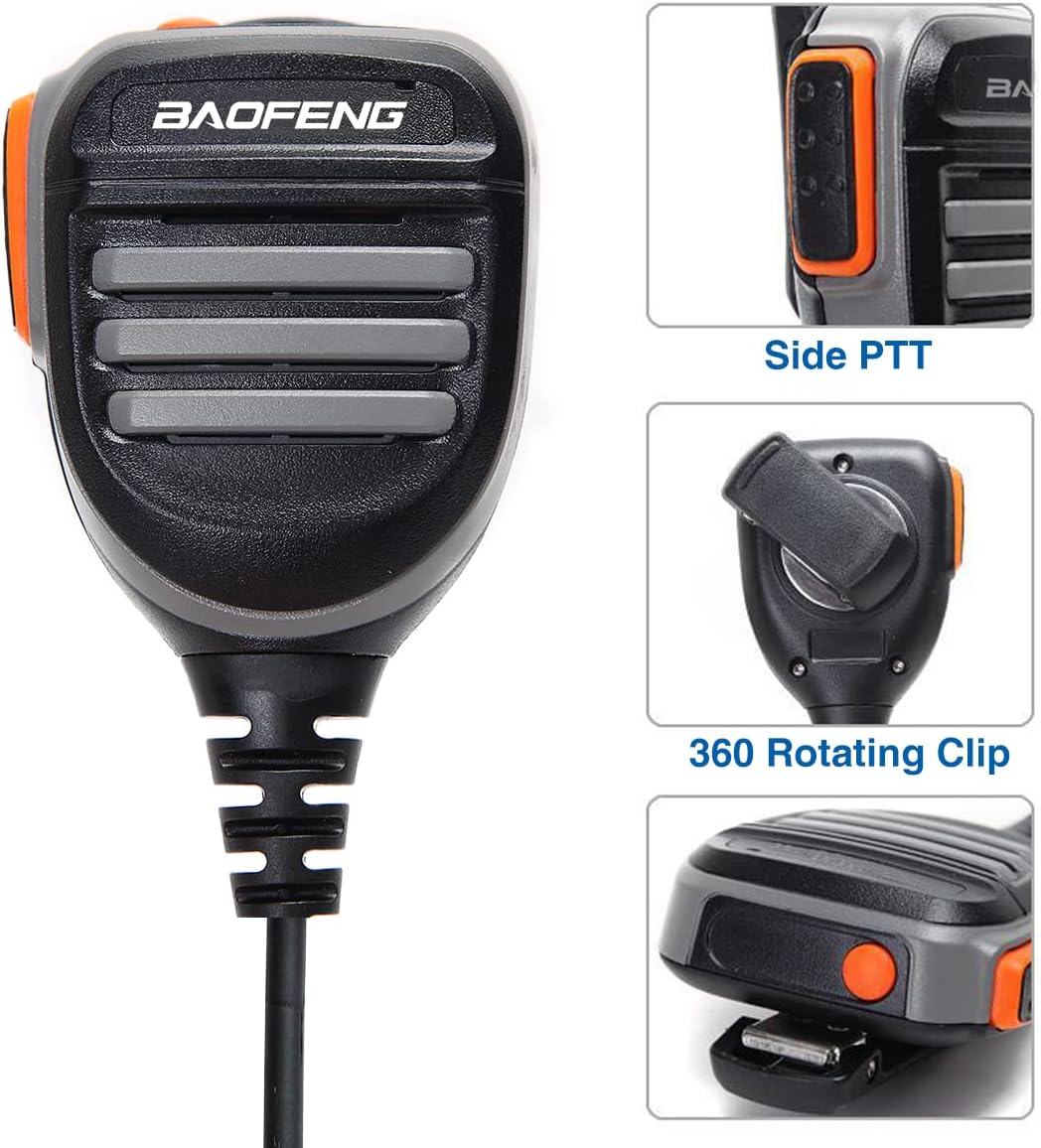
A close-up view of the BAOFENG BF-780 speaker microphone, illustrating the Push-to-Talk (PTT) button located on the side and the versatile 360-degree rotating clip on the back for attachment to clothing or gear.

This image displays the BAOFENG BF-780 speaker microphone alongside a diagram indicating its 4.5 cm (1.77 inch) speaker, designed for clear audio output.

Two hands are shown stretching the coiled cable of the BAOFENG BF-780 speaker microphone, demonstrating its flexibility and extended length capability from 60 cm to 210 cm, made from durable PU material.
Compatibility
The BAOFENG BF-780 Speaker Microphone is compatible with a wide range of two-way radios, including but not limited to:
- Baofeng UV-5R, UV-5RX3, UV-5R+, UV-5X, UV-5RA, UV-5RE
- Baofeng BF-F8HP, BF-F8+, BF-888S
- Baofeng UV-S9Plus, GM-15PRO, TP-8Plus, BF-H6
- Other compatible models: DM21, UV32, UV-21R, K5PLUS, GM-15 Pro, UV-5G Plus, AR-152, GM-5RH, UV-17R, Quansheng UV-K5 8, H777, BF-f9 v2+, GT-3TP, BTECH, TYT

An image detailing the compatibility of the BAOFENG BF-780 speaker microphone with several Baofeng radio models.
Setup Instructions
- Connect to Radio: Locate the 2-pin K-type audio jack on your compatible two-way radio. Align the two pins of the speaker microphone's connector with the corresponding ports on the radio and firmly insert until it clicks into place.
- Secure the Microphone: Use the integrated 360-degree rotating clip on the back of the speaker microphone to attach it securely to your clothing, belt, or gear. Adjust the clip to your preferred angle for comfort and accessibility.

This image shows the BAOFENG BF-780 speaker microphone connected to a Baofeng UV-5R8W two-way radio, illustrating how the accessory integrates with the main communication device.
Operating Instructions
Once connected, the BF-780 speaker microphone allows for convenient hands-free communication.
- Transmitting (Push-to-Talk - PTT): To transmit your voice, press and hold either the large PTT button on the side of the microphone or the smaller PTT button located on the top. Speak clearly into the microphone grille. Release the PTT button to stop transmitting and return to receive mode.
- Receiving Audio: When not transmitting, the speaker on the front of the microphone will output incoming audio from your radio. Ensure your radio's volume is set to an appropriate level.
- Microphone Placement: For optimal voice clarity, position the microphone approximately 2-5 cm (1-2 inches) from your mouth when speaking.
Maintenance
Proper maintenance ensures the longevity and reliable performance of your speaker microphone.
- Cleaning: Wipe the exterior of the microphone with a soft, dry, or slightly damp cloth. Do not use harsh chemicals or abrasive cleaners.
- Water Resistance: While the device is water-resistant (IP54), avoid intentional submersion. Ensure the waterproof sealing ring remains intact and free of debris. If exposed to water, dry thoroughly before storage or next use.
- Cable Care: Avoid excessive pulling, twisting, or sharp bends of the coiled cable to prevent internal damage. Store the cable loosely coiled.
- Storage: Store the microphone in a cool, dry place away from direct sunlight and extreme temperatures.
Troubleshooting
If you encounter issues with your BF-780 speaker microphone, refer to the following common solutions:
- No Sound from Speaker:
- Ensure the 2-pin connector is fully and securely inserted into the radio's audio jack.
- Check the radio's volume level and increase if necessary.
- Test the microphone with another compatible radio if available to rule out a radio issue.
- No Transmission from Microphone:
- Verify the connector is fully inserted.
- Ensure the PTT button is pressed firmly and held down during transmission.
- Check radio settings to ensure external microphone input is enabled, if applicable.
- Distorted or Unclear Audio:
- Ensure the connector is clean and fully inserted.
- Adjust the radio's volume to avoid over-driving the speaker.
- Speak clearly and maintain proper distance from the microphone.
Specifications
| Model Number | BF-780 |
| Item Weight | 4.3 ounces (122 grams) |
| Package Dimensions | 5.91 x 4.88 x 1.57 inches (15 x 12.4 x 4 cm) |
| International Protection Rating | IP54 (Water Resistant) |
| Frequency Range | 450-470 MHz (Radio dependent) |
| Talking Range Maximum | 8 Mile (Radio dependent) |
| Included Components | Microphone |
| Compatible Devices | Two-Way Radios with K-type 2-pin connector |
Warranty and Support
For warranty information and technical support, please refer to the official BAOFENG website or contact your authorized dealer. Keep your purchase receipt as proof of purchase for any warranty claims.


