
GENMAX GM9000iED
GENMAX GM9000iED Dual Fuel Inverter Generator Instruction Manual
Model: GM9000iED
Brand: GENMAX
1. Introduction
The GENMAX GM9000iED Portable Inverter Generator is a powerful and versatile solution for your power needs, whether for home backup, job site use, or camping with your RV. Equipped with a robust 458cc 4-stroke OHV engine, it delivers 9000 peak watts and 7600 rated watts, offering reliable clean power for sensitive electronics. Its dual-fuel capability allows operation on either gasoline or propane, providing flexibility and convenience. Designed for quiet operation and ease of use, this generator features remote/electric start and a comprehensive digital data center for monitoring performance.

Figure 1: GENMAX GM9000iED Dual Fuel Inverter Generator
2. Important Safety Information
Always prioritize safety when operating the generator. Read and understand all safety warnings and instructions in the complete user manual before use.
2.1 Carbon Monoxide (CO) Safety
This generator is equipped with a CO DETECT system that automatically turns off the generator when an unsafe level of carbon monoxide is detected. While this feature enhances safety, it is crucial to operate the generator outdoors in a well-ventilated area, far away from windows, doors, and vents, to prevent carbon monoxide poisoning.
2.2 General Safety Precautions
- Never operate the generator indoors or in partially enclosed spaces.
- Ensure proper grounding of the generator before operation.
- Handle fuel with extreme care. Store gasoline in approved containers and away from ignition sources.
- Keep children and pets away from the generator during operation.
- Do not operate the generator in wet conditions.
3. Setup Guide
3.1 Unboxing and Initial Assembly
Carefully remove the generator from its packaging. The GM9000iED comes with strong steel handles and rolling wheels for easy transport and maneuverability. Attach the handles as per the instructions in the full manual.

Figure 2: Generator with Fold-Down Handle for easy transport.
3.2 Adding Engine Oil
Before first use, the engine must be filled with the recommended oil. Locate the oil fill cap/dipstick. Refer to the complete manual for the correct oil type (e.g., 10W-30) and capacity (458cc engine). Do not overfill.

Figure 3: Location for adding engine oil.
3.3 Connecting the Battery
For electric start functionality, ensure the battery is properly connected. Follow the polarity markings (positive to positive, negative to negative) to avoid damage.
3.4 Fueling the Generator
The GM9000iED is a dual-fuel generator, capable of running on gasoline or propane.
- Gasoline: Fill the 6.9-gallon fuel tank with unleaded gasoline. Do not overfill.
- Propane (LPG): Connect a standard propane tank to the LPG inlet on the control panel using a compatible hose and regulator (not included).

Figure 4: The generator supports both gasoline and propane fuel sources.
Video 1: Instructional video demonstrating the use of the GM9000iED, including propane connection.
4. Operating Instructions
4.1 Control Panel Overview
Familiarize yourself with the generator's control panel, which provides all necessary controls and indicators for operation.

Figure 5: Detailed diagram of the generator's control panel.
The 5-in-1 Digital Data Center displays crucial information such as running hours, voltage, load, and frequency, allowing for easy monitoring of the generator's status.
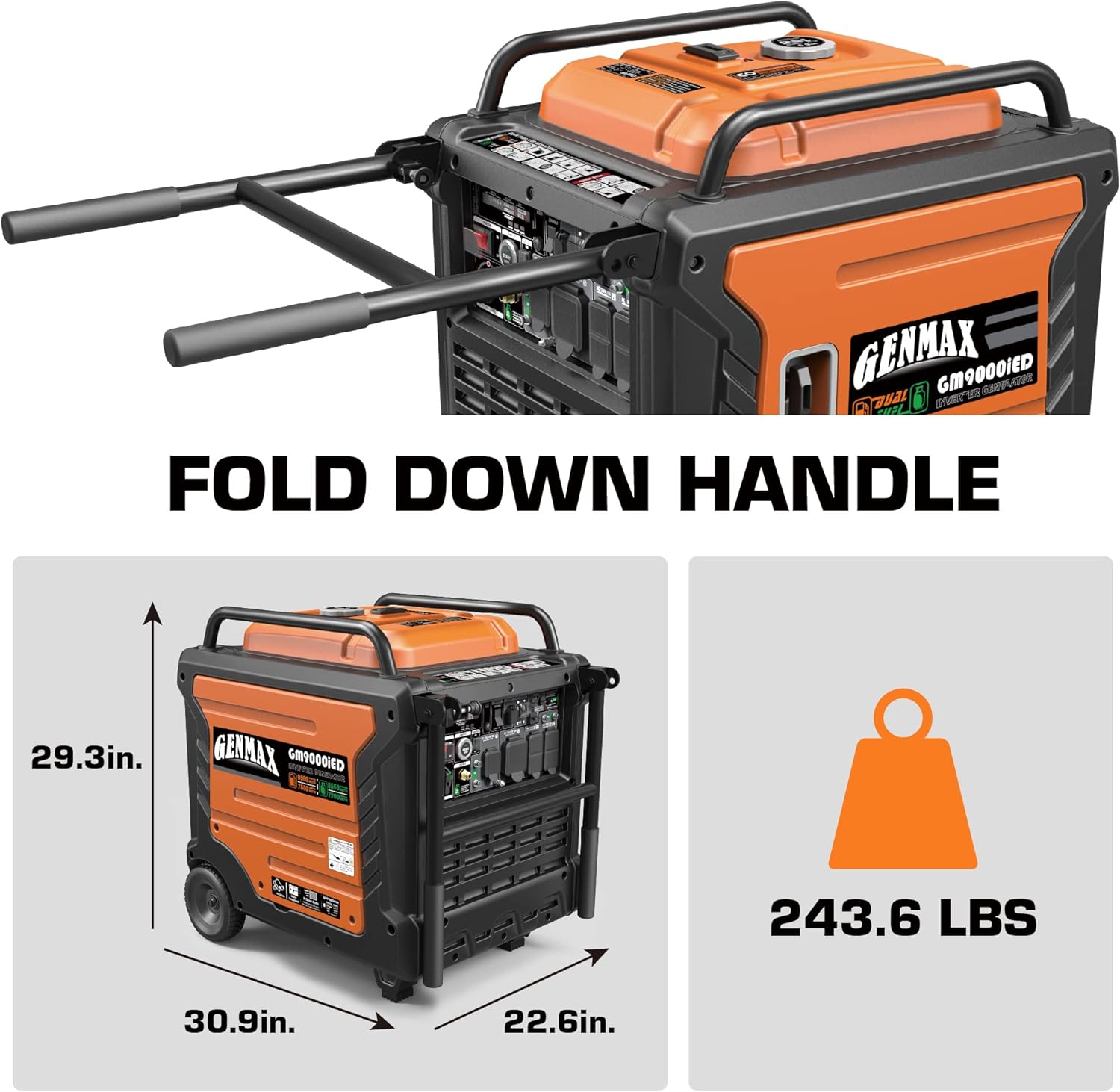
Figure 6: Close-up view of the Digital Data Center display.
4.2 Starting the Generator
The GM9000iED offers multiple starting options:
- Electric Start: Simply press the "ENGINE START/STOP" button on the control panel.
- Remote Start: Use the included key fob for convenient remote starting.
Video 2: An introductory video detailing the features and usage of the GENMAX GM9000ED generator, including starting procedures.
4.3 Eco Mode (Low Idle)
Activate the "LOW IDLE Mode" switch for maximum fuel efficiency and reduced noise levels, especially during periods of low power demand.
4.4 Parallel Operation
The GM9000iED features parallel capability, allowing you to connect two GM9000iED inverters together to double your power output to 18,000 peak watts and 15,200 running watts. A parallel kit is sold separately.
Video 3: A factory video showcasing the GM9000iED, including its parallel connection feature.
5. Maintenance
Regular maintenance is essential to ensure the longevity and optimal performance of your GENMAX generator. Always refer to the complete user manual for detailed maintenance schedules and procedures.
5.1 Routine Checks
- Engine Oil: Check oil level before each use and change according to the recommended intervals.
- Air Filter: Inspect and clean or replace the air filter regularly to ensure proper engine function.
- Spark Plug: Check and clean the spark plug periodically. Replace if worn.
5.2 Storage
For long-term storage, properly prepare the generator by draining the fuel system (or using a fuel stabilizer for gasoline) and performing an oil change. Store in a clean, dry place.
6. Troubleshooting
If you encounter issues with your generator, consult the troubleshooting section in the complete user manual for detailed solutions. Below are some common issues:
- Generator Will Not Start: Check fuel level, oil level, spark plug, and ensure the main switch is ON.
- No Power Output: Check circuit breakers and ensure no overload condition.
- CO Detect Shutdown: Move the generator to a well-ventilated outdoor area and allow it to cool before attempting to restart.
7. Technical Specifications
| Feature | Specification |
|---|---|
| Brand | GENMAX |
| Model Name | GM9000iED |
| Wattage | 9000 Watts (Peak) / 7600 Watts (Running) |
| Fuel Type | Dual Fuel (Gasoline, Propane) |
| Engine Type | 458cc 4-stroke OHV |
| Tank Volume | 6.9 Gallons |
| Voltage | 120V/240V |
| Frequency | 60 Hz |
| Special Features | Portable, Electric Start, Super Quiet, CO Detect, Parallel Capability |
| Item Weight | 280 pounds |
| Product Dimensions | 30.91"L x 22.64"W x 29.33"H |
| Total Power Outlets | 5 |
| UPC | 713424639076 |
8. Warranty and Support
For any questions, technical assistance, or warranty claims, please contact GENMAX Direct customer support. Detailed warranty information can be found in your product's included documentation.
Extended protection plans are also available for purchase, including 3-Year and 4-Year options, to further safeguard your investment.
Related documentsGM9000iED


Ask a question about this manual
Ask about setup, troubleshooting, compatibility, parts, safety, or missing instructions. Manuals+ will review the question and use this page’s manual context to help answer it.