
1. Introduction
Thank you for choosing the SUGON A8 Soldering Station. This professional-grade soldering station is designed for precision work, offering rapid heating, stable temperature control, and a range of features to enhance your soldering experience. Please read this manual thoroughly before operation to ensure safe and efficient use of the device.
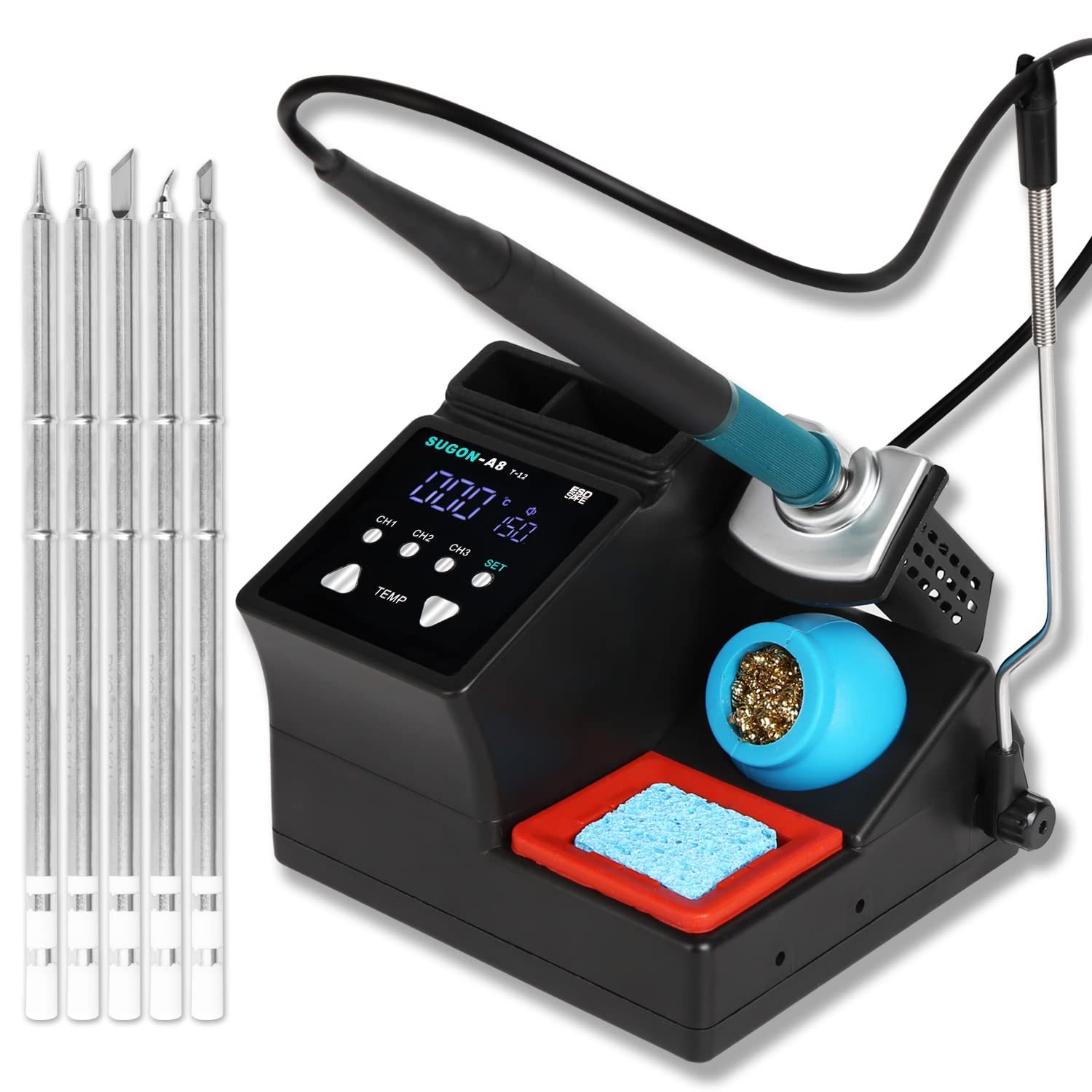
The SUGON A8 Soldering Station features 75W (max) power and adjustable temperature from 200-450°C (392-842°F), achieving rapid heating in approximately 5 seconds.
2. Safety Information
Always observe the following safety precautions to prevent injury or damage to the equipment:
- Use in a Well-Ventilated Area: Soldering fumes can be harmful. Ensure adequate ventilation or use a fume extractor.
- Wear Eye Protection: Always wear safety glasses to protect against solder splashes.
- Avoid Contact with Hot Surfaces: The soldering iron tip and heating element reach very high temperatures. Do not touch them directly.
- Power Off When Not in Use: Disconnect the power when the station is not in use or before performing maintenance.
- Use Proper Grounding: Ensure the soldering station is properly grounded to prevent electrostatic discharge (ESD) damage to sensitive components.
- Keep Away from Flammable Materials: Do not operate near flammable liquids, gases, or materials.
- Children and Pets: Keep the soldering station out of reach of children and pets.
3. Package Contents
Verify that all items are present in your package:
- 1 x SUGON A8 Soldering Station Unit
- 1 x Soldering Iron Handle
- 5 x T12 One-Piece Soldering Tips (IS, K, ILS, KU, BC2)
- 1 x Power Cable
- 1 x High-Temperature Cleaning Sponge
- 1 x Copper Wire Cleaning Ball
- 1 x Power Cord Retaining Bar
- 1 x Soldering Tip Care Guide
- 1 x Instruction Manual
- 1 x Warranty Card (1 Year)

The package includes 5 different T12 one-piece soldering tips (IS, K, ILS, KU, BC2) for diverse soldering applications.
4. Product Features
- Rapid Heating: The 75W (max) power, combined with the one-piece T12 soldering tip, allows the station to reach the desired operating temperature from standby in just 5 seconds.
- One-Piece Soldering Tip: The integrated heating core and tip design offers an extended lifespan, convenient disassembly and assembly, and faster heat transfer.
- Multi-functional Operation: Features include 200-450°C temperature adjustment, °F/°C unit switching, standby temperature settings, automatic sleep mode, and temperature memory storage.
- Temperature Memory Storage: Three dedicated buttons (CH1, CH2, CH3) allow you to save and quickly recall frequently used working temperatures, eliminating repetitive adjustments.
- Adjustable Standby Temperature & Auto-Sleep: Equipped with 4 standby temperature settings (0, 150, 180, 200°C / 0, 302, 356, 392°F) for immediate soldering. The automatic sleep mode activates when the handle is placed in its holder, protecting the tip from prolonged high temperatures and extending its life.
5. Setup
- Unpack: Carefully remove all components from the packaging.
- Placement: Place the soldering station on a stable, heat-resistant, and non-flammable surface. Ensure adequate space for ventilation.
- Connect Handle: Connect the soldering iron handle to the designated port on the soldering station.
- Insert Tip: Select the desired T12 soldering tip and insert it firmly into the soldering iron handle.
- Power Connection: Connect the power cable to the soldering station and then plug it into a standard 110V AC power outlet.
- Prepare Cleaning Tools: Place the high-temperature cleaning sponge in its tray and moisten it slightly with water. Position the copper wire cleaning ball nearby for easy access.
6. Operating Instructions
6.1 Power On/Off
- To power on, press the main power switch located on the unit. The LCD display will illuminate.
- To power off, press the main power switch again.
6.2 Temperature Adjustment
- The default operating temperature range is 200-450°C (392-842°F).
- Use the TEMP adjustment buttons (up/down arrows) to increase or decrease the desired temperature.
- The display will show the set temperature and the current tip temperature.

The display shows temperature adjustment controls and the three temperature storage buttons (CH1, CH2, CH3).
6.3 Temperature Unit Switch (°F/°C)
- Press the SET button to toggle between Celsius (°C) and Fahrenheit (°F) temperature displays.
6.4 Preset Temperature Storage
- Set your desired working temperature using the TEMP buttons.
- Press and hold one of the CH1, CH2, or CH3 buttons for a few seconds until the display confirms the temperature is saved.
- To recall a saved temperature, simply press the corresponding CH1, CH2, or CH3 button.

The display illustrates the auto sleep mode and the functionality of the temperature unit switch (°F/°C).
6.5 Automatic Sleep Mode
- When the soldering iron handle is placed in its holder, the station will automatically enter sleep mode after a set period (default settings apply, refer to advanced settings for customization).
- In sleep mode, the tip temperature is reduced to a standby temperature (0, 150, 180, or 200°C / 0, 302, 356, or 392°F) to prevent oxidation and extend tip life.
- Picking up the handle will instantly bring the tip back to the last set working temperature.
7. Maintenance
7.1 Soldering Tip Care
- Clean Regularly: Always clean the soldering tip before and after use. Use the copper wire cleaning ball to remove excess solder and oxidation. For stubborn residue, use the moistened high-temperature sponge.
- Tin the Tip: After cleaning, apply a small amount of fresh solder to the tip (tinning) to prevent oxidation and ensure efficient heat transfer.
- Replace Tips: Replace tips when they become excessively worn or corroded, as this affects performance.
7.2 General Cleaning
- Ensure the unit is powered off and unplugged before cleaning.
- Wipe the exterior of the soldering station with a soft, damp cloth. Do not use abrasive cleaners or solvents.
- Keep the ventilation openings clear of dust and debris.
8. Troubleshooting
If you encounter issues with your SUGON A8 Soldering Station, refer to the following common problems and solutions:
| Problem | Possible Cause | Solution |
|---|---|---|
| Station does not power on. | No power supply; faulty power cable; unit malfunction. | Check power cable connection and wall outlet. Try a different power cable. If problem persists, contact support. |
| Soldering iron not heating up. | Tip not properly inserted; faulty tip; handle connection issue. | Ensure tip is fully inserted. Try a different tip. Check handle connection. |
| Temperature display is inaccurate. | Tip oxidation; sensor issue. | Clean and re-tin the soldering tip. If problem persists, contact support. |
| Auto-sleep not activating. | Handle not correctly placed in holder; settings configured differently. | Ensure handle is securely in its holder. Check advanced settings for sleep timer configuration. |
If you experience any issues not listed here or if the suggested solutions do not resolve the problem, please contact customer support for further assistance.
9. Specifications
| Feature | Specification |
|---|---|
| Model Number | A8 |
| Brand | SUGON |
| Voltage | 110 Volts (AC) |
| Wattage | 75 Watts (Max) |
| Display Type | LCD |
| Temperature Range | 200-450°C (392-842°F) |
| Number of Channels | 3 (for temperature memory) |
| UPC | 768490059495 |
| GTIN | 768490059495 |
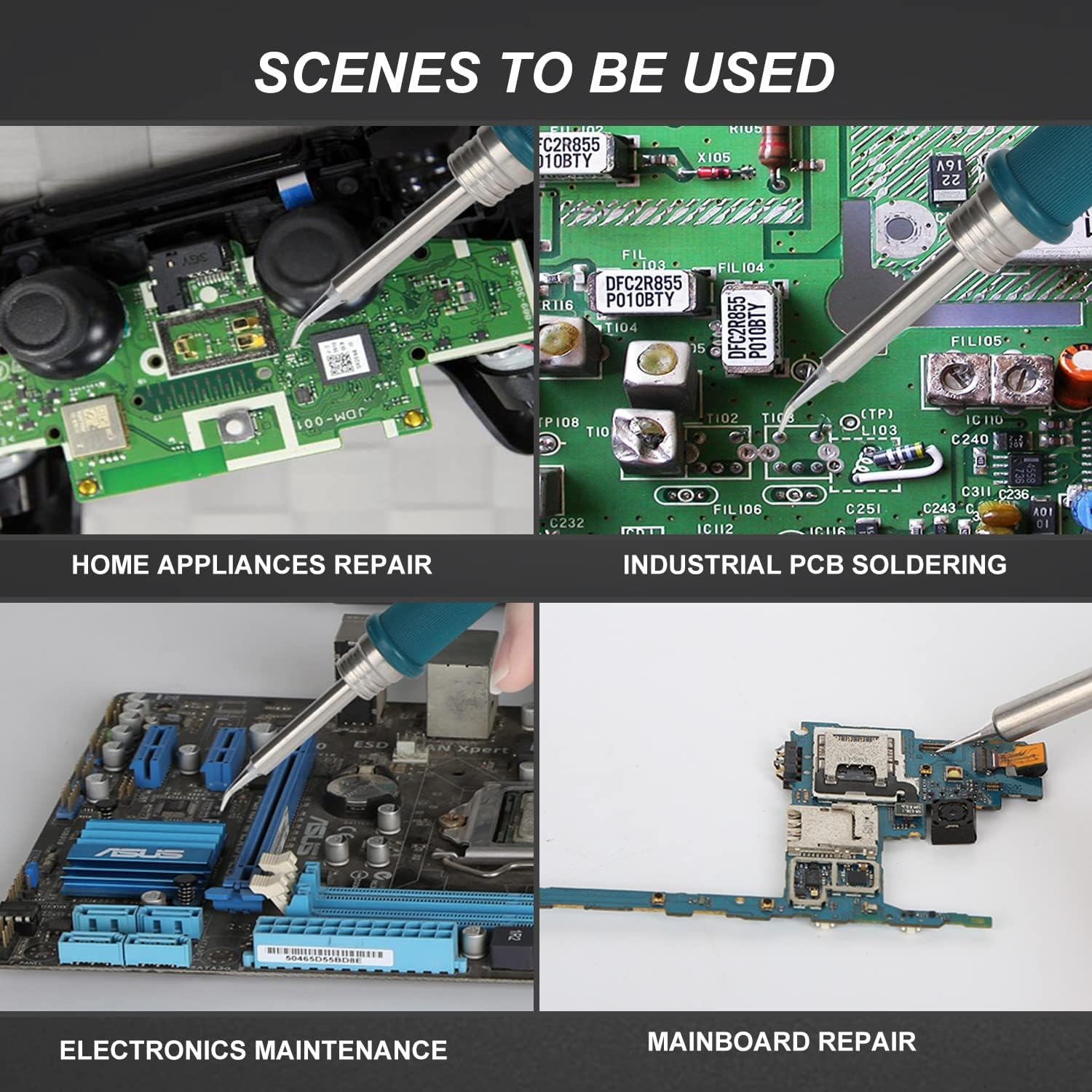
The SUGON A8 soldering station is suitable for various applications including home appliance repair, industrial PCB soldering, electronics maintenance, and mainboard repair.
10. Warranty and Support
10.1 Warranty Information
A 12-month quality service is provided for the SUGON A8 Soldering Station. Please note that this warranty does not cover the one-piece soldering iron core or other consumable parts, as their lifespan is dependent on usage and maintenance.
10.2 Customer Support
For any questions, concerns, or technical assistance regarding your SUGON A8 Soldering Station, please do not hesitate to contact our customer support team. We are committed to providing prompt and helpful responses to ensure your satisfaction.
Please refer to the warranty card or product packaging for specific contact details.