
JOY worker FDS107F-W
JOY worker Mobile Standing Desk User Manual
Model: FDS107F-W
1. Introduction
Thank you for choosing the JOY worker Mobile Standing Desk. This desk is designed to provide a versatile and ergonomic workspace, allowing you to easily switch between sitting and standing positions. Its unique tiltable board and mobile design make it suitable for various environments, including home, office, and school. Please read this manual carefully before assembly and use to ensure proper operation and longevity of your desk.
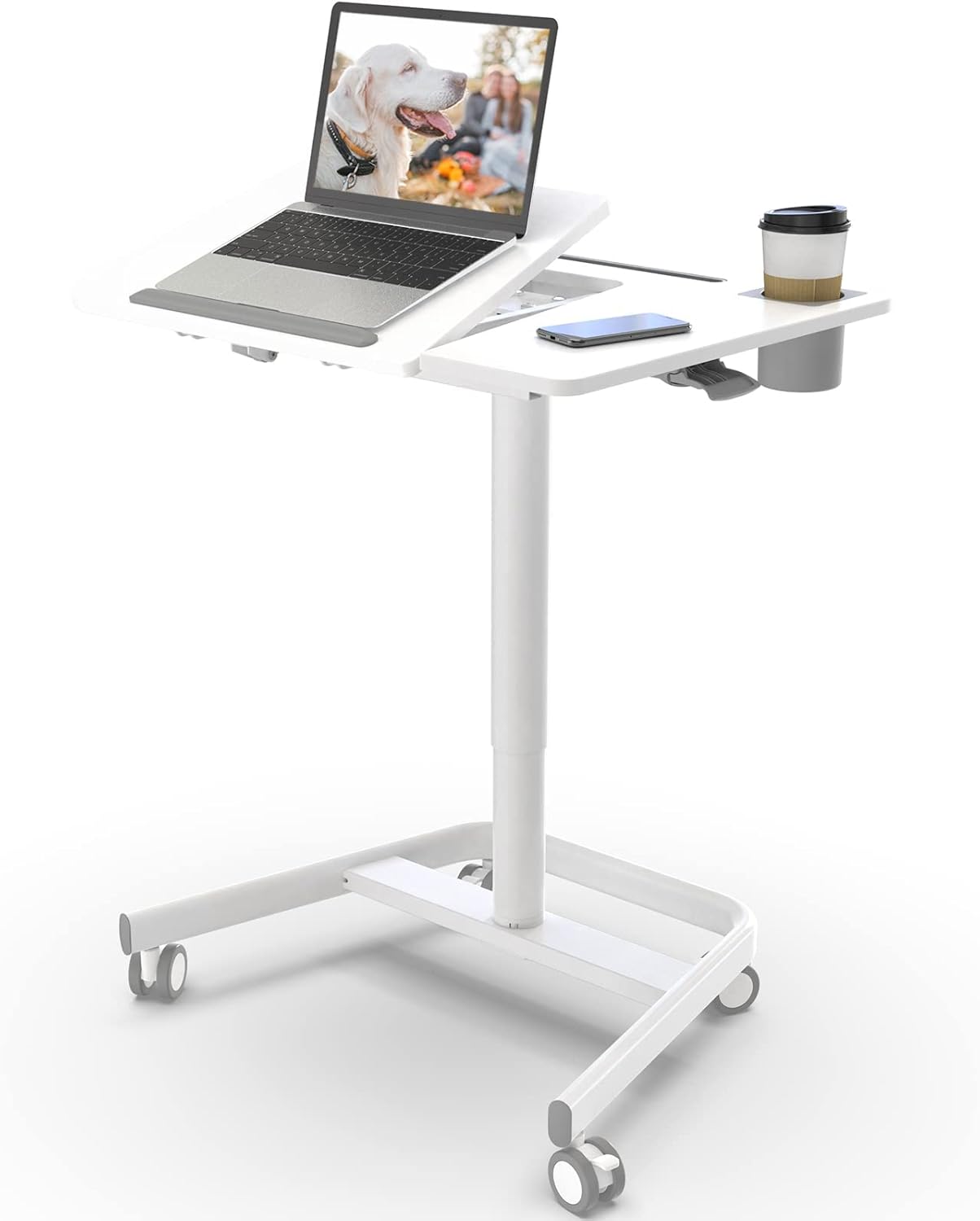
Figure 1: JOY worker Mobile Standing Desk
2. Important Safety Information
WARNING: Failure to follow these instructions may result in injury or damage to the product.
- Ensure proper assembly according to instructions provided in this manual.
- Do not exceed the maximum weight limit of 22 pounds (10 kg) on the desktop.
- Keep hands and fingers clear of moving parts during height adjustment and tilting.
- Do not allow children to play on or around the desk without adult supervision.
- Place the desk on a stable, level surface.
- Regularly check all fasteners to ensure they are tight.
3. Product Overview
3.1 Key Features
- Unique Folding Board: The bedside table with wheels is designed with a built-in folding board, supporting 0-60° flip, can be used for reading, composing and painting, etc. Added non-slip pads to protect the laptop from falling when used at an angle.
- Gas Spring Height Adjustment: The height of the rolling computer desk can be adjusted from 29.5" to 41.7" with one-button lifting. Using pneumatic technology, the lifting process is smooth and fast, easy to switch between sitting and standing positions.
- Spacious Desktop: The table top measures up to 27.2x21.8 inches and the built-in folding board measures 20.2x15.7 inches. The white laptop desk on wheels includes a cup holder and a recess for your tablet and cups without taking up any unnecessary space.
- Movable & Lockable Wheels: The Laptop desk can be fixed in any specific position by locking the swivel wheels, and you can move it by releasing the brakes. Round table sides better protect you from bumps.
- Sturdy Construction: The Portable Rolling Desk is made of cold rolled steel with a rust-resistant coating for extended use. Load up to 22 lbs.
3.2 Components

Figure 2: Desk Components (Easy to Install)

Figure 3: Desktop Features (Cup Holder, Device Slot, Tiltable Board)
3.3 Product Dimensions

Figure 4: Product Dimensions
4. Setup and Assembly
Follow these steps to assemble your JOY worker Mobile Standing Desk:
- Attach the Wheels: Turn the hex bolts with a wrench and screw the casters into the base. Ensure they are securely fastened.
- Assemble the Base and Column: The side of the column with the handle wire hole should be consistent with the side of the base opening. Ensure the base opening faces forward and the handle wire hole faces forward, keeping the direction consistent for proper installation.
- Attach the Desktop: Secure the desktop to the assembled column and base using the provided hardware.
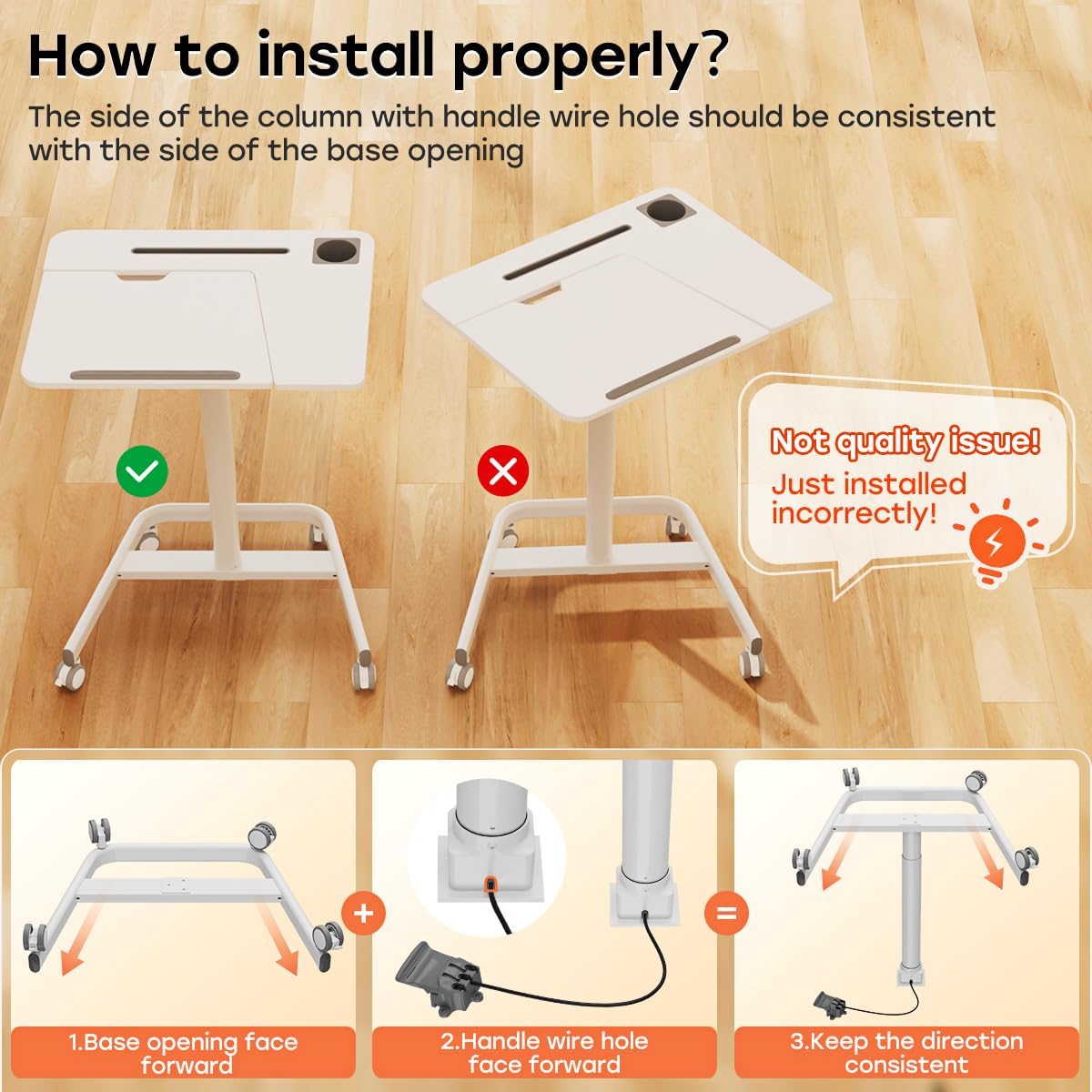
Figure 5: Correct Base and Column Alignment
4.1 Wheel Installation and Adjustment Video
Video 1: How to install and adjust the wheels. This video demonstrates the correct procedure for installing the desk's wheels and how to adjust their height using the hexagon nut to ensure stability on uneven surfaces.
5. Operating Instructions
5.1 Height Adjustment
The desk features a gas spring lifting mechanism for smooth height adjustment. To adjust the height:
- Locate the height adjustment handle on the central column.
- Press the handle to release the lock.
- Gently raise or lower the desktop to your desired height (between 29.5" and 41.7").
- Release the handle to lock the desk in place.

Figure 6: Sit-Stand Freedom (Height Adjustment)

Figure 7: Unique Pneumatic Design (Height Handle)
5.2 Tiltable Desktop
The desk features a unique folding board that can be tilted for various activities.
- Locate the flip handle underneath the tiltable section of the desktop.
- Pull the handle to release the lock.
- Adjust the tiltable board to your desired angle (0-60°).
- Release the handle to lock the board in place.
- Ensure your laptop or items are secured by the non-slip pads when tilted.

Figure 8: Partially Tiltable Desktop (Correct Usage)
Figure 9: Unique Pneumatic Design (Flip Handle)
5.3 Using the Wheels
The desk is equipped with four rolling wheels, two of which are lockable, for easy mobility and stability.
- To move the desk, ensure the wheel brakes are disengaged.
- To lock the desk in a specific position, press down on the levers of the two lockable wheels until they click into place.
- To unlock, lift the levers until they release.
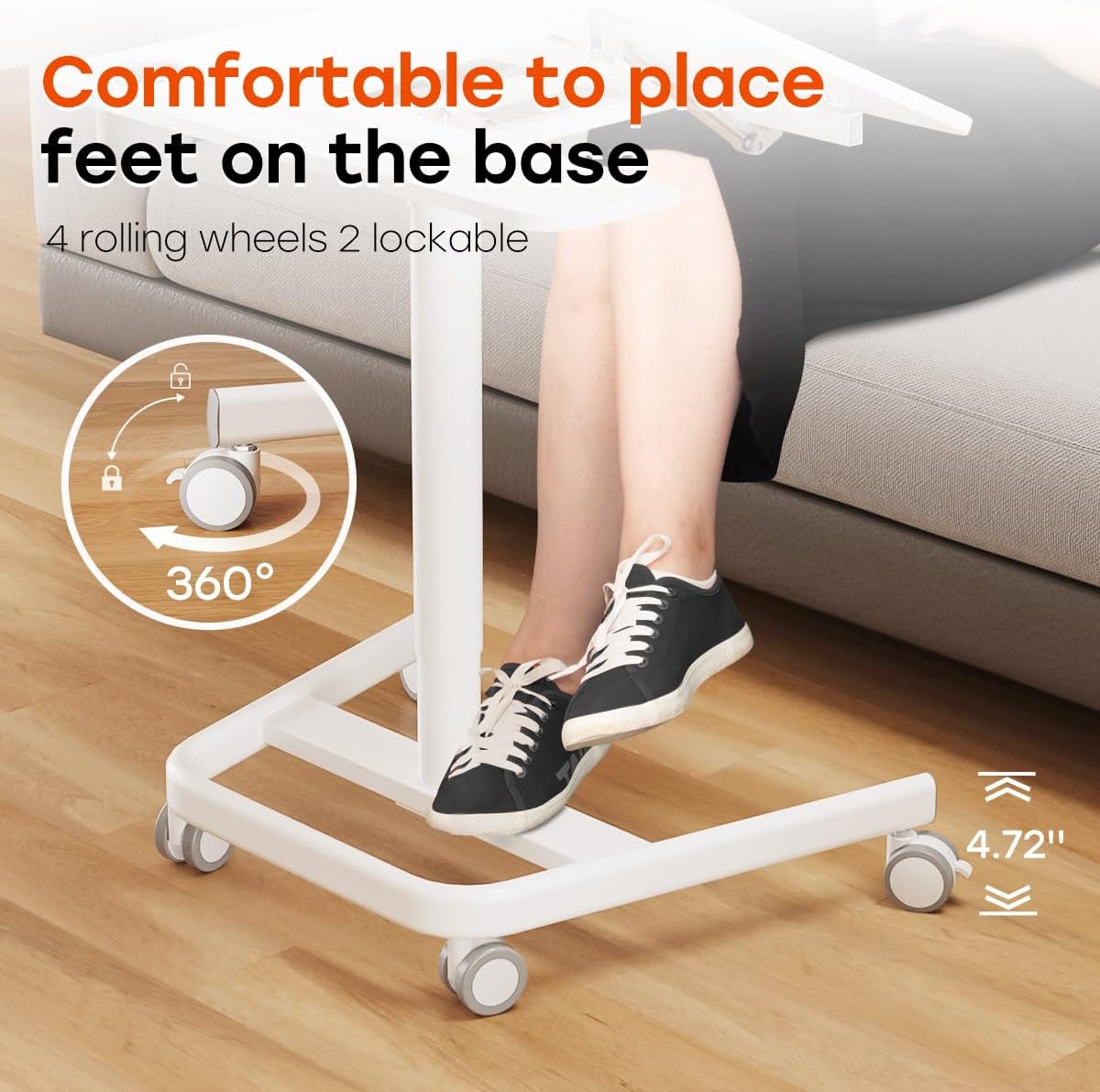
Figure 10: Movable & Lockable Wheels
6. Maintenance
- Cleaning: Wipe the desk surfaces with a dry cloth. Avoid abrasive cleaners or harsh chemicals.
- Fasteners: Periodically check all screws and bolts to ensure they are tight. Re-tighten if necessary.
- Wheel Adjustment: If the desk feels unstable or shakes on an uneven ground, you can adjust the height of the wheels. Our M8 Stem Caster is 0.94" long and can be adjusted and fixed with nuts. Refer to Video 1 in the Setup and Assembly section for detailed instructions on adjusting the wheel height.
7. Troubleshooting
7.1 Desk is Shaking or Unstable
- Check Wheel Adjustment: Ensure all wheels are properly adjusted to compensate for uneven flooring. Use the hexagon nuts on the casters to fine-tune the height of each wheel.
- Verify Assembly: Double-check that all components are securely fastened according to the assembly instructions. Pay particular attention to the connection between the column and the base.
- Weight Distribution: Ensure the weight on the desktop is evenly distributed and does not exceed the maximum capacity of 22 lbs.
7.2 Height Adjustment is Stiff or Not Working
- Clear Obstructions: Ensure there are no obstructions preventing the column from moving freely.
- Check Handle Mechanism: Verify that the height adjustment handle is fully engaged or disengaged as required.
- Lubrication: If the mechanism feels stiff, a small amount of silicone-based lubricant can be applied to the moving parts of the gas spring, if accessible and recommended by the manufacturer (consult customer support if unsure).
8. Specifications
| Attribute | Detail |
|---|---|
| Brand | JOY worker |
| Model Number | FDS107F-W |
| Product Dimensions (D x W x H) | 21.8"D x 27.2"W x 41.7"H |
| Color | White |
| Style | Modern |
| Base Material | Aluminum |
| Top Material Type | Engineered Wood |
| Finish Type | Laminated |
| Special Feature | Adjustable Height |
| Recommended Uses | Working |
| Included Components | Cup Holder |
| Item Weight | 22 Pounds |
| Required Assembly | Yes |
| Maximum Weight Recommendation | 22 Pounds |
| Recommended Number of People for Assembly | 1 |
| Maximum Tilt Angle | 60 Degrees |
| Minimum Height | 29.5 Inches |
| Maximum Height | 41.7 Inches |
| Lifting Mechanism | Pneumatic |
9. Warranty and Support
For warranty information and customer support, please refer to the documentation included with your purchase or visit the official JOY worker website. If you encounter any issues not covered in this manual, please contact JOY worker customer service for assistance.
JOY worker Store: https://www.amazon.com/stores/JOYworker/page/CA93DB5E-D3F0-4AA0-9437-83A5A38CCDA2
Related Documents - FDS107F-W
 |
JOY worker Double Column Mobile Desk: Assembly and User Manual Comprehensive instruction manual for the JOY worker Double Column Mobile Desk, detailing specifications, component list, hardware, and step-by-step assembly instructions for this height-adjustable, mobile workstation. |
 |
JOY worker Height Adjustable Electric Standing Desk Assembly and User Manual This manual provides detailed assembly instructions, component and hardware lists, and operational guidance for the JOY worker Height Adjustable Electric Standing Desk. Learn how to assemble your desk, use the controller, and troubleshoot common issues. |
 |
JOY worker Height Adjustable Electric Standing Desk Assembly Instructions Comprehensive assembly instructions for the JOY worker Height Adjustable Electric Standing Desk. This guide provides detailed steps, component lists, hardware information, and controller usage for assembling your sit-stand desk. |
 |
Joy Seeker Electric Standing Desk with Drawer - Instruction Manual Comprehensive instruction manual for assembling and operating the Joy Seeker Electric Standing Desk with Drawer. Includes specifications, component list, hardware details, assembly steps, controller functions, and troubleshooting. |