
Introduction
This manual provides comprehensive instructions for the safe and efficient operation of your Dreo Nomad One S Tower Fan. Please read this manual thoroughly before use and retain it for future reference.
Important Safety Instructions
- Always ensure the fan is placed on a stable, level surface to prevent tipping.
- Do not insert fingers or foreign objects through the grilles when the fan is operating.
- Unplug the fan from the power outlet before cleaning or performing any maintenance.
- Keep the power cord away from heated surfaces.
- This appliance is not intended for use by persons (including children) with reduced physical, sensory or mental capabilities, or lack of experience and knowledge, unless they have been given supervision or instruction concerning use of the appliance by a person responsible for their safety.
- Do not operate any fan with a damaged cord or plug. Discard fan or return to an authorized service facility for examination and/or repair.
- Do not use outdoors.
- Do not operate where aerosol (spray) products are being used or where oxygen is being administered.
- Do not run cord under carpeting. Do not cover cord with throw rugs, runners, or similar coverings. Arrange cord away from traffic area and where it will not be tripped over.
Package Contents
- Dreo Nomad One S Tower Fan Body x 1
- Front Fan Base x 1
- Rear Fan Base x 1
- Remote Control x 1 (Battery Included)
- User Manual x 1
Assembly Instructions
The Dreo Nomad One S Tower Fan requires minimal assembly. Follow these steps:
- Attach the Base: Align the front and rear fan base pieces. Secure them together.
- Connect to Fan Body: Place the assembled base onto the bottom of the tower fan body. Twist clockwise until it locks securely.
- Power Connection: Plug the power cord into a suitable electrical outlet.
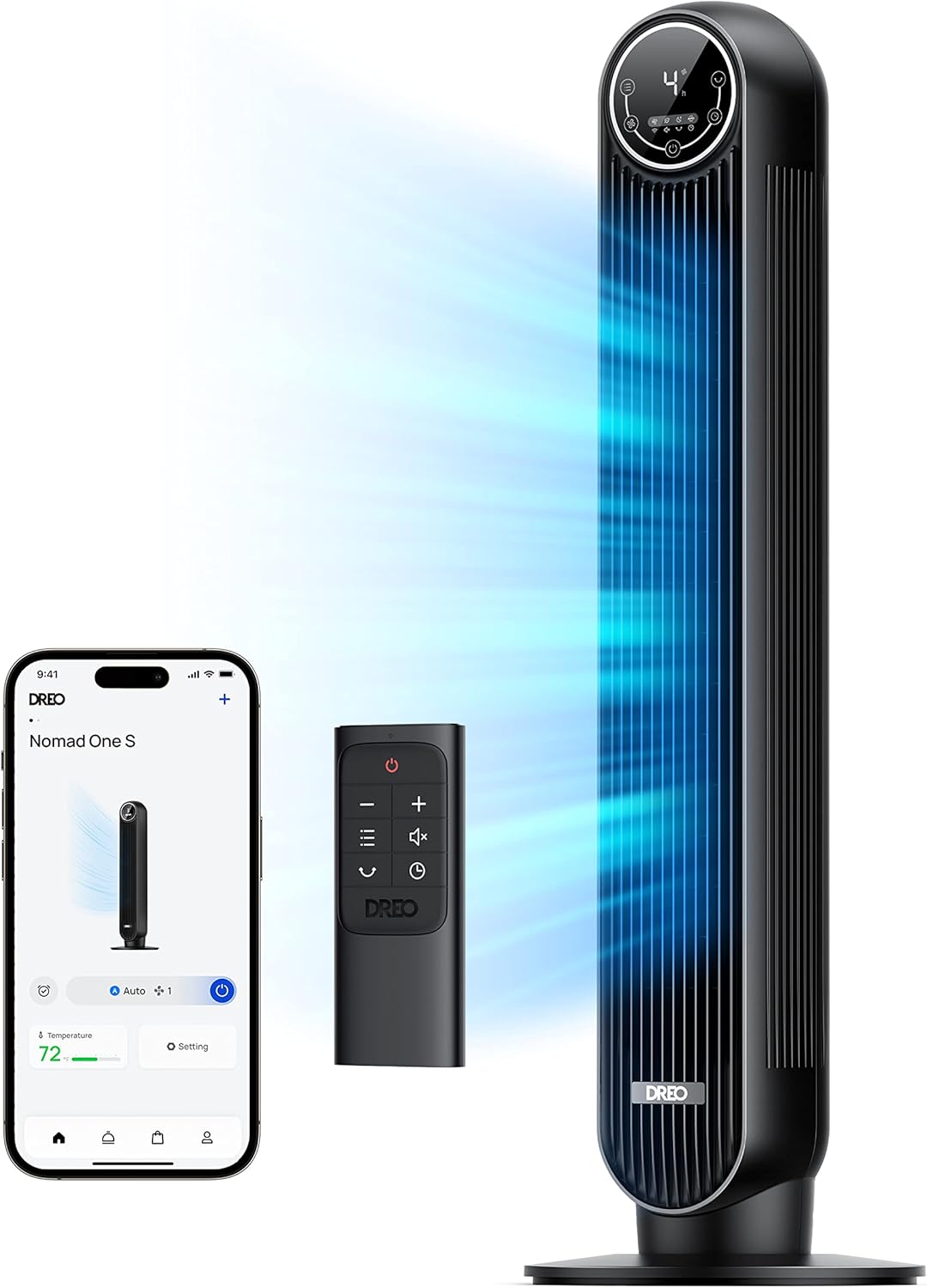
Image: The Dreo Nomad One S Tower Fan, showing its sleek black design, remote control, and a smartphone displaying the control app. This image illustrates the fan's components and smart features.
Operating Instructions
Control Panel and Remote Control
The fan can be operated using the touch control panel on top of the unit or the included remote control.

Image: A detailed view of the fan's LED control panel, displaying current settings such as speed and timer. This shows the intuitive interface for manual operation.
- Power Button: Turns the fan On or Off.
- Mode Button: Cycles through Normal, Natural, Sleep, and Auto modes.
- Speed Button: Adjusts fan speed (Levels 1-4).
- Oscillation Button: Activates or deactivates 90° oscillation.
- Timer Button: Sets the auto-off timer (1-8 hours).
Smart Control (Dreo App, Alexa, Google Assistant)
For advanced control and smart features, download the Dreo App on your smartphone. The fan is compatible with Alexa and Google Assistant for voice control.
- Download App: Search for "Dreo" in your device's app store.
- Pair Device: Follow the in-app instructions to connect your fan to your home Wi-Fi network.
- Voice Control Setup: Enable the Dreo skill in your Alexa or Google Home app and link your Dreo account.

Image: A user interacting with the Dreo app on a smartphone, showing options for scheduling, temperature control, and fan settings. This highlights the smart control capabilities.
Available Modes:
- Normal Mode: Provides a constant airflow at your selected speed.
- Natural Mode: Simulates natural breeze by varying fan speed.
- Sleep Mode: Operates at a lower speed with reduced noise, and the display lights dim or turn off.
- Auto Mode: Adjusts fan speed automatically based on ambient room temperature.
Maintenance and Cleaning
Regular cleaning ensures optimal performance and extends the lifespan of your fan.
- Before Cleaning: Always unplug the fan from the power outlet.
- Exterior Cleaning: Wipe the exterior surfaces with a soft, damp cloth. Do not use abrasive cleaners or solvents.
- Grille Cleaning: The rear grille is removable for easier access to the impeller wheel. Gently remove dust and debris using a vacuum cleaner with a brush attachment or a soft cloth.
- Storage: If storing the fan for an extended period, cover it to protect from dust and store in a cool, dry place.

Image: An illustration demonstrating the removable rear grille and impeller for easy cleaning. This highlights the user-friendly maintenance design.
Troubleshooting
| Problem | Possible Cause | Solution |
|---|---|---|
| Fan does not turn on. | Not plugged in; power outlet not working; power button not pressed. | Ensure the fan is securely plugged into a working outlet. Press the power button. |
| Weak airflow. | Fan speed too low; grilles are blocked by dust. | Increase fan speed. Clean the grilles and impeller as per maintenance instructions. |
| Fan is noisy. | Fan is not on a level surface; internal components are dirty. | Place the fan on a flat, stable surface. Clean the fan. |
| Remote control not working. | Battery depleted; obstruction between remote and fan. | Replace the remote control battery. Ensure a clear line of sight to the fan's receiver. |
| Wi-Fi connection issues. | Incorrect Wi-Fi password; fan too far from router; router issues. | Re-enter Wi-Fi password in the app. Move fan closer to router. Restart router. |
Specifications
- Model Name: DR-HTF007S
- Brand: Dreo
- Color: Black
- Product Dimensions: 11.81"D x 11.81"W x 36.22"H
- Item Weight: 9 Pounds
- Power Source: Corded Electric
- Wattage: 35 watts
- Voltage: 120V
- Noise Level: 28 dB (at lowest speed)
- Air Flow Capacity: 1236 Cubic Feet Per Minute
- Speed: Up to 25 Feet Per Second
- Oscillation: 90°
- Control Method: App, Remote, Touch, Voice (Alexa, Google Assistant)
- Special Features: Remote Controlled, Oscillating, Timer, Bladeless, Portable, WiFi Connectivity
- Safety Certification: ETL Listed
Warranty and Support
Your Dreo Nomad One S Tower Fan comes with a 12-month default warranty. You can extend this warranty up to 30 months by registering your product on the official Dreo website.
For technical support, warranty claims, or general inquiries, please contact Dreo customer service through their official website or the contact information provided in your product packaging.
Please have your model number (DR-HTF007S) and proof of purchase ready when contacting support.


