
KitchenBoss B09Q81J8KY
Contents
KitchenBoss Food Vacuum Sealer Machine User Manual
Model: B09Q81J8KY
1. Introduction
Thank you for choosing the KitchenBoss Food Vacuum Sealer Machine. This appliance is designed to extend the freshness of your food by removing air from specially designed bags and containers, preventing spoilage and freezer burn. By following the instructions in this manual, you can ensure safe and efficient operation of your vacuum sealer, preserving nutrients, flavor, and shelf life of various foods.

Image: The KitchenBoss Food Vacuum Sealer Machine, showcasing its sleek design and its primary function of sealing food, surrounded by fresh produce and meat.
2. Important Safety Instructions
Please read all instructions carefully before using the appliance.
- Do not operate the appliance with a damaged cord or plug. If the appliance malfunctions or has been damaged in any manner, discontinue use and contact customer support.
- Do not immerse the appliance, power cord, or plug in water or other liquids.
- This appliance is for household use only. Do not use outdoors or for commercial purposes.
- Close supervision is necessary when any appliance is used by or near children.
- Unplug from outlet when not in use and before cleaning.
- Use only KitchenBoss recommended accessories and bags.
- Avoid contact with moving parts.
- Do not place on or near a hot gas or electric burner, or in a heated oven.
- Always ensure the lid is properly closed and locked before operating.
3. Package Contents
Upon opening the package, please verify that all items are present and in good condition:
- KitchenBoss Food Vacuum Sealer Machine
- Vacuum Hose for external containers
- User Manual
- Starter pack of vacuum sealer bags (quantity may vary)
4. Product Overview
Familiarize yourself with the main components and control panel of your KitchenBoss Vacuum Sealer:
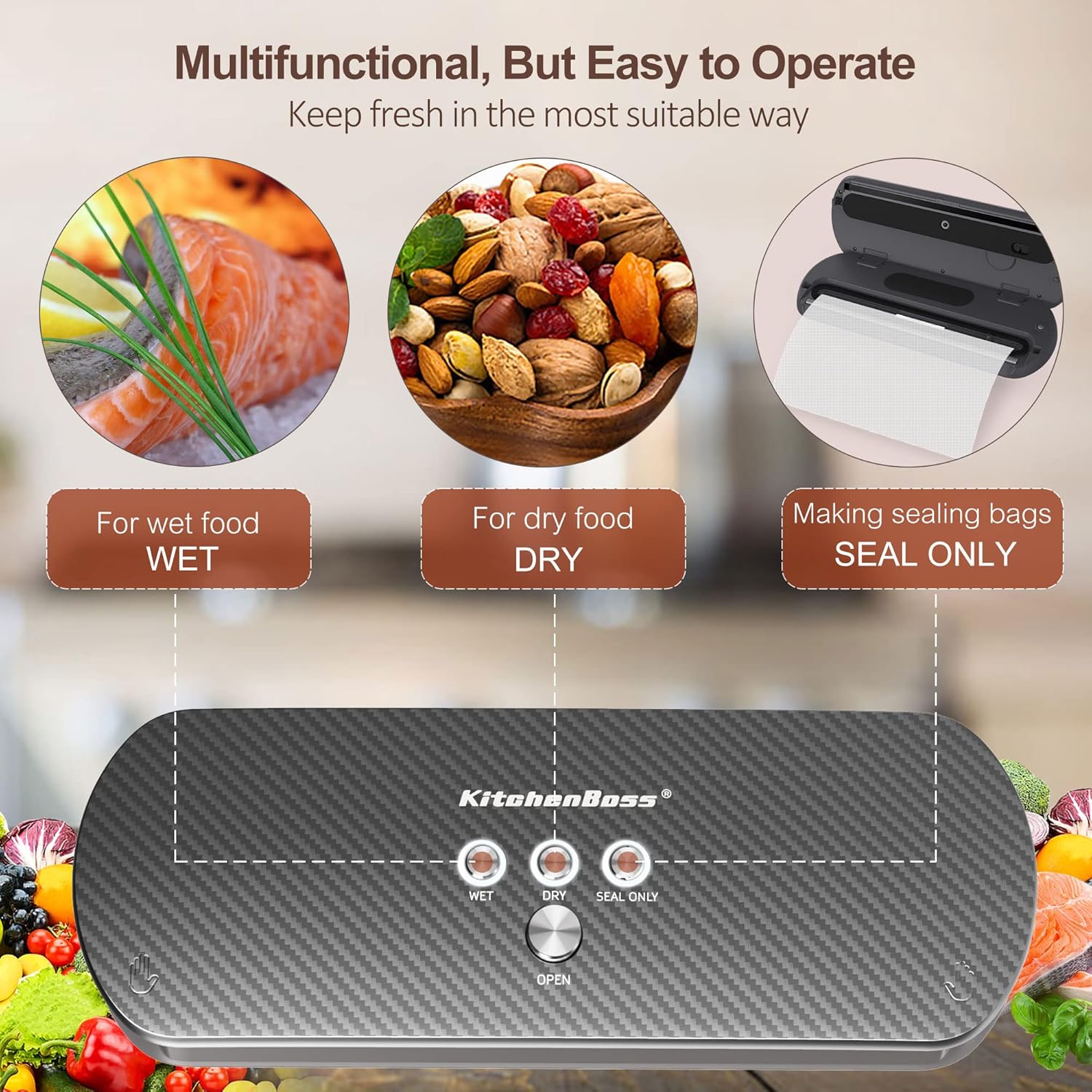
Image: Top view of the KitchenBoss Vacuum Sealer highlighting the control buttons for Wet, Dry, and Seal Only modes, along with the 'Open' button.
Control Panel Functions:
- WET Button: Activates vacuum sealing for moist foods.
- DRY Button: Activates vacuum sealing for dry foods.
- SEAL ONLY Button: Seals bags without vacuuming, useful for making custom-sized bags from rolls or sealing delicate items.
- OPEN Button: Releases the lid locks after sealing is complete.
- Vacuum Chamber: Area where the bag opening is placed for vacuuming.
- Sealing Strip: Heats up to create a strong, airtight seal.
5. Setup
- Unpack the Appliance: Carefully remove the vacuum sealer and all accessories from the packaging. Retain packaging for future storage or transport.
- Placement: Place the vacuum sealer on a flat, stable, and dry surface. Ensure there is enough space around the unit for operation and ventilation.
- Power Connection: Plug the power cord into a standard electrical outlet. The machine is now ready for use.
6. Operating Instructions
6.1. Basic Vacuum Sealing (Bags)
Follow these steps for vacuum sealing food in bags:

Image: A visual guide demonstrating the five steps to vacuum seal food in a bag, from placing the bag to releasing the lid.
- Prepare the Bag: Place the food item into a vacuum sealer bag, ensuring that the open end of the bag is clean, dry, and free of wrinkles. Leave at least 2-3 inches of space between the food and the top of the bag.
- Position the Bag: Open the lid of the vacuum sealer. Place the open end of the bag flat into the vacuum chamber, ensuring it covers the pumping port on the right side. Make sure the bag is smooth and extends across the sealing strip.
- Close the Lid: Firmly press down on both ends of the lid until you hear a "click" sound, indicating that the lid is securely locked.
- Select Mode and Start:
- For dry foods (e.g., nuts, grains, dried fruits), press the DRY button.
- For moist foods (e.g., fresh meat, fish, marinated items), press the WET button.
- Release and Remove: Once the sealing process is finished, press the OPEN button to release the lid locks. Carefully remove the sealed bag.
6.2. Seal Only Function
To seal a bag without vacuuming (e.g., for making custom-sized bags from a roll or sealing delicate items):
- Place the open end of the bag onto the sealing strip, ensuring it is flat and smooth.
- Close the lid firmly until it clicks.
- Press the SEAL ONLY button. The machine will heat the sealing strip to create a seal.
- Once the sealing indicator light turns off, press the OPEN button and remove the sealed bag.
6.3. External Vacuum Function (Containers/Jars)
Your KitchenBoss vacuum sealer comes with a hose for vacuuming external containers and jars:
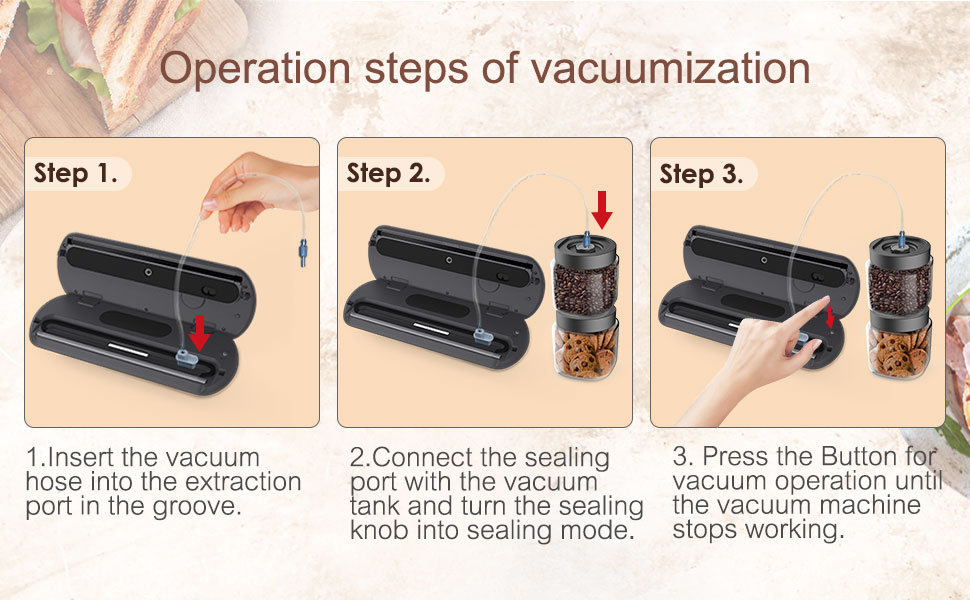
Image: A visual guide illustrating the three steps for using the external vacuum function with a hose and a vacuum-compatible jar.
- Prepare Container: Place food into a vacuum-compatible container or jar. Ensure the container's lid is properly closed and the vacuum port is accessible.
- Connect Hose to Machine: Insert one end of the vacuum hose into the extraction port located on the vacuum sealer (usually inside the vacuum chamber or on the side).
- Connect Hose to Container: Connect the other end of the vacuum hose to the vacuum port on the container's lid.
- Start Vacuuming: Close the lid of the vacuum sealer (if applicable for your model) and press the appropriate vacuum button (e.g., DRY or a dedicated External Vacuum button if present). The machine will begin to extract air from the container.
- Finish: The machine will stop automatically when the desired vacuum level is reached. Remove the hose from the container and the machine.
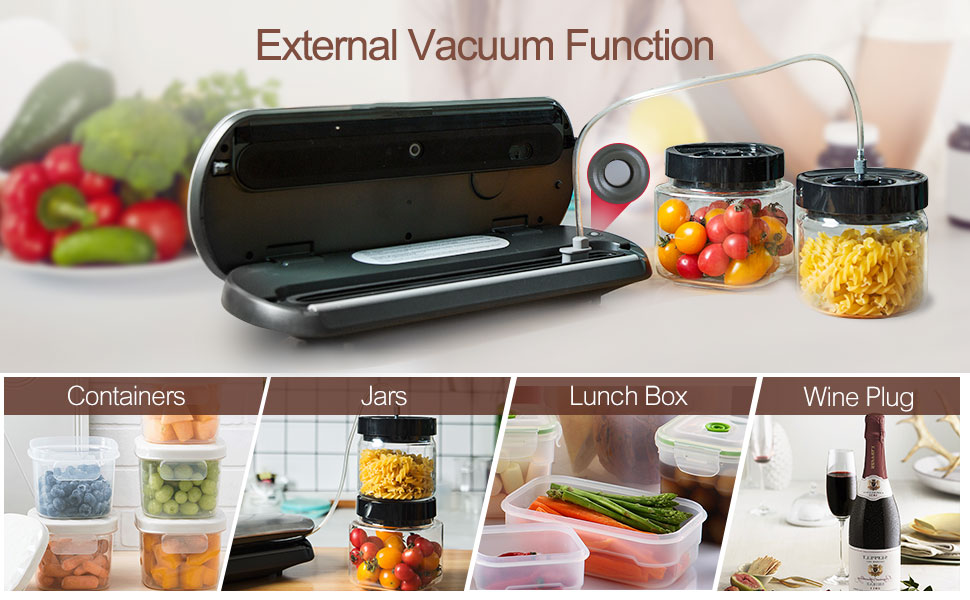
Image: An illustration showing different types of containers, jars, lunch boxes, and wine plugs that can be used with the external vacuum function.
7. Maintenance and Cleaning
Regular cleaning and maintenance will ensure the longevity and optimal performance of your vacuum sealer.
- Always Unplug: Before cleaning, always unplug the appliance from the electrical outlet.
- Clean the Exterior: Wipe the exterior of the machine with a soft, damp cloth. Do not use abrasive cleaners or solvents.
- Clean the Vacuum Chamber: If any liquid or food particles enter the vacuum chamber, wipe it clean with a damp cloth and mild soap. Dry thoroughly.
- Clean the Sealing Strip: Gently wipe the sealing strip with a soft cloth. Do not scratch or damage the strip, as this can affect sealing performance.
- Storage: Store the appliance in a cool, dry place with the lid unlatched to prevent compression of the sealing gaskets, which can lead to poor seals over time.
8. Troubleshooting
If you encounter issues with your KitchenBoss Vacuum Sealer, refer to the following common problems and solutions:
| Problem | Possible Cause | Solution |
|---|---|---|
| Machine does not turn on. | Not plugged in; power outlet issue. | Ensure the power cord is securely plugged into a working outlet. |
| Bag does not vacuum properly. | Lid not properly locked; bag not positioned correctly; bag is wet or wrinkled; bag is not a vacuum sealer bag. | Ensure the lid is firmly pressed down until it clicks. Reposition the bag, ensuring it is flat and extends into the vacuum chamber. Use dry, clean bags designed for vacuum sealing. |
| Bag does not seal. | Sealing strip is dirty or damaged; bag is wet or wrinkled in sealing area; overheating. | Clean the sealing strip. Ensure the bag opening is dry and smooth. Allow the machine to cool down for 20-30 seconds between seals if performing multiple seals. |
| Vacuum is weak or inconsistent. | Gaskets are dirty or damaged; vacuum chamber is obstructed; bag is too wide. | Clean the gaskets and vacuum chamber. Ensure the bag width does not exceed 12 inches. |
| External vacuum function not working. | Hose not properly connected; container not sealed; container not vacuum-compatible. | Ensure the hose is securely connected to both the machine and the container. Verify the container lid is properly closed and designed for vacuum sealing. |
If the problem persists after trying these solutions, please contact KitchenBoss customer support for further assistance.
9. Specifications
| Feature | Detail |
|---|---|
| Brand | KitchenBoss |
| Model | B09Q81J8KY |
| Color | Carbon Fibre Black |
| Product Dimensions | 39.37 x 15.24 x 8.13 cm |
| Item Weight | 1.5 kg |
| Power/Wattage | 240 watts |
| Voltage | 100 Volts (AC) |
| Material | ABS+PC |
| Operation Mode | Automatic |
10. Warranty and Support
KitchenBoss is committed to providing high-quality products and excellent customer service. While specific warranty details are not provided in this manual, KitchenBoss offers attentive after-sale support for your vacuum food sealer machine.
For any assistance, information, or support regarding your KitchenBoss auto vacuum sealer, please contact our customer service team. We are dedicated to serving you and ensuring your satisfaction.
Please refer to the product packaging or the official KitchenBoss website for the most up-to-date warranty information and contact details.
Documents and downloads
Ask a question about this manual
Ask about setup, troubleshooting, compatibility, parts, safety, or missing instructions. Manuals+ will review the question and use this page’s manual context to help answer it.