
Boytone BT-32W
Boytone BT-32W All-in-One Music System
User Instruction Manual
Model: BT-32W | Brand: Boytone
1. Introduction
Thank you for purchasing the Boytone BT-32W All-in-One Music System. This versatile unit combines a classic record player with modern audio functionalities, including a CD player, cassette deck, AM/FM radio, Bluetooth connectivity, and USB/SD recording capabilities. This manual provides detailed instructions for setting up, operating, and maintaining your new music system to ensure optimal performance and longevity.

Image: Front view of the Boytone BT-32W All-in-One Music System, showcasing the turntable, control panel, and speakers.
2. Safety Information
Please read all safety warnings and instructions carefully before operating this product. Keep this manual for future reference.
- Power Source: Ensure the unit is connected to a power supply that matches the voltage specified on the rating label.
- Ventilation: Do not block any ventilation openings. Allow adequate space around the unit for proper airflow.
- Water and Moisture: Do not expose the unit to rain, moisture, or excessive humidity. Do not place objects filled with liquids, such as vases, on the unit.
- Heat: Keep the unit away from heat sources such as radiators, heat registers, stoves, or other apparatus (including amplifiers) that produce heat.
- Cleaning: Unplug the unit from the wall outlet before cleaning. Use a soft, dry cloth. Do not use liquid cleaners or aerosol cleaners.
- Servicing: Do not attempt to service this product yourself. Refer all servicing to qualified service personnel.
3. Package Contents
Upon unpacking, please ensure all items listed below are present and in good condition:
- Boytone BT-32W All-in-One Music System Unit
- Dust Cover
- 45 RPM Adapter
- Remote Control (Note: Some functions, including power on/off and volume, may be primarily controlled via the remote.)
- User Manual (this document)
4. Product Features
- Rich Audio Experience: Integrated stereo system with high-quality external speakers for enhanced sound.
- Versatile Listening Options: 3-speed turntable (33 1/3, 45, and 78 RPM) for vinyl records, a CD player, cassette deck, and AM/FM radio.
- Bluetooth Connectivity: Seamlessly stream music from your Bluetooth-enabled devices.
- All-in-One Music Center: Multiple audio playback options and MP3 conversion via USB/SD.
- Classic Design: Blends vintage aesthetics with modern audio technology.
- Ceramic Cartridge: Durable, high-quality diamond stylus for extended record player life.
- 3-Speed Belt Drive Turntable: Ensures optimal performance for vinyl playback.
- Intelligent Auto-Stop Setting: Protects your vinyl records by automatically stopping playback at the end of a record.

Image: Visual representation of the BT-32W's key features, including USB/SD port, wireless sound, all-in-one system, and phone line out jacks.

Image: Close-up views highlighting the ceramic cartridge, 3-speed belt drive turntable, and intelligent auto-stop setting.
5. Setup
- Unpacking: Carefully remove the unit and all accessories from the packaging. Retain the packaging for future transport or storage.
- Placement: Place the unit on a stable, flat surface away from direct sunlight, heat sources, and excessive dust or moisture. Ensure adequate ventilation around the unit.
- Connect Speakers: The BT-32W comes with integrated stereo speakers. If you wish to connect external powered speakers, use the 'LINE OUT' jacks located on the rear of the unit.
- Power Connection: Connect the AC power cord to the unit's power input and then to a standard wall outlet.
- Dust Cover: Place the clear dust cover over the turntable to protect it when not in use.

Image: Rear view of the Boytone BT-32W, showing the 'LINE OUT' jacks, DC 12V input, and FM antenna connection.
6. Operating Instructions
6.1 General Operation
- Power On/Off: Use the 'VOLUME/STANDBY' knob or the remote control to turn the unit on or off.
- Function Selection: Press the 'FUNCTION' button to cycle through modes: PHONO (Turntable), CD, TAPE (Cassette), FM/AM Radio, Bluetooth, USB, SD, AUX IN.
- Volume Control: Adjust the 'VOLUME/STANDBY' knob or use the remote control to set the desired volume level.
6.2 Turntable Operation (PHONO Mode)
- Lift the dust cover.
- Place a vinyl record on the turntable platter. If playing a 45 RPM single, place the included 45 RPM adapter on the center spindle.
- Select 'PHONO' mode using the 'FUNCTION' button.
- Set the speed selector switch (33 1/3, 45, or 78 RPM) to match your record.
- Gently lift the tone arm and move it over the record. Lower the tone arm onto the desired track.
- The turntable will begin to spin and play. At the end of the record, the auto-stop feature will halt the platter.
- To stop playback manually, lift the tone arm and return it to its rest.
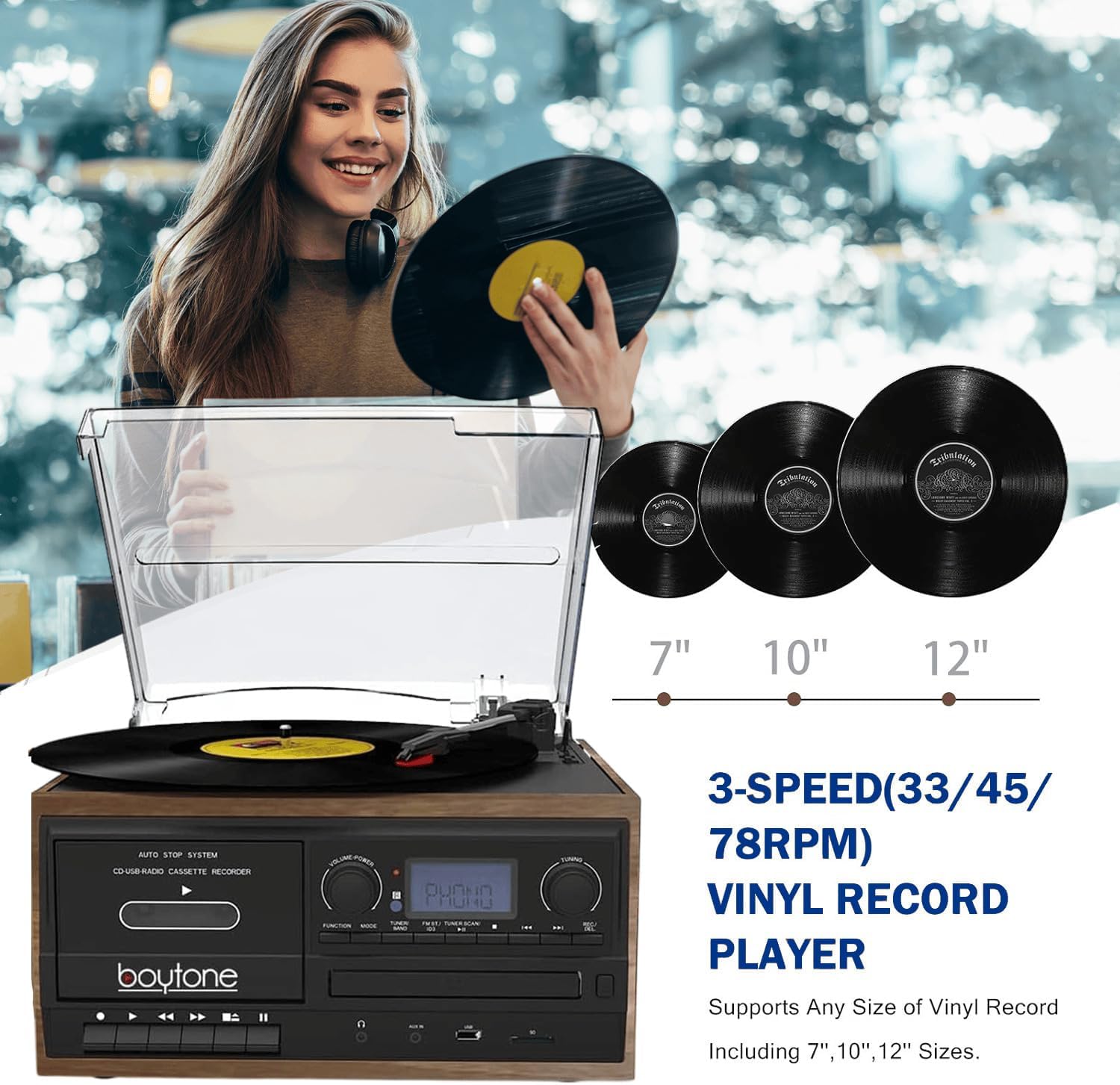
Image: A person placing a vinyl record on the turntable, illustrating the 3-speed capability for 7", 10", and 12" records.
6.3 CD Player Operation
- Press the 'FUNCTION' button to select 'CD' mode.
- Press the 'OPEN/CLOSE' button to open the CD tray.
- Place a CD with the label side facing up into the tray.
- Press the 'OPEN/CLOSE' button again to close the tray. The unit will read the CD and begin playback automatically.
- Use the 'PLAY/PAUSE', 'STOP', 'SKIP FORWARD', and 'SKIP BACKWARD' buttons for playback control.
6.4 Cassette Player Operation (TAPE Mode)
- Press the 'FUNCTION' button to select 'TAPE' mode.
- Insert a cassette tape into the cassette deck slot.
- Use the cassette control buttons (Play, Stop, Fast Forward, Rewind) to operate the cassette player.
6.5 AM/FM Radio Operation
- Press the 'FUNCTION' button to select 'FM' or 'AM' radio mode.
- Use the 'TUNING' knob to manually tune to your desired radio station.
- For FM reception, extend the FM wire antenna located at the back of the unit for better signal.
6.6 Bluetooth Operation
- Press the 'FUNCTION' button to select 'Bluetooth' mode. The display will show 'BT' and begin flashing, indicating it's ready for pairing.
- On your Bluetooth-enabled device (smartphone, tablet, etc.), enable Bluetooth and search for available devices.
- Select 'BT-32W' from the list of devices. Once paired, the 'BT' indicator on the unit will stop flashing and remain solid.
- You can now play music from your device through the BT-32W speakers.

Image: Illustration showing a smartphone wirelessly connected to the Boytone BT-32W via Bluetooth.
6.7 USB/SD Playback and Recording
- Playback: Insert a USB flash drive or SD card into the respective slot. Press the 'FUNCTION' button to select 'USB' or 'SD' mode. The unit will automatically detect and play compatible MP3 files.
- Recording (Vinyl, Radio, Cassette to MP3):
- Ensure a USB drive or SD card is inserted.
- Select the desired source (PHONO, TAPE, or FM/AM Radio).
- Begin playback of the source material.
- Press the 'REC' button on the unit. The recording indicator will light up.
- Press 'REC' again to stop recording. The recorded MP3 files will be saved to the USB drive or SD card.
6.8 AUX IN Operation
Connect an external audio device (e.g., MP3 player, smartphone) to the 'AUX IN' jack on the front panel using a 3.5mm audio cable. Press the 'FUNCTION' button to select 'AUX IN' mode. Audio from your external device will now play through the BT-32W speakers.
7. Maintenance
- Cleaning the Unit: Use a soft, dry cloth to wipe the exterior of the unit. Do not use abrasive cleaners, waxes, or solvents.
- Cleaning the Dust Cover: Wipe gently with a soft, damp cloth. Avoid harsh chemicals that may scratch or cloud the plastic.
- Stylus Care: The stylus (needle) is delicate. Clean it periodically with a soft brush, brushing from back to front. Avoid touching the stylus with your fingers. Replace the stylus if sound quality deteriorates or if it appears damaged.
- Record Care: Keep your vinyl records clean and free of dust. Store them vertically in their sleeves to prevent warping.
- CD/Cassette Care: Handle CDs by the edges to avoid fingerprints. Store cassettes in their cases to prevent dust accumulation.
8. Troubleshooting
| Problem | Possible Cause | Solution |
|---|---|---|
| No power / Unit does not turn on. | Power cord not securely connected; Remote control battery low or missing. | Ensure power cord is firmly plugged into the unit and wall outlet. Check remote control batteries and replace if necessary. Note that some functions, including power, may be primarily controlled by the remote. |
| No sound. | Volume too low; Incorrect function mode selected; External speakers not connected or powered. | Increase volume. Ensure the correct function mode (PHONO, CD, etc.) is selected. If using external speakers, verify they are properly connected and powered on. |
| Turntable skipping records. | Record is dirty or scratched; Stylus is worn or damaged; Unit is not on a stable surface. | Clean the record. Inspect the stylus for damage and replace if needed. Place the unit on a flat, stable, and vibration-free surface. |
| CD player not working / CD not playing. | CD is dirty, scratched, or inserted incorrectly; CD tray mechanism issue. | Clean the CD with a soft, lint-free cloth. Ensure the CD is inserted correctly with the label side up. Try a different CD. If the issue persists, contact customer support. |
| Bluetooth pairing issues. | Device too far; Bluetooth not enabled on device; Incorrect pairing procedure. | Ensure your device is within 30 feet (10 meters) of the unit. Make sure Bluetooth is enabled on your device and the unit is in Bluetooth pairing mode. Try restarting both devices. |
| Radio reception is poor. | Antenna not extended; Weak signal. | Fully extend the FM wire antenna. Adjust the position of the unit or antenna for better reception. |
9. Specifications
| Feature | Detail |
|---|---|
| Brand | Boytone |
| Model Name | BT-32W |
| Connectivity Technology | SD, Bluetooth, Auxiliary, USB |
| Maximum Rotational Speed | 78 RPM (supports 33 1/3, 45, and 78 RPM) |
| Included Components | Dust cover, 45 RPM adapter |
| Material | Plastic (with Walnut finish) |
| Style | Modern, classic |
| Color | Walnut |
| Compatible Devices | Headphone, Speaker |
| Motor Type | AC Motor |
| Package Dimensions | 14.57 x 13.78 x 10.63 inches |
| Item Weight | 9.11 pounds |
| On-mode power consumption | 28 watts |
| Date First Available | January 11, 2022 |
10. Warranty and Support
Boytone products are manufactured with high-quality standards and come with a limited warranty. For detailed warranty information, product support, or service inquiries, please refer to the warranty card included with your product or visit the official Boytone website. Please retain your proof of purchase for warranty claims.
For further assistance, you may contact Boytone customer support through their official channels.
Ask a question about this manual
Ask about setup, troubleshooting, compatibility, parts, safety, or missing instructions. Manuals+ will review the question and use this page’s manual context to help answer it.