1. Introduction
This manual provides instructions for the proper installation, operation, and maintenance of your ciciglow KX-T504 Desk Telephone. This corded landline telephone is designed for reliable communication in various environments such as offices, hotels, and homes. It features essential functions including pause, mute, hold, and redial, along with an adjustable ringer.
2. Product Overview
Familiarize yourself with the components of your KX-T504 desk telephone.

Figure 2.1: Telephone Components
This image displays the ciciglow KX-T504 desk telephone with its key components labeled. These include the handle handset, handle curve (cord), numeric buttons (number buttons), silent key (mute), pause key, hold button, and redial key. The ringer indicator is also visible.
- Handle Handset: Used for speaking and listening during a call.
- Numeric Buttons (0-9, *, #): For dialing phone numbers.
- Mute Key: Temporarily silences your microphone during a call.
- Pause Key: Inserts a pause in the dialing sequence, useful for accessing automated systems.
- Hold Key: Places the current call on hold.
- Redial Key: Dials the last number called.
- Ringer Indicator: A light that flashes when there is an incoming call.
3. Setup Instructions
Follow these steps to set up your ciciglow KX-T504 Desk Telephone.
3.1 Connecting the Handset
- Locate the coiled handset cord.
- Plug one end of the coiled cord into the handset port on the side of the telephone base.
- Plug the other end of the coiled cord into the port on the bottom of the handset. Ensure both connections are secure.
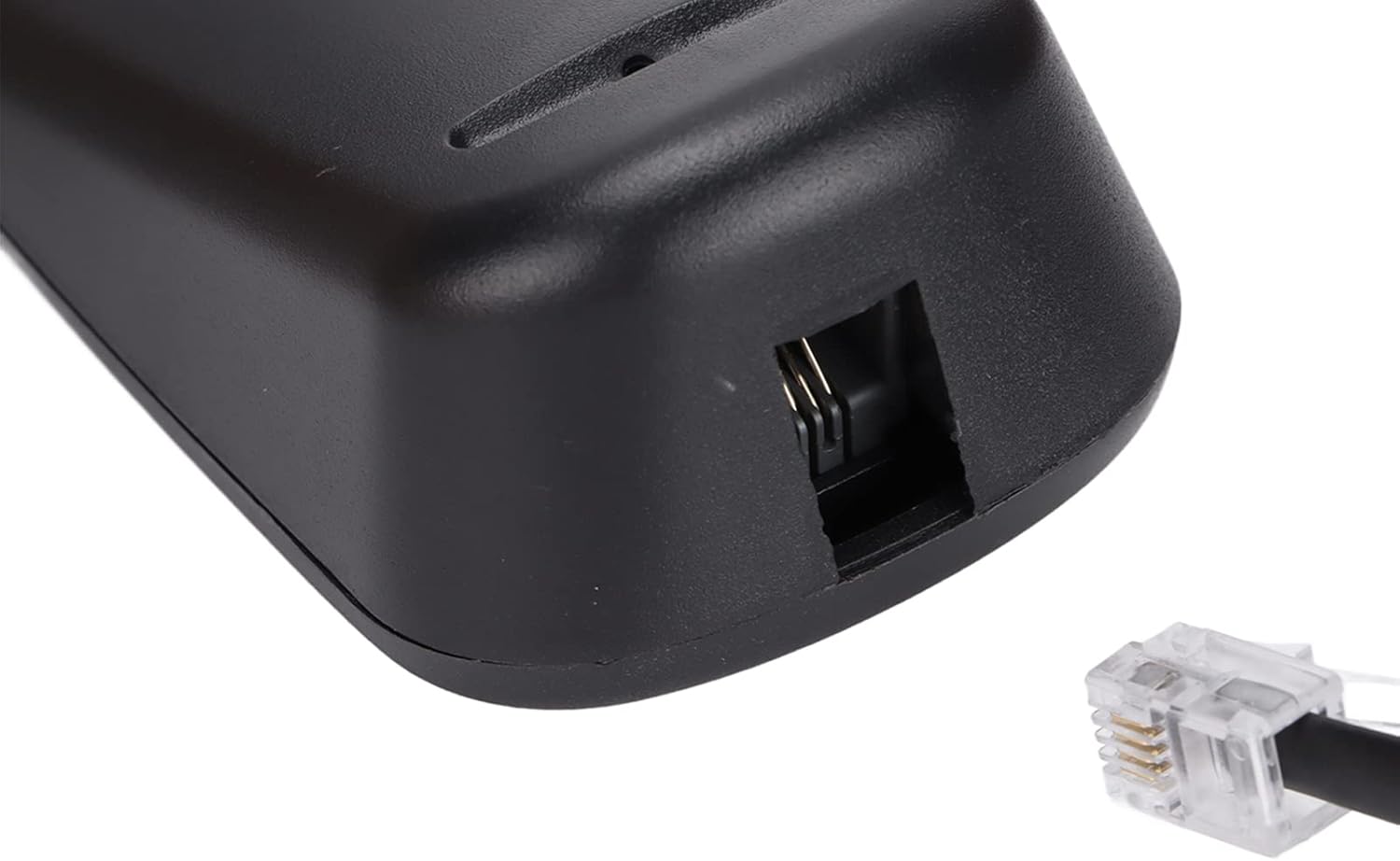
Figure 3.1: Handset Cord Port
This image shows a close-up of the port on the telephone base where the coiled handset cord connects.
3.2 Connecting to the Telephone Line
- Locate the straight telephone line cord (typically black).
- Plug one end of the telephone line cord into the LINE port on the back or side of the telephone base.
- Plug the other end of the telephone line cord into your wall telephone jack. Ensure both connections are secure.

Figure 3.2: Telephone Line Port
This image shows a close-up of the port on the telephone base where the telephone line cord connects to the wall jack.
3.3 Power Source
This telephone is powered by the telephone line itself and may also use a battery for certain functions (e.g., memory retention if applicable). No external power adapter is typically required for basic operation.
4. Operating Instructions
Learn how to use the various functions of your telephone.
4.1 Making a Call
- Lift the handset.
- Listen for a dial tone.
- Dial the desired phone number using the numeric buttons.
- Wait for the call to connect.
- To end the call, place the handset back on the telephone base.
4.2 Receiving a Call
- When the telephone rings, lift the handset to answer the call.
- To end the call, place the handset back on the telephone base.
4.3 Using Special Functions
- Mute: During a call, press the MUTE button to temporarily disable your microphone. The other party will not hear you. Press MUTE again to resume speaking.
- Pause: When dialing, press the PAUSE button to insert a brief delay. This is useful when dialing numbers that require a pause before entering extensions or menu options.
- Hold: During a call, press the HOLD button to place the call on hold. The other party will hear silence or hold music (if provided by your phone service). Lift the handset or press HOLD again to resume the conversation.
- Redial: To redial the last number called, lift the handset and press the REDIAL button.
4.4 Adjusting Ringer Tone
The incoming ringer tone can be selected or adjusted. Refer to the small switch or button labeled 'RINGER' on the telephone base to change the setting according to your preference. Options typically include High, Low, or Off.
5. Maintenance
To ensure the longevity and proper functioning of your telephone, follow these maintenance guidelines:
- Cleaning: Wipe the telephone with a soft, damp cloth. Do not use harsh chemicals, cleaning solvents, or strong detergents.
- Avoid Liquids: Keep the telephone away from water and other liquids.
- Temperature: Do not expose the telephone to extreme temperatures or direct sunlight.
- Storage: When not in use for extended periods, store the telephone in a cool, dry place.
6. Troubleshooting
If you encounter issues with your telephone, try the following solutions:
| Problem | Possible Solution |
|---|---|
| No dial tone | Check if the telephone line cord is securely connected to both the phone and the wall jack. Ensure your phone service is active. |
| Cannot hear or be heard | Ensure the handset cord is securely connected. Check if the MUTE function is accidentally activated. |
| Telephone does not ring | Check the ringer switch setting. Ensure it is not set to 'Off'. |
| Redial function not working | Ensure you are lifting the handset before pressing the REDIAL button. |
7. Specifications
Key technical specifications for the ciciglow KX-T504 Desk Telephone.
| Feature | Detail |
|---|---|
| Brand | ciciglow |
| Model | KX-T504 |
| Telephone Type | Corded |
| Material | Acrylonitrile Butadiene Styrene (ABS) |
| Power Source | Telephone Line Powered, Battery Powered (for specific functions) |
| Dialer Type | Single Keypad |
| Caller Identification | No |
| Functions | Pause, Mute, Hold, Redial, Adjustable Ringer |

Figure 7.1: Product Dimensions
This image shows the ciciglow KX-T504 desk telephone, indicating approximate dimensions of 200mm/7.9in (length), 130mm/5.1in (width), and 70mm/2.8in (height).
8. Warranty and Support
For warranty information or technical support, please refer to the contact details provided with your purchase or visit the official ciciglow website. Keep your proof of purchase for warranty claims.


