
1. Introduction
The Klein Tools 32304 14-in-1 Adjustable Screwdriver is a versatile hand tool designed for various applications, particularly in HVAC systems. It integrates multiple driver bits and nut drivers into a single unit, offering convenience and efficiency. This manual provides instructions for the proper use, maintenance, and care of your tool.

Image 1.1: The Klein Tools 32304 14-in-1 Adjustable Screwdriver, showcasing its compact design and integrated bit storage.
2. Safety Information
Always observe basic safety precautions when using hand tools. Failure to do so may result in injury or damage to the tool or workpiece.
- Wear appropriate personal protective equipment, such as safety glasses, when using the screwdriver.
- Ensure the bit or nut driver is securely seated in the tool before applying torque.
- Do not use the tool if it is damaged or appears to be malfunctioning.
- Keep hands and fingers clear of moving parts, especially when adjusting the blade length or changing bits.
- Use the correct size and type of bit for the fastener to prevent stripping or damage.
3. Package Contents
The Klein Tools 32304 package includes:
- 1 x Klein Tools 32304 14-in-1 Adjustable Screwdriver handle with integrated bit storage.
- 1 x Adjustable-length blade with 1/4-inch and 5/16-inch nut drivers.
- 12 x Driver bits, including:
- #0, #1, #2 Phillips
- 1/8-inch (3.2 mm), 3/16-inch (4.8 mm), and 1/4-inch (6.4 mm) Slotted
- #2 Square
- T10, T15 Torx
- #2 JIS Bit
- Schrader Valve Insertion Bit
- Core Removal Bit

Image 3.1: An illustration of the 12 commonly used HVAC bits and 2 nut drivers included with the tool.
4. Features
The Klein Tools 32304 screwdriver offers several key features for enhanced functionality:
- 14-in-1 Versatility: Combines 12 driver bits and 1/4-inch and 5/16-inch nut drivers in one tool.
- Adjustable-Length Blade: The blade can be adjusted for various applications, including use with an impact driver or for reaching into tight spaces.
- Multi-Function Flip Socket: The 1/4-inch socket features both shallow (driver) and deep (bit holder) configurations for increased adaptability.
- Impact Rated: The blade is designed for durability and can be used with an impact driver.
- Rare-Earth Magnet: A powerful magnet securely holds bits and hex head fasteners.
- Integrated Bit Storage: All 12 driver bits are conveniently stored within the handle.

Image 4.1: The screwdriver highlighting its adjustable-length blade, integrated bit storage, and impact-rated design.
5. Setup
The Klein Tools 32304 screwdriver is designed for immediate use. Follow these steps to prepare the tool for your task:
- Accessing Bits: To access the stored bits, pull off the end cap of the handle. The bits are organized in a rotating carousel. Select the required bit.
- Inserting Bits: Insert the chosen bit into the magnetic tip of the adjustable blade. Ensure it is fully seated.
- Adjusting Blade Length: To adjust the blade length, grasp the blade release ring (located near the handle) and pull the blade to the desired extension. Release the ring to lock the blade in place. The blade can be fully extended for long reach or retracted for compact use.
- Retracting Blade for Storage: To retract the blade, pull the blade release ring and push the blade back into the handle until it clicks into its shortest position.

Image 5.1: The screwdriver with its blade fully extended, demonstrating its long-reach capability.

Image 5.2: The screwdriver with its blade fully retracted, illustrating its compact storage configuration.
6. Operating Instructions
This section details how to operate your Klein Tools 32304 screwdriver for various tasks.
6.1 Using as a Screwdriver
- Select the appropriate bit from the handle's storage.
- Insert the bit into the magnetic tip of the adjustable blade.
- Adjust the blade length as needed for access to the fastener.
- Place the bit onto the fastener head and rotate the handle to tighten or loosen.

Image 6.1: A user operating the screwdriver to work on an HVAC unit, demonstrating its practical application.
6.2 Using the Flip Socket (Nut Driver)
The flip socket offers both 1/4-inch and 5/16-inch nut driving capabilities.
- To use as a nut driver, ensure the flip socket is in the correct position.
- For 1/4-inch nut driving, push the inner part of the socket up.
- For 5/16-inch nut driving, pull the outer part of the socket down.
- Place the appropriate nut driver over the fastener and rotate the handle.
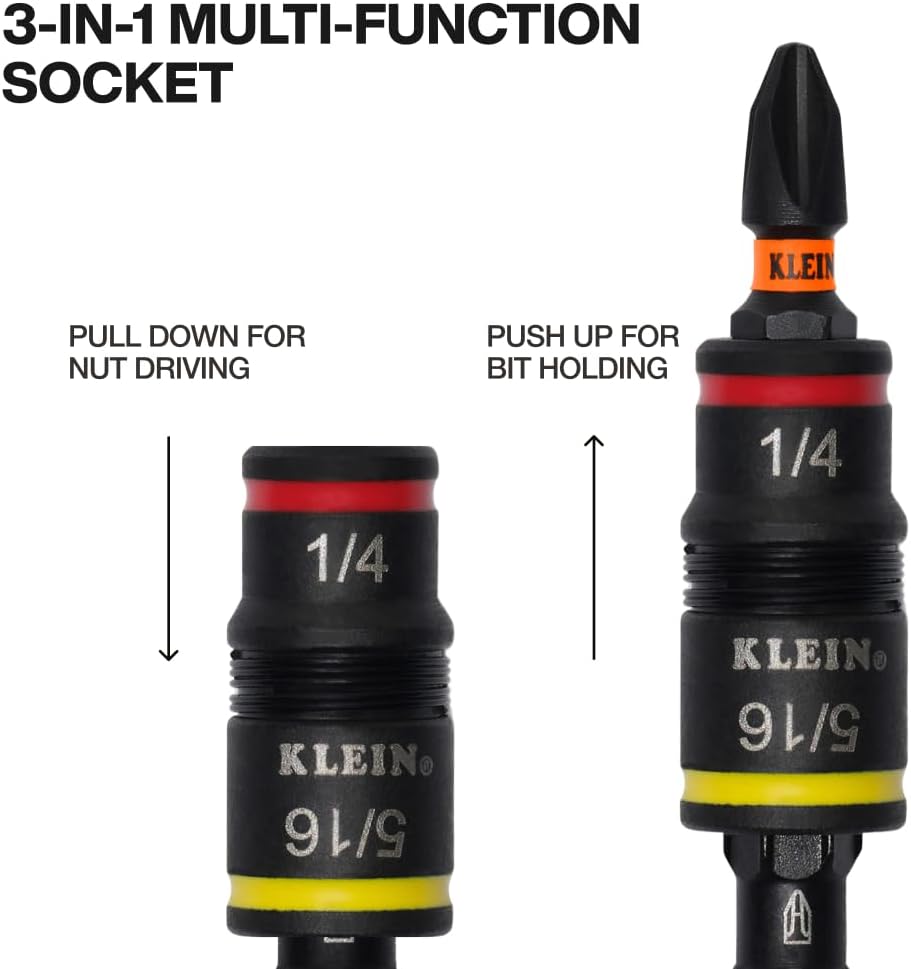
Image 6.2: A visual guide demonstrating how to adjust the 3-in-1 multi-function socket for either nut driving (pull down) or bit holding (push up).

Image 6.3: A close-up of a hand manipulating the flip socket, illustrating the ease of switching between nut driver sizes.
6.3 Using with an Impact Driver
The impact-rated blade allows the tool to be used with an impact driver for increased torque.
- Ensure the blade is fully extended and locked.
- Insert the hex end of the blade into the chuck of your impact driver.
- Securely fasten the impact driver's chuck around the blade.
- Select the appropriate bit and insert it into the magnetic tip of the blade.
- Operate the impact driver according to its manufacturer's instructions.

Image 6.4: The screwdriver's blade inserted into an impact driver, demonstrating its compatibility for power-assisted fastening.

Image 6.5: A full view of an impact driver with the Klein Tools 32304 blade attached, ready for heavy-duty tasks.
7. Maintenance
Proper maintenance ensures the longevity and optimal performance of your tool.
- Cleaning: Wipe the tool clean with a dry cloth after each use to remove dirt, grease, and debris. For stubborn grime, a mild detergent solution can be used, followed by thorough drying.
- Storage: Store the screwdriver in a dry environment to prevent rust and corrosion. Ensure all bits are securely stored within the handle.
- Inspection: Periodically inspect the tool for any signs of wear, damage, or loose components. Replace any damaged parts immediately.
- Lubrication: The adjustable mechanism may benefit from a light application of silicone-based lubricant if it becomes stiff.
8. Troubleshooting
If you encounter issues with your Klein Tools 32304 screwdriver, consider the following common solutions:
- Bits not holding securely: Ensure the bit is fully inserted into the magnetic tip. Clean any debris from the magnetic area. If the magnet is weakened, contact customer support.
- Blade difficult to adjust: Check for any debris obstructing the blade release ring or the blade itself. Clean the mechanism. A small amount of lubricant may help.
- Nut driver not engaging: Ensure the flip socket is correctly positioned for the desired nut size (pulled down for 5/16-inch, pushed up for 1/4-inch).
- Tool feels loose or wobbly: Inspect all components for damage. If the handle or blade feels excessively loose, discontinue use and contact customer support.
9. Specifications
| Specification | Detail |
|---|---|
| Model Number | 32304 |
| Brand | KLEIN TOOLS |
| Number of Items | 1 |
| Head Style | Phillips, Square, Slotted, Torx, JIS, Schrader |
| Material | Blend |
| Color | Black |
| Special Feature | Ergonomic, Impact Rated, Adjustable Length |
| Item Weight | 8.8 Ounces (249.5 grams) |
| Product Dimensions | Approximately 10 x 10 x 10 inches (packaging dimensions) |
| UPC | 092644323041 |
| Power Source | Hand Powered |
10. Warranty and Support
For information regarding warranty coverage, product registration, or technical support, please refer to the official Klein Tools website or contact their customer service department. Keep your purchase receipt as proof of purchase.
No official seller videos were found for this product in the provided data.


