Introduction
The FORAS PP-12 automatic pressure switch is designed to regulate water pressure in various pump systems. It controls the electric pump's start and stop functions based on water flow and pressure changes, ensuring consistent water supply and protecting the pump from dry running.
This manual provides essential information for the safe and efficient installation, operation, and maintenance of your FORAS PP-12 pressure switch.
Product Features
- Original European quality, manufactured by PENTAX INDUSTRIES S.P.A. in Italy.
- Ensures constant water pressure for household electric water pumps, small well pumps, and garden watering pumps.
- Automatically regulates water pressure, activating the pump when pressure drops and deactivating it when the set pressure is reached.
- Integrated dry-running protection.
- Adjustable starting pressure during installation.
- Versatile installation: can be mounted in any position (vertical or horizontal) relative to flow direction.
- Easy installation with standard 1/4 inch cylindrical pipe thread hydraulic connectors.
- Maintenance-free operation.
- Impact-resistant electrical control panel, rated IP20.
- Closed body made of non-flammable injection-molded plastic.
- Equipped with two easily adjustable and accurate springs for pressure threshold setting.
- CE certified, protection class IP20.
Technical Specifications
| Specification | Value |
|---|---|
| Power Supply | AC 230V ± 10% 50/60Hz |
| Rated Load | 16 (10)A |
| Starter Pressure Range | 3-12 bar |
| Factory Pressure Range Set | 5-7 bar |
| Voltage | 250V (AC) |
| Maximum Motor Power | 2 hp (1 phase), 3 hp (3 phases) |
| Maximum Pressure | 15 bar |
| Protection Class | IP20 |
| Weight | 0.4 kg (400 Grams) |
| Dimensions (L x W x H) | 95 x 100 x 70 mm (approx. 10 x 7 x 8.5 cm) |
| Maximum Liquid Temperature | 55°C |
| Maximum Ambient Temperature | 55°C |
| Hydraulic Connectors | 1/4 inch Cylindrical Pipe Thread |
| Manufacturer | PENTAX INDUSTRIES S.p.A. |
| Model Number | PP-12 |
| Material | Steel (internal components), Plastic (body) |
| Style | Pressure Switch |
| Specific Uses | Flow regulation |
Setup and Installation
Unpacking
Carefully remove the FORAS PP-12 pressure switch from its packaging. Inspect for any signs of damage. The package should contain one PP-12 automatic flow sensor (without cable), electrical connections, and instructions.
Mounting
The PP-12 can be installed in any position, either vertically or horizontally, relative to the direction of water flow. Ensure the installation location is protected from direct weather exposure if the IP20 rating is not sufficient for the environment.

This image shows a side profile of the FORAS PP-12 pressure switch, highlighting its compact blue casing and the threaded connection point.
Hydraulic Connection
Connect the pressure switch to your pump system using standard 1/4 inch cylindrical pipe thread hydraulic connectors. Ensure all connections are watertight.
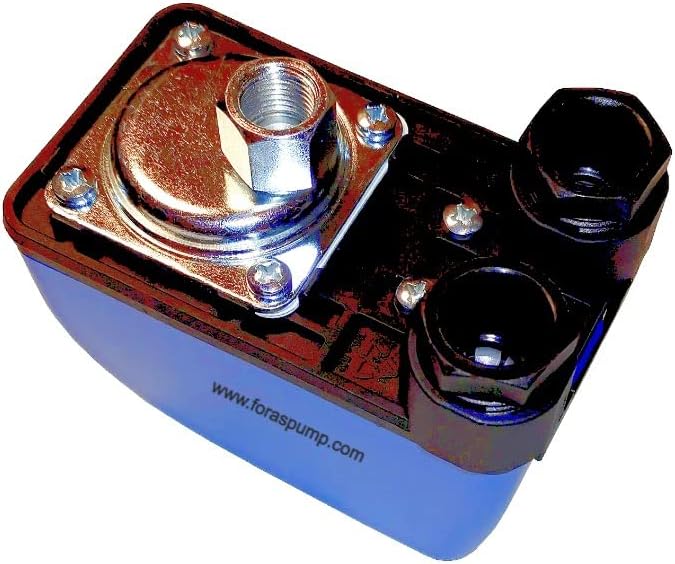
This image provides a view of the underside of the FORAS PP-12 pressure switch, revealing the metal plate covering the pressure diaphragm and the two black hydraulic connection ports.
Electrical Connection
The device operates on AC 230V ± 10% 50/60Hz. Refer to the wiring diagram provided in the technical data section for correct electrical connections. Ensure the power supply is disconnected before making any electrical connections. The electrical control panel is rated IP20.

This image displays a table of technical specifications for various FORAS pressure switches, including the PP-12, detailing pressure ranges, rated current, and voltage. Below the table are wiring diagrams for different models, illustrating electrical connections for pump motors.

An illustration demonstrating the FORAS PP-12 pressure switch connected to a water pump, with a power cord visible, indicating a typical installation setup.
Adjusting Starting Pressure
The starting pressure is adjustable during installation. The factory-set pressure range is typically 5-7 bar, with an adjustable range of 3-12 bar. Consult the technical data (refer to the image above) for specific adjustment procedures.
Operating Instructions
The FORAS PP-12 automatically controls your electric pump. When a tap is opened, the pressure in the system drops, and the PP-12 detects this pressure drop, initiating the pump's operation. When the tap is closed, the liquid flow stops, and the pressure reaches the maximum level of the electric pump, causing the PP-12 to stop the pump.
The integrated dry-running protection feature prevents the pump from operating without water, safeguarding it from damage.
Maintenance
The FORAS PP-12 pressure switch is designed for maintenance-free operation. Regular visual inspections are recommended to ensure all connections are secure and there are no signs of physical damage or leaks.
Keep the device clean and free from dust or debris, especially around electrical connections.
Troubleshooting
Pump Does Not Start
- Check the power supply to the unit.
- Verify electrical connections are secure and correct according to the wiring diagram.
- Ensure the starting pressure setting is appropriate for your system.
- Check for water supply to the pump; the dry-running protection may be activated.
Pump Does Not Stop
- Check for leaks in the hydraulic system that might prevent pressure from building up.
- Verify that the maximum pressure setting is correctly configured.
- Ensure no taps or outlets are open.
Inconsistent Pressure
- Review the starting pressure adjustment. It may need fine-tuning.
- Inspect for air in the system.
If issues persist, consult a qualified technician or contact FORAS customer support.
Warranty and Support
For warranty information and technical support, please refer to the documentation provided with your purchase or contact PENTAX INDUSTRIES S.p.A., the manufacturer. The manufacturer's details are: PENTAX INDUSTRIES S.p.A., Viale dell'Industria 1, 37040 Veronella (VR) Italy.
EU Spare Part Availability Duration: 20 Years.