
1. Introduction
The eufy Security Video Doorbell S330 is a wired dual-camera video doorbell designed to enhance your home security. It provides a comprehensive view of your doorstep, eliminating blind spots, and offers advanced features like Delivery Guard and 3-second preview videos. With 2K HDR resolution and local storage, it ensures clear recordings without the need for monthly subscription fees.
This manual provides detailed instructions for setting up, operating, and maintaining your eufy Security Video Doorbell S330.
2. Package Contents
Please verify that all items listed below are included in your package:
- Video Doorbell Dual (Wired)
- Doorbell Chime
- Screw pack
- Mounting bracket
- Micro-USB charging cable
- Screw hole positioning card
- 15° mounting wedge
- Detaching pin
- Quick start guide
- Brand card
- 24/7 monitoring sticker
3. Product Overview
The eufy Security Video Doorbell S330 features an innovative dual-camera system, providing both a wide-angle view of visitors and a dedicated low-angle camera for package monitoring. This design ensures comprehensive coverage of your porch area.
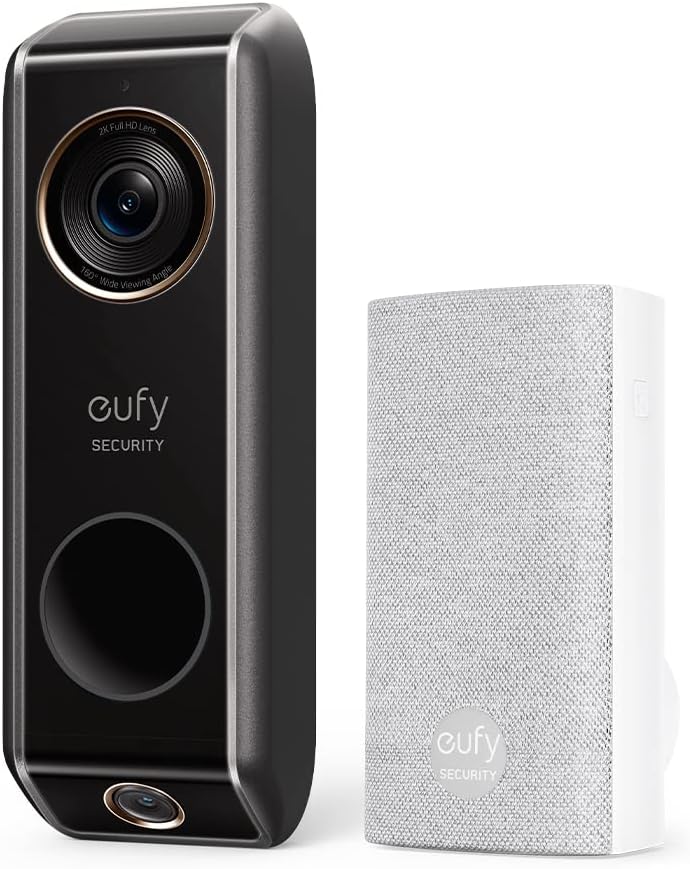
Image: The eufy Security Video Doorbell S330 (left) and its accompanying wireless chime (right).

Image: The eufy Video Doorbell S330 mounted on a wall, highlighting its dual camera design for zero blind spots.
4. Initial Setup
Before physical installation, ensure you have downloaded the eufy Security app on your smartphone or tablet. The app will guide you through the initial setup process, including connecting the doorbell to your 2.4GHz Wi-Fi network.
- Download the eufy Security app from the App Store (iOS) or Google Play Store (Android).
- Create an account or log in if you already have one.
- Follow the in-app instructions to add your new Video Doorbell S330. This typically involves scanning a QR code on the device.
- Connect the doorbell to your home's 2.4GHz Wi-Fi network as prompted by the app.
5. Installation
The eufy Security Video Doorbell S330 is designed for wired installation, connecting to your existing doorbell wiring. It is crucial to ensure your transformer meets the power requirements for optimal performance.

Image: A hand connecting the eufy Video Doorbell S330 to existing doorbell wiring on a wall, with a diagram of a compatible transformer.
5.1 Power Requirements
The Video Doorbell S330 requires a wired connection with a transformer providing 16-24VAC, 30VA or more. If your current transformer does not meet these specifications, it must be replaced. Consult a qualified electrician if you are unsure about your transformer's compatibility or need assistance with replacement.
5.2 Installation Steps
- Turn off power: Before beginning, turn off the power to your existing doorbell at the circuit breaker.
- Remove old doorbell: Carefully remove your existing doorbell from the wall.
- Install mounting bracket: Use the provided screw pack and positioning card to securely attach the mounting bracket to your wall. If needed, use the 15° mounting wedge to angle the doorbell for a better view.
- Connect wires: Connect the existing doorbell wires to the terminals on the back of the eufy Video Doorbell.
- Mount doorbell: Snap the eufy Video Doorbell onto the mounting bracket.
- Bypass existing chime (if applicable): The Video Doorbell Dual is not compatible with existing mechanical chimes. Use the included jumper wire to bypass your existing chime inside your home.
- Install eufy Chime: Plug the included eufy Doorbell Chime into a power outlet inside your home. It will wirelessly connect to the doorbell.
- Restore power: Turn the power back on at the circuit breaker.
- Test: Press the doorbell button to ensure it rings the eufy Chime and sends notifications to your app.
6. Operation
Once installed, you can manage and interact with your eufy Security Video Doorbell S330 through the eufy Security app.
6.1 Live View and Two-Way Talk
Access the live video feed from your doorbell at any time through the app. Use the two-way talk feature to communicate with visitors at your door from anywhere.
6.2 Motion Detection and Alerts
The doorbell is equipped with advanced motion detection. You will receive instant notifications on your smartphone when motion is detected. Customize detection zones and sensitivity settings within the app to reduce unwanted alerts.
6.3 Recorded Events
All detected events and doorbell presses are recorded and stored locally on the device's internal memory. You can review these recordings directly from the eufy Security app without any subscription fees.
7. Key Features
7.1 Dual Cam Technology
The dual camera system provides both a main 2K camera for a wide horizontal view and a lower 1080p camera to monitor the area directly in front of your door, effectively eliminating blind spots and ensuring you see everything from head to toe and packages on the ground.
7.2 Delivery Guard™
This intelligent feature detects when a package is delivered and notifies you. It also sends reminders to pick up your package and alerts you if anyone approaches your package, helping to prevent theft.

Image: The eufy app displaying a delivery person and a package, demonstrating the Delivery Guard feature.
7.3 3-Second Preview Videos
Before a full recording begins, the doorbell captures a 3-second preview video. This allows you to see what triggered the recording and how visitors approached your door, providing crucial context.

Image: A person walking away from a door, representing the 3-second preview video feature that captures moments before a main recording.
7.4 2K with HDR
The main camera records in 2K HD resolution, ensuring clear and detailed surveillance. High Dynamic Range (HDR) technology improves image quality in varying lighting conditions, allowing you to identify visitors even when backlit by the sun.

Image: A family walking towards the camera, demonstrating the clear and detailed 2K Ultra-HD video quality.
7.5 No Monthly Fee & Local Storage
All recordings are stored locally on the doorbell's internal 8GB flash memory, eliminating the need for cloud storage subscriptions. You can access your recordings anytime without additional charges.

Image: A visual representation of '0' monthly fees, emphasizing the cost-saving benefit of local storage.
7.6 Smart Home Integration
The eufy Security Video Doorbell S330 is compatible with popular smart home ecosystems, including Amazon Alexa and Google Assistant. You can connect your doorbell to these voice assistants to check on your home's activity and receive alerts.

Image: An Amazon Echo Show device displaying a live feed from the eufy doorbell, illustrating its compatibility with Alexa and Google Assistant.
8. Maintenance
To ensure the longevity and optimal performance of your eufy Security Video Doorbell S330, follow these maintenance guidelines:
- Cleaning: Periodically wipe the camera lens and the doorbell's exterior with a soft, damp cloth to remove dust and smudges. Avoid using harsh chemicals or abrasive materials.
- Software Updates: Keep your doorbell's firmware updated through the eufy Security app. Updates often include performance improvements, new features, and security enhancements.
- Check Wiring: Occasionally inspect the wiring connections to ensure they remain secure, especially after extreme weather conditions.
9. Troubleshooting
If you encounter issues with your eufy Security Video Doorbell S330, refer to the following common problems and solutions:
| Problem | Possible Cause / Solution |
|---|---|
| Doorbell not powering on or frequently disconnecting. |
|
| Cannot connect to Wi-Fi or frequent Wi-Fi drops. |
|
| No audio or poor audio quality during two-way talk. |
|
| Motion alerts are too frequent or not detecting. |
|
10. Specifications
| Feature | Detail |
|---|---|
| Model Number | E8203 |
| Video Capture Resolution | 2K (Main Camera), 1080p (Lower Camera) |
| Power Source | Wired (16-24VAC, 30VA or more) |
| Connectivity Protocol | Wi-Fi (2.4GHz only) |
| Internal Storage | 8 GB Flash Memory |
| Dimensions (L x W x H) | 6.22 x 1.97 x 1.06 inches (15.8 x 5.0 x 2.7 cm) |
| Item Weight | 7 ounces (0.44 Pounds) |
| Indoor/Outdoor Usage | Outdoor (IP65 rated) |
| Alert Type | Motion Only |
| Compatible Devices | Smartphone, Tablet |
| UPC | 194644096007 |
11. Warranty and Support
11.1 Warranty Information
eufy Security products typically come with a standard manufacturer's warranty. For new products, this is generally 1 year from the date of purchase. Please retain your proof of purchase for warranty claims. Note that warranty periods may vary for refurbished or used products (e.g., 90 days for 'used-like new' items).
11.2 Customer Support
For technical assistance, troubleshooting, or warranty inquiries, please contact eufy Security customer support. You can typically find contact information (phone, email, or live chat) within the eufy Security app or on the official eufy Security website (www.eufylife.com).
When contacting support, please have your product model number (E8203) and purchase details ready.


