
Behringer Behringer Brains
Behringer Brains Multi-engine Oscillator Eurorack Module User Manual
Model: Behringer Brains
Brand: Behringer
Introduction
The Behringer Brains is a versatile multi-engine oscillator module designed for Eurorack modular synthesizer systems. It offers 20 distinct digital oscillator modes, providing a wide range of sonic possibilities from classic virtual analog waveforms to complex granular synthesis and percussive sounds. This module is engineered to expand your sound design capabilities within your Eurorack setup, featuring intuitive controls for timbre, harmonics, frequency, and morphing to allow for extensive sound shaping.
Key features include:
- 16HP Eurorack Multi-engine Oscillator Module with 20 Synthesis Engines
- 96kHz Audio Quality for high-fidelity sound
- Integrated OLED Oscilloscope for visual feedback of waveforms
Setup
Eurorack Installation
The Behringer Brains module is designed for installation into a standard Eurorack case. Ensure your Eurorack case provides sufficient power and space (16HP width) for the module.
- Power Off: Before installation, always ensure your Eurorack case's power supply is turned off and disconnected from the mains.
- Mounting: Align the module with an available 16HP space in your Eurorack rail. Secure the module using the provided screws. Do not overtighten.
- Power Connection: Connect the ribbon cable from your Eurorack power supply to the 16-pin header on the back of the Brains module. Ensure the red stripe on the ribbon cable aligns with the -12V pin on both the power supply and the module. Incorrect connection can damage the module.
- Power On: Once securely mounted and powered, you can turn on your Eurorack case's power supply.
Initial Power-Up
Upon successful installation and power-up, the OLED display on the Brains module should illuminate, indicating it is ready for operation.
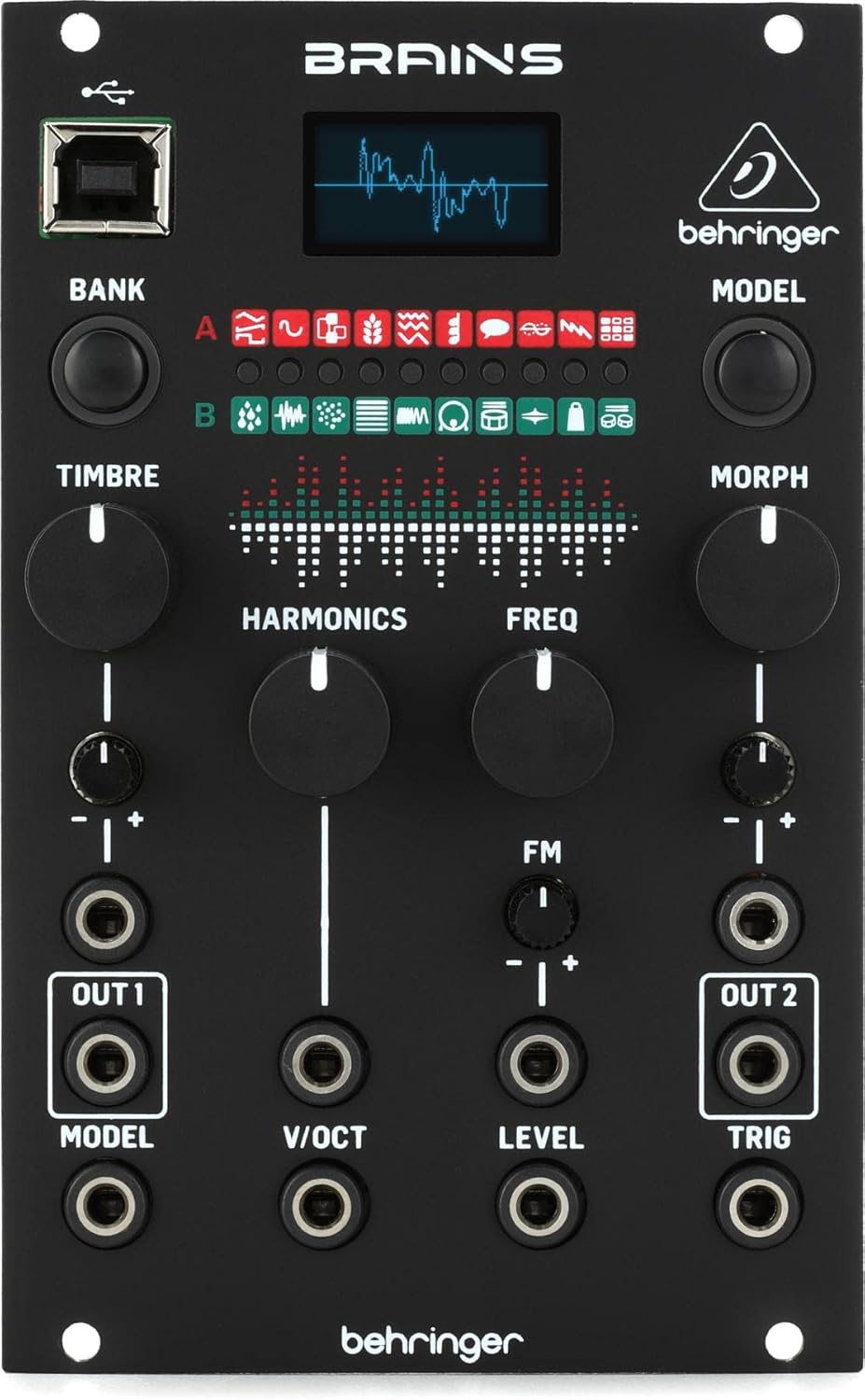
Figure 1: Front panel of the Behringer Brains Multi-engine Oscillator Eurorack Module, showing its controls, display, and jacks.
Operating Instructions
The Behringer Brains module features a user-friendly interface with dedicated controls for sound generation and modulation.
Controls Overview
- BANK Button: This button cycles through the two banks of oscillator models (Bank A and Bank B). Each bank contains 10 unique synthesis engines, indicated by the illuminated LEDs.
- MODEL Knob: This knob selects one of the 10 oscillator models within the currently active bank. The selected model is indicated by the corresponding LED. The OLED display will show a visual representation or text related to the selected model.
- TIMBRE Knob: Controls the primary sonic characteristic of the selected oscillator model. Its function varies significantly between models, ranging from waveform shape to filter cutoff or other synthesis parameters.
- HARMONICS Knob: Adjusts the harmonic content or spectral complexity of the sound. This can influence the richness, brightness, or overtone structure.
- FREQ Knob: Sets the fundamental frequency (pitch) of the oscillator. This knob works in conjunction with the V/OCT input for precise pitch control.
- MORPH Knob: Provides a continuous morphing control, often blending between different states or variations of the selected oscillator model. This allows for dynamic sound evolution.
- FM Knob: Controls the amount of internal Frequency Modulation applied to the oscillator. This can create complex timbres and metallic sounds.
Inputs and Outputs
- OUT 1 (MODEL): Main audio output for the oscillator. This jack can also be used to output a control voltage (CV) related to the currently selected MODEL, depending on the internal settings.
- OUT 2 (TRIG): Secondary audio output. This jack can also function as a trigger output for certain oscillator models, particularly those with percussive or event-based characteristics.
- V/OCT Input: Voltage per Octave input. Connect a 1V/Octave control voltage source (e.g., from a keyboard or sequencer) here to control the pitch of the oscillator.
- LEVEL Input: Control voltage input for modulating the output level of the oscillator.
- TRIG Input: Trigger input. Used to trigger events or re-start waveforms for certain oscillator models, especially those with percussive or sample-based engines.
OLED Oscilloscope
The integrated OLED display provides real-time visual feedback of the generated waveform, aiding in sound design and understanding the effect of control adjustments. It also displays information about the currently selected oscillator model and its parameters.
Oscillator Models (20 Engines)
The Brains module features 20 distinct digital synthesis engines, categorized into two banks (A and B). Each engine offers a unique approach to sound generation:
- Virtual Analog: Classic subtractive synthesis waveforms (saw, square, sine, triangle).
- Waveshaping: Distorts and folds waveforms for complex timbres.
- FM Synthesis: Frequency modulation for metallic and bell-like sounds.
- Granular Synthesis: Breaks audio into small "grains" for textural sounds.
- Drum Synthesis: Dedicated engines for generating various percussive sounds.
- Noise Engines: Various types of noise generation for effects and textures.
- And many more, including physical modeling, speech synthesis, and chord generators.
Experiment with the TIMBRE, HARMONICS, and MORPH knobs to explore the full sonic range of each model. Refer to the Behringer website for detailed descriptions of each of the 20 oscillator models.
Maintenance
To ensure the longevity and optimal performance of your Behringer Brains module, follow these maintenance guidelines:
- Cleaning: Use a soft, dry cloth to wipe the module's surface. Avoid abrasive cleaners, solvents, or sprays, as these can damage the finish or internal components.
- Environment: Operate the module in a clean, dry environment, away from direct sunlight, excessive heat, humidity, or dust.
- Handling: Handle the module with care. Avoid dropping it or subjecting it to strong impacts. When patching, insert and remove cables gently.
- Firmware Updates: Periodically check the official Behringer website for any available firmware updates. Follow the instructions provided by Behringer for safe updating procedures.
Troubleshooting
If you encounter issues with your Behringer Brains module, consult the following common troubleshooting steps:
| Problem | Possible Cause / Solution |
|---|---|
| Module does not power on. |
|
| No sound output. |
|
| OLED display is blank or flickering. |
|
For more complex issues or technical support, please refer to the official Behringer support channels.
Specifications
| Feature | Detail |
|---|---|
| Model Name | Behringer Brains |
| Item Model Number | Behringer Brains |
| ASIN | B09PZ1B9VH |
| Product Dimensions | 6.15 x 3.8 x 2.05 inches |
| Item Weight | 8 ounces |
| Power Source | Eurorack case power supply |
| Connectivity Technology | USB (for firmware updates/data) |
| Audio Quality | 96kHz |
| Oscillator Engines | 20 Digital Modes |
| Display | OLED Oscilloscope |
| UPC | 644216639106 |
Warranty and Support
For detailed warranty information, product registration, and technical support, please visit the official Behringer website or contact their customer service department. Keep your proof of purchase for warranty claims.
Behringer Official Website: www.behringer.com
Related documentsBehringer Brains


Ask a question about this manual
Ask about setup, troubleshooting, compatibility, parts, safety, or missing instructions. Manuals+ will review the question and use this page’s manual context to help answer it.